

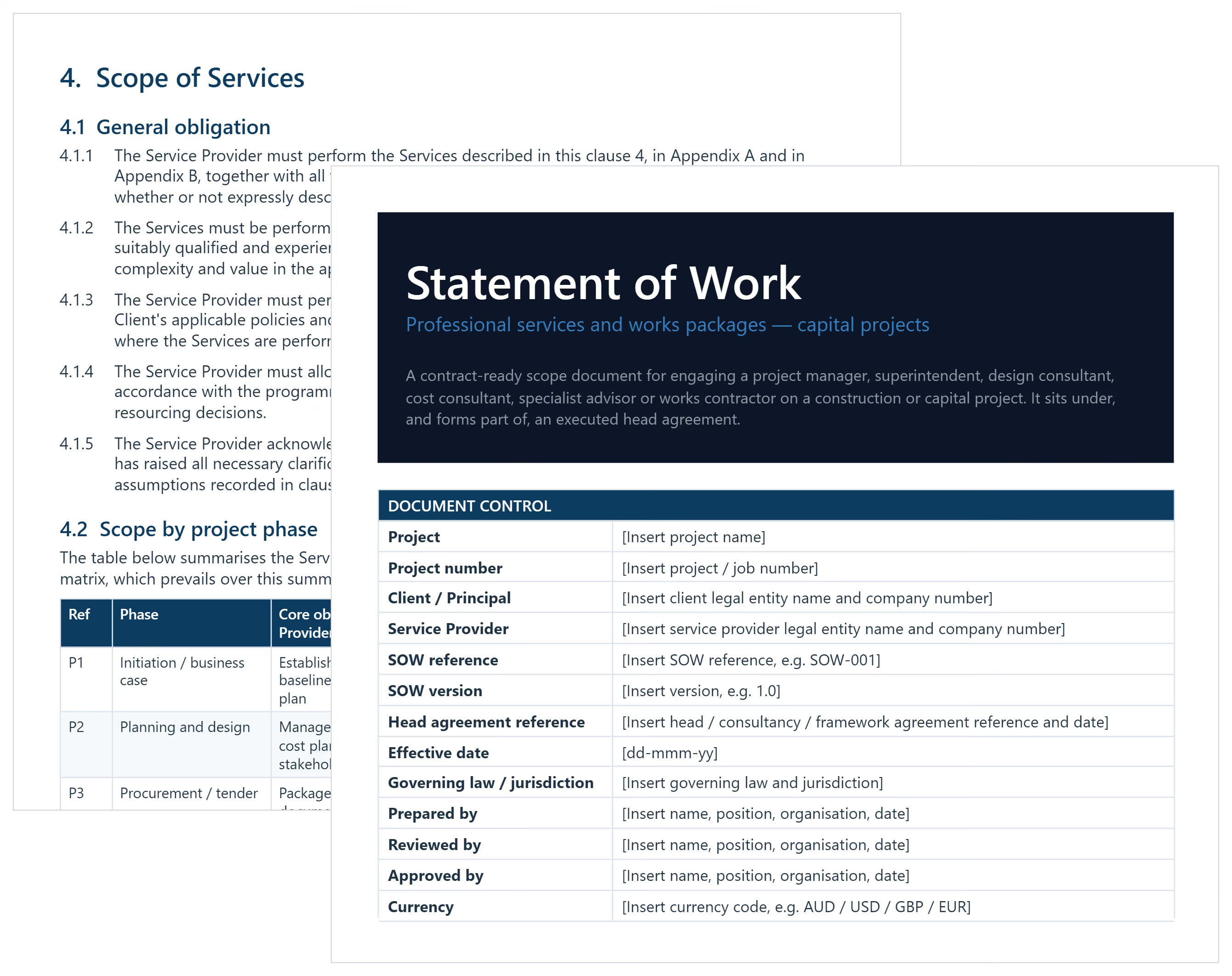

What is a Statement of Work Template?
A statement of work template is a pre-formatted project management document that defines a project’s scope and delivery terms. It records deliverables, timelines, roles, acceptance criteria, and payment terms in one clear agreement.
Project managers, procurement teams, and service providers use SOW to confirm what work will happen and how success gets measured. It turns verbal expectations into a written agreement teams can follow.
Most teams use Word, Google Doc, or PDF templates because they’re easy to share and sign. Simple projects can use a short scope of work template, while complex capital projects need a detailed format.
What's Included in SOW Templates?
A well-built SOW template organizes every critical element of a project agreement. Missing one field creates gaps that lead to disputes later.
Core fields in a construction or consulting SOW include:
- Project overview: Brief summary of the engagement, parties involved, and purpose. Note the contract type and governing conditions, such as AIA A201, where applicable.
- Effective date: The confirmed start date when contract obligations begin. Also capture the expected end date and any phase-based renewal provisions.
- Specific tasks: Actions the contractor or consultant must complete. Tag OSHA compliance activities where site safety obligations apply.
- Project deliverables: Tangible outputs with descriptions and due dates. Link each deliverable directly to its acceptance criteria for clean sign-off.
- Milestone schedule: Key progress points tied to deadlines and payment triggers. Align milestones with design, procurement, and construction phases.
- Payment terms: Fee structure, invoicing schedule, and release conditions. Specify whether fees are fixed-price, time-and-materials, or unit rate.
- Work breakdown structure: Task hierarchy breaking large scopes into manageable packages. A clear WBS reduces ambiguity across contractor and subcontractor tiers.
- Acceptance criteria: Standards the client uses to verify each deliverable. Without these, resolving disputes about "done" becomes nearly impossible.
- Master services agreement reference: Links the SOW to the governing legal framework. Include a reference to any NDA if confidential project data will be shared.
💡 Pro Tip: Lock your exclusions section before sending for review. Most disputes trace back to what was never listed as out of scope.
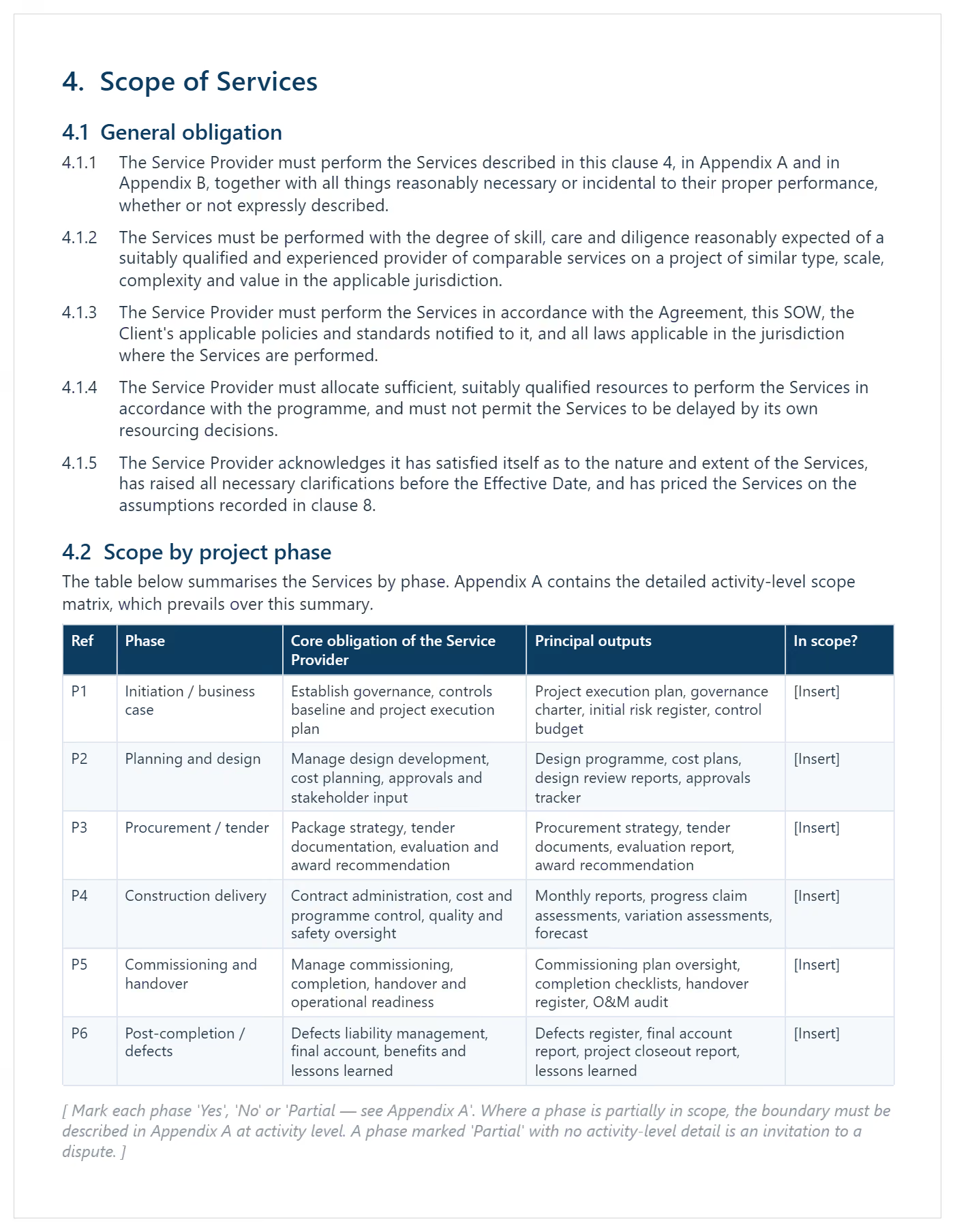
Why Every Project Needs a Formal Statement of Work
A statement of work converts verbal agreements into written, enforceable commitments. Without one, expectations shift and billing disputes follow.
Every engagement needs a formal SOW because:
- Stops scope creep: Written boundaries give both parties a documented basis to push back on additions.
- Sets expectations: Deliverables, timelines, and responsibilities are agreed before kickoff. Misalignment after work starts costs far more to fix.
- Protects payment: Milestone-linked fees reduce billing disagreements on progress invoices. Vague payment conditions are the most common source of cash flow disputes.
- Aligns stakeholders: A signed document replaces "I thought you meant..." conversations. Everyone references the same written agreement at every project stage.
- Enables change control: Scope deviations require a formal change order. The SOW is the baseline for any revision.
- Speeds onboarding: Subcontractors can read the SOW and understand their role immediately. No waiting for verbal briefings or follow-up emails.
- Reduces legal exposure: Arbitrators and courts rely on written scope agreements when verbal accounts conflict. A signed SOW is your strongest documentary evidence.
Without a formal statement of work template, project management becomes reactive. PMI's PMBOK Guide treats the SOW as a foundational scope planning document. You manage conflict instead of delivering results.
How to Draft an Effective SOW from Start to Finish
Effective SOW drafting starts with defining scope before writing any deliverable. Vague scoping causes expensive problems later.
- Identify the parties: Name the client, contractor, and representatives authorized to approve work. Include their decision-making limits upfront.
- Draft a project background: Summarize the engagement purpose and context in plain language. Reference the RFP or prior proposals to maintain consistency.
- Define the scope: State what is included, then list exclusions explicitly. Reference applicable contract standards like AIA A201 general conditions where relevant.
- Break down required actions: List every task the contractor must perform, referencing work packages where applicable. Group tasks by phase to make assignment clear.
- Set the timeline: Attach realistic dates to each deliverable and project phase. Map these onto a Gantt chart to visualize dependencies and critical path.
- Specify acceptance criteria: Define how the client verifies each output. Use pass/fail language rather than subjective quality descriptors.
- Document payment terms: Tie fees to milestones so obligations are unambiguous. State whether billing is fixed-price, time-and-materials, or unit rate.
- Add a change control clause: Describe how additions get requested and approved. Align this process with your contract's existing change order mechanism.
- Define 'done': State what finishing the project looks like, using objective and measurable language.
- Obtain signatures: Both parties sign before work starts. No exceptions.
💡 Pro Tip: Write deliverable descriptions as pass/fail tests. "Feasibility report accepted in writing by the client" is enforceable. "Deliver a report" is not.
When to Issue a Project Management SOW
A statement of work template should be issued before any work begins. Commit budget only after both parties have signed.
Issue a SOW when:
- Engaging a new contractor or consultant: Define specific deliverables before the first invoice arrives. Document the engagement type, fee structure, and reporting obligations upfront.
- Issuing or responding to an RFP: Attach the SOW to set project goal clarity from the start. On federal bids, the Federal Acquisition Regulation (FAR) prescribes required SOW format.
- Onboarding a subcontractor: Each trade package needs its own SOW. Link it to the work package scope and site-specific requirements.
- Starting a new project phase: Design, procurement, and construction each carry different deliverables. A phase-specific SOW prevents carryover scope confusion.
- Pursuing GSA or government agency contracts: Federal and state agencies require a compliant SOW before contract award. Review GSA standard templates before drafting scope language.
- Approaching project completion: Define punch list, documentation, and handover deliverables in writing. Verbal close-out agreements are the most disputed stage of any project.
- After a material change order: Significant scope changes need a revised SOW reflecting the new agreement. Update deliverable descriptions and acceptance criteria to match.
Best Practices for Writing a Statement of Work
A statement of work fails when the scope stays vague. Use these best practices to keep the SOW enforceable and reduce disputes.
☑️ Pair it with a master services agreement: The MSA holds legal terms. The SOW sets project scope and delivery. Link them by reference and keep them separate.
☑️ Name who approves each deliverable: Assign a specific approver by name or role email. Avoid vague titles with unclear ownership.
☑️ Use objective acceptance criteria: Set measurable approval rules and timeframes. For example: written approval within five business days.
☑️ Cap revision rounds per deliverable: Unlimited revisions cause scope creep fast. Set a firm limit and define what counts.
☑️ Document client dependencies and due dates: List required inputs like data, access, and reviews. Missed dependencies should shift dates and costs.
☑️ Add termination and handover terms: State fees owed, notice periods, and deliverable handover. Protect both parties if work ends early.
☑️ Version-control every change: Number each draft and date it. Store the final signed version in one place.
Common Problems with Free and Generic Work Templates
A free work template rarely fits real construction or consulting engagements. Problems surface mid-project when they are hardest to fix. Free Word downloads and generic PDFs share the same gaps.
⚠️ No exclusions field: Free Word and Excel templates skip out-of-scope sections. Deliverables stay open to interpretation.
⚠️ Vague deliverable language: Placeholder text gets copied without customization. Vague deliverables are unenforceable when disputes arise.
⚠️ No change control process: Free downloads omit change management entirely. There is no mechanism to handle scope additions formally.
⚠️ MSA compatibility gaps: Generic templates aren't designed to work with an MSA. Legal gaps appear across multi-engagement relationships.
⚠️ Google Docs version chaos: Multiple parties editing a shared Google Docs SOW creates conflicting versions. Finding the signed copy becomes a problem.
⚠️ PDF templates aren't editable: A statement of work template PDF works for reference. It fails when project scope evolves and edits are needed.
⚠️ Missing construction-specific fields: Generic templates omit substantial completion standards and progress payment schedules. WBS fields are missing too, critical for capital project delivery.
💡 Pro Tip: Before using any downloaded template, add three things immediately. An exclusions list, a change control clause, and a version number. These three additions address the most common SOW failure points.
.avif)
Written by
Doug Vincent
Doug Vincent is the co-founder and CEO of Mastt, the AI capital-project management platform used by governments, Fortune 500 companies, and consultancies across APAC, North America, and MENA. Before founding Mastt in 2019, he spent a decade at RPS delivering more than $2 billion in capital works, including the $2.1B Defence Navy Infrastructure program, and holds a CPSPM certification with the AIPM. He contributes content and speaks on AI in capital project delivery at Mastt.

Use this free statement of work template to define scope and deliverables fast. Set payment terms, milestones, and roles before work begins.

Top Performers Don’t Guess. They Deliver.
Cut the stress of showing up unprepared
Start for FreeTrusted by the bold, the brave, and the brilliant to deliver the future