


What Is a Construction Schedule Template?
A construction schedule template is a pre-built layout for sequencing a project's activities, milestones and phases. It maps the work needed to finish on time. You fill in the activities instead of building the structure from scratch.
It is also called a construction timeline template or a construction program (programme of works in Australia and the UK). A schedule of works is the same idea.
A good schedule does more than list dates. It shows the critical path and flags the milestones that gate payment or handover. Sequencing the work this way is the core of project scheduling. It also gives you a baseline to measure slip against once work starts.
What's Included in a Construction Schedule Template
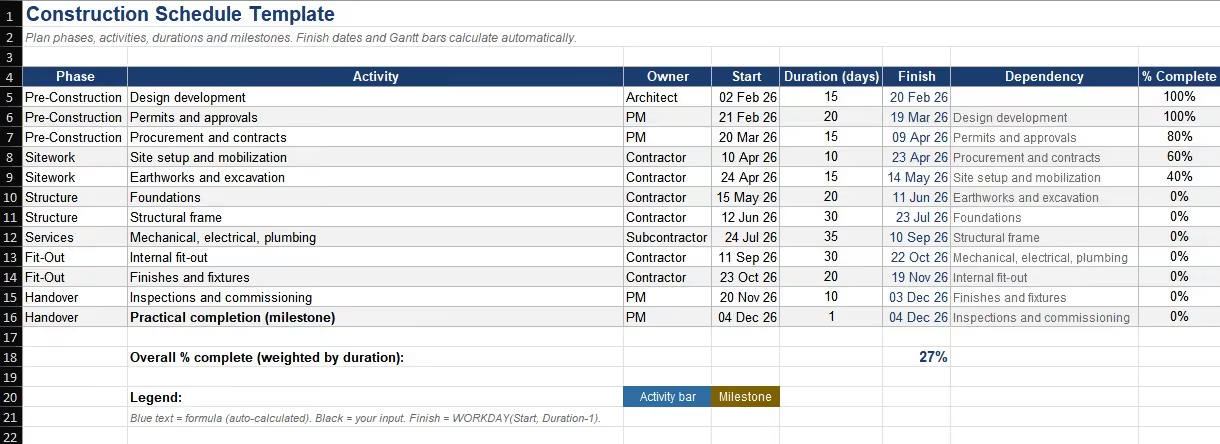
A construction schedule template includes every field needed to plan and track delivery across the project phases. Each row is one activity or task, and the columns turn that task list into a working timeline:
- Phase: pre-construction, sitework, foundation, structure, services, fit-out, and handover.
- Activity name and a short scope, so each task is unambiguous on site.
- Start and finish dates, with planned duration in working days.
- Dependencies: the activities that must finish before this one starts.
- Milestones: approvals, substantial completion (practical completion in Australia and the UK), and handover.
- Baseline dates, locked at the start so slip and gain are measurable.
- Percent complete and actual dates, updated each reporting cycle.
- Responsible party for each activity.
💡 Pro Tip: Build the schedule around the critical path, not the calendar. Sequence the activities that drive the end date first, then fit the rest around them. A critical path that slips one day moves the whole completion date.
Types of Construction Schedule Template
Construction schedules come in several forms. The right one depends on the project and how far ahead you are planning. Most projects run more than one at once. Each template below is free to download in Excel and Word:
A Gantt chart is how most of these are drawn: bars across a timeline, linked by dependencies. The master schedule is the one you baseline; the look-ahead is the one the crew reads.
How to Build a Construction Schedule in Excel
To build a construction schedule in Excel, list activities in delivery order and set durations and dependencies. Then layer milestones and a baseline on top. Work through seven steps:
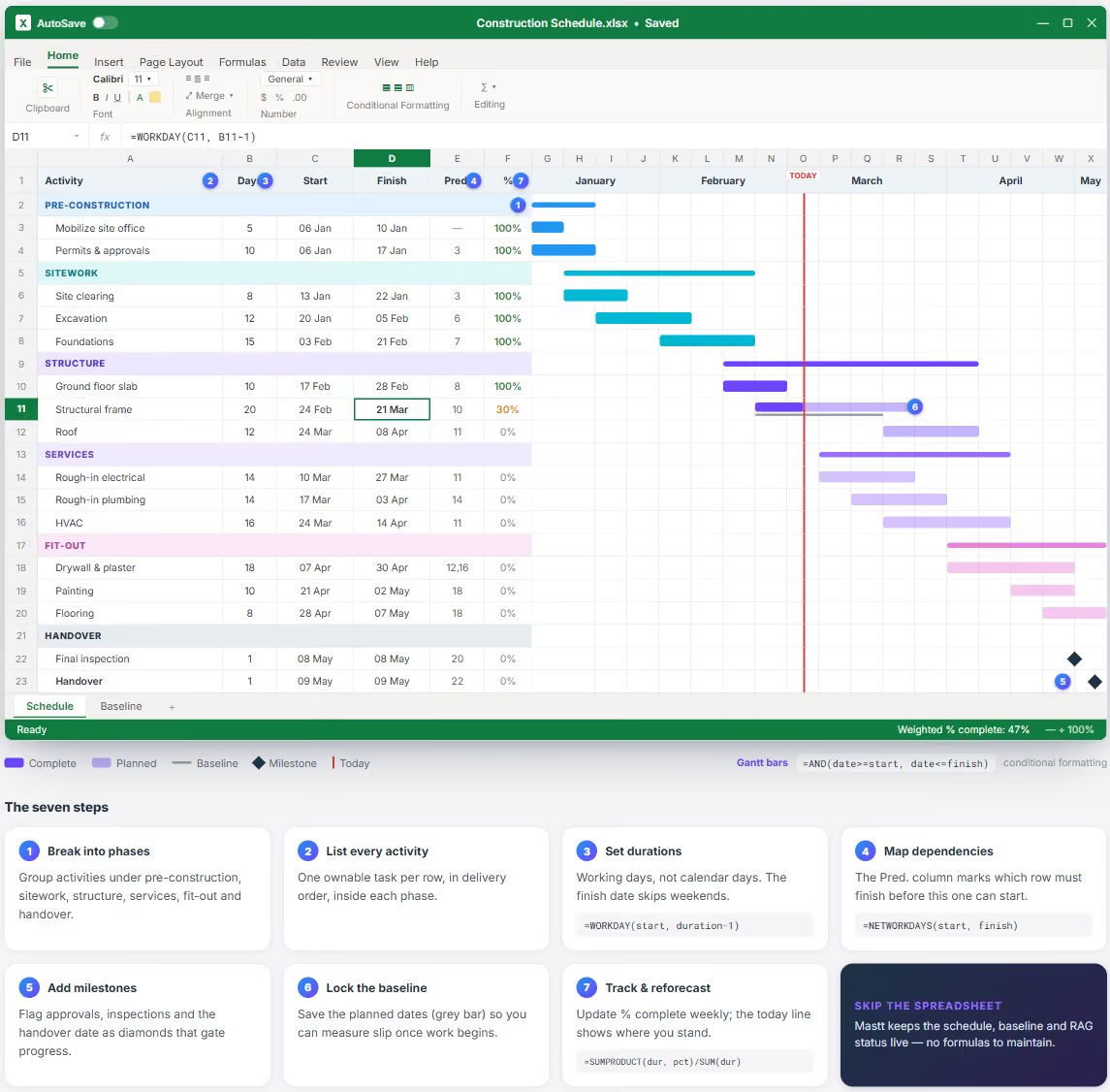
- Break the work into phases: Group activities under pre-construction, sitework, structure, services, fit-out, and handover.
- List every activity inside each phase: Keep each one to a single, ownable task.
- Set durations: Estimate working days for each activity, not calendar days.
- Map dependencies: Mark which activities must finish before the next can start.
- Add milestones: Flag approvals, inspections, and the handover date that gate progress.
- Lock the baseline: Save the planned dates so you can measure slip once work begins.
- Track and reforecast: Update percent complete and actual dates each week, and reschedule downstream activities when one slips.
A few formulas do the heavy lifting, and the Excel template has them built in:
- Finish date in working days: =WORKDAY(start, duration-1), which skips weekends.
- Duration between two dates: =NETWORKDAYS(start, finish).
- The Gantt bar: conditional formatting across the date grid, =AND(date>=start, date<=finish), shades each active cell.
- Weighted percent complete: =SUMPRODUCT(durations, percents)/SUM(durations).
💡 Tip: Update the schedule on the same day each week. A schedule reviewed monthly is a record of what already went wrong, not a tool to prevent it.
Construction Schedule Example
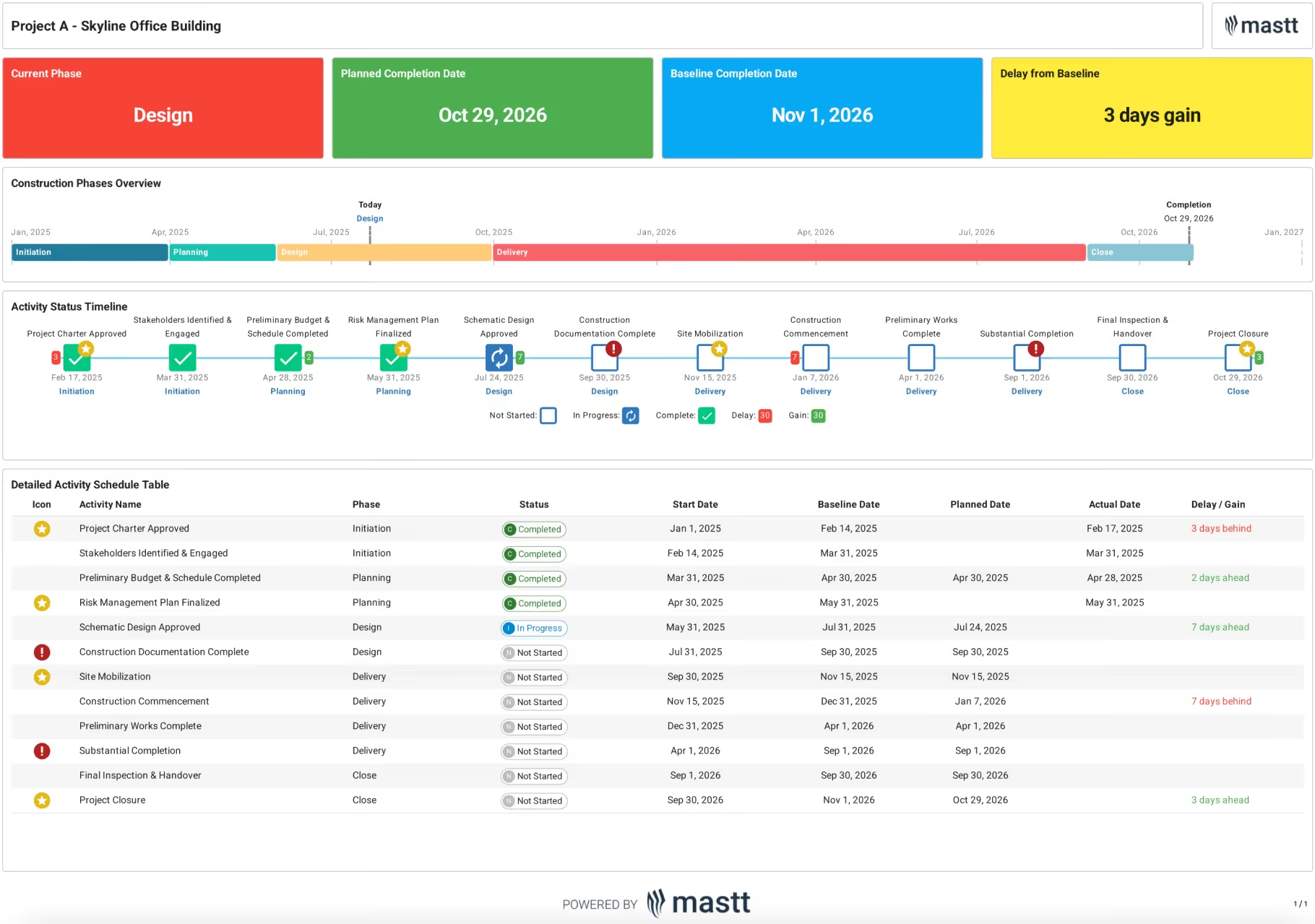
Here is a good example, or sample, of a construction schedule, taken from a project in Mastt.
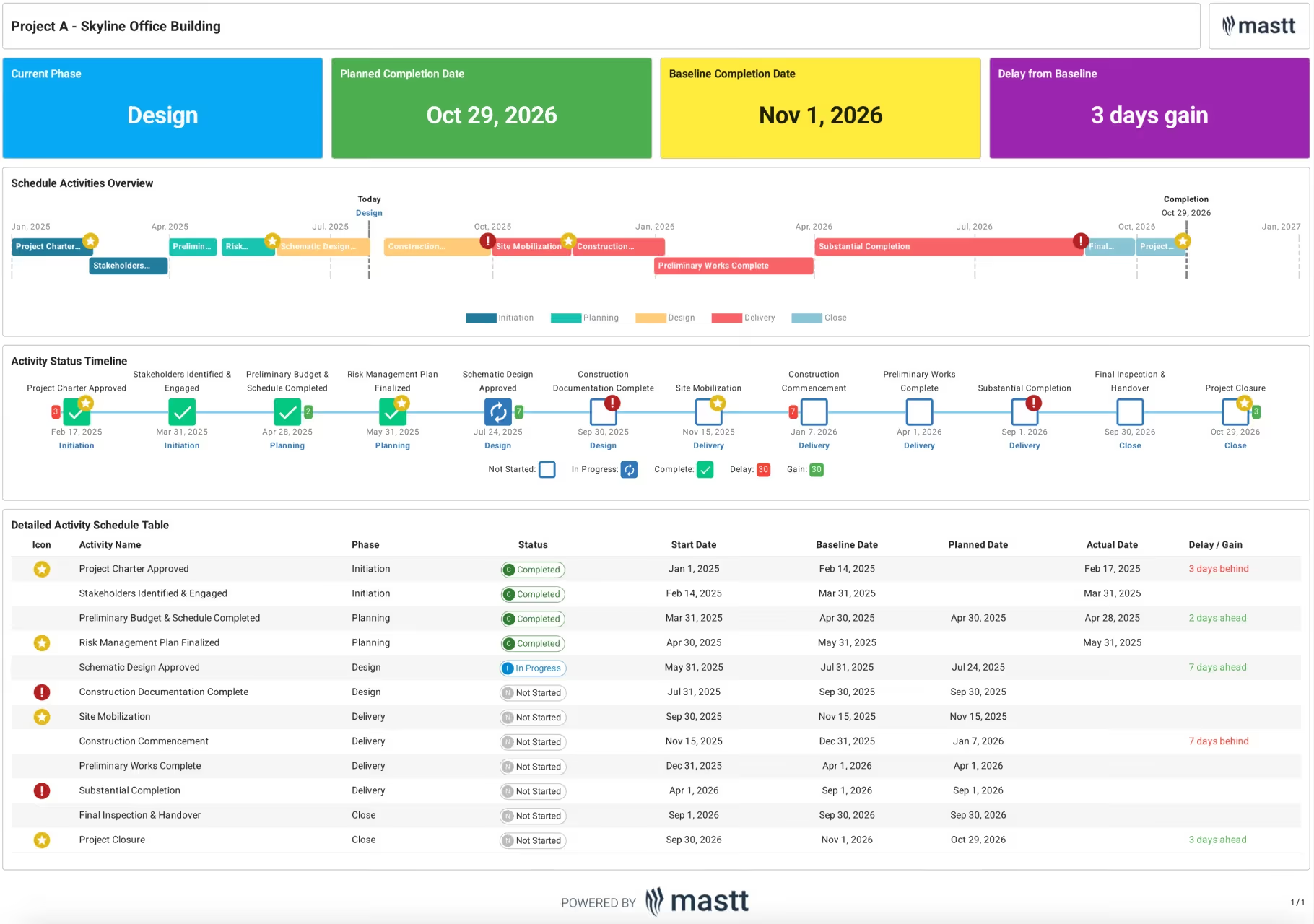
Each activity is tracked against its baseline, so slip and gain show at a glance. The whole project reports three days ahead, even while single activities run behind.
Who Uses a Construction Schedule Template
A construction schedule template is used by everyone accountable for on-time delivery, on both sides of the contract:
- Project owners and client-side teams hold the program to its baseline and report delivery status to the board or funder.
- Project and construction managers build the construction project schedule, coordinate trades, and manage the critical path.
- Superintendents and site engineers run the look-ahead and drive the daily program on site.
- Contractors and subcontractors plan their own work against the master schedule and flag clashes early.
- Planners and schedulers build and maintain the schedule, often in Primavera P6 or Microsoft Project.
Owners and client-side teams care most about the milestones and the baseline. The contractor owns the detailed sequence. Both work from the same dates.
Common Construction Scheduling Mistakes and How to Fix Them
Most construction schedules fail in the same ways, and each has a known fix. Check yours against this list before you baseline it:
A schedule in Excel holds up on a small job. As the activity count and trade overlap grow, manual dependency tracking and version control are where it breaks.
Build Your Construction Schedule in Mastt
Mastt's construction project scheduling software turns a static template into a live schedule that tracks itself against the baseline. Import an existing program, start from a built-in construction template, or build activities by hand. Progress, slip and milestones update as the team works.
Build your construction schedule in Mastt to:
📅 Plan activities by phase, with dependencies, durations and milestones in one view.
📊 Track slip and gain automatically against a locked baseline.
🔗 Tie schedule milestones to cost and payment progress, so time and money stay aligned.
📥 Report with a Gantt, milestone worm and phase view, and export board-ready PDFs.
Here's how to get started:
- Open the Schedule module from your project, then choose how to start.
- Import a schedule: drag in an MS Project (.xml) or Primavera P6 (.xer) file and confirm the activities.
- Or use a template: pick the Standard Construction Template and set your project start date.
- Or add activities by hand: click + Activity and set the name, phase, status, start and baseline dates.
- Set the start and completion activities so Mastt tracks progress against them.
- Review the Gantt, worm and phase views, then export or share a report.
💡 Pro Tip: Import your planner's P6 or MS Project file rather than rebuilding it. Mastt keeps the activities and dates, and you report against them without maintaining two schedules.
.avif)
Written by
Doug Vincent
Doug Vincent is the co-founder and CEO of Mastt, the AI capital-project management platform used by governments, Fortune 500 companies, and consultancies across APAC, North America, and MENA. Before founding Mastt in 2019, he spent a decade at RPS delivering more than $2 billion in capital works, including the $2.1B Defence Navy Infrastructure program, and holds a CPSPM certification with the AIPM. He contributes content and speaks on AI in capital project delivery at Mastt.

Use this FREE Construction Schedule Template to plan and outline all phases, milestones, and tasks. Keep your construction project organized and on track from start to finish.

Top Performers Don’t Guess. They Deliver.
Cut the stress of showing up unprepared
Start for FreeTrusted by the bold, the brave, and the brilliant to deliver the future