

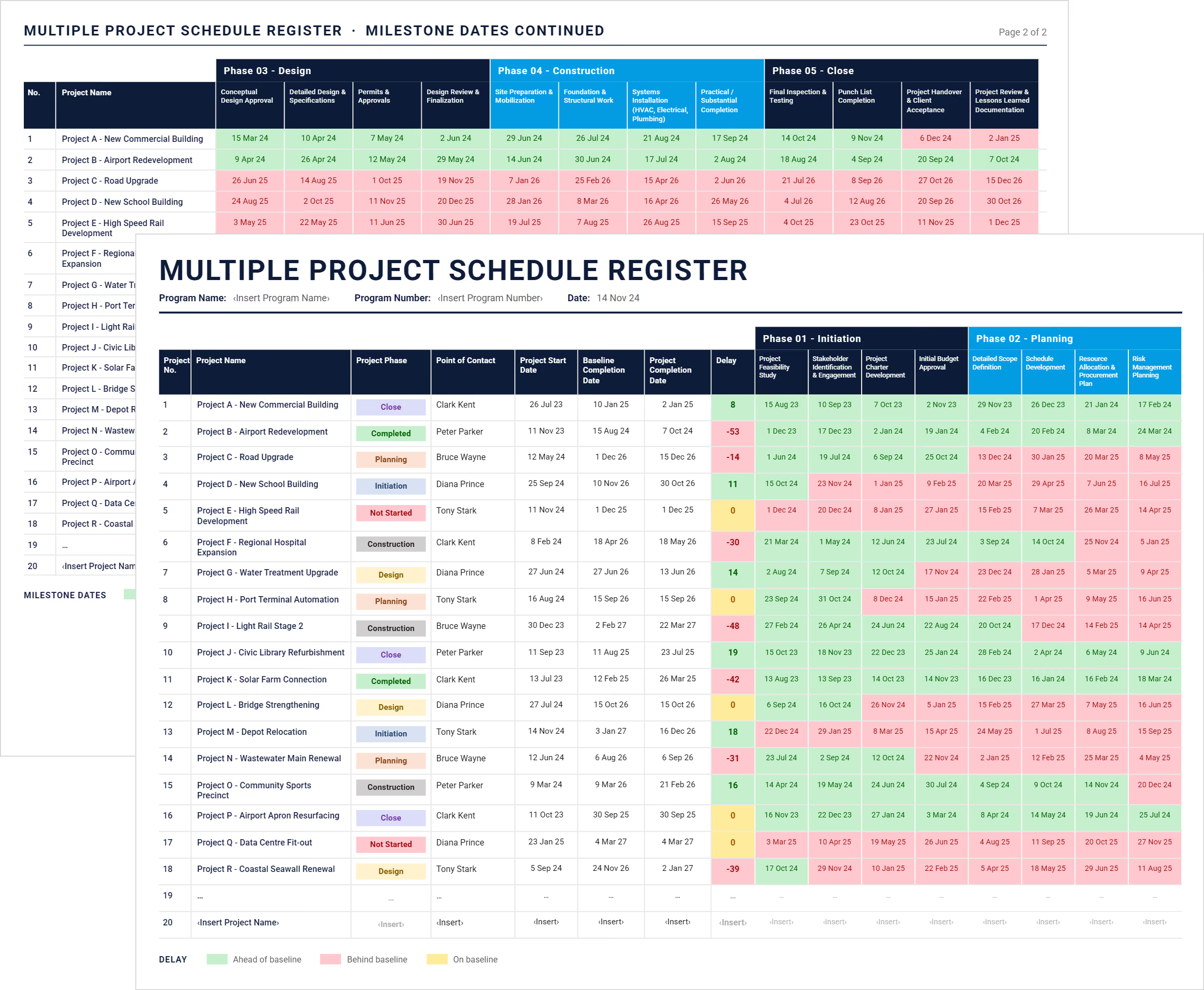

What is a Multiple Project Timeline Template?
A multiple project timeline template is a spreadsheet that shows the schedule of every project in a program on one sheet, with a row for each project and columns running across the project lifecycle. Instead of opening twenty separate schedules, you read the whole portfolio in a single view.
It answers a different question from a single project schedule. A project schedule breaks one project into tasks, durations and dependencies. A multi-project timeline shows which phase each project has reached, when each phase completes, and how far ahead or behind its baseline it is running.
Program managers, PMO leads and owner's representatives use it for portfolio reporting rather than day-to-day delivery.
Multiple Project Timeline Format: Key Components
A multiple project timeline needs seven things: a project identifier, the current phase, an accountable owner, a start date, a fixed baseline completion date, a current completion date, and the variance between the last two.
The five phases each hold four activities. Initiation covers the feasibility study, stakeholder identification, charter development and initial budget approval.
Planning covers detailed scope definition, schedule development, resource allocation and risk management planning. Design, construction and close follow the same pattern.
Every phase cell and the delay column are conditionally formatted against baseline, so a program with a scheduling problem shows as a band of red before anyone reads a date.
Multiple Project Timeline Example
Here is the template completed for a capital program of eighteen projects, from a commercial building to a light rail stage.
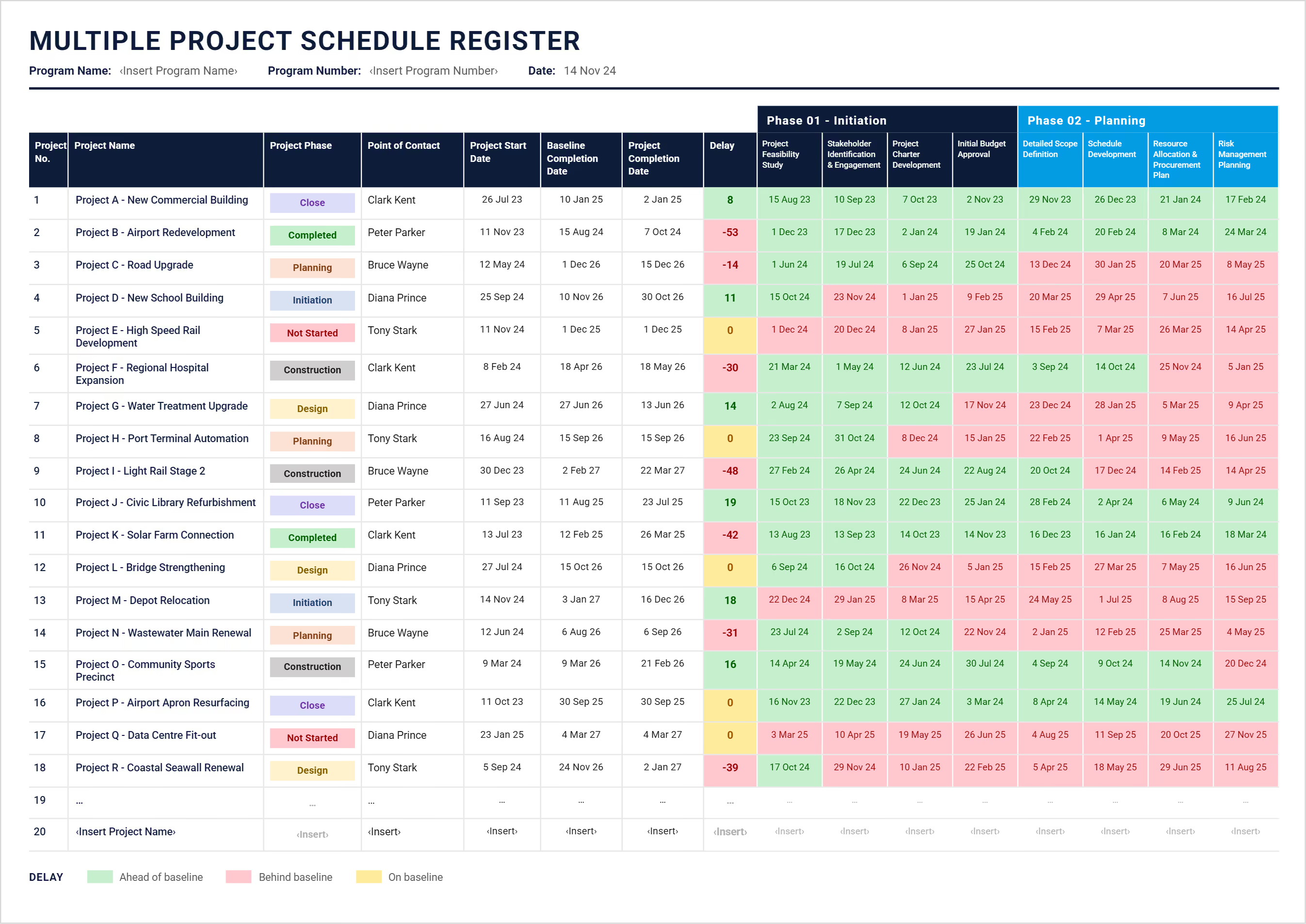
Read the delay column first. Project I sits 48 days behind baseline and Project B 53 behind, while Project J is running 19 days early. Note the sign convention: negative means behind, positive means ahead.
How to Create a Multiple Project Timeline in Excel
Give each project a row and each phase a set of dated columns, then measure the current completion date against a baseline that never moves. The template below already has that structure built, so most of the work is filling it in.
- Enter the program name, program number and the date you are reporting from.
- Add each project on its own row with a sequential number and a descriptive name.
- Set the current phase from the dropdown, which reads from the settings tab.
- Name a point of contact for every project, since a schedule with no owner gets no updates.
- Record the project start date and the baseline completion date, then leave the baseline alone.
- Update the project completion date as forecasts change, and let the delay column calculate the variance.
- Fill in the dates for each phase activity as they are agreed, then revise them as work completes.
- Refresh the reporting date every time you circulate it, so nobody reads last month's position as current.
Add or rename phases on the settings tab rather than typing over the dropdown, since the phase column reads from that list.
Multiple Project Timeline vs Project Tracker: Which Do You Need?
Use a timeline when you need to know when, and a tracker when you need to know how it is going. Most program teams run both.
If you are chasing progress and ownership rather than dates, the multiple project tracking template is the better fit. For a single project rather than a portfolio, use a project timeline template instead.
When a Spreadsheet Stops Working for Multiple Projects
A spreadsheet holds a portfolio timeline well until the dates start changing faster than someone can retype them, which for most programs is somewhere between twenty and thirty projects.
Three things usually break first. Version control goes, once several people hold copies and nobody knows which one the board saw. Dependencies between projects cannot be modelled, so a delay on one shows nothing on the others it feeds. And the project baseline quietly gets overwritten during an update, which destroys the variance the sheet exists to show.
At that point the roll-up moves into capital program management software, where phase dates update from each project rather than being re-entered by hand.
Related Articles and Templates
.avif)
Written by
Doug Vincent
Doug Vincent is the co-founder and CEO of Mastt, the AI capital-project management platform used by governments, Fortune 500 companies, and consultancies across APAC, North America, and MENA. Before founding Mastt in 2019, he spent a decade at RPS delivering more than $2 billion in capital works, including the $2.1B Defence Navy Infrastructure program, and holds a CPSPM certification with the AIPM. He contributes content and speaks on AI in capital project delivery at Mastt.

FREE multiple project timeline template in Excel. See every project's phase, dates, and days ahead or behind baseline on a single sheet.

Top Performers Don’t Guess. They Deliver.
Cut the stress of showing up unprepared
Start for FreeTrusted by the bold, the brave, and the brilliant to deliver the future