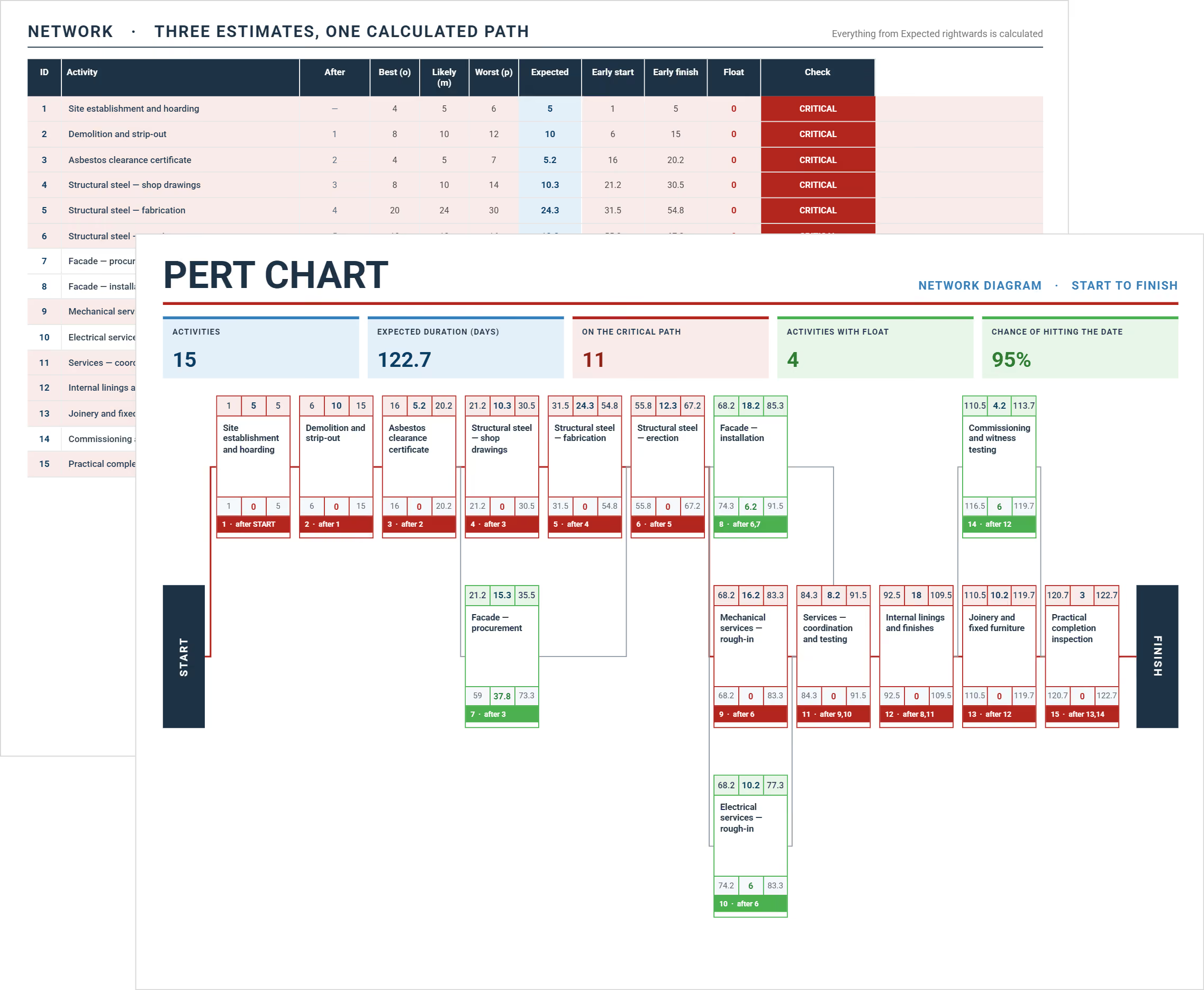
PERT chart template showing task nodes, predecessor sequences, and expected duration calculations
Free Template

PERT Chart Template

Use this free PERT chart template to map task sequences and calculate critical path durations. Available in Excel and Word, ready for construction project planning.

Templates
Word Template
Excel Template
Powerpoint Template
PERT Chart Template
Template by
Doug Vincent
Published:
Nov 5, 2024

What is a PERT Chart Template?

A PERT chart template is a pre-formatted project scheduling document that maps project tasks, sequences, and dependencies before work begins. It provides ready-made fields for time estimates, predecessor mapping, and critical path calculation.

Project managers use PERT diagrams to identify which sequences control the completion date. The template organizes activities in a node-and-arrow diagram, showing connections between work phases. The method is called PERT, for Program Evaluation and Review Technique. The U.S. Navy developed it in the 1950s.

PERT chart templates come in Excel and Word formats for most construction teams. Excel suits analysis-heavy builds where the weighted average formula auto-calculates per task. Word works for presentation-ready diagrams shared with owners and program managers.

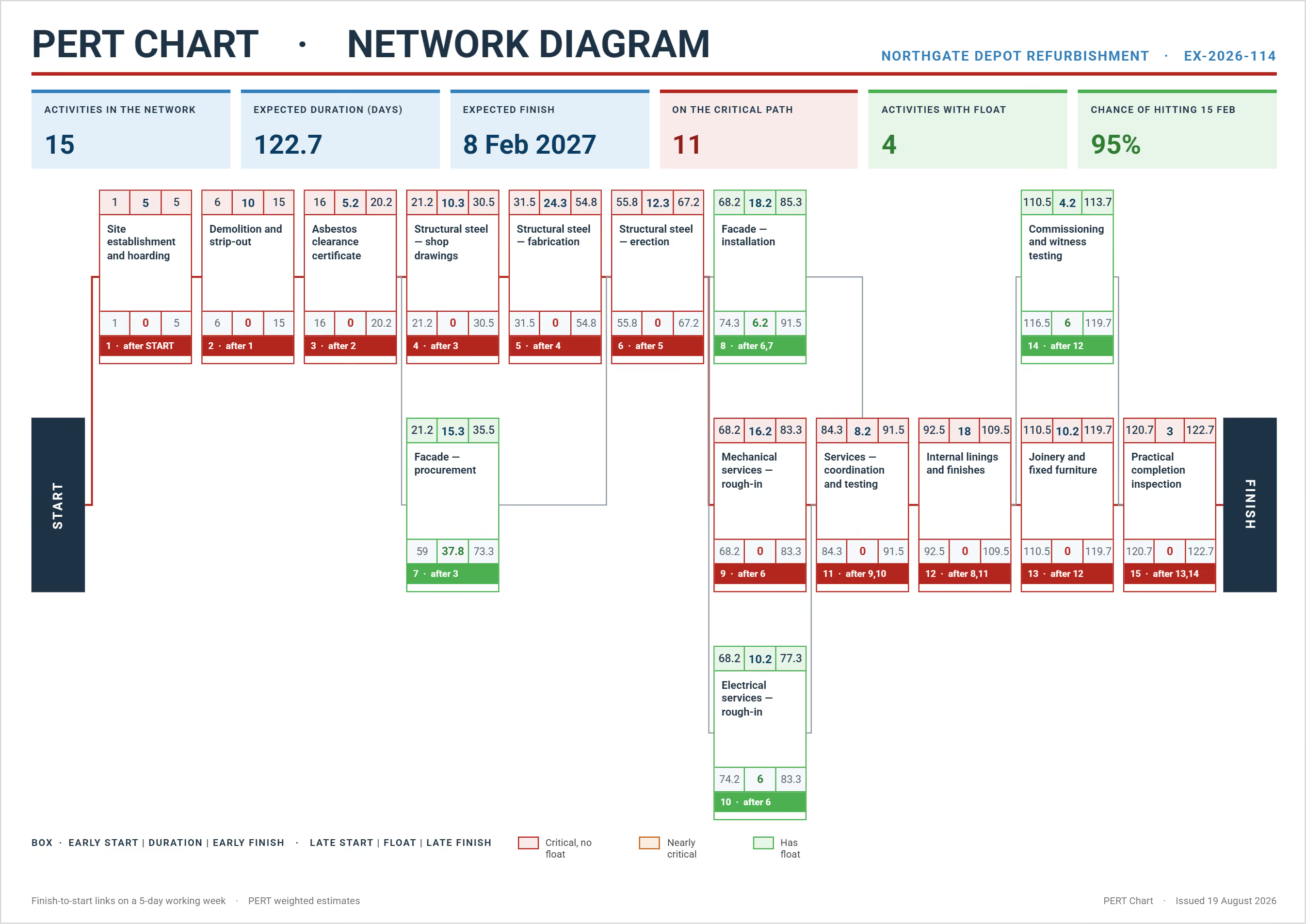
PERT chart network diagram mapping construction fit-out tasks from start to finish with durations and predecessor sequences

What's Included in a PERT Diagram Template?

A PERT diagram template contains visual components and fields for sequencing project work. The chart includes nodes, directional arrows, and a task data table that covers both the network diagram and the analysis in one document.

Core components of a PERT scheduling template include:

  • Task list table: Assigns a unique ID to each project task, maps task dependency and predecessor logic, forming the backbone of the network diagram.
  • Three time estimate columns: Captures optimistic, most likely, and pessimistic durations per activity for the PERT weighted average calculation.
  • Expected time formula: Auto-calculates expected duration per task using E = (O + 4M + P) ÷ 6, giving the most likely estimate its proper weight.
  • Variance column: Measures the spread between optimistic and pessimistic inputs, flagging activities where duration uncertainty is highest.
  • Milestone nodes: Numbered shapes marking key project events, decision points, and phase transitions across the network.
  • Directional arrows: Link task nodes in logical sequence, defining predecessor and successor relationships between activities.
  • Critical path marker: Color-codes the longest chain of zero-float activities, making critical tasks immediately visible to any project manager.
  • Slack/float display: Calculates how long each non-critical task can be delayed before it affects the completion date.
💡 Pro Tip: Add a dotted "dummy activity" arrow for logical dependencies that carry no actual duration. It preserves your diagram's accuracy without inflating task duration totals. Most manual PERT builds skip this step entirely.

Why Use a PERT Chart for Construction Project Planning?

A PERT chart template gives construction teams a probabilistic scheduling approach. PERT diagrams are built for uncertainty and construction projects face it at every phase, from pre-tender through to closeout.

PERT chart templates benefit construction project management by:

  • Handling uncertain durations: Three-point estimation produces realistic durations when no reliable historical project schedule data exists.
  • Exposing the critical path: Identifies exactly which task sequence carries zero float and holds the highest schedule risk.
  • Mapping multi-trade sequences: Connects excavation, structural framing, MEP rough-in, and finishes in correct predecessor order before mobilization.
  • Coordinating complex projects: Keeps multi-contract coordination visible before crews commit to site, preventing costly sequencing conflicts.
  • Aligning milestones with progress payments: Maps pay application submission points to planned project schedule milestones.
  • Quantifying change order impact: Shows how approved scope additions shift predecessor relationships and affect the completion date.
  • Enabling what-if scenario planning: Lets schedulers test duration compression or sequencing changes before committing resources.

Without PERT diagrams, duration assumptions stay hidden until delays surface on site.

💡 Pro Tip: Map procurement lead times as dedicated PERT nodes. Structural steel, switchgear, and curtain wall systems regularly become critical path items. Schedulers who exclude procurement timing almost always discover this too late to act.

How to Build a PERT Diagram Step by Step

Building a PERT diagram starts with a task list and realistic time estimates. Begin from your work breakdown structure and sequence each activity outward.

Follow these steps:

  1. List all project tasks: Assign each project task a unique WBS ID so every activity is traceable to its scope item.
  2. Define predecessors: Identify which activity must finish before each dependent task can begin, working through every trade.
  3. Collect time estimates: Gather optimistic, most likely, and pessimistic durations from subcontractors and site supervisors.
  4. Calculate expected time: Apply the PERT formula, E = (O + 4M + P) ÷ 6, to produce a weighted expected duration for each activity.
  5. Reference a PERT chart example: Use a completed sample to verify your node layout and sequencing logic.
  6. Draw your network: Connect task nodes with directional arrows following the predecessor relationships you've defined.
  7. Identify the critical path: Find the longest chain of activities with zero float from start to completion.
  8. Calculate slack: Subtract earliest finish from latest finish for each non-critical task to find schedule buffer.
  9. Validate with your scheduler: Walk the completed diagram with a superintendent or project controls lead before distributing it.
💡 Pro Tip: Never collect duration estimates alone. Pull subcontractor leads and site foremen into the session. Field knowledge produces far more accurate pessimistic figures than any assumption made from the office.

Generate Accurate PERT Charts Instantly with Mastt's AI Assistant

Mastt's AI Assistant removes the manual setup that delays PERT scheduling. Describe your project and a working PERT schedule comes back ready to review.

Here's what you can do:

🚀 Generate PERT chart templates on demand: Describe your project type and scope. AI builds a complete, structured diagram template ready for your review.

📄 Upload project documents: Share a PDF brief or scope document. Mastt's AI serves as your PERT chart generator, extracting tasks and predecessor relationships automatically.

📂 Customize through conversation: Adjust task names, durations, and sequences in plain language, without any spreadsheet configuration required on your end.

📑 Export in Word or Excel: Your free PERT chart template is download-ready the moment the conversation is complete.

Getting started:

  1. Open AI Assistant and describe your project. For example: "Create a PERT chart for a hospital wing construction project."
  2. Refine through conversation: Add tasks, adjust durations, or upload a PDF scope document for AI to extract from.
  3. Export: Download in Word or Excel, ready for stakeholder review and field use.

Every conversation stays private in your secure workspace.

👉 Visit the Mastt's Help Center for more about using AI Assistant for scheduling.

Mastt's AI Assistant interface generating PERT chart templates with schedule, contracts, and document support built in

Who Should Use PERT Chart Templates?

Construction project managers are the primary users. Any role managing schedule dependencies and duration uncertainty benefits from PERT. Project managers at every level use it to structure hard-to-estimate work.

Owner's Representatives: Review contractor milestone sequences and verify critical path logic before construction begins.

General Contractors: Build pre-construction schedules and sequence multi-trade work before subcontractor durations are confirmed.

✅ Construction Schedulers: Handle activities with uncertain durations alongside CPM tools when no reliable historical data exists.

✅ Capital Project Owners: Follow task sequences and milestone logic without direct access to Primavera P6 or construction project scheduling software.

Project Controls Specialists: Track actual progress against the planned PERT sequence and flag float consumption throughout delivery.

✅ Subcontractor Coordinators: Confirm trade sequencing and resolve predecessor conflicts before authorizing any crew to mobilize.

✅ Government Program Managers: Present infrastructure timelines to oversight bodies using a clear visual that avoids CPM data complexity.

Across all roles, PERT makes dependencies visible before site commitments are made.

When to Use a PERT CPM Chart on Your Project

Deploy this PERT scheduling document during early planning. Use it before building the full project timeline in Mastt, P6, or Microsoft Project. PERT is most valuable when firm duration data does not yet exist.

Critical moments for using PERT include:

  • Pre-construction phase: When design is still in progress and task durations remain uncertain, making single-point estimates unreliable.
  • Early contractor involvement: When a GC joins the team before full construction documents have been issued for tender.
  • Owner milestone reviews: When stakeholders need schedule visibility but can't interpret a full CPM output.
  • Novel project types: When no historical data exists to support reliable single-point duration estimates.
  • Post-change order evaluation: When approved scope changes shift predecessor relationships and increase schedule slippage exposure.
  • Multi-phase infrastructure delivery: When overlapping phases create sequencing complexity a simple bar chart can't represent.
  • Notice to proceed issuance: When confirming trade sequencing before authorizing subcontractors to mobilize on site.

Earlier PERT application means more influence over the decisions that drive delivery performance.

Best Practices for Accurate PERT Estimation

Accurate PERT estimation requires more than entering three numbers per task. These practices strengthen schedule reliability before any crew mobilizes to site:

☑️ Source task lists from your WBS dictionary, not memory. Scope gaps in PERT almost always trace back to tasks assumed but never formally listed.

☑️ Treat every critical task as an individual schedule risk. Zero-float activities need separate contingency review, not just a color highlight on the diagram.

☑️ Build related diagram templates for each trade scope separately. Mechanical, electrical, and civil sequences need independent PERT maps before integration into the master network.

☑️ Run fast tracking analysis only after the critical path is confirmed. Overlapping tasks without a mapped predecessor sequence introduces new risk rather than saving time.

☑️ Revisit variance values after every significant change order. High variance scores flag where schedule confidence is lowest and monitoring needs to be tightest.

☑️ Lock your PERT baseline before mobilization. Post-mobilization changes belong in a formal time impact analysis, not edits to the working file.

Applied consistently, these practices turn a PERT diagram into a living schedule tool. It supports delivery decisions from pre-construction through to substantial completion.

Common Problems with Manual PERT Diagrams in Excel and Word

Building PERT charts manually in Excel or Word creates accuracy and version problems. Without a dedicated PERT chart maker, these issues grow with project complexity.

⚠️ No auto-calculation: Expected time and variance require manual formula entry. One overwritten cell corrupts the entire critical path output with no warning.

⚠️ Diagram layout drift: Nodes shift when rows or columns are added, breaking arrow connections and destroying the task logic.

⚠️ Version fragmentation: Teams circulate separate Excel files by email, with no single controlled source reflecting the current schedule.

⚠️ No predecessor enforcement: Basic Excel and Word PERT chart templates can't flag logical gaps or circular dependency errors automatically.

⚠️ Manual critical path identification: Spotting zero-float tasks without automated highlighting requires a full manual review of every activity.

⚠️ No document extraction: Tasks can't be pulled from a PDF scope into a static Excel file. Every item must be re-entered by hand.

⚠️ No reusability across projects: Static files can't carry forward proven task structures or duration benchmarks from past projects.

💡 Pro Tip: If you must use Excel for PERT, password-protect the formula columns the moment the file is set up. A single overwritten E = (O + 4M + P) ÷ 6 cell is the most common PERT error in practice, and nobody notices until the critical path analysis has already gone wrong.

Simplify Complex Project Scheduling with Mastt

Construction projects don't wait for perfect schedules. A poorly structured PERT sequence damages credibility with owners and program managers.

Mastt's AI for construction generates a PERT chart template from your project description. You skip blank-page problems, formula setup, and version control issues from manual builds. Your team starts from a consistent, exportable framework from the first conversation.

👉 Try Mastt's AI Assistant today and build an accurate PERT chart in minutes.

FAQs About PERT Chart Templates

Excel is the most common choice because it handles the expected time formula automatically. Word works better when you need a clean visual diagram for owner or stakeholder presentations.
Use E = (O + 4M + P) ÷ 6, where O is optimistic, M is most likely, and P is pessimistic. The formula puts more weight on the most likely estimate, giving you a realistic, uncertainty-adjusted duration for each task.
Yes. Excel handles the calculations and you can draw nodes and arrows using basic shapes. Starting from a pre-built template saves a lot of setup time compared to building from scratch.
A PERT diagram shows task sequences and dependencies, including what must happen before what. A Gantt chart shows when tasks are scheduled on a timeline, making it better for day-to-day progress tracking.
PERT uses three time estimates per task to account for uncertainty, while the critical path method uses a single fixed duration. In practice, PERT suits early planning when you don't yet have reliable duration data.
Topic: 
PERT Chart Template

Written by

Doug Vincent

Doug Vincent is the co-founder and CEO of Mastt.com, leading the charge to revolutionize the construction industry with cutting-edge project management solutions. With over a decade of experience managing billions in construction projects, Doug has seen the transformative power of the industry in building a better future. A former program manager, he’s passionate about empowering construction professionals by replacing outdated processes with innovative, AI-driven tools. Under his leadership, Mastt serves global clients, including governments, Fortune 500 companies, and consultants, delivering solutions that save time, enhance visibility, and drive efficiency. Doug also mentors entrepreneurs and shares insights on LinkedIn and YouTube.

LinkedIn Icon
Back to top

Frequently Asked Questions

More Templates

Supercharging Construction Project Management with AI Powered Tools