

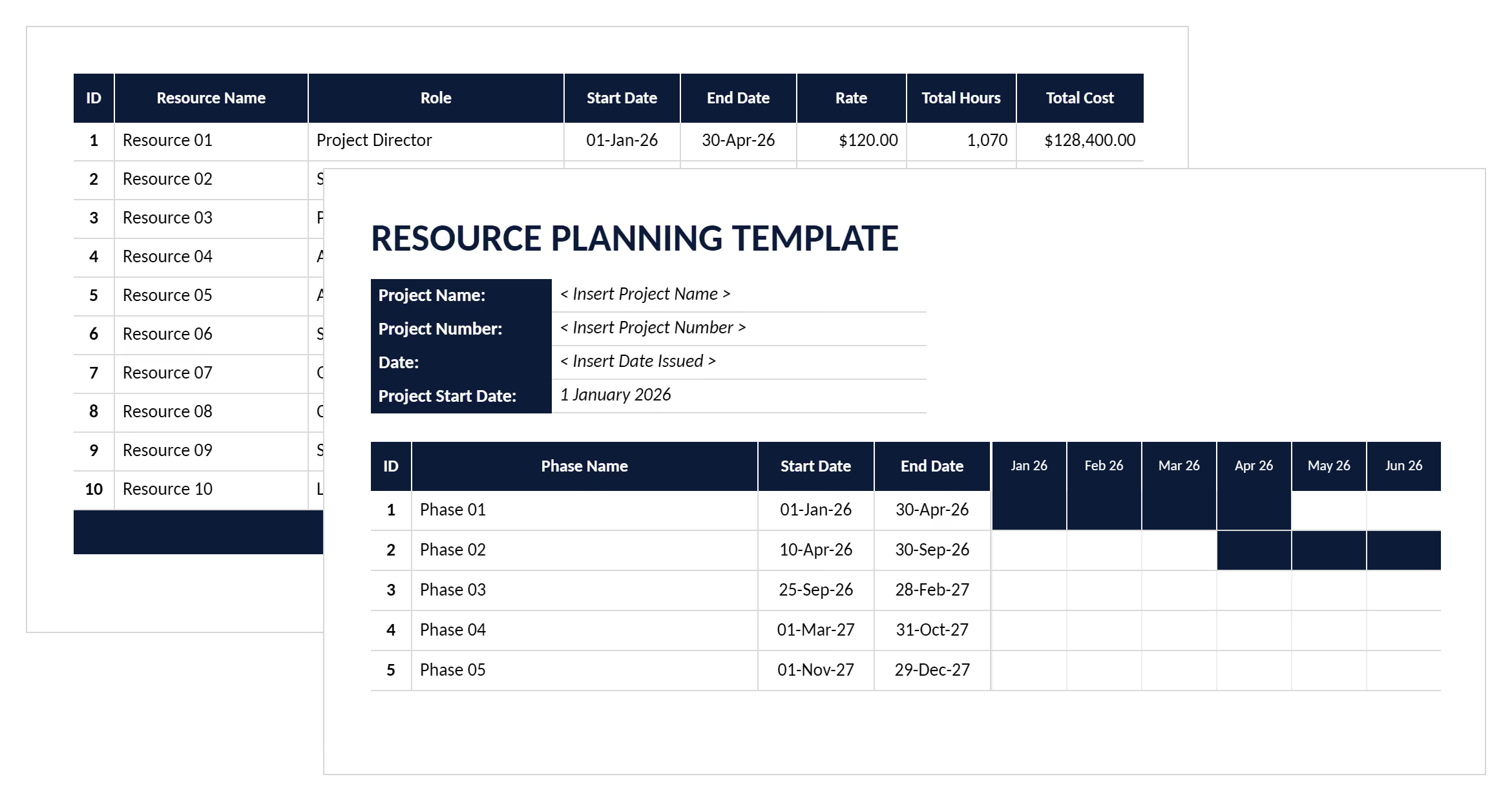

What is a Resource Planning Template?
A resource planning template is a pre-formatted spreadsheet that organizes workforce allocation, material procurement, and equipment scheduling across project timelines. It provides structured columns for tracking resource availability, costs, utilization rates, and assignment conflicts.
Project teams use these resource planning templates to coordinate labor crews, heavy equipment, and material deliveries across multiple project phases. The format captures resource names, hourly rates, daily capacity, start dates, and total effort required for each activity.
Project managers rely on resource management templates to prevent the overallocation conflicts that cause schedule delays. The template structure supports both resource leveling decisions and capacity forecasting throughout delivery.
What's Included in Resource Planning Templates?
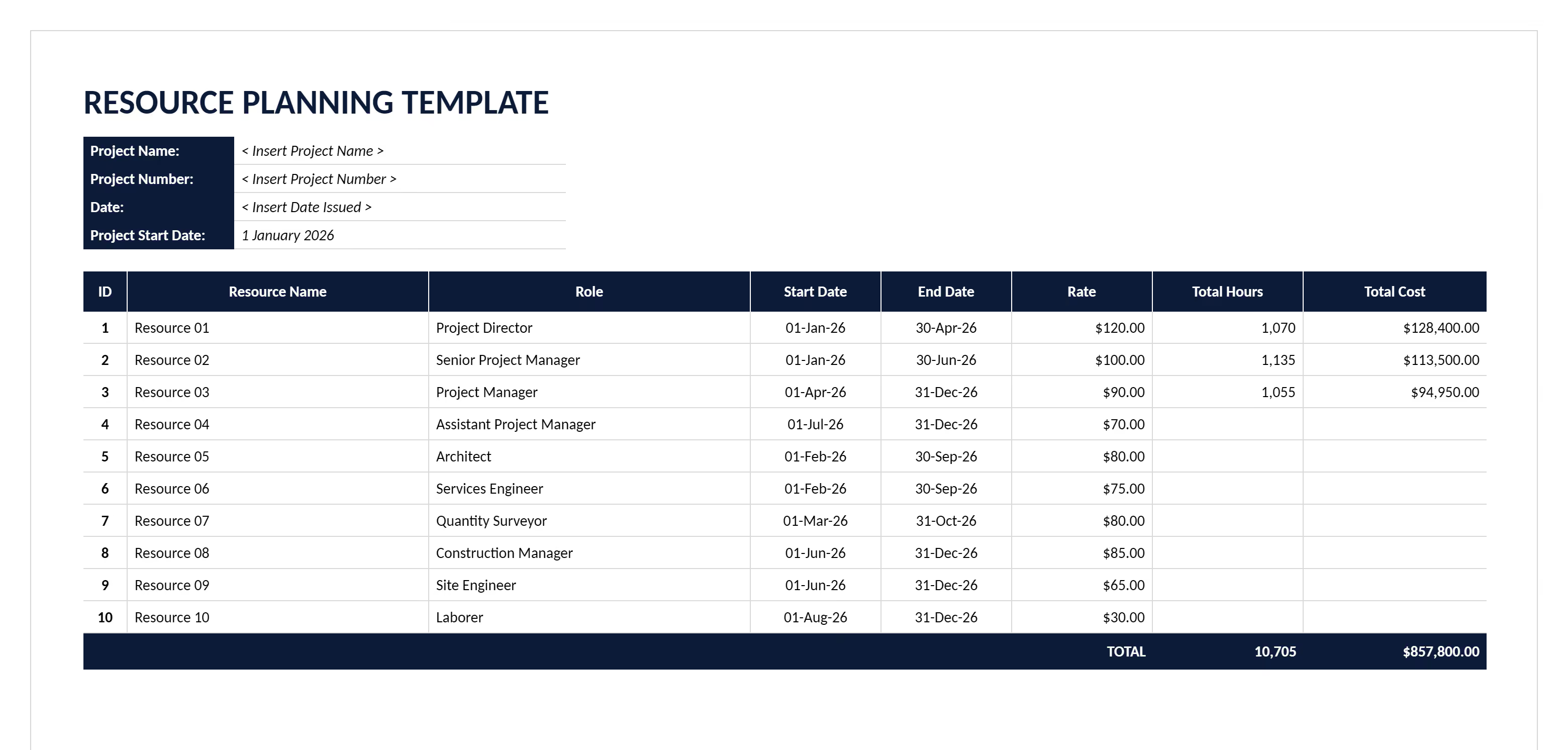
Resource planning templates contain essential fields for tracking workforce, materials, and equipment across project schedules. Each column captures specific allocation data that prevents the scheduling conflicts and capacity shortages threatening project delivery.
Standard components of a resource planning template include:
- Resource identification fields: Name, type classification, category grouping, and department assignment for organizational tracking across project phases.
- Task assignment columns: Activity descriptions, project phases, work breakdown structure links, and dependency relationships showing resource coordination requirements.
- Cost tracking fields: Hourly rates for labor, unit costs for materials, rental rates for equipment, and budget allocation against approved estimates.
- Availability data: Hours per day capacity, calendar availability windows, start and end dates, and total effort calculations for scheduling decisions.
- Utilization metrics: Booked hours against available capacity, utilization percentage calculations, and overallocation flags highlighting conflicts exceeding daily limits.
- Status indicators: Current assignment status, actual hours worked, actual costs incurred, and variance tracking against planned allocations.
- Location assignments: Site locations, work zones, or facility designations coordinating resource deployment across multiple construction areas.
💡 Pro Tip: Set your template to flag when any resource exceeds 8 hours daily. Overallocation warnings catch scheduling conflicts immediately, before they cascade into delays affecting dependent activities downstream.
Why Use Resource Planning Templates for Project Management?
Resource planning templates prevent the allocation disasters that destroy project schedules and budgets. Systematic tracking stops the overallocation conflicts, equipment double-bookings, and material delivery failures that cause costly project delays.
Project resource management templates protect delivery because they:
- Prevent workforce overallocation: Visual capacity tracking stops schedulers from assigning 12-hour days repeatedly, avoiding the burnout that increases turnover and reduces productivity.
- Eliminate equipment conflicts: Shared visibility prevents double-booking excavators or cranes, reducing rental cost overruns from emergency equipment sourcing at premium rates.
- Coordinate material deliveries: Linked procurement timing prevents early deliveries creating storage problems and late arrivals stopping work crews waiting for supplies.
- Control labor costs: Tracking actual hours against estimates reveals cost overruns early, enabling corrective action before budgets blow out beyond recovery.
- Improve utilization rates: Identifying underutilized resources enables reassignment to other activities, maximizing return on labor and equipment investments already committed.
- Support capacity forecasting: Historical utilization data guides future project bidding, helping estimators quote realistic schedules with appropriate resource buffers.
- Enable proactive decisions: Three-week lookahead visibility lets managers secure additional crews or equipment before shortages stop critical path activities.
Consider a project scheduling three concrete pours simultaneously without checking pump availability. With templates tracking equipment capacity, that conflict surfaces immediately rather than the morning trucks arrive.
How to Use a Template for Resource Planning
Using resource planning templates effectively requires accurate baseline data entry followed by continuous monitoring as assignments change throughout delivery. The template becomes reliable only when teams update allocations consistently and review utilization patterns regularly.
Follow these steps for effective resource allocation:
- Establish resource inventory: List every crew, equipment piece, and material type available for assignment with their daily capacities and cost rates.
- Link tasks to schedules: Connect resource needs to specific activities in your project schedule, showing when each resource starts and finishes work.
- Calculate total requirements: Sum hours needed across overlapping activities to identify periods when demand exceeds available supply causing allocation conflicts.
- Flag overallocation conflicts: Review capacity warnings showing resources assigned beyond daily limits, then reschedule activities or add crews to resolve issues.
- Balance workload distribution: Apply resource leveling to extend timelines when capacity constraints prevent completing work as originally scheduled.
- Track actual utilization: Record hours worked and costs incurred weekly, comparing against planned allocations to identify variances requiring budget adjustments.
- Update forecasts continuously: Revise remaining effort estimates as work progresses, maintaining accurate predictions of completion dates and final costs.
- Review utilization patterns: Analyze which resources consistently run over capacity and which sit idle, informing future project planning decisions.
💡 Pro Tip: Don't level resources during your initial schedule build. Create the unconstrained schedule first showing what's needed, then apply leveling to see how capacity limitations actually affect completion dates.
Who Should Use Resource Planning for Construction Projects?
Resource planning templates serve construction professionals managing workforce allocation, equipment deployment, and material coordination across project schedules. These templates ensure teams coordinate effectively across the capacity constraints and scheduling dependencies making construction resource management complex.
✅ Project Managers: Coordinate labor crews, equipment, and materials across all project phases, preventing allocation conflicts that delay critical path activities.
✅ Construction Schedulers: Develop resource-loaded schedules showing when crews and equipment are needed, identifying capacity bottlenecks before mobilization begins.
✅ General Contractors: Manage subcontractor coordination, equipment sharing across trades, and material procurement timing for multiple concurrent projects.
✅ Resource Managers: Track workforce utilization rates, equipment rental costs, and material inventory levels, optimizing allocation efficiency across the portfolio.
✅ Construction Superintendents: Coordinate daily crew assignments, resolve equipment conflicts, and manage material deliveries aligning with three-week lookahead plans.
✅ Construction Estimators: Forecast resource requirements for bidding, using historical utilization data to quote realistic labor hours and equipment needs.
✅ Project Management Office (PMO): Standardize resource tracking across multiple projects, enabling portfolio-level visibility into capacity constraints and utilization patterns.
💡 Pro Tip: Assign resource planning ownership to schedulers, not project managers. Schedulers understand task dependencies and duration impacts better, preventing the allocation decisions that accidentally extend critical paths.
When to Use a Project Resource Planning Template
Project resource planning templates deploy when teams need to coordinate workforce, equipment, and materials across complex schedules with competing demands. Deploy resource planning templates during:
- Preconstruction planning: Before mobilization, forecast labor crews, heavy equipment, and material deliveries needed across each construction phase.
- Schedule development: While building CPM schedules, identify resource requirements for each activity, revealing capacity constraints affecting completion dates.
- Bid preparation: During construction estimating, calculate total labor hours, equipment rental periods, and material quantities supporting realistic cost proposals.
- Workforce planning: When addressing labor shortages, analyze skill requirements and crew sizes needed, identifying hiring or subcontractor needs early.
- Equipment procurement: Before renting cranes, excavators, or specialty tools, confirm scheduling conflicts across overlapping activities requiring shared equipment.
- Material ordering: While coordinating deliveries, align procurement timing with construction sequences, preventing storage problems or work stoppages.
- Multi-project coordination: When managing portfolio resources, track allocation across simultaneous projects, identifying opportunities to share crews or equipment.
- Schedule recovery: During delays, reassess resource availability for acceleration strategies like adding shifts or bringing additional crews on site.
Common Problems with Generic Resource Planning Templates in Excel and Word
Generic resource planning templates downloaded from online sources create allocation problems undermining project schedules. Free Excel spreadsheets and Word documents lack the project-specific structure and calculation logic needed for accurate capacity forecasting.
Common challenges with free generic downloadable templates include:
⚠️ Inadequate resource categories: Generic templates include generic "labor" and "equipment" rows, missing trade-specific classifications like concrete crews, steel erectors, or tower cranes.
⚠️ Broken calculation formulas: Free Excel templates use hardcoded formulas that break when adding rows, causing utilization percentages and cost totals to miscalculate.
⚠️ No overallocation detection: Basic spreadsheets lack conditional formatting flagging when resources exceed daily capacity, hiding conflicts until schedules blow out.
⚠️ Missing schedule integration: Downloaded templates don't link to Primavera P6 or Microsoft Project, requiring duplicate data entry when project schedules change.
⚠️ Insufficient cost tracking: Simple Word templates omit actual cost fields and variance calculations, preventing budget performance monitoring throughout delivery.
⚠️ Poor multi-project support: Generic templates assume single-project use, lacking the portfolio view needed when crews and equipment serve multiple simultaneous jobs.
⚠️ Version control chaos: Teams circulate separate Excel files via email, creating conflicting allocation data when multiple planners update different versions.
⚠️ Limited collaboration: Static spreadsheets prevent real-time updates, causing allocation conflicts when field changes don't reach planning teams immediately.
Even well-formatted Excel templates require extensive customization for union labor rules, equipment rental terms, and material delivery logistics specific to your project location and contract requirements.
Best Practices for Resource Management and Allocation
Effective resource management requires disciplined execution beyond template selection, applying proven practices that prevent the common failures destroying construction schedules. Here are proven practices protecting resource allocation success:
☑️ Build unconstrained schedules first: Sequence activities by logic before applying resource limits, revealing true capacity needs rather than forcing artificial constraints.
☑️ Apply resource leveling strategically: Extend timelines when capacity prevents original schedules, avoiding overallocation that guarantees delays and budget overruns.
☑️ Track utilization rates weekly: Monitor actual hours against planned capacity continuously, catching productivity drops before they compound into schedule impacts.
☑️ Maintain three-week lookahead visibility: Review upcoming needs three weeks forward, securing crews or equipment before shortages stop critical work.
☑️ Coordinate material procurement timing: Link deliveries to construction sequences, preventing storage costs from early arrivals or stoppages from late shipments.
☑️ Assign resources by skill: Match crew qualifications to task requirements systematically, avoiding rework from assigning unqualified workers to specialized activities.
☑️ Build contingency into peak periods: Add capacity buffers during high-demand phases when delays cascade through dependent activities like concrete pours.
☑️ Review historical utilization data: Analyze past performance to improve forecasting, using actual productivity rates rather than optimistic assumptions.
Build Better Projects with Mastt AI
Every project faces resource constraints threatening delivery timelines and budgets. The difference between successful completion and costly delays lies in systematic planning that identifies capacity shortages, coordinates allocation conflicts, and tracks utilization before problems escalate.
With Mastt AI, you don't need to build resource frameworks from scratch or struggle with inadequate Excel templates. Describe your project requirements, and AI generates comprehensive resource planning templates tailored to your workforce size, equipment fleet, and material coordination needs.
👉 Create your resource planning template with Mastt's AI Assistant and prevent allocation disasters before they delay delivery.

Written by
Jackson Row
Jackson Row is the Growth & North American Market Lead at Mastt. With a background in risk modeling, cost forecasting, and integrated project delivery, he helps capital project owners work smarter and faster. Jackson’s work supports better tools, better data, and better outcomes across the construction industry.

Use this FREE resource planning template to prevent overallocation conflicts and equipment scheduling disasters. Track labor, materials, and equipment availability across projects while identifying bottlenecks before they delay delivery.

Top Performers Don’t Guess. They Deliver.
Cut the stress of showing up unprepared
Start for FreeTrusted by the bold, the brave, and the brilliant to deliver the future