What is a RACI Matrix Template?
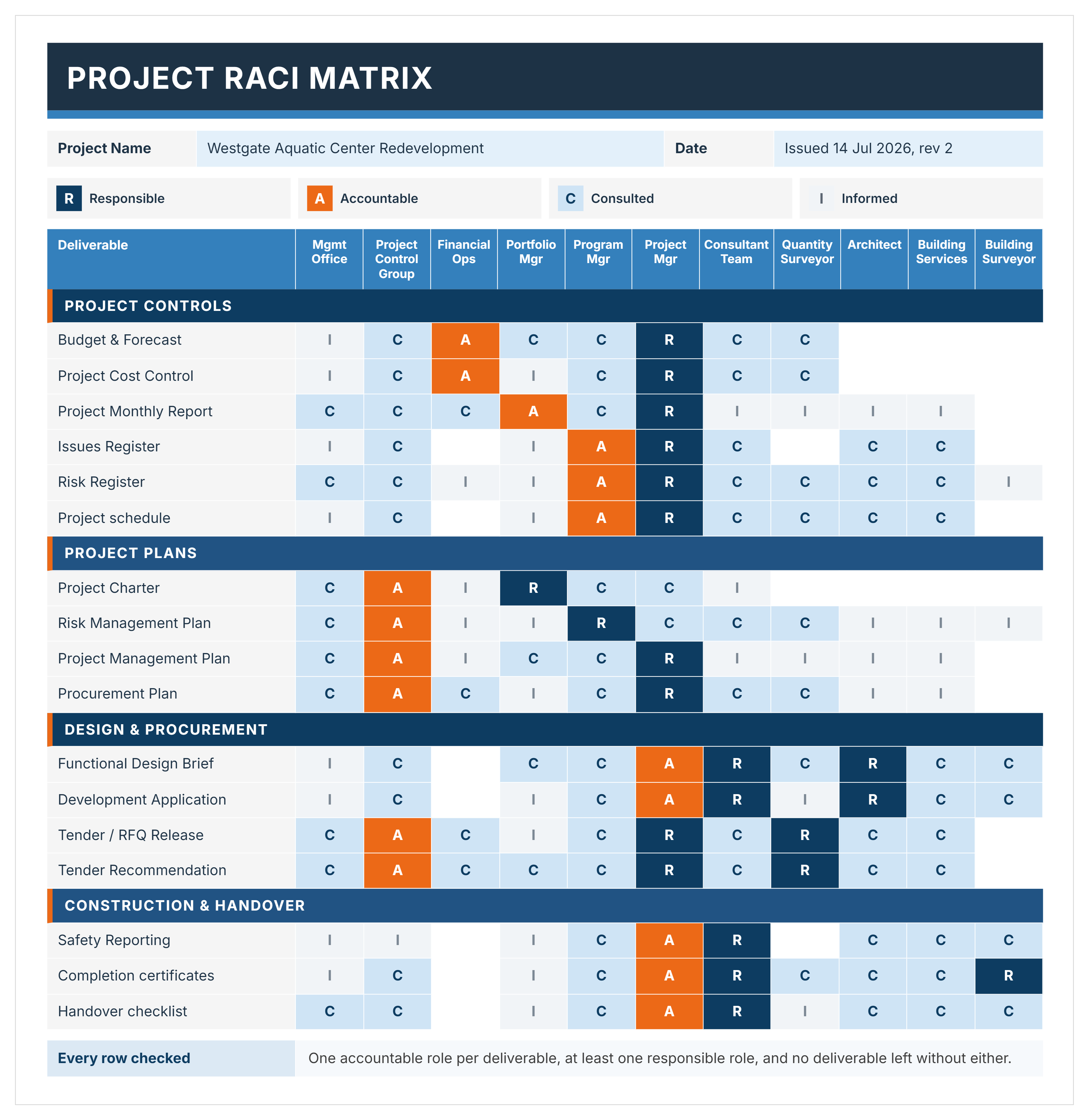
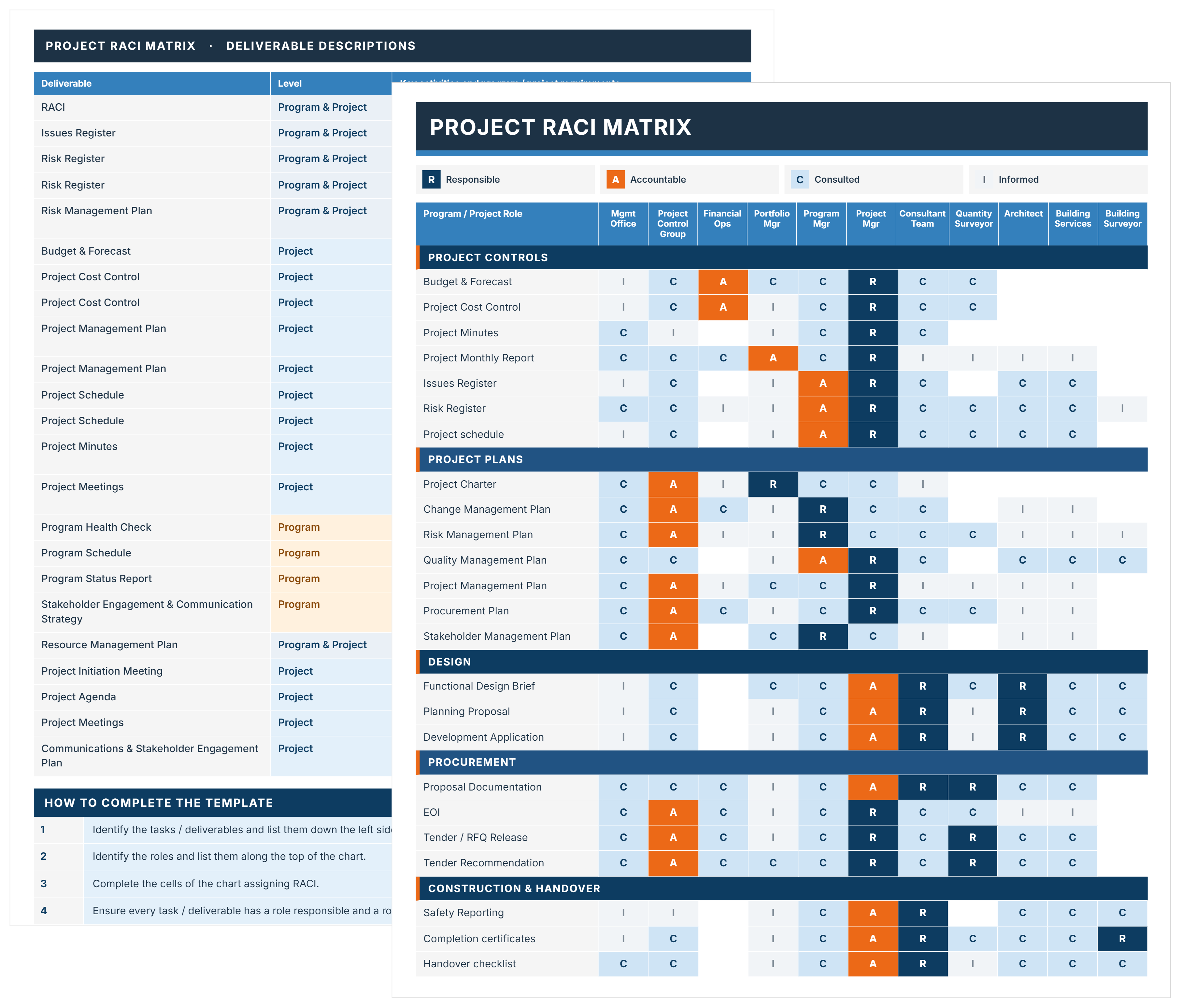
A RACI matrix template is a pre-built grid for assigning project roles. The acronym RACI stands for Responsible, Accountable, Consulted, and Informed. It is also formally known as a responsibility assignment matrix.
The grid places tasks in rows and team members in columns. It's also called a RACI chart or RACI model. Every task must have exactly one Accountable person.
RACI templates are available in Microsoft Excel, Google Sheets, Word, and PDF. Microsoft Excel is the most common choice for project teams. Google Sheets suits teams collaborating across multiple offices in real time.
Some teams use a RASCI matrix, which adds a fifth role: Supportive. RASCI adds a Supportive role. That person assists the Responsible party but doesn't own the outcome. For most projects, the four-role RACI model is sufficient.
What's Included in a RACI Chart Template?
A RACI chart should include task columns, role columns, and designation cells. Version and date fields are also included.
Core components of a RACI matrix include:
- Task/Activity Column: Lists every deliverable, decision, and approval in project sequence. It runs down the left side and forms the matrix spine.
- RACI Designation Cells: Each cell holds one of four values: R, A, C, or I. One designation per person per task row keeps every ownership boundary unambiguous.
- Project Phase Groupings: Tasks are organized by phase: design, procurement, construction, and closeout. Teams can scan roles by stage at a glance.
- Accountable Owner Field: Identifies the single named person who owns each task's final outcome. The one-A-per-row rule is the most important constraint in the entire matrix.
- Consulted Party List: Names the experts whose input is required before each decision can proceed.
- Informed Stakeholders Column: Lists those who receive status updates on each task. They have no active role in how the work gets done.
- Version and Date Fields: Records who last updated the matrix and when it changed. Every party works from the same current version at all times.
💡 Pro Tip: Add a short "Notes" column next to each task row. Flag tasks where ownership overlaps between parties. It prevents the matrix from becoming a dispute document mid-project.
Why Construction Projects Need a Responsibility Assignment Matrix
A RACI matrix helps teams clarify roles before accountability gaps cause problems. On a complex project, undefined ownership leads to delays, rework, and costly disputes.
Project management depends on knowing who owns what at every level. Here's why:
- Clarify roles before work starts: Teams stop wasting time figuring out who owns each decision, approval, or deliverable.
- Improved communication: Everyone knows who to consult vs. who just needs a status update, cutting the over-copying habit on emails.
- Single point of accountability: One named Accountable owner per task keeps approvals moving without stalling at committee level.
- Fewer change order disputes: Defined approval authority shows exactly who can sanction scope changes before cost problems arise.
- Defined project roles: New parties joining mid-project inherit clear responsibilities from the matrix, so onboarding takes minutes.
- Eliminates duplicated effort: Two parties won't review the same submittal when the matrix already shows only one is Responsible.
- Protects ownership during team changes: Replacing a contractor or consultant doesn't reset task accountability across the project.
Consider a fit-out where the AIA architect and GC both claim Accountable status. Neither checks with the other. Rework gets ordered, cost is added, and a change order dispute follows. A RACI matrix set at the project initiation stage prevents all of it.
How to Create and Use a RACI Matrix
To create a RACI matrix template, build your task list first. Then assign roles row by row. Start from your project scope or WBS so no task is missed.
Follow these steps to build and use yours:
- List all tasks and decisions: Cover every deliverable, approval, and handover point across your project lifecycle.
- Identify all parties involved: Include every team member, stakeholder, and vendor who touches the work.
- Group tasks by project phase: Organize by phase: initiation, planning, execution, and closeout. On construction projects, use design, procurement, construction, and handover.
- Assign Responsible parties: Mark who executes each task. Every row needs at least one R.
- Assign exactly one Accountable person: This is the model template rule most teams violate. One A only.
- Mark Consulted parties: Only include experts whose input is needed before action.
- Flag Informed assignments: Those who receive updates but don't influence the task.
- Validate with your full team: Review the draft with key parties. Close every gap before sharing.
- Distribute at kickoff: Share it with every team member before work begins.
- Reference it actively: Pull up the RACI in project meetings, during approvals, and whenever ownership is unclear.
💡 Pro Tip: Complete the matrix left to right. Fill in all R assignments first, then A, then C, then I. This surfaces gaps immediately. If no one fits the A column, that task needs more definition first.
Download a Custom RACI Matrix with Mastt's AI Assistant
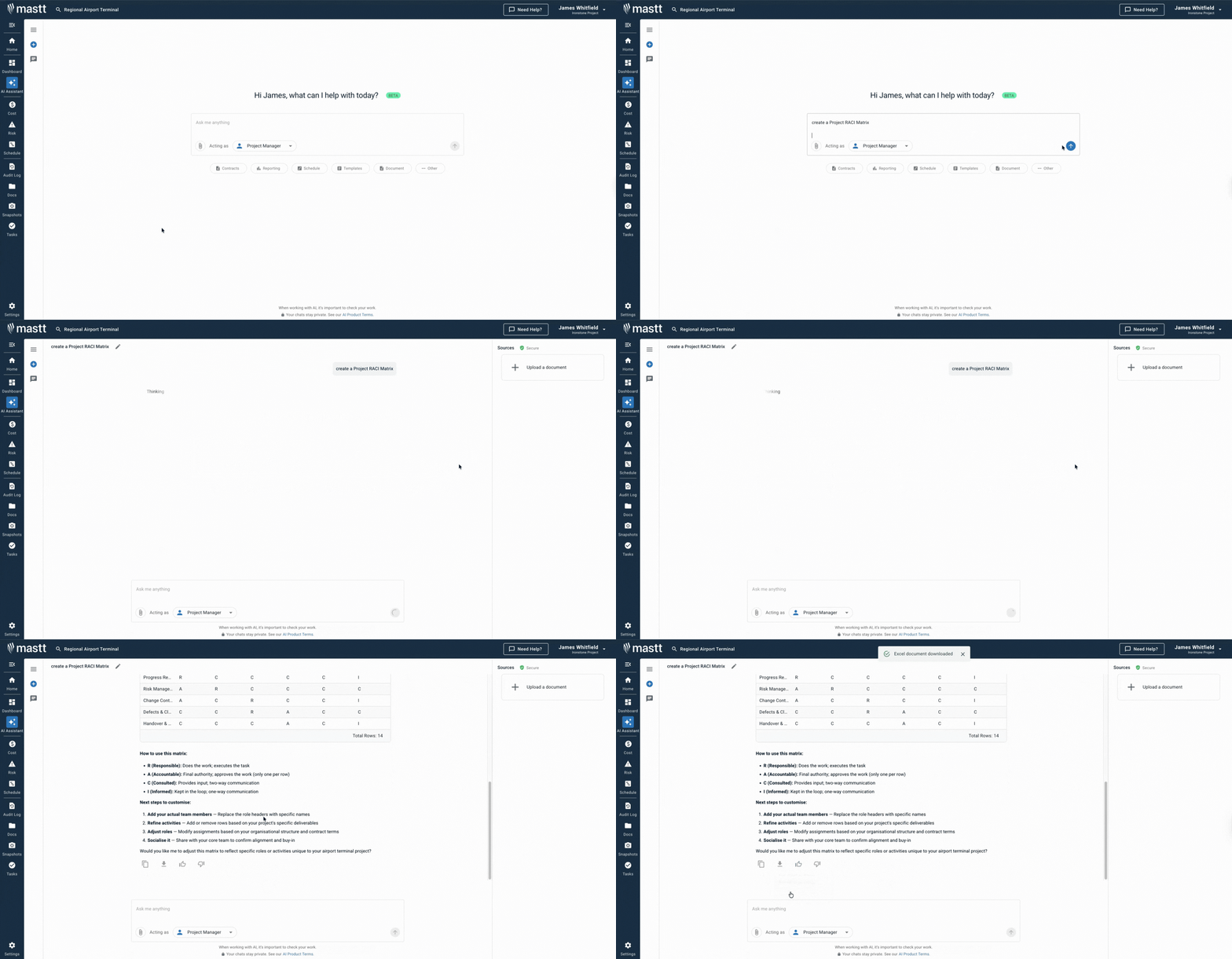
Mastt's AI Assistant removes the blank-page problem when building your RACI. Describe your project team and get a tailored assignment template in seconds.
Here's what you can do:
🚀 Build from scratch: Describe your project type and team. AI generates a complete responsibility matrix instantly.
📂 Upload existing documents: Add a PDF scope of work or contract. AI extracts tasks and maps roles automatically.
📑 Refine through conversation: Adjust phases, add roles, or remap ownership through simple back-and-forth chat.
⚡ Export ready to use: Download your completed RACI framework template in Excel or Word. Ready to share with your team.
Getting started is simple:
- Describe your project: Type "create a RACI matrix for a commercial fit-out" or "build a hospital RACI."
- Upload supporting documents: Add a PDF scope of work, contract, or project brief for tailored output.
- Refine and download: Adjust the matrix through chat, then export as an Excel or Word file.
Your conversations are private. What you type or upload is stored securely in Mastt. It's never sent to external AI models or used to train them.
👉 Visit the Mastt Help Center to get started with Mastt's AI Assistant.

Who Should Use a RACI Matrix?
A project manager is the most common RACI creator. PMI's PMBOK recognizes role definition as a core planning output. The value extends well beyond construction project teams.
The RACI framework gives every stakeholder a defined place on any project. It's widely used across:
✅ Project Managers: Build and maintain the matrix. Define approval authority for RFIs, submittals, and change orders.
✅ Owner's Representatives: Clarify which decisions the owner retains vs. delegates to the delivery team.
✅ General Contractors: Assign accountability across subcontractors to prevent task overlap on site.
✅ Construction Managers: Coordinate authority across consultants, the GC, and the owner. Prevent conflicting instructions.
✅ Project Sponsors: Understand where they're Accountable vs. simply Informed. Avoid slowing delivery decisions.
✅ Client-Side Project Managers: Draw a clear line between oversight and the contractor's delivery obligations.
✅ IT and Infrastructure Teams: Map roles across developers, vendors, and approvers on technology rollouts.
✅ Subcontractors: Confirm exact scope: which tasks they execute vs. which they're informed about.
When Your Project Needs a RACI Chart
Teams need a RACI matrix before the first task is assigned. Use a RACI diagram at the start of each phase. Don't wait until confusion sets in.
Critical moments to build or update your RACI include:
- Project initiation: Before teams mobilize, map roles across every phase of delivery. Establish clear ownership from day one.
- Multi-party procurement: When multiple consultants, contractors, or vendors are engaged at once. Role clarity prevents conflict.
- Design reviews and approvals: Clarify who reviews vs. who approves each submittal before it circulates. This matters especially on NEC and JCT contracts where approvals carry contractual weight.
- Change or scope processing: Define who initiates, who approves, and who is notified. Set this before a scope request becomes a dispute.
- Onboarding new parties: Update the matrix whenever key personnel, contractors, or vendors change.
- Tracking project progress: Reference the RACI during team meetings to verify ownership is honored.
- Handover and closeout: Assign final responsibility for inspections, commissioning, and punch list sign-off.
RACI Best Practices for Construction Project Managers
Most teams build a RACI once and file it away. The practices below are what sustained, useful RACI management actually looks like.
AGC and CMAA both recognize responsibility mapping as a core governance step. Apply these to keep your matrix working throughout the project:
☑️ Enforce the one-A rule with zero exceptions: Every task row gets exactly one Accountable person. Two names in that column means the matrix is already broken.
☑️ Align your RACI with the work breakdown structure: Every WBS deliverable should appear in the matrix. Gaps in one reveal gaps in the other.
☑️ Get signatures at the kickoff meeting: A signed matrix carries real weight when disputes arise. A verbal agreement does not.
☑️ Run a phase-gate review at each transition: Roles shift between design, procurement, and construction. Revise the matrix before moving forward.
☑️ Cap Consulted parties at two or three per task: Too many C's slow every decision. Keep consultations tight and purposeful.
☑️ Write specific task descriptions: "Design review" is too vague. "Structural drawings, Stage 2 approval" is clear and prevents ownership disputes later.
☑️ Store it where your team actually works: A RACI buried in a folder no one opens is worthless. Pin it to your project management dashboard or shared workspace.
Challenges with Free Generic RACI Templates in Excel and Word
A free RACI template from the internet rarely fits a real project. Generic chart templates serve every industry and size. They're optimized for none of them.
⚠️ Tasks are too vague: Free downloads list "Phase 1 Activities," not permit approvals or specific deliverables.
⚠️ No project roles pre-mapped: Most list "Team Member A" rather than the actual roles your project uses. A free RACI chart template wasn't built for your team structure.
⚠️ The one-A rule isn't enforced: Generic templates allow multiple Accountable entries per row. That defeats the entire purpose of the matrix.
⚠️ Excel formulas break at scale: RACI excel files built for small teams break down as projects grow.
⚠️ No phase structure included: Projects run in phases. A flat task list confuses teams about when each role applies.
⚠️ No version control built in: Most RACI model template downloads have no audit trail. No one knows who changed what or when.
⚠️ Abandoned after kickoff: Static RACI excel template downloads aren't updated as projects evolve.
💡 Pro Tip: Replace generic task rows with real scope items from your project. A matrix built on real deliverables gets used. One with placeholders gets abandoned fast.
Assign Clear Roles and Deliver Projects with Confidence in Mastt
Role confusion is one of the fastest ways to derail a construction project. Every undefined task is an ownership gap waiting to cause a problem.
Mastt's AI Assistant generates a construction-ready RACI matrix template tailored to your project. Upload your documents, describe your build, and download in Excel or Word.
👉 Try Mastt's AI Assistant today and build your first RACI matrix for free.


.avif)