


What is a Progress Claim Template?
A Progress Claim Template is a ready-to-go format used to request and track progress payments for completed work on a construction project. It includes key claim details like the contract’s line items, variations, retention amount, and sums to the total claim amount.
Standardising the progress claim’s process with a template helps save time, ensure consistency, transparency, and compliance across consecutive payment claims and projects. It also supports legal and contractual obligations, such as those under the Security of Payments Act in Australia, by clearly documenting in detail the progress payment’s schedule and the period it covers.
For teams managing complex contracts, Mastt offers a faster, digital alternative. Purpose-built for project managers and contract administrators, Mastt streamlines progress claims, automates payment certificates and retentions, and gives teams real-time visibility—without relying on spreadsheets.
How to Use This Construction Progress Claim Template in Excel
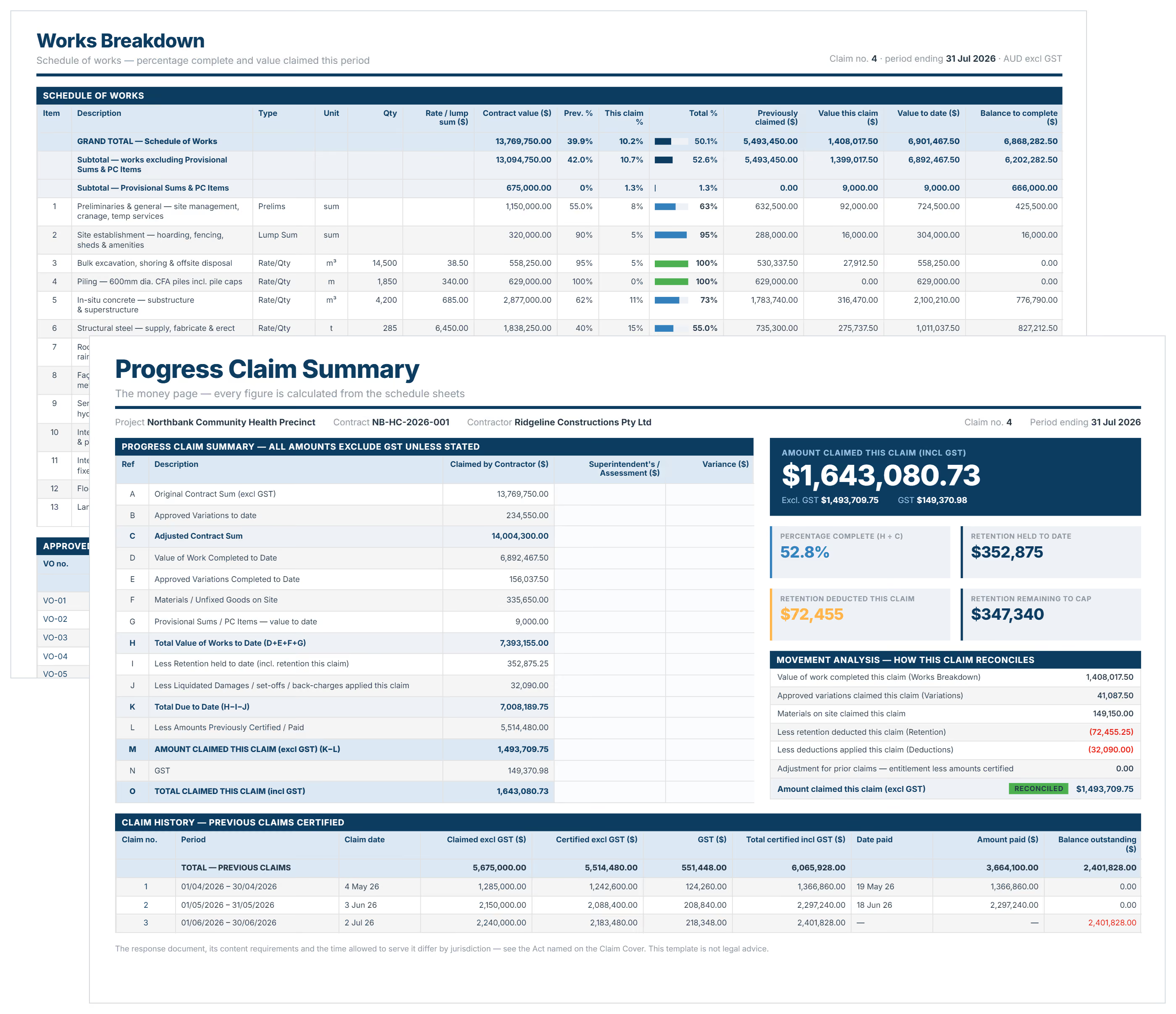
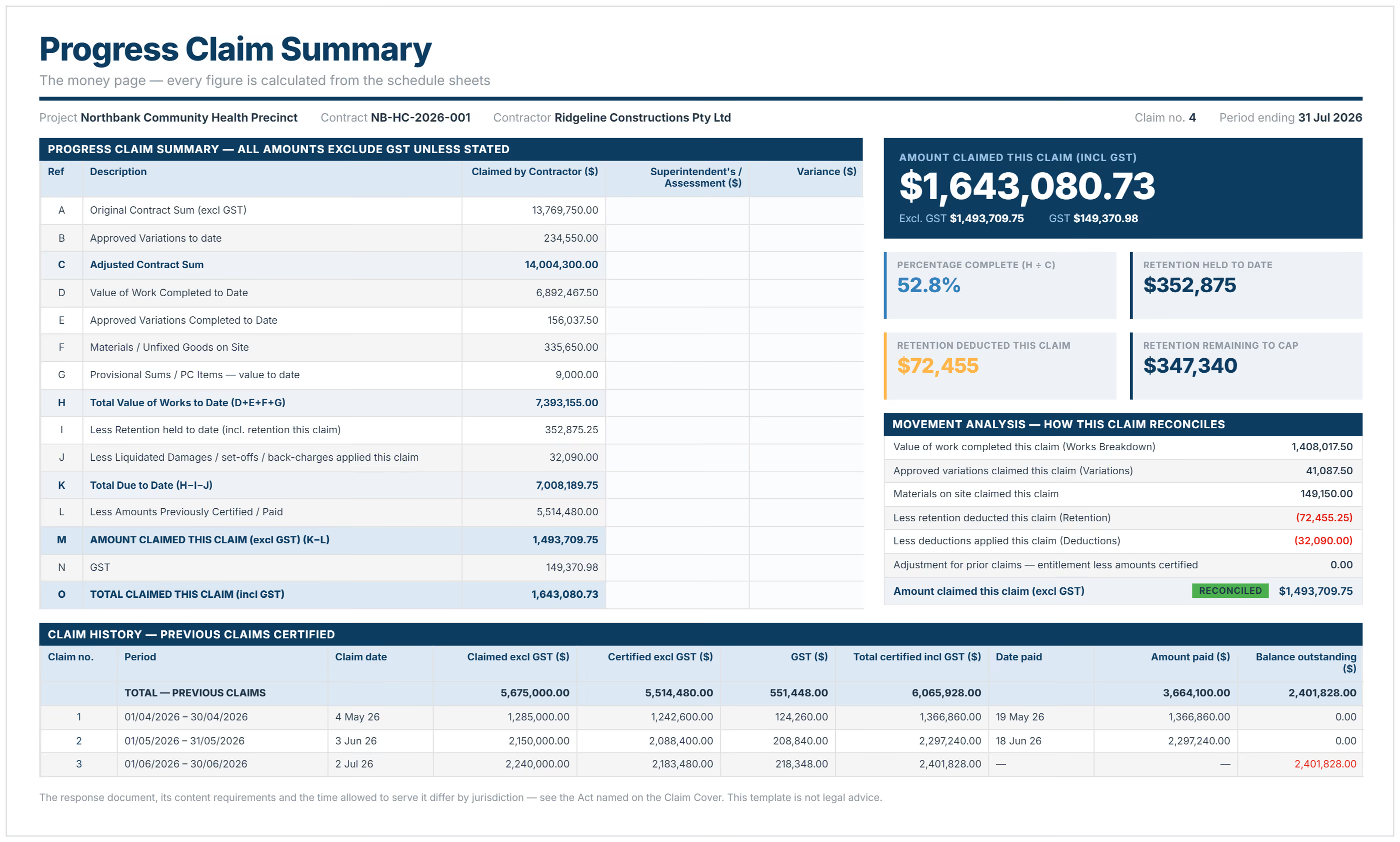
Open the workbook in Excel, fill in the shaded cells on the Claim Cover sheet, then update the percentage complete columns on Works Breakdown for the current claim period. Everything on the Claim Summary calculates from the schedule sheets, so the amount claimed, retention, and GST resolve on their own.
The workbook ships with example data and each sheet feeds the next, so delete every row flagged EXAMPLE, overwrite the sample cover details, and work through the tabs in order.
- Complete the Claim Cover: project and contract details, claim number, claim period, and the jurisdiction of the works, which sets the Security of Payment Act named in the statutory statement
- Price the work on Works Breakdown by entering Qty and Rate for re-measured items, or leaving Qty blank and putting the lump sum in the Rate / Lump Sum column
- Update Previous % Complete and This Claim % Complete against each line, the only two columns you touch each month
- Record approved variations on Variations, unfixed goods on Materials on Site, and any liquidated damages or back-charges on Deductions
- Set your retention rates and cap on Retention, then enter the retention held per the last payment certificate
- Enter every prior claim on Claim History, where the Amount Certified column drives "less amounts previously certified" on the summary
- Read the total off Claim Summary, print it with the Claim Cover, sign the declaration, and issue it to the superintendent
Only the shaded cells are inputs. The tinted columns are formulas, so typing over them breaks the reconciliation check at the bottom of the Claim Summary, which is what tells you the claim adds up.
Once a claim has been certified, add it to Claim History before you start the next one, and leave the current claim out of that sheet until it comes back certified.
Who Should Use a Progress Claim Template?
Anyone involved in managing payments on a construction project can benefit from a structured Progress Claim Template - Project Manager, Quantity Surveyor, Commercial Manager, Contract Administrator, etc...!
You should use this template if you’re a:
- Contractor or construction company submitting claims for completed work and needing clear documentation to support timely payment and reduce disputes
- Project manager overseeing progress payments and ensuring claims align with the terms of the construction contract and broader project management workflows
- Construction professionals like quantity surveyors or consultants responsible for managing claims efficiently and supporting compliance across the construction industry
- Project owner who needs visibility over submitted and approved claims to maintain transparency and forecast payments accurately across capital projects
- Finance teams relying on structured, auditable claim details that connect to budgets and support informed decision-making
Importance of a Template for Progress Claims
A consistent Progress Claim Template adds structure, clarity, and control to the claims process, especially across fast-moving or high-value construction projects. It helps projects maintain high-quality standards and stay aligned, so every payment claim follows a clear, review-ready format.
-p-500.webp)
"Most importantly, a solid progress claim template and process ensures the construction industry gets paid on-time or earlier to help with projects move forward. "
Here’s some benefits to standardising this template:
✔️ Ensures every claim includes key details in accordance with the contract—such as line items, retention, variations, and supporting documents
✔️ Improves transparency between contractors, project managers, certifiers, and finance teams
✔️ Reduces the risk of disputes and delays by clearly outlining claim amounts and what’s been approved
✔️ Helps track progress against key milestones, making it easier to manage contracts and monitor completed tasks
✔️ Supports better project management by linking claims to budgets, timelines, and reporting cycles
✔️ Simplifies progress billing by aligning payment schedules with construction progress
✔️ Provides a clear foundation for compliance with payment terms and legislation
When managed well—or better yet, through a digital platform like Mastt—this template becomes an essential tool for streamlining the claims process and improving control across your construction project. It also ensures consistency for any payment request issued under the contract.
Progress Claims Software
A typical progress claim template in Excel or Word can handle the basics. But it struggles to keep up with shifting contract terms, evolving scopes, and the pace of real-world project delivery.
That’s where purpose-built software like Mastt offers a smarter alternative. You get everything your spreadsheet does—but simpler, faster, and automated. Mastt helps teams manage progress claims, retentions, and payment certificates in one connected platform—no spreadsheets, no version chaos.
Here’s how a progress claim software compares to a traditional spreadsheets:
Prepopulating Your Progress Claim Template with Mastt AI
Manually setting up progress claims has always been a time sink. Copying contract data into spreadsheets, checking calculations, chasing missing fields—it’s error-prone and eats up valuable project time. That’s exactly what Mastt’s new AI tools are built to solve.
Mastt AI automatically extracts key financial data from your source documents—like contracts, invoices, or claim forms—and pre-fills your progress claims in seconds. No more retyping values, fixing broken formulas, or second-guessing totals.
Here’s how Mastt is transforming the setup process:
- Smart pre-fill from your documents: Upload a contract, variation, or payment request, and Mastt AI will instantly identify and input fields like contractor name, claim amount, retention, and reference dates.
- Visual confirmation: Purple highlights show which fields were populated by AI. You can click through and easily review each entry before submitting.
- Click to confirm: Once everything looks good, all it takes is one click to finalise the claim. That’s it—job done.
- Faster, error-free setup: What used to take hours of admin is now done in seconds, with structured, accurate claims ready to review and certify—no spreadsheet required.
- Built for construction workflows: Mastt AI is trained on real project documentation, so it understands what’s relevant, and where it goes. It’s purpose-built for the construction industry and the way project teams actually work.
A Glimpse of What’s Next
Progress claims are just the beginning. Mastt is working on AI tools to manage contracts, variations, and project reporting. The long-term vision? An intelligent assistant that can act on commands like “Upload this contract” or “Send this month’s payment dashboard to the client.”
Progress Claim Template in Excel or Word [Free Download]
If you're managing a smaller project, a free Progress Claim Template in Excel or Word can help you get started quickly. It’s simple, familiar, and easy to customise.
But templates have their limits. As your project scales, tracking claims, retentions, and approvals across spreadsheets becomes time-consuming—and risky.
When you're ready to move faster and stay in control, Mastt gives you a smarter way to manage progress claims with real-time tracking, one-click certificates, and automated workflows—no spreadsheets needed.
Common Problems with Free Generic Progress Claim Templates
Managing progress claims through static templates might seem like a simple solution. But it quickly becomes time-consuming, inconsistent, and risky as your project scales.
Here are the common challenges with free templates:
⚠️ Time Consuming: Setting up and maintaining progress claims templates takes hours. Manually entering claim data, calculating retention, and producing payment certificates slow down your workflow and increase the chance of human error.
⚠️ Keeping Track of Previous Claims and Variations: With no smart linking between claims, variations, and payments, it's easy to miss something. Cross-checking amounts or figuring out what’s already been paid often involves digging through multiple versions or files.
⚠️ Complex Cost Tracking: Templates don’t automatically sync claims back to contract budgets or variation approvals. That means heavy formulas, manual cross-referencing, and a risk of mismatch between what's submitted and what's approved.
⚠️ Disconnected from Actuals: Integrating financial data from ERPs or accounting reports into a static template is time-consuming. It often leads to rework when actuals change or new information comes in.
⚠️ Reporting: Transposing data into charts or visuals for clients, funders, or internal dashboards takes far too long, and the results are rarely current. Stakeholders end up with static progress report that don’t reflect live project performance.
⚠️ Compliance: Free templates don’t offer safeguards for financial reporting or legislative requirements like the Security of Payments Act.
Adopting Progress Claims Software
Spreadsheets might be familiar. But they weren’t built to handle the complexity of managing progress claims on modern construction projects.
As your portfolio grows, so do the risks—missed payments, inconsistent data, and wasted hours chasing updates. Mastt gives you a better way forward.
Mastt’s intuitive tools are purpose-built to simplify progress claim management. So you can move faster, stay compliant, and reduce admin from day one.
Here’s what you unlock with Mastt:
✅ Create payments with full control: Easily log progress claims, retentions, and payments with clear status tracking—submitted, reviewed, certified, and paid—all in one place.
✅ Manage submitted vs approved amounts: Review each claim, adjust values if needed, add comments, and issue payment decisions with complete visibility and context.
✅ Apply retentions automatically: Configure retention terms directly in the contract, including percentages and release conditions, and apply them per claim—no manual calculations required.
✅ Attach and reference documents easily: Upload supporting files like invoices, letters, and claim forms directly to each payment record, keeping everything in one place for review, collaboration, and audit.
🎯 Start for free and see how Mastt transforms your progress claims into a faster, smarter, and fully connected payment workflow.

Additional Resources for Progress Claims
To further enhance your understanding and streamline your progress claim process, here are a few valuable resources:
- Progress Claim vs Final Claim in Construction Explained
- Key Insights on Materials Off-Site Payments
- What is Retention? Guide to Managing Retentions in Construction
By exploring these quick links, you’ll gain the knowledge and tools needed to streamline your claims process, reduce errors, and ensure timely, compliant payments across your projects.
.avif)
Written by
Doug Vincent
Doug Vincent is the co-founder and CEO of Mastt, the AI capital-project management platform used by governments, Fortune 500 companies, and consultancies across APAC, North America, and MENA. Before founding Mastt in 2019, he spent a decade at RPS delivering more than $2 billion in capital works, including the $2.1B Defence Navy Infrastructure program, and holds a CPSPM certification with the AIPM. He contributes content and speaks on AI in capital project delivery at Mastt.

Use this FREE Progress Claim Template to prepare and submit clear, accurate claims for work completed. Track amounts, percentages, and approvals with ease and confidence.

Top Performers Don’t Guess. They Deliver.
Cut the stress of showing up unprepared
Start for FreeTrusted by the bold, the brave, and the brilliant to deliver the future