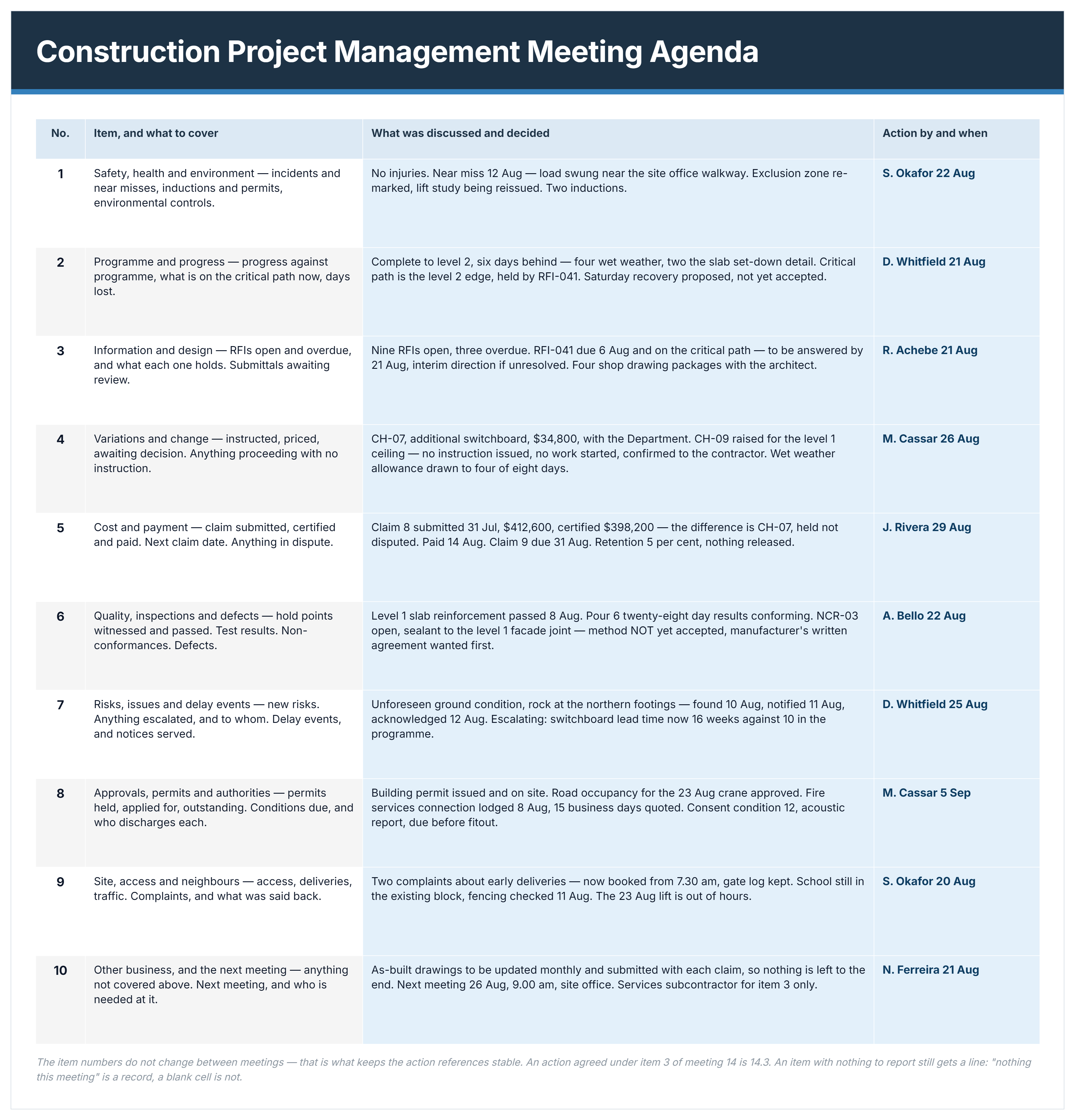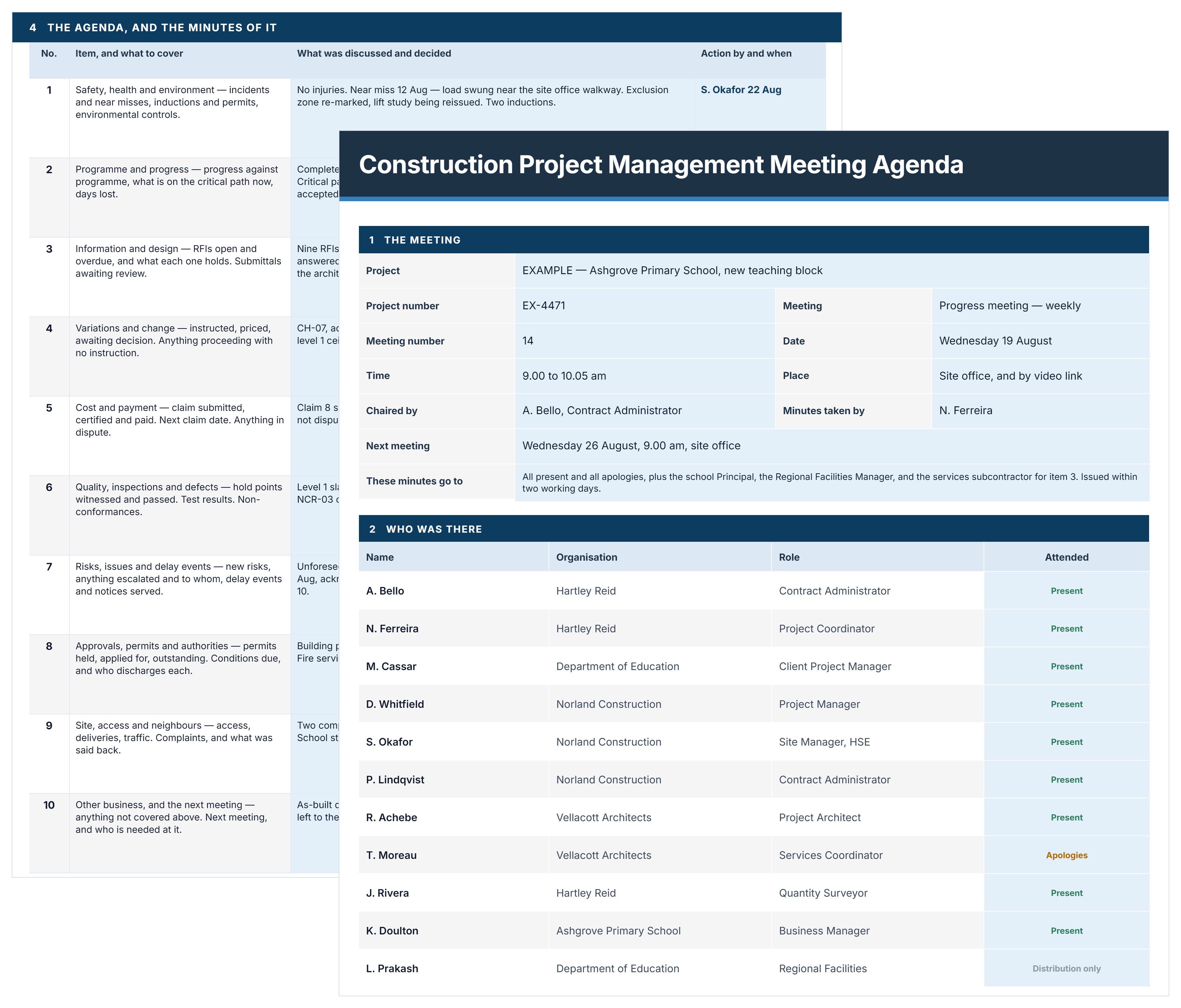
Professional project meeting agenda example showing time allocations, status updates, and milestone tracking for construction coordination
Free Template

Project Meeting Agenda Template

Use this FREE project meeting agenda template to run focused meetings and prevent wasted time. Pre-formatted sections ensure critical topics get discussed, action items get assigned, and teams stay aligned on deliverables.

Templates
Word Template
Excel Template
Powerpoint Template
Project Meeting Agenda Template
Template by
Doug Vincent
Published:
May 13, 2022

What is a Project Meeting Agenda Template?

A project meeting agenda template is a pre-formatted document outlining topics for discussion during project status meetings. It lists subjects in priority order with time allocations for each agenda item.

The meeting agenda template includes sections for project updates, issues requiring decisions, action items, and next steps. Most formats contain fields for meeting details like date, attendees, and facilitator names. Templates often come in Word, Excel, PDF, and digital collaboration formats.

Teams use agenda templates to maintain project meeting focus and prevent scope drift during discussions. The structure ensures critical topics receive attention before time runs out.

What's Included in Meeting Agenda Templates for Projects?

Structured project meeting agenda templates contain essential sections for organizing discussions and tracking decisions. The format provides consistent structure across all project status meetings.

Core components of a project meeting agenda template include:

  • Meeting identification: Project name, date, time, location, and designated facilitator who runs the discussion.
  • Attendee list: Names and roles of required participants, optional attendees, and those receiving meeting minutes.
  • Objective statement: Brief description explaining the meeting's primary purpose and expected outcomes for participants.
  • Agenda topics: Prioritized list of discussion items with allocated time blocks and responsible presenters identified.
  • Action items section: Template fields capturing tasks assigned, responsible parties, and completion deadlines from discussions.
  • Decision log: Space recording choices made during meetings, including context and approving stakeholders for documentation.
  • Issues and risks: Section highlighting problems requiring escalation, with impact assessment and proposed mitigation approaches.
  • Reference materials: Links to supporting documents like drawings, specifications, schedules, or reports participants need for informed discussion.
  • Budget and schedule status: Quick reference showing current financial and timeline performance against baseline targets.
  • Next meeting details: Follow-up scheduling information, outstanding items carried forward, and preparation requirements for attendees.
💡 Pro Tip: List agenda items as questions requiring answers rather than vague topics. "Should we accelerate the MEP rough-in schedule?" focuses discussion better than "MEP coordination update."

Why Project Managers Need Meeting Agenda Templates

A project meeting agenda template is essential for PMs to prevent wasted time by keeping discussions focused on decisions. Without structure, project management meetings drift into status updates that could happen via email instead.

Project agenda templates strengthen meeting productivity because they:

  • Eliminate scope creep in discussions: Predefined topics prevent tangential conversations that consume time without advancing project objectives.
  • Prioritize critical decisions first: Important items receive attention before time expires, preventing postponement of urgent choices.
  • Create accountability through documentation: Written agendas establish clear expectations for preparation, reducing meeting time spent gathering information.
  • Accelerate decision velocity: Structured formats force presenters to prepare, enabling faster choices during actual meeting time.
  • Reduce meeting frequency needs: Comprehensive agendas cover more topics effectively, decreasing the number of follow-up meetings required.
  • Improve remote participation quality: Distributed teams review agendas beforehand, arriving prepared despite timezone or location barriers.
  • Build institutional memory over time: Consistent formats create searchable records showing decision history and action item completion.
  • Prevent dominant voices from controlling discussions: Time allocations ensure all agenda topics receive attention regardless of participant dynamics.

Teams using structured agendas complete project meetings faster while making better decisions. The difference lies in preparation rather than discussion time.

How to Use a Project Meeting Agenda Template

Using a project meeting agenda template requires filling it out completely before each meeting and distributing it with enough time for preparation. The template guides discussions and captures decisions during the session.

Follow these steps to use your agenda template:

  1. Download or access your template: Retrieve the blank agenda format from your project management system or shared drive.
  2. Fill in meeting basics: Enter meeting date, start/end times, location (physical or virtual link), and list of required attendees.
  3. Add specific agenda items: List the exact topics for this meeting, such as "Review foundation delay impact" or "Approve electrical subcontractor substitution."
  4. Assign time slots to each item: Allocate realistic durations like 10 minutes for updates, 20 minutes for decisions requiring discussion.
  5. Identify topic owners: Note who will lead each agenda item, ensuring they know to prepare materials or data.
  6. List required pre-reads: Attach reports, drawings, or RFIs that attendees must review before the meeting starts.
  7. Distribute 48 hours in advance: Send the completed agenda to all attendees, giving them time to prepare questions and feedback.
  8. Use template during meeting: Follow the agenda order, recording decisions and action items directly in the template as discussions occur.
  9. Capture action items with owners: Document what must happen next, who owns each task, and when it's due.
  10. Distribute meeting minutes within 24 hours: Send the completed agenda showing decisions made and actions assigned while discussions remain fresh.
💡 Pro Tip: Print two copies of the agenda - one for following discussion flow, another for capturing notes. This prevents losing your place while documenting decisions.

Build Customized Project Meeting Agendas with Mastt AI

Mastt's AI Assistant eliminates the formatting work that delays meeting preparation. Instead of building agendas from scratch, you generate tailored structures matching your project type and meeting cadence.

Here's what you can do with Mastt's AI:

🚀 Create agenda templates instantly: Generate complete structures with discussion topics, time allocations, and action item sections.

📂 Upload existing meeting notes: Attach PDF files of previous minutes, and AI extracts recurring topics to build agenda frameworks.

📑 Let AI structure from documents: Upload project plans or status reports, and AI identifies topics requiring regular discussion.

Customize for meeting types: Describe whether you need daily huddles, weekly reviews, or monthly stakeholder briefings.

🎯 Export in multiple formats: Download finished agendas in Word for editing or Excel for tracking.

Getting started with Mastt AI takes three steps:

  1. Describe your meeting needs: Type requests like "create project meeting agenda" or upload existing meeting documentation.
  2. Refine through conversation: Adjust topics, add project-specific items, or modify time allocations through natural dialogue.
  3. Export and deploy: Download the customized agenda template ready for your next project meeting.

Every conversation stays private in your secure workspace. Project information remains under your control.

👉 Visit the Mastt Help Center to learn more about generating professional meeting agendas today.

Mastt's AI Assistant chat interface generating project meeting agenda templates with role-based chat and module access

Who Should Use a Construction Meeting Agenda Template

Construction meeting agenda templates serve site supervisors, trade coordinators, and project teams managing daily coordination. They're essential for anyone running project meetings where decisions affect schedule, safety, or subcontractor coordination.

Project Managers: Run weekly progress meetings covering schedule status, budget tracking, and coordination between trades.

Construction Superintendents: Lead daily huddles addressing safety briefings, work sequencing, and equipment logistics on active jobsites.

General Contractors: Facilitate coordination meetings aligning subcontractors on access, utilities, and material deliveries across overlapping work.

✅ Safety Managers: Conduct weekly safety meetings reviewing incident reports, near misses, and upcoming high-risk activities.

Client-Side Project Managers: Chair owner meetings tracking milestone progress, change order approvals, and budget status with stakeholders.

✅ Preconstruction Managers: Run kickoff meetings establishing project protocols, communication standards, and submittal requirements before mobilization.

✅ BIM Coordinators: Lead clash detection meetings resolving conflicts between architectural, structural, and MEP models before fabrication.

✅ Commercial Managers: Facilitate payment review meetings validating subcontractor applications for payment against completed work.

When to Use a Meeting Agenda Template

A meeting agenda template should be used whenever project discussions require decisions, coordination, or documented outcomes. Deploy structured agendas when meeting time costs exceed the effort of preparation.

Key moments requiring project meeting agendas include:

  • When decisions need stakeholder approval: Use agendas before presenting change orders, schedule adjustments, or budget modifications requiring formal sign-off.
  • Weekly status review cycles: Deploy agendas every Monday or Friday for regular progress updates, keeping teams synchronized on schedule and budget status.
  • Monthly steering committee meetings: Schedule agendas for executive briefings showing milestone completion, forecast updates, and upcoming risks requiring leadership intervention.
  • Daily coordination huddles: Brief site teams each morning using agendas covering safety focus, equipment conflicts, and work sequencing for that specific day.
  • After incidents or delays occur: Convene meetings immediately following safety events, weather disruptions, or design issues to document response actions and schedule impacts.
  • Before major project phases begin: Hold agenda-driven meetings 2-3 weeks prior to excavation, concrete pours, or MEP rough-in to coordinate logistics and resources.
  • When multiple trades overlap: Use agendas during periods when five or more subcontractors work simultaneously, preventing conflicts over site access and material storage.
  • At contract award or mobilization: Schedule structured meetings when new contractors join, establishing communication protocols and reviewing submittal requirements.
  • During closeout activities: Deploy agendas weekly when approaching substantial completion to track punch list progress, commissioning activities, and warranty documentation.
💡 Pro Tip: Schedule standing weekly meetings with consistent day/time slots rather than ad-hoc scheduling. Teams prepare better when meetings follow predictable patterns.

Common Problems with Generic Meeting Agenda Templates in Excel and Word

Generic meeting agenda templates downloaded in Excel or Word create coordination problems undermining meeting effectiveness. Free online formats lack customization for project-specific needs and meeting types.

Common challenges with downloadable project meeting agenda templates include:

⚠️ Vague topic descriptions: Generic sections like "project updates" allow rambling discussions instead of focused decision-making conversations.

⚠️ Missing time allocations: Templates without duration limits let discussions expand indefinitely, consuming time for critical topics.

⚠️ No action item tracking: Basic Word formats lack fields capturing who owns tasks and when completion is expected.

⚠️ Outdated recurring topics: Excel templates require manual updates when project phases change or new coordination needs emerge.

⚠️ Poor version control: Multiple copies circulate via email, creating confusion about which agenda reflects current priorities.

⚠️ Inadequate pre-work sections: Downloadable templates don't identify which topics require advance document review or data preparation.

⚠️ No decision documentation structure: Free formats omit fields recording choices made, forcing separate meeting minutes creation.

⚠️ Generic participant lists: Online templates lack project-specific roles like BIM coordinator, safety officer, or trade representatives.

💡 Pro Tip: If using Word or Excel templates, create a master copy stored in one location. Version chaos kills agenda effectiveness faster than bad formatting.

Best Practices for Construction Project Meeting Management

Effective construction project meeting management requires discipline beyond template selection. Apply these field-proven practices to transform agendas into coordination tools that accelerate delivery.

☑️ Rotate meeting facilitators among trades: Different perspectives prevent owner-centric discussions ignoring subcontractor coordination needs on site.

☑️ Start with open action items review: Accountability for previous commitments must precede new discussions, preventing task abandonment.

☑️ Park unrelated topics in "parking lot": Capture off-agenda items without allowing discussion derailment, addressing them separately afterward.

☑️ End meetings with verbal recap: Facilitator summarizes decisions and actions aloud, catching misunderstandings before participants disperse.

☑️ Limit status updates to exception reporting: Only discuss activities behind schedule or over budget, eliminating routine updates.

☑️ Require data in pre-reads, not presentations: Distribute reports 48 hours beforehand, reserving meeting time for questions not presentations.

☑️ Set standing agenda review cycles: Monthly assessment of topics covered prevents agenda drift from project priorities.

☑️ Use visual schedule displays during meetings: Physical or digital Gantt charts focus discussions on sequencing and dependencies.

☑️ Establish "no device" policy for attendees: Phones and laptops during meetings signal the agenda isn't engaging enough.

☑️ Document decisions immediately in shared systems: Real-time recording prevents memory failures and eliminates conflicting recollections.

☑️ Assign backup note-takers for critical meetings: Redundancy ensures accurate capture when primary recorders need to participate actively.

Run More Productive Project Meetings with Mastt's AI

Project meetings consume 25-35% of delivery team time. Without structure, discussions drift into status updates that could happen asynchronously. Meeting agendas transform gatherings into decision engines that advance delivery.

With Mastt's AI, you generate customized agenda structures in seconds, tailored to your meeting type and project needs. Every template arrives ready for your team, eliminating preparation delays.

👉 Create your project meeting agenda template with Mastt's AI Assistant and stop wasting time in unproductive meetings.

FAQs About Project Meeting Agenda Templates

Word works for discussion-heavy meetings where narrative captures nuance. Excel suits data-driven reviews tracking metrics and action items. Digital tools like Microsoft Teams or Slack integrate agendas with collaboration platforms for distributed teams.
Yes, adapt templates for specific industries and delivery methods. Construction projects need safety and trade coordination sections. Software projects require sprint review and backlog prioritization topics. Customize standing items while maintaining core structure.
Send agendas 48 hours before meetings for complex topics requiring preparation. Distribute 24 hours ahead for routine status reviews. Same-day distribution reduces meeting effectiveness as attendees cannot adequately prepare.
Always start with open action items review before introducing new topics. This creates accountability and prevents task abandonment. Carry incomplete items forward until closed or explicitly deferred with documented reason.
Daily huddles take 10-15 minutes covering immediate coordination. Weekly progress meetings run 60-90 minutes maximum. Monthly steering committees need 90-120 minutes for strategic discussions. Longer meetings signal agenda problems or wrong attendees.
Topic: 
Project Meeting Agenda Template

Written by

Doug Vincent

Doug Vincent is the co-founder and CEO of Mastt.com, leading the charge to revolutionize the construction industry with cutting-edge project management solutions. With over a decade of experience managing billions in construction projects, Doug has seen the transformative power of the industry in building a better future. A former program manager, he’s passionate about empowering construction professionals by replacing outdated processes with innovative, AI-driven tools. Under his leadership, Mastt serves global clients, including governments, Fortune 500 companies, and consultants, delivering solutions that save time, enhance visibility, and drive efficiency. Doug also mentors entrepreneurs and shares insights on LinkedIn and YouTube.

LinkedIn Icon
Back to top

Frequently Asked Questions

More Templates

Supercharging Construction Project Management with AI Powered Tools