

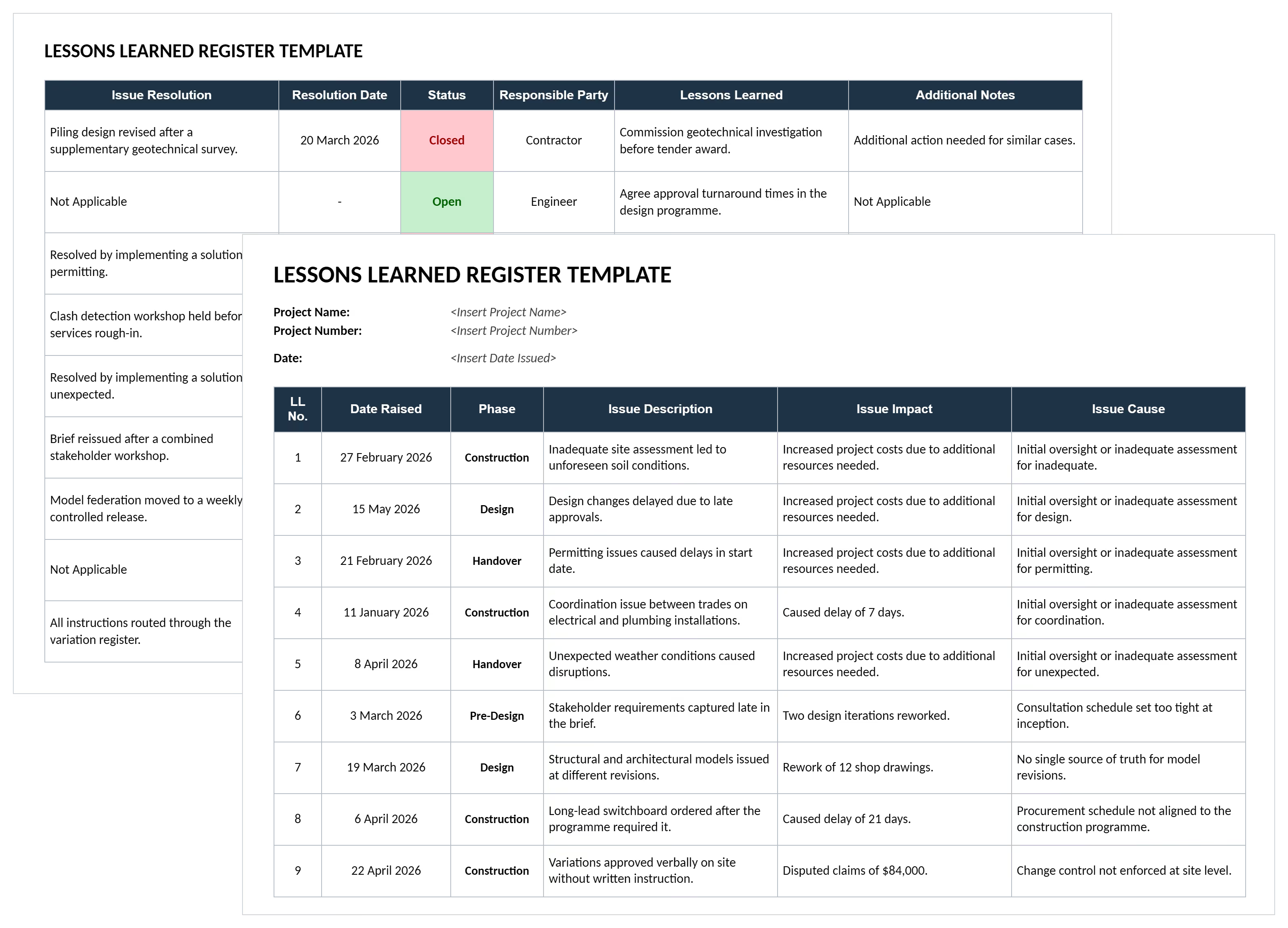

What is a Lessons Learned Template in Project Management?
A lessons learned template is a structured document for recording what a project taught you: the issue that arose, what caused it, what it cost, and what should be done differently next time. In project management it is normally kept as a lessons learned register or log, with one row per lesson, built up during delivery rather than written from memory at the end.
The point is not documentation. A lessons learned register prevents the same mistake being paid for twice. A lesson recorded as "communication could have been better" changes nothing. A lesson recorded as "confirm permit approval timelines before committing to a start date" is an instruction the next project manager can act on.
Lessons Learned Document Format: What to Include
A lessons learned document needs six things per entry: a reference, when it was raised, what happened, why it happened, what it cost, and what to do differently. That format holds whether you keep it as a spreadsheet or a document template.
Two columns do the real work. Issue cause is where most registers go soft, because "poor planning" is not a cause and cannot be prevented. Lessons learned is the only column anyone reads later, so it should be written as an instruction rather than an observation.
Lessons Learned Examples in Project Management
Here's an example of a lessons learned register completed for a construction project, showing twelve lessons from pre-design through to handover.
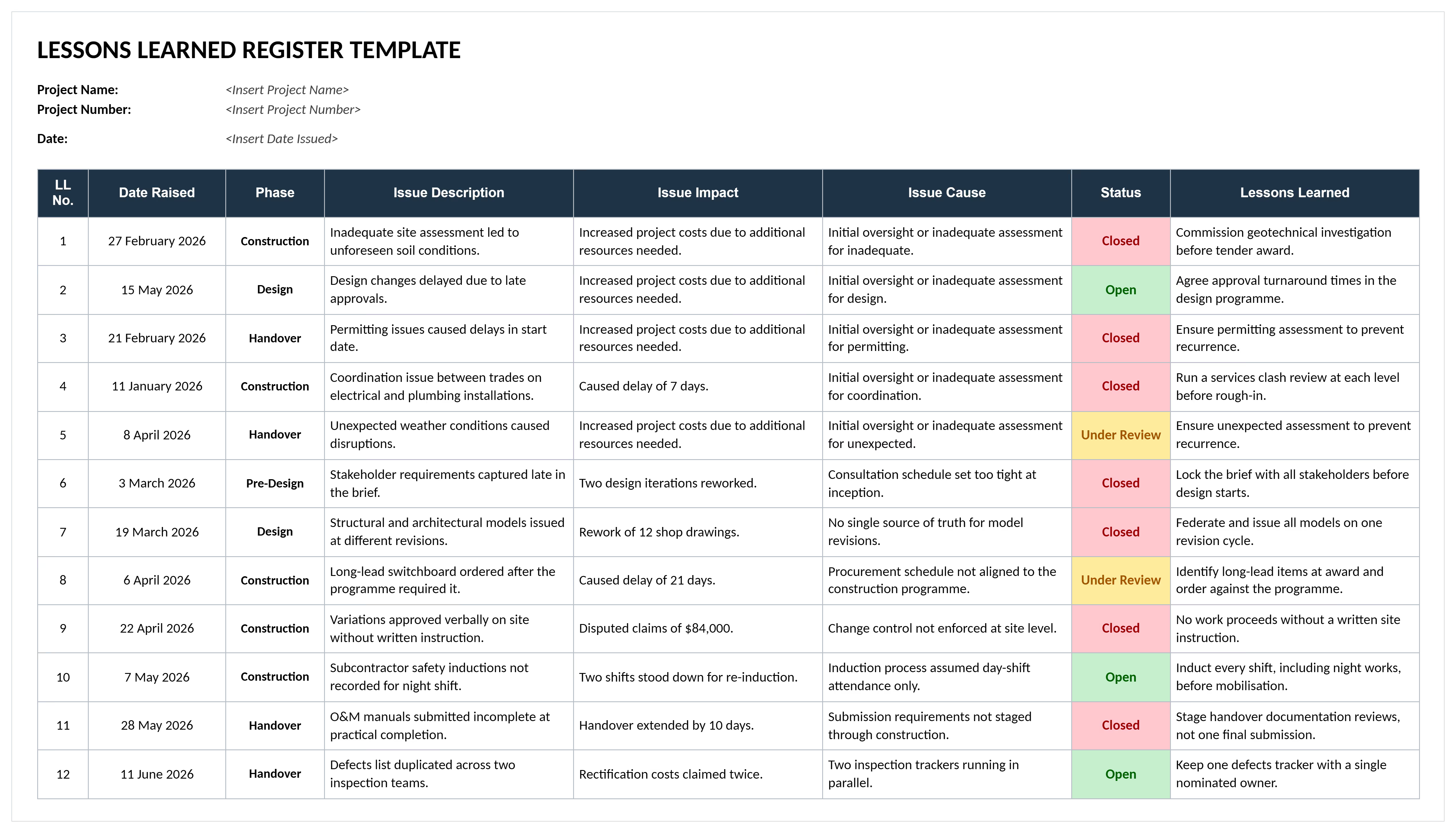
Look at the last column. Every lesson is written as an instruction, not an observation. "No work proceeds without a written site instruction" tells the next project manager what to do. "Change control was poor" would not.
The impact column carries numbers wherever they exist: 21 days lost on the switchboard, $84,000 in disputed payments, two shifts stood down. A lesson with a cost attached gets read.
Examples of lessons learned that are worth recording:
- Instead of "site conditions were unexpected", write commission a geotechnical investigation before tender award.
- Instead of "approvals took too long", write agree approval turnaround times in the design program.
- Instead of "trades clashed on site", write run a services clash review at each level before rough-in.
- Instead of "procurement was late", write identify long-lead items at award and order against the program.
The pattern is the same each time. A lesson names an action and the point in the project where it applies.
The 5 Steps of the Lessons Learned Process
The lessons learned process runs in five steps: identify, document, analyze, store and retrieve. Most organizations do the first two and stop.
- Identify: Capture the issue as it happens, from site reports, meetings, variations and risk reviews, rather than trying to recall it at closeout.
- Document: Record the issue, its cause, its impact and the resolution while the detail is still available.
- Analyze: Look for the underlying cause and the pattern across projects, since three similar issues on three jobs is a process problem rather than bad luck.
- Store: Keep lessons somewhere searchable and shared, not in a file on one project's server.
- Retrieve: Bring relevant lessons into the next project's planning, risk register and estimate.
Step five is where nearly every organization fails. A lesson nobody reads before the next project starts has cost you the effort of recording it and returned nothing. Retrieval is what turns a register into an asset, which is why lessons increasingly live in a shared knowledge base rather than a folder.
How to Use a Lessons Learned Template in Excel or Word
Add one row per lesson as issues arise, then complete the lesson column when the issue closes. The columns work the same in an Excel register or a Word document template, though a spreadsheet sorts and filters where a document does not.
- Enter the project name, project number and the date the register was issued.
- Give each entry a sequential LL number and the date the issue was raised.
- Set the phase, so lessons can be filtered by where in the project they occurred.
- Describe the issue in one specific sentence, naming what happened rather than characterizing it.
- Record the impact in concrete terms, such as days lost or cost added.
- Record the cause, pushing past the first answer to something that could actually be prevented.
- Name a responsible party, since a lesson owned by everybody is owned by nobody.
- Update the status as the issue moves through open, under review and closed.
- Write the lesson once the issue is closed, as an instruction for the next project.
Review the register at each phase gate rather than only at closeout. Lessons from design are useless to a project already in construction, but they are valuable to the project starting next month.
Lessons Learned Register vs Report vs Meeting
These three are often confused. They are different artefacts and most projects produce all three.
The register is the source. The report draws on it, and the meeting is where entries get added that no one thought to log at the time. If you are planning the session rather than the document, use the lessons learned meeting template.
Lessons Learned Best Practices
Most registers fail the same few ways. These are the practices that separate a register people use from one they fill in to satisfy a checklist.
- Record lessons during delivery, not at the end. Memory at closeout is selective, and the people who saw the issue have usually moved on.
- Write the lesson as an instruction. If it does not name an action, it is an observation and nobody can apply it.
- Push past the first cause. "Late approval" is a symptom. "We assumed a four-week authority turnaround with nothing in writing" is a cause you can prevent.
- Capture what went right. A register of only failures teaches nothing about what to repeat, and it makes people defensive about contributing.
- Name a responsible party for every entry. Both for the issue and for carrying the lesson forward.
- Feed lessons into the next project's risk register. A recurring lesson is a known risk, and the risk register is where it becomes actionable.
- Review at phase gates. Waiting until closeout means the project that generated the lesson never benefits from it.
A register full of causes like "poor communication" and "insufficient planning" is a register that will produce the same lessons again next year.
Related Articles and Templates
Explore these resources for lessons learned, project reviews, closeout, and future planning:
- Issue Register
- Construction Project Closeout Checklist
- Practical Completion Checklist
- Project Life Cycle Template
- Contract Closeout: Best Practices for Closing Out a Contract
- Project Completion: Everything You Need to Know Before It Happens!
- How to Create a Project Risk Register: Best Practices and Tips
- Project Lifecycle: Key Phases, Tasks, and Deliverables
.avif)
Written by
Doug Vincent
Doug Vincent is the co-founder and CEO of Mastt, the AI capital-project management platform used by governments, Fortune 500 companies, and consultancies across APAC, North America, and MENA. Before founding Mastt in 2019, he spent a decade at RPS delivering more than $2 billion in capital works, including the $2.1B Defence Navy Infrastructure program, and holds a CPSPM certification with the AIPM. He contributes content and speaks on AI in capital project delivery at Mastt.

FREE lessons learned template to capture insights, prevent repeated mistakes, and improve future project outcomes. Document what worked, what failed, and why across all construction phases.

Top Performers Don’t Guess. They Deliver.
Cut the stress of showing up unprepared
Start for FreeTrusted by the bold, the brave, and the brilliant to deliver the future