What is a Lessons Learned Template?
A lessons learned template is a pre-structured document that records insights gained during construction project delivery. It captures what worked well, what failed, root causes behind outcomes, and recommendations for future projects.
Construction teams use lessons learned registers to document experiences systematically across design, procurement, construction, and closeout phases. The framework transforms informal observations into actionable knowledge that improves future project outcomes.
Project managers maintain lessons learned documentation throughout the project lifecycle, not just at completion. Early capture prevents memory loss and ensures critical insights reach teams before similar decisions occur on upcoming work.
What's Included in a Project Lessons Documentation?
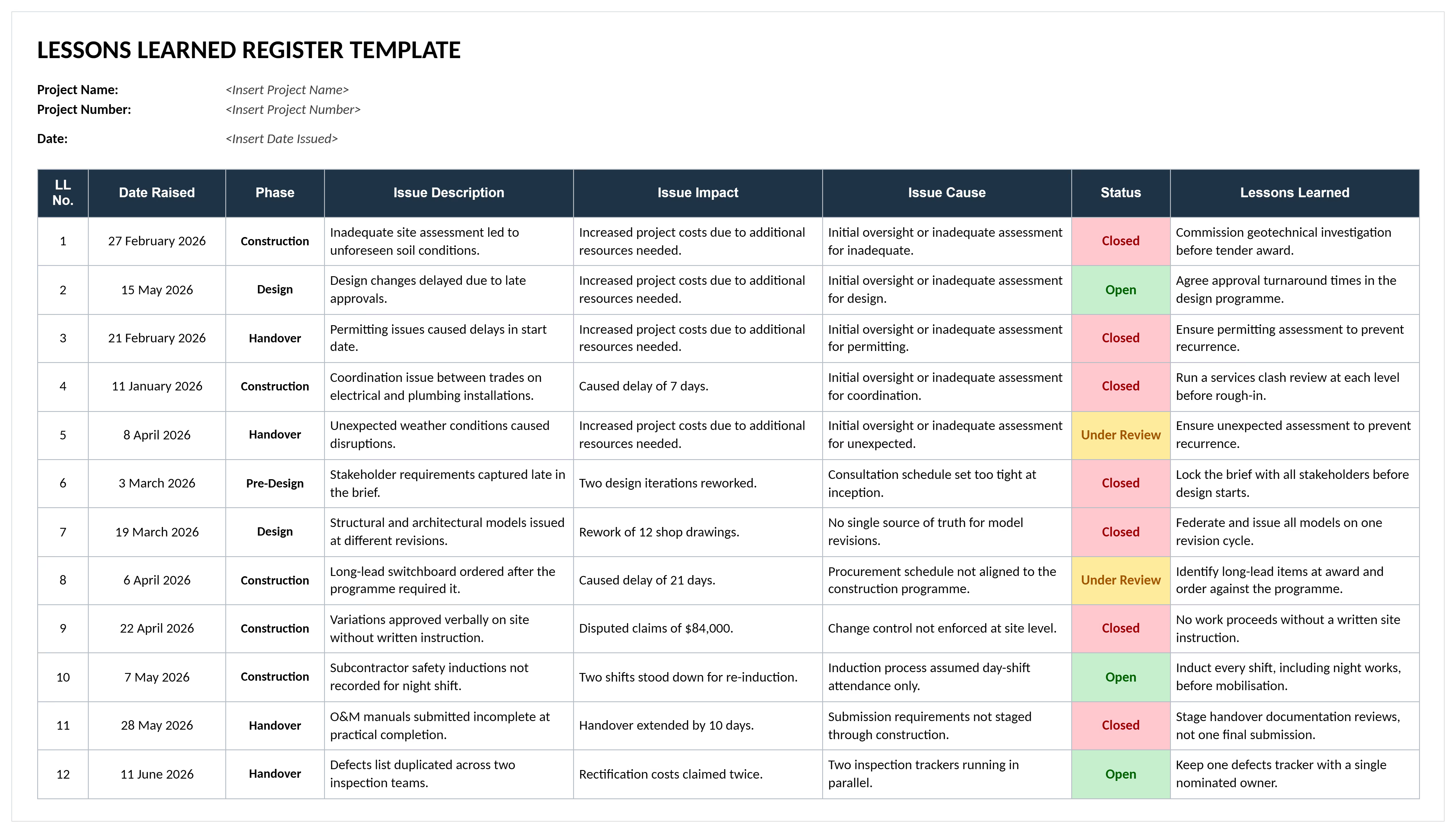
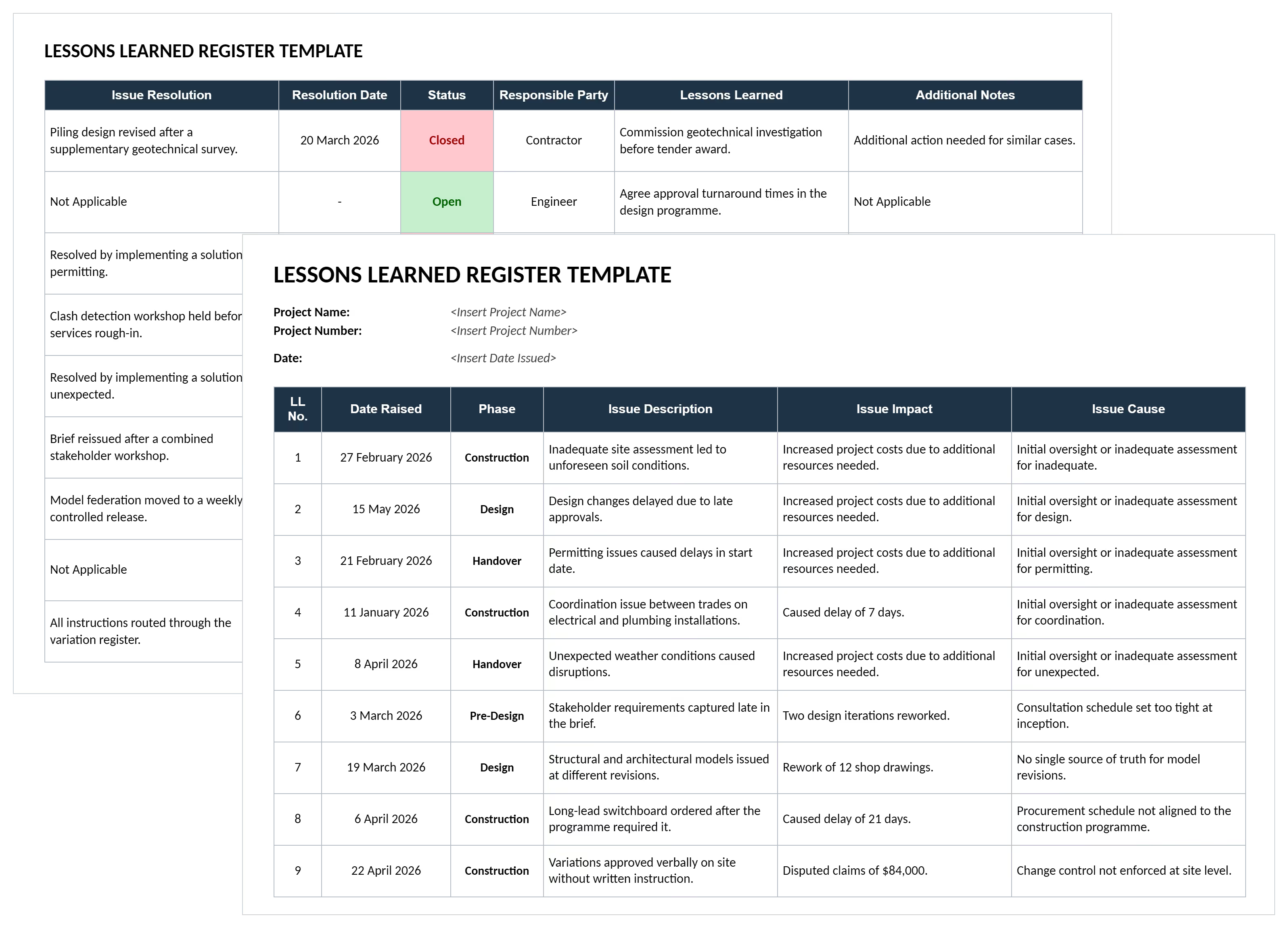
A project lessons register includes structured fields documenting experiences and translating insights into specific recommendations. Each component ensures captured knowledge becomes actionable for future teams.
Standard fields in a lessons learned template include:
- Project Identification: Project name, number, manager, phase, and date captured to link lessons to specific contexts.
- Lesson Category: Classification by knowledge area such as cost management, schedule control, quality assurance, safety, procurement, or stakeholder coordination.
- Lesson Description: Clear explanation of what happened, providing enough context for teams unfamiliar with the project to understand the situation.
- Impact Assessment: Quantified effect on budget, schedule, quality, or safety showing magnitude and whether the outcome was positive or negative.
- Root Cause Analysis: Underlying factors that caused the outcome, not just symptoms, enabling teams to address fundamental issues.
- Recommendation: Specific action to take or avoid on future projects, written as clear guidance rather than vague suggestions.
- Action Items: Follow-up tasks required to implement the lesson, including responsible parties and completion dates.
- Priority Level: Rating indicating which lessons demand immediate attention versus those providing incremental improvements.
💡 Pro Tip: Add a "Validation Status" field showing whether the lesson was tested on another project. Unvalidated lessons are theories; validated lessons are proven improvements worth spreading across your entire organization.
Why Capture Lessons on Construction Projects?
Logging lessons prevents teams from repeating expensive mistakes that destroyed profitability on previous work. Construction companies that systematically document and apply lessons complete projects faster than those relying on informal knowledge transfer.
Structured lesson capture delivers these protection mechanisms:
- Prevents repeated failures: Documentation stops teams from making identical mistakes on multiple projects when knowledge doesn't transfer between crews.
- Protects profit margins: Early identification of cost drivers from past projects enables accurate bidding and contingency planning on future work.
- Accelerates project delivery: Proven techniques from successful projects get replicated, eliminating trial-and-error delays during critical phases.
- Reduces risk exposure: Historical risk data reveals patterns that help teams anticipate and mitigate threats before they materialize.
- Improves estimating accuracy: Real project data on labor productivity, material quantities, and equipment needs produces reliable cost forecasts.
- Strengthens client relationships: Demonstrated learning from past challenges builds confidence that new projects will benefit from accumulated experience.
- Retains institutional knowledge: When experienced project managers leave, documented lessons preserve their expertise for remaining teams.
Organizations that implement lessons learned programs can expect fewer closeout problems and shorter handover periods. The difference lies in proactive knowledge management rather than reactive problem-solving.
How to Use a Project Management Lessons Learned Register
Using a lessons learned template effectively requires establishing clear capture protocols and integrating documentation into regular project workflows. Teams that wait until closeout lose critical insights that emerged during active delivery phases.
Follow these implementation steps:
- Establish capture timing: Schedule lessons learned sessions, retrospectives, or project debriefs at major milestones, not just at project completion, to document insights while context remains fresh.
- Assign clear ownership: Designate specific individuals responsible for facilitating sessions, documenting outcomes, and ensuring follow-through on action items.
- Facilitate structured discussions: Use the template to guide conversations, ensuring teams address root causes rather than just symptoms of problems encountered.
- Document with specificity: Record concrete details including dates, costs, durations, and involved parties rather than vague generalizations about what occurred.
- Validate through review: Have project sponsors and key stakeholders verify captured lessons accurately reflect project experiences before finalization.
- Create action plans: Transform recommendations into assigned tasks with completion dates, preventing lessons from becoming filed documents nobody implements.
- Share across organization: Distribute relevant lessons to estimating, operations, and project management teams before they encounter similar situations.
- Track implementation: Monitor whether future projects apply documented lessons, measuring adoption rates and resulting performance improvements.
💡 Pro Tip: Run lessons learned sessions with a neutral facilitator from outside the project team. Internal team members struggle to objectively critique their own decisions. External facilitation produces more honest, actionable insights.
Capture Complete Lessons Learned with Mastt AI
Mastt's AI Assistant eliminates the manual effort of building lessons learned documentation from scattered project information. Instead of sifting through emails, meeting notes, and progress reports to extract insights, generate structured project lessons automatically.
Here's what you can do with Mastt's AI:
🚀 Generate structured templates instantly: Create complete frameworks with all fields needed for comprehensive lesson learned documentation.
📂 Extract lessons from project documents: Upload PDFs like progress reports, meeting minutes, or closeout summaries and let AI identify key insights automatically.
📑 Customize for your methodology: Describe in chat your project type, delivery method, and specific challenges so AI tailors lesson categories to your context.
⚡ Export in any format: Download completed lessons learned documentation in Word or Excel, ready for team review and organizational distribution.
Getting started with Mastt AI takes three straightforward steps:
- Generate or upload: Either request "create a project lessons documentation for commercial construction" or upload existing project documentation for AI extraction.
- Refine through natural conversation: Adjust categories, add project-specific context, or expand on automatically extracted insights through chat.
- Export and implement: Download the finished documentation in your preferred format and begin using it immediately with your teams.
Every conversation stays private in your secure workspace. Project information remains under your control. You decide how lessons are customized and shared.
👉 Visit the Mastt Help Center to learn more about generating professional lessons learned documentation with AI.

Who Should Use a Lessons Learned Register Template?
Lessons learned templates serve construction professionals managing project delivery, organizational improvement, and knowledge retention. Structured registers ensure insights get captured, reviewed, and applied systematically across the organization.
✅ Project Managers: Lead lessons learned sessions, document team insights, and ensure recommendations get implemented on future projects.
✅ General Contractors: Capture operational lessons across multiple concurrent projects, improving estimating accuracy and execution efficiency.
✅ Project Owners and Developers: Review contractor lessons during closeout, verify that recurring issues get addressed, and incorporate insights into future project requirements.
✅ Construction Managers: Document field execution challenges, successful techniques, and coordination improvements that enhance delivery performance.
✅ Subcontractors: Record trade-specific lessons about sequencing, productivity factors, and coordination requirements for specialized work.
✅ Estimators and Cost Engineers: Analyze actual project costs against estimates, documenting variances and their causes to improve future bid accuracy.
✅ Contract Administrators: Capture lessons about contract terms, change order processes, and dispute resolution that inform future contract negotiations.
✅ Quality Managers: Document quality issues encountered, root causes identified, and control measures that prevented defects on subsequent work.
✅ Project Sponsors and Executives: Review organizational patterns across project portfolios, identifying systemic improvements needed in processes, training, or resource allocation.
When to Record Lessons During Construction?
Recording lessons throughout active project delivery captures insights when context remains fresh and details stay accurate. Teams that wait until project closeout lose valuable lessons to memory decay and staff turnover.
Deploy structured lesson learned capture at these critical moments:
- Project planning completion: Document decisions about delivery methods, contract strategies, and risk mitigation approaches while reasoning remains clear.
- Design milestone reviews: Capture coordination challenges, design errors caught early, and effective review processes before moving to construction documentation.
- Major procurement awards: Record evaluation criteria effectiveness, vendor selection factors, and contract negotiation insights following significant subcontractor commitments.
- Phase transitions: Document handoff processes, information gaps discovered, and coordination improvements needed when moving between project stages.
- Schedule recovery efforts: Capture what accelerated delivery, what wasted effort, and cost impacts of various recovery strategies attempted.
- Quality or safety incidents: Immediately document root causes, contributing factors, and preventive measures before investigation details fade from memory.
- Substantial completion: Record punch list patterns, final testing challenges, owner acceptance issues, and as-built drawing or O&M manual submission problems while closeout activities remain active.
- Project closeout: Conduct comprehensive review covering all phases, synthesizing earlier lessons with final project outcomes and financial reconciliation required under AIA or other contract standards.
💡 Pro Tip: Schedule lessons learned discussions immediately after project crises get resolved, not weeks later. The adrenaline fades and people rationalize what happened. You lose the raw truth about what went wrong and why.
Common Problems with Lessons Learned Templates in Excel and Word
Generic lessons learned templates in Excel spreadsheets and Word documents creates knowledge management failures that prevent organizational learning. Static formats lack the structure and accessibility needed for systematic improvement across project portfolios.
Typical challenges when using generic lessons learned report templates found online include:
⚠️ Inconsistent documentation: Different project managers use varying formats in Excel, making it impossible to aggregate lessons or identify patterns across multiple projects.
⚠️ Lost institutional knowledge: Word documents stored on individual computers disappear when staff leave, losing captured expertise accumulated over years of project delivery.
⚠️ No implementation tracking: Spreadsheets can't show whether future projects actually applied documented lessons, leaving teams uncertain if recommendations produced improvements.
⚠️ Difficult pattern identification: Manually reviewing hundreds of Excel rows across multiple project files prevents recognition of recurring issues demanding systemic solutions.
⚠️ Limited accessibility: Static Word documents filed in network folders become invisible to new project teams who don't know relevant lessons exist.
⚠️ Vague recommendations: Free-form text fields in basic templates allow generic advice like "improve communication" rather than forcing specific, actionable guidance.
⚠️ Version control failures: Multiple Excel copies circulate via email, creating confusion about which version contains current organizational knowledge.
⚠️ Shallow analysis: Simple spreadsheet layouts don't prompt root cause investigation, resulting in symptom documentation rather than underlying problem identification.
⚠️ No validation mechanism: Templates lack fields showing whether lessons were tested and proven effective versus remaining untested theories.
Even well-intentioned Excel documentation requires continuous manual effort. Maintaining, categorizing, and distributing across growing portfolios demands significant resources.
Best Practices for Capturing Project Lessons
Effective lesson capture requires systematic processes that transform reactive documentation into proactive organizational learning. PMI's PMBOK Guide identifies post-project reviews as essential knowledge management activities.
☑️ Start from project inception: Establish lesson capture protocols during kickoff, not closeout, so teams know documentation expectations from day one.
☑️ Use neutral facilitation: Bring in facilitators from outside the project team to run sessions, enabling honest discussion without defensive posturing.
☑️ Focus on root causes: Require teams to identify underlying factors, not just symptoms, using techniques like five-whys analysis during facilitation sessions.
☑️ Quantify impact when possible: Document specific dollar amounts, schedule days, or incident counts rather than vague descriptions of "significant" or "major" effects.
☑️ Write actionable recommendations: Transform insights into specific guidance that future teams can implement, avoiding generic advice about "better" practices.
☑️ Validate through application: Test documented lessons on subsequent projects, updating records to show which recommendations proved effective in practice.
☑️ Create centralized repositories: Store all project lessons in searchable document control systems or construction platforms like Autodesk Construction Cloud or InEight where any team member can access relevant insights.
☑️ Integrate into planning: Require new project teams to review applicable lessons during planning phases, demonstrating how past insights informed current decisions.
☑️ Track implementation rates: Monitor whether projects apply relevant lessons, measuring adoption percentages and investigating why recommendations get ignored.
Transform Lessons Learned into Project Improvements with Mastt
Every construction project generates valuable insights that could improve future delivery. The difference between successful organizations and struggling ones lies in systematic lesson capture that transforms experience into institutional knowledge.
With Mastt AI, you don't need to spend hours extracting insights from scattered documents or formatting lessons learned registers. Describe your project context or upload existing documentation, and AI generates comprehensive lessons ready for organizational implementation.
👉 Create your lessons learned template with Mastt AI today and turn project experience into lasting competitive advantage.


.avif)