

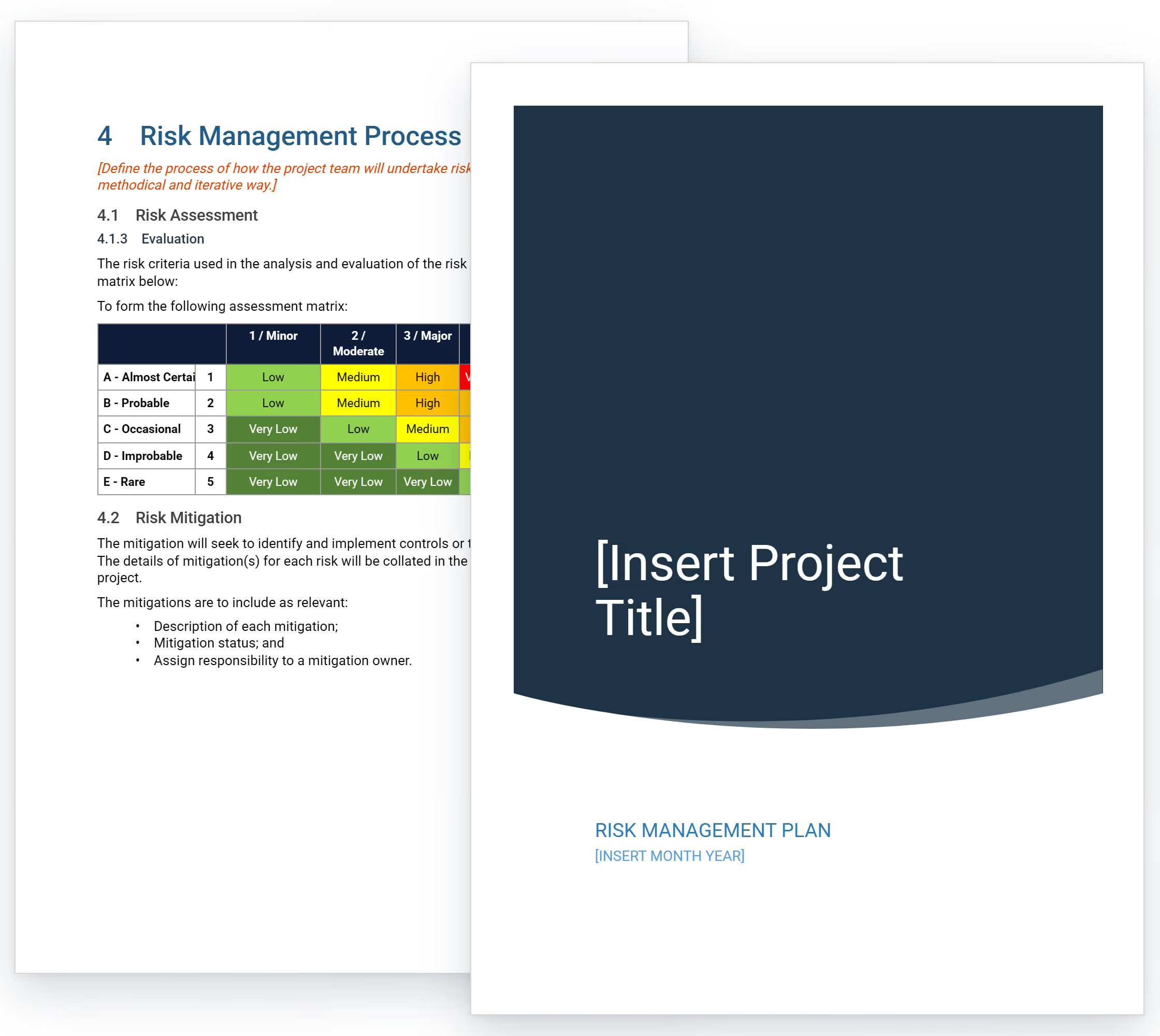

What is a Risk Management Plan Template?
A risk management plan template is a pre-formatted document that guides teams through systematic threat identification and response planning. It provides ready-made sections for documenting risks, rating likelihood and impact, and establishing mitigation actions.
Project teams use the template to structure how project risks get documented from discovery through resolution. It captures technical dependencies, resource constraints, vendor uncertainties, and operational challenges throughout the project lifecycle.
Risk management plan templates come in Excel, Word, and PDF formats for different use cases. Excel works well for probability-impact matrices and quantitative analysis, while Word suits narrative descriptions aligned with ISO 31000:2018 principles.
What's Included in Risk Management Plan Templates?
Risk management templates contain essential fields for documenting and controlling project risks. The framework captures threat identification, probability assessment, response strategies, and monitoring procedures. It aligns with ISO 31000:2018 international risk management standards.
Core components of a risk management plan template typically include:
- Risk Register: Complete inventory with unique IDs, descriptions, categories, likelihood ratings, impact scores, and current status tracking.
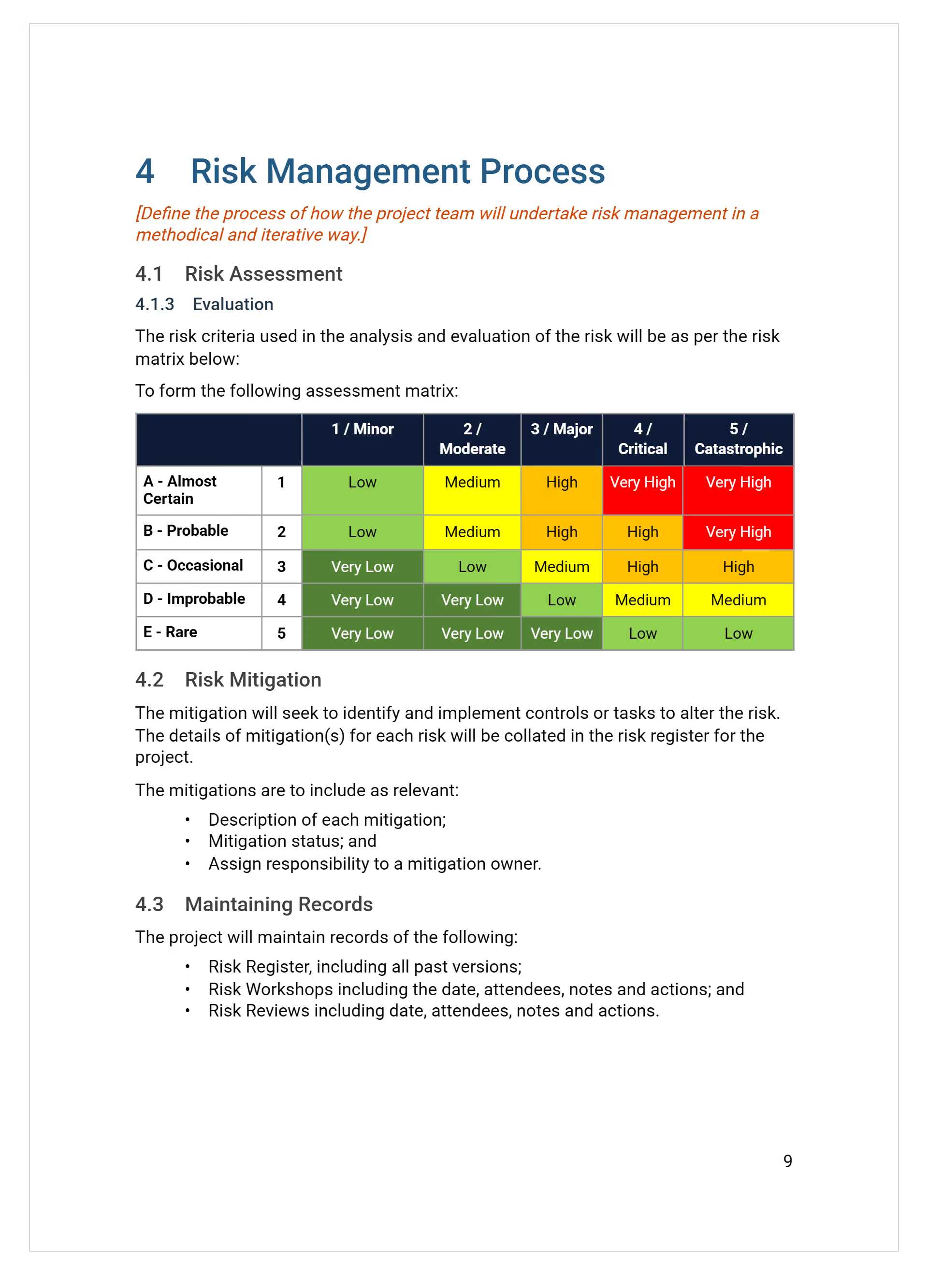
- Assessment Matrix: Probability-impact matrix (typically 5×5 risk matrix) plotting each risk by likelihood and severity to prioritize mitigation efforts and resource allocation decisions.
- Response Strategies: Documented approaches including avoidance, mitigation, transfer, and acceptance with specific actions for each identified threat.
- Ownership Assignment: Designated individuals accountable for monitoring risks, implementing responses, and reporting status changes to leadership.
- Contingency Allocation: Budget reserves and schedule buffers based on risk appetite, established for addressing unforeseen ground conditions, design changes, and procurement delays.
- Risk Categories: Organization framework grouping threats into safety hazards, cost overruns, schedule delays, quality issues, and compliance violations.
- Monitoring Procedures: Scheduled review meetings, reporting formats, escalation triggers, and update protocols throughout the initiative.
- Communication Protocols: Methods for sharing risk information with stakeholders, including report frequency and escalation pathways.
💡 Pro Tip: Include a "residual risk" column in your register. After documenting mitigation actions, show what risk remains. This proves to stakeholders that you've actually thought through response effectiveness, not just listed generic controls.
Why Projects Need Risk Management Strategy Templates
Projects need systematic risk planning because proactive threat identification prevents the budget overruns and delays that destroy profitability. Whether managing IT implementations, product launches, or infrastructure projects, documented risk strategy is essential.
Risk management strategy templates strengthen delivery through:
- Prevents Financial Surprises: Early identification enables accurate contingency planning and protects profit margins throughout delivery.
- Reduces Schedule Delays: Anticipating procurement lead times, design coordination issues, and weather impacts allows teams to build realistic schedules with appropriate float.
- Improves Decision Quality: Structured assessment provides objective data supporting procurement strategies, contract terms, and execution approaches.
- Strengthens Stakeholder Confidence: Documented risk management following PMI PMBOK Chapter 11 guidelines demonstrates professional capability and maintains trust.
- Enables Smart Resource Allocation: Understanding where risks concentrate helps teams assign management attention, inspection resources, and technical expertise strategically.
- Facilitates Better Contract Negotiation: Clear risk allocation in planning supports fair terms and reduces disputes over unforeseen conditions.
- Supports Funding and Bonding Requirements: Lenders, insurers, and surety companies require credible assessment before committing capital or providing bonds.
Projects with risk management plan demonstrates due diligence that secures funding and stakeholder support. In facts, teams with documented plans complete projects faster than those managing reactively, with anticipation preventing problems that reaction can't solve.
How to Create and Use a Project Risk Management Plan Template
Creating a risk management plan starts with selecting the right format for your team's workflow and project type. Customize the template to match your organization's risk tolerance, reporting requirements, and decision-making processes.
Follow these steps to build and use an effective risk management plan template:
- Choose your base format: Select Excel for calculation-heavy risk matrices, Word or Google Doc for narrative-focused plans, or PDF for distribution-only versions.
- Define template sections: Include risk identification fields, probability ratings, impact assessments, mitigation strategies, ownership assignments, and status tracking.
- Customize rating scales: Establish probability levels (rare to almost certain) and impact categories (negligible to catastrophic) matching your context.
- Add project-specific fields: Include sections for regulatory requirements, stakeholder concerns, budget thresholds, or technical constraints relevant to your work.
- Create instructions and examples: Add guidance within the template showing how to complete each section with sample entries.
- Populate with initial data: Fill header sections with project name, dates, team members, and objectives before distributing.
- Distribute to stakeholders: Share the template with all team members who will identify, assess, or respond to risks.
- Schedule regular updates: Establish review cycles (weekly or monthly) when the template gets refreshed with new threats and status changes.
💡 Pro Tip: Create a master template with dropdown menus for probability and impact ratings. This forces consistency across team members and eliminates scoring disputes that slow down risk reviews.
Who Should Use Project Risk Management Plans?
Risk management plans should be used by anyone responsible for project delivery, budget protection, or stakeholder accountability. They're essential for teams managing complex initiatives across IT, product development, infrastructure, and organizational change.
✅ Project Owners and Sponsors: Protect capital investments by understanding all threats to budget, schedule, and quality before committing resources.
✅ Project Managers and Team Leads: Oversee comprehensive risk management across all phases, coordinate mitigation strategies, and maintain stakeholder confidence throughout delivery.
✅ Program Managers and PMO Directors: Lead identification workshops, facilitate assessment sessions, and monitor risk registers across project portfolios for enterprise clients.
✅ Business Analysts and Product Managers: Quantify strategic risks, assess market threats, and support accurate forecasting during planning cycles.
✅ IT Managers and Technical Leads: Document system risks, manage integration challenges, and maintain records supporting technical decision-making.
✅ Operations Managers: Identify process risks, develop contingency plans, and coordinate response strategies across functional teams.
✅ Risk Managers and Consultants: Establish risk frameworks, train project teams on assessment methods, and audit risk management practices across organizations.
💡 Pro Tip: Assign one person as chief risk officer for the project. Distributed accountability sounds collaborative, but risks fall through cracks without clear ownership and reporting lines.
When to Develop Risk Management Plans for Projects
Risk management plans should be developed during initial planning before detailed design or commitments are finalized. Early threat identification enables teams to build risk mitigation strategy when responses are least expensive to implement.
Critical moments to deploy risk planning include:
- Feasibility and Project Planning Phase: Identify strategic risks, regulatory constraints, financing challenges, and market conditions before committing resources.
- Design and Development: Document technical risks, integration issues, vendor dependencies, and requirements uncertainties during solution design.
- Procurement and Vendor Selection: Assess supplier risks, capacity constraints, cost volatility, and delivery reliability before finalizing commitments.
- Contract Negotiation: Allocate risks fairly between parties, establish appropriate contingencies, and document transfer mechanisms in agreements.
- Throughout Active Execution: Update registers weekly, monitor emerging threats, track mitigation effectiveness, and escalate issues requiring leadership decisions.
- Project Closeout: Document lessons learned, capture risk outcomes, and analyze prediction accuracy to improve future planning.
💡 Pro Tip: Schedule monthly risk review meetings separate from regular project meetings. Dedicated sessions prevent urgent operational issues from consuming time needed for proactive risk management.
Challenges with Free Risk Management Templates in Excel and Word
Generic risk management plan templates in Excel or Word formats provide basic frameworks but quickly become limiting. A free downloadable template might save initial setup time, but manual formats create ongoing challenges throughout delivery.
Common issues include:
⚠️ Incomplete risk identification: Free templates contain generic risk lists missing project-specific threats. Environmental constraints, jurisdictional requirements, and delivery complexities get overlooked.
⚠️ Version control failures: Plans in Word circulated via email result in multiple conflicting documents with inconsistent updates.
⚠️ Limited stakeholder visibility: Static PDF documents prevent real-time monitoring. Owners and executives struggle to track mitigation effectiveness.
⚠️ No automated updates: Manual plans require tedious reformatting and data entry. Every risk status change or new threat demands manual work.
⚠️ Inconsistent assessment criteria: Generic Excel templates rarely include project-specific probability scales, impact definitions, or risk thresholds aligned with tolerance.
⚠️ Poor integration: Standalone documents in Word or downloadable formats don't connect to schedules, budgets, or change management systems.
⚠️ Difficult quantitative analysis: Calculating risk exposure and contingency requirements from spreadsheet data is time-consuming and error-prone. Monte Carlo simulation capabilities are absent.
⚠️ Lost institutional knowledge: When projects close, plans stored as Word documents on individual computers disappear. They fail to inform future initiatives.
💡 Pro Tip: If you're using Excel or Word templates, establish clear naming conventions and centralized storage from day one. Add version numbers and update dates to filenames to maintain basic version control.
Best Practices for Using Risk Management Plans
Effective risk management process requires disciplined execution following proven practices that prevent common failures. Experienced teams apply these principles systematically across risk identification workshops, assessment cycles, and mitigation tracking.
Here are essential practices protecting project success:
☑️ Conduct risk workshops early: Gather cross-functional teams during planning. Brainstorm threats before commitments lock in approaches and costs.
☑️ Update risk registers weekly: Review active risks during team meetings, adding newly discovered threats and closing resolved items systematically.
☑️ Quantify probability and impact consistently: Use standardized scoring criteria across all risks, enabling accurate prioritization and meaningful comparisons.
☑️ Assign single risk owners: Designate one accountable individual per risk rather than shared responsibility. This ensures clear accountability for monitoring and response.
☑️ Test mitigation strategies before relying on them: Validate that planned responses actually work. Run simulations or pilot tests before risks materialize.
☑️ Escalate threshold breaches immediately: Define clear triggers for executive notification and implement automatic alerts when risks cross severity thresholds.
☑️ Document assumptions behind assessments: Record the reasoning behind probability and impact ratings, enabling better review when circumstances change.
☑️ Link risks to project controls: Connect risk register entries to schedule activities and budget line items. Include contract terms where relevant.
☑️ Capture lessons learned systematically: Document which risks materialized, whether responses worked, and how assessment accuracy improved throughout delivery.
💡 Pro Tip: Structure your risk identification workshops with a proven agenda that keeps sessions productive. Use a risk workshop agenda to ensuring you cover all threat categories without wasting time on tangents that dilute focus.
Protect Projects and Prevent Costly Failures with Mastt
Every project faces threats to budget, schedule, and quality that can derail delivery without systematic management. The difference between success and costly failure comes down to transforming uncertainty into manageable challenge through documented risk planning.
With Mastt AI, you don't need to build frameworks from scratch or struggle with generic templates. Describe your initiative, and AI generates comprehensive plans tailored to your delivery method, scope, and complexity.
👉 Try Mastt AI today and create a risk management plan template that protects your project from day one.

Written by
Jackson Row
Jackson Row is the Growth & North American Market Lead at Mastt. With a background in risk modeling, cost forecasting, and integrated project delivery, he helps capital project owners work smarter and faster. Jackson’s work supports better tools, better data, and better outcomes across the construction industry.

Use this FREE risk management plan template to identify threats before they escalate. Systematic risk documentation prevents costly surprises while demonstrating required due diligence.

Top Performers Don’t Guess. They Deliver.
Cut the stress of showing up unprepared
Start for FreeTrusted by the bold, the brave, and the brilliant to deliver the future