Workflows

Set up a process once, and let Agent run it every time

Describe your workflow in plain language, then let your Agent run the process the same way, every time — on demand, on a trigger or on a schedule.

Screenshot of the Mastt AI Contract Assistant interface showing a natural language chat explaining the payment process under a consultancy contract. The AI displays a step-by-step payment process

Agentic AI for Construction Professionals

A logo with black text that says "Australian Department of Defence"
Jacobs company logo with stylized 'JACOBS' text in bold black letters on white background.
The Projects Group logo with blue and orange squares beside the text.
The word Tango in bold orange letters with a stylized lowercase g.
A logo of RPS.
Wellington Water logo with stylized W and water droplet in blue and teal colors.
Logo with a blue cross and heart symbol next to text St Vincent's Health Australia.
Superyacht Project Management logo with a circular symbol above the text.
Summertown Interiors logo with a stylized white tree on a red square and text on gray background.
SOILCO logo with stylized dark and green shapes forming an S above bold text
Black and white diagram of a traditional crossbow with labeled parts and descriptions.
Octopus Energy Generation logo with octopus and energy words in dark and green text.
Waterfall with wide streams flowing down rocky cliffs surrounded by green hills and trees.
Exagen company logo with purple letters and a teal accent on the letter X.
The Australian Army emblem with crown and sunburst above the word Army in red text.
Super Retail Group text logo with three slanted bars in orange, blue, and red on the right.
HOLT Group logo with stylized vertical bars and bold letters.
Newcastle Airport logo with colorful star-shaped graphic and text.
Text logo with PAULSON above PUERTO RICO, separated by horizontal lines.
Cheo in bold rounded purple letters on a transparent background.
Retire Australia company logo with blue diamond icon next to gray text.
Logo with maroon double arrow curving right above lowercase 'cfb' and text Carrollton-Farmers Branch ISD.
COHA Group logo with stylized 'A' and horizontal line beneath.
Airport Retail Group
A logo with black text that says "Australian Department of Defence"
Jacobs company logo with stylized 'JACOBS' text in bold black letters on white background.
The Projects Group logo with blue and orange squares beside the text.
The word Tango in bold orange letters with a stylized lowercase g.
A logo of RPS.
Wellington Water logo with stylized W and water droplet in blue and teal colors.
Logo with a blue cross and heart symbol next to text St Vincent's Health Australia.
Superyacht Project Management logo with a circular symbol above the text.
Summertown Interiors logo with a stylized white tree on a red square and text on gray background.
SOILCO logo with stylized dark and green shapes forming an S above bold text
Black and white diagram of a traditional crossbow with labeled parts and descriptions.
Octopus Energy Generation logo with octopus and energy words in dark and green text.
Waterfall with wide streams flowing down rocky cliffs surrounded by green hills and trees.
Exagen company logo with purple letters and a teal accent on the letter X.
The Australian Army emblem with crown and sunburst above the word Army in red text.
Super Retail Group text logo with three slanted bars in orange, blue, and red on the right.
HOLT Group logo with stylized vertical bars and bold letters.
Newcastle Airport logo with colorful star-shaped graphic and text.
Text logo with PAULSON above PUERTO RICO, separated by horizontal lines.
Cheo in bold rounded purple letters on a transparent background.
Retire Australia company logo with blue diamond icon next to gray text.
Logo with maroon double arrow curving right above lowercase 'cfb' and text Carrollton-Farmers Branch ISD.
COHA Group logo with stylized 'A' and horizontal line beneath.
Airport Retail Group

Agent + Workflow = a teammate who never needs telling twice

The jobs you do the same way every time shouldn't need fresh instructions on each occasion. Show your Agent the routine once — the way you would a new teammate — and it runs the whole thing from then on, every time.

Just describe your routine in plain language

Tell your Agent how the job gets done, the way you'd explain it to anyone — no setup, no building, no technical know-how.

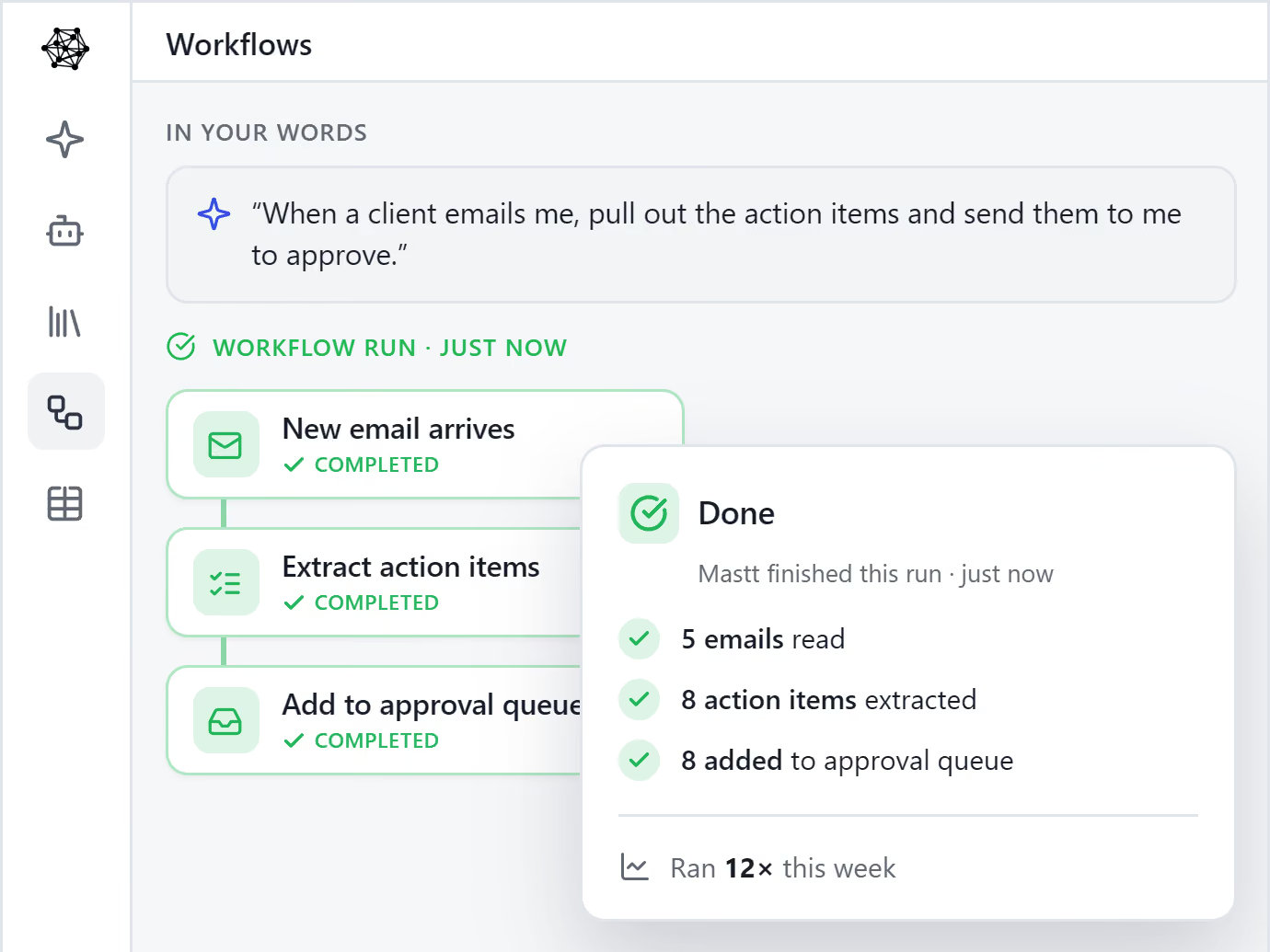
You describe the routine once, and your Agent visualizes it back to you for approval. The work you keep repeating never needs fresh instructions again.

Discover Agent >
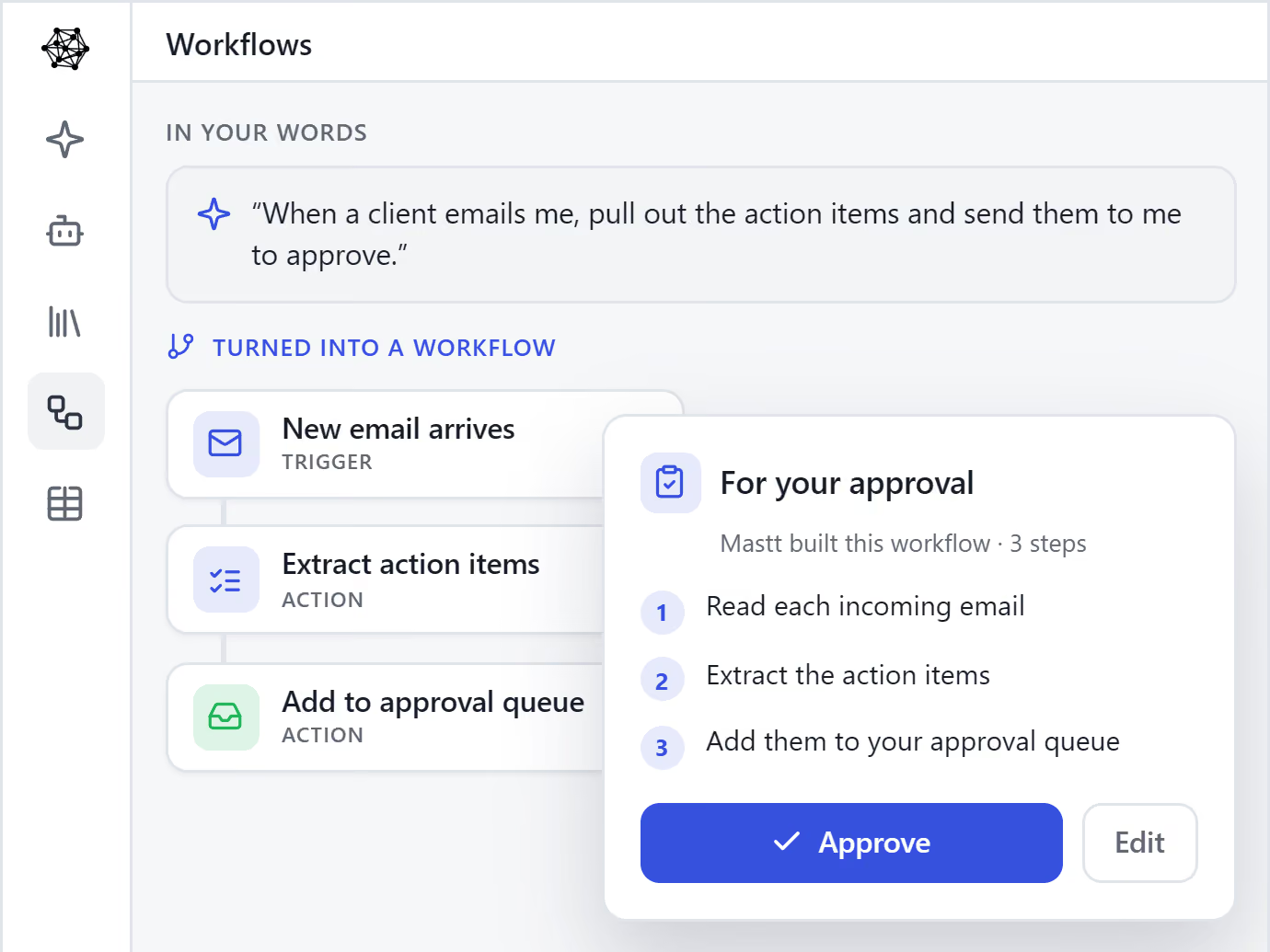
Mastt Agent turning a plain-language request into a workflow with an email trigger that extracts action items into an approval queue.
Mastt Agent completing a recurring workflow run, reading five emails and extracting eight action items, its twelfth run this week.

Take the repeat work off your team, reliably

Kill the recurring jobs that quietly eat your team's week. Your Agent runs the routine workflow from start to finish and brings back completed work.

Get hours back for the decisions, relationships and judgment that make humans valuable.

Book a demo now >

Always in the loop, always in control

Running on its own doesn't mean running unchecked. Your Agent works to the process you set, keeps every step in view, and brings the work back for your sign-off before anything's final.

You stay in charge of how the job is done and what goes out — free of the repetition, never out of the loop.

Explore your Agent >
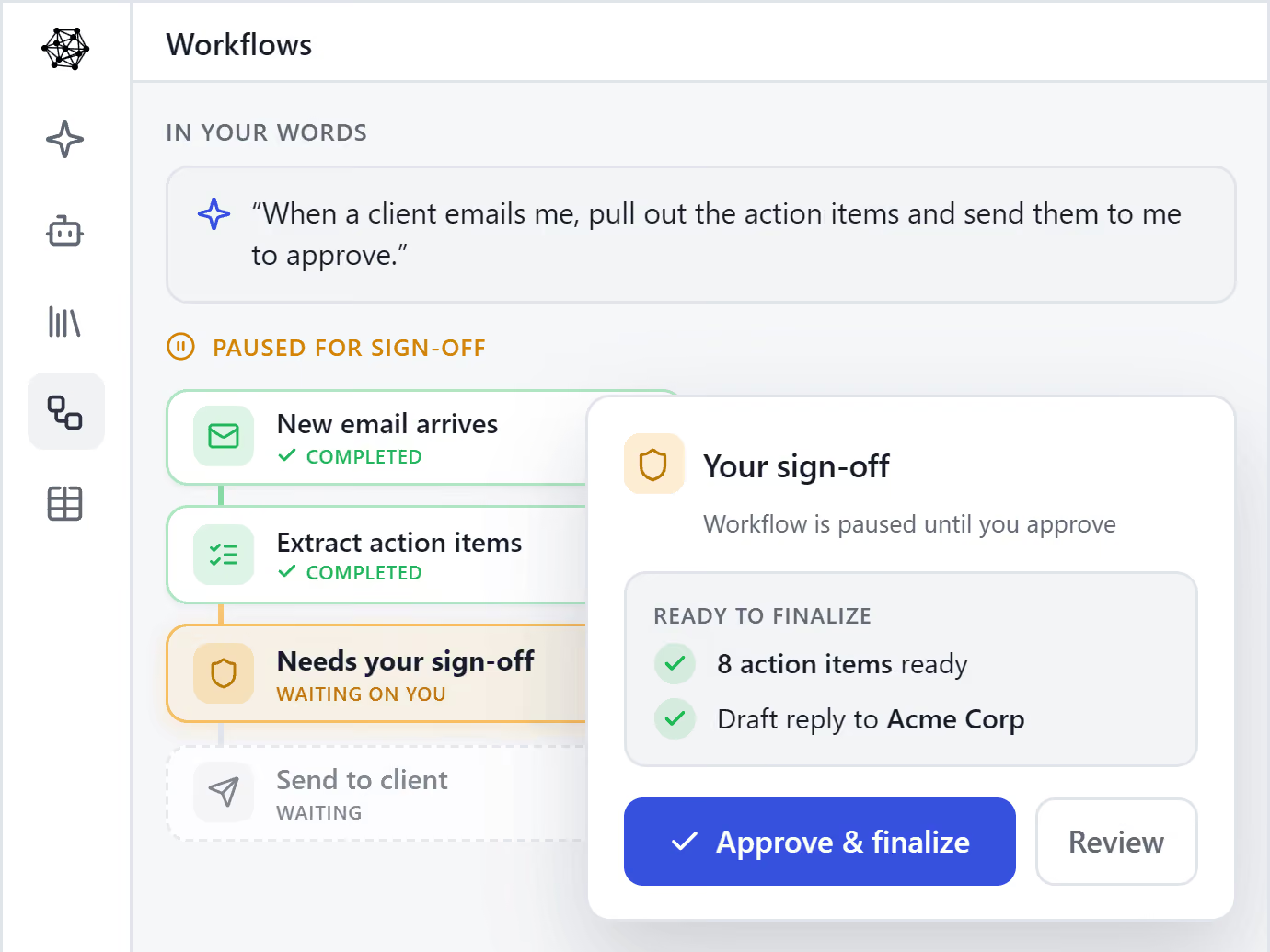
Mastt Agent pausing a workflow for human sign-off, holding a draft reply to Acme Corp before it goes to the client.

Ready to work with an AI Agent?

Become human + AI. Put an Agent to work on the routines that eat your week, and give your people their best hours back — without losing control of a thing.

Book a Demo
Smiling young man with beard working on a laptop at a desk with a black coffee mug and phone.

Perfect for Construction Leaders Who Value Smart Efficiency

See what project managers and construction executives are saying about AI transformation.

It instantly takes workload off of people's plates. It's an easy buy. You know, it's something that you can put some reliability on.

— School District Program Manager

I'm thrilled to get the automated entry features. Really helps the team streamline that process which is great.

— Hospital Project Manager

This is a great timing. We're realizing it's time to make sure we are not getting surpassed by the competition or maybe even jumping to stay ahead.

— Construction Executive

The AI Advantage

Construction teams using AI are already seeing dramatic improvements

90%
Time Savings on Data Entry
100%
Accuracy with Human Verification
60sec
Process 100+ Page Documents
Zero
Missed Compliance Requirements

Built for Construction's Trust Standards

We understand that accuracy isn't optional in construction. Our AI is designed with the verification and control you need.

See the Work

No more questioning if the AI made it up. Compare every extraction to exactly where it came from in the source document.

You Stay in Control

Nothing reaches your clients without your approval. You control what gets saved and prevent embarrassing mistakes.

Transparent Process

Clear confidence indicators show what needs your attention. You'll know exactly when something requires verification.

Frequently Asked Questions

What is Mastt Workflows?

Mastt Workflows lets you set a routine up once and have your Agent run it for you, the same way every time. Instead of repeating the same steps manually, you define them once, and the Agent carries them out on a schedule, when something happens, or whenever you run it.

What can I automate with Workflows?

The repeatable work that fills your week. Mastt ships with ready-made routines that extract action items from emails, pull register entries out of meetings, draft follow-up emails and send a weekly client digest. Use those, or build your own, like a month-end report drafted in your Templates.

Can workflows run automatically, or do I have to start them?

Either way. A workflow can run on a schedule, such as every weekday at 6am. It can fire automatically when something happens, like a meeting being processed or an email arriving. You can also run it yourself, on demand. You set the trigger once and it holds.

Do I need to know how to code to set Workflows up?

No. Start from one of the ready-made routines and adjust it, or describe what you want in plain English in Ask, and it builds the workflow for you. There is no code and no complicated setup, so the people who do the work can automate it themselves.

Can I trust a workflow to run unattended?

Yes. A workflow runs its routine steps on its own, but anything that needs a decision waits in a review queue for a person to approve, so nothing risky goes out on its own. Every run is logged step by step inside your secure workspace. See our data privacy and cyber security pages for more details.

What happens if a step fails or the system goes down?

Workflows are built to be resilient. If a step fails, it retries. If the system restarts mid-run, it picks up where it left off rather than starting over or dropping the task. A missed scheduled run advances one cycle instead of piling up, so a hiccup never quietly breaks your routine.

Can I change a workflow after I set it up?

Yes, at any time. You can edit a workflow whenever your process changes, and every edit is saved as a new version, so you can roll back to an earlier one if you need to. You are never stuck with a routine that no longer fits how you work.

How is a Workflow different from other automation tools?

Generic automation moves data between apps and stops there. A Mastt workflow uses the same construction-aware AI as your Agent to do the work itself, drafting, extracting and updating, with a human check on anything that matters. Book a demo to see how it works.

Ready to Lead with AI?

Join forward-thinking construction teams already transforming their projects with artificial intelligence.