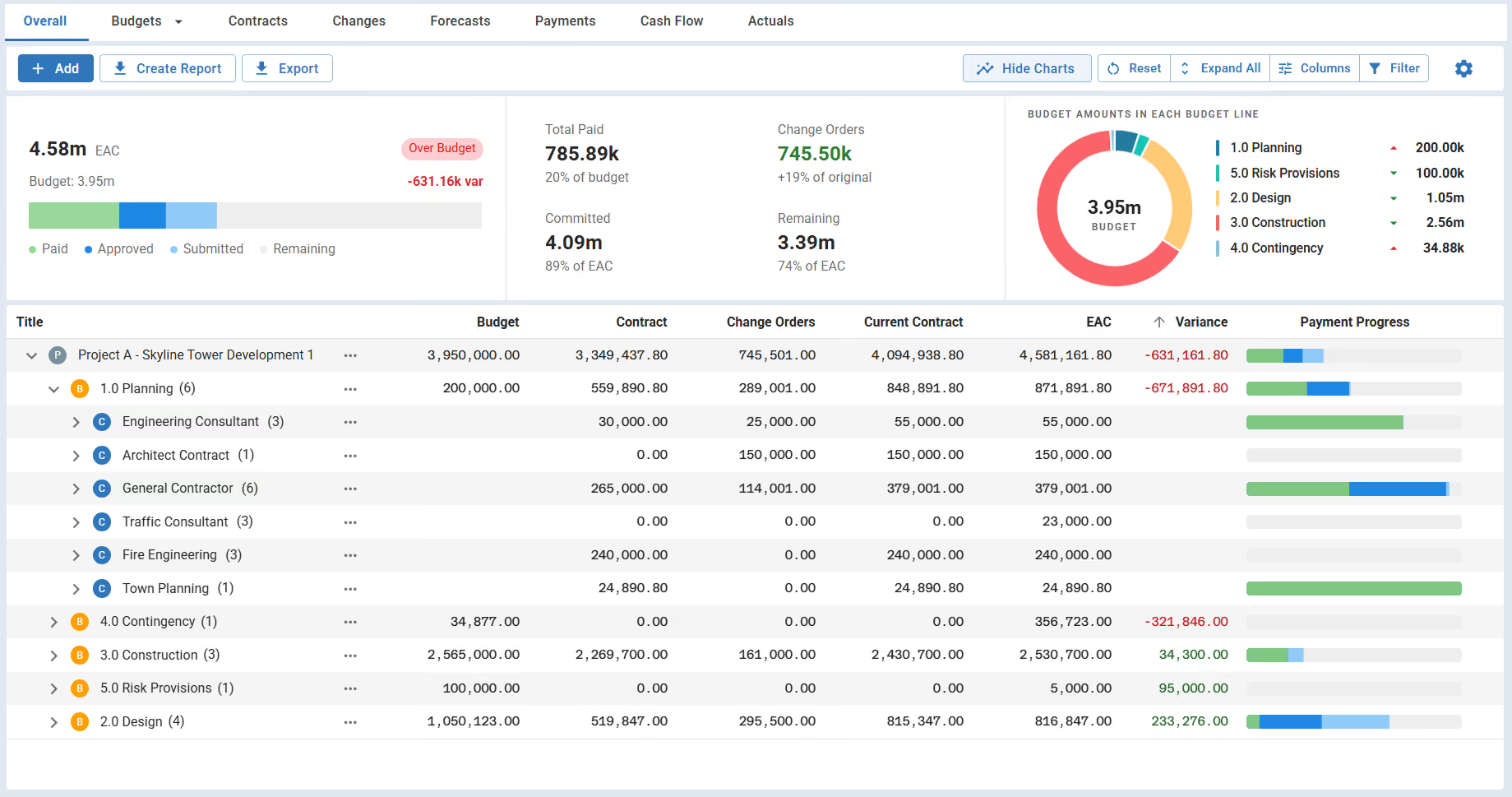
Construction cost management software for owners and project managers. Connect budgets, contracts, changes, and payments to see what's committed, what's paid, and the expected final cost.

























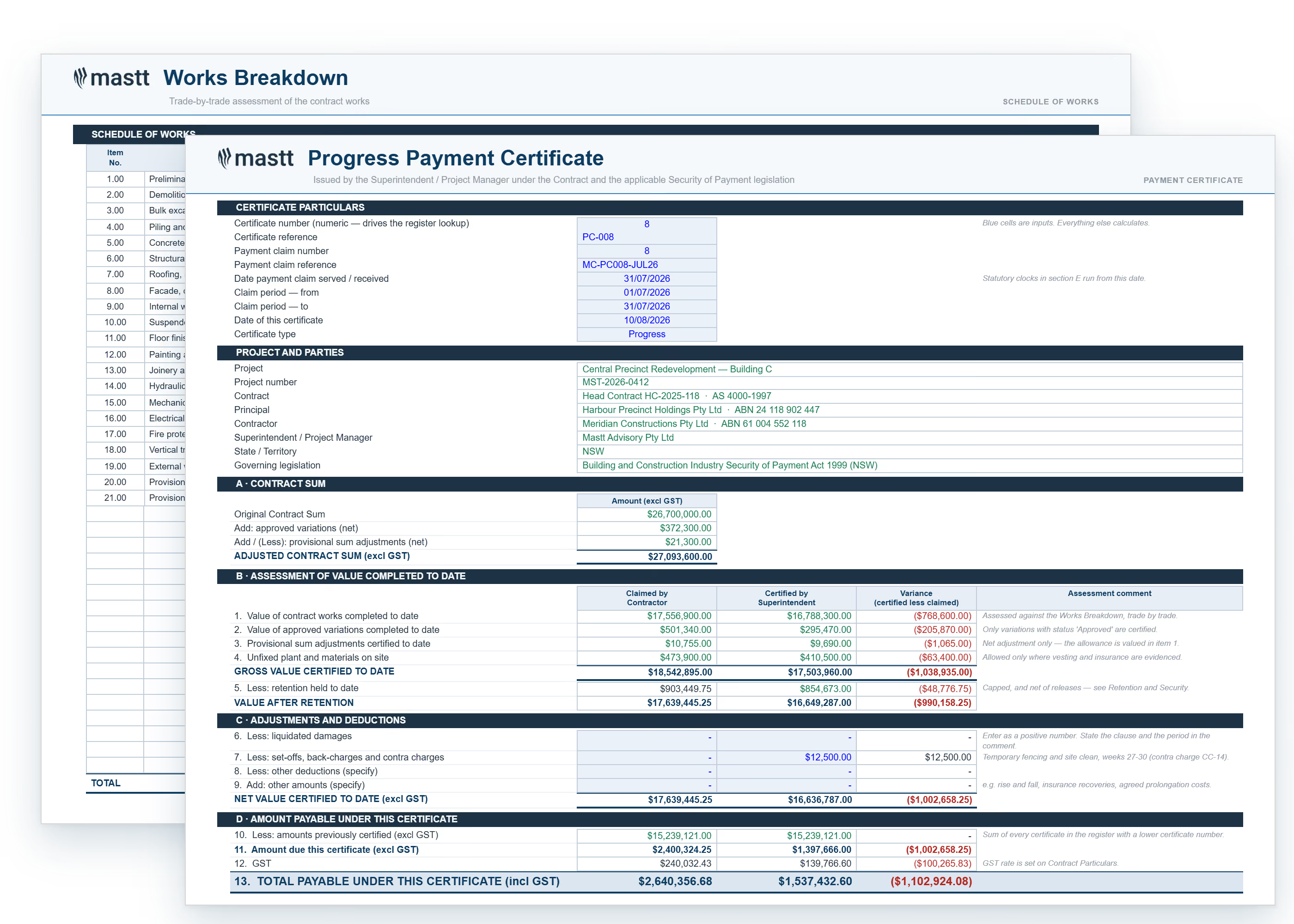
Trace cost movements back to the contracts, change orders, and payments behind them. Give owners and stakeholders a clear explanation of the current financial position and expected final cost.

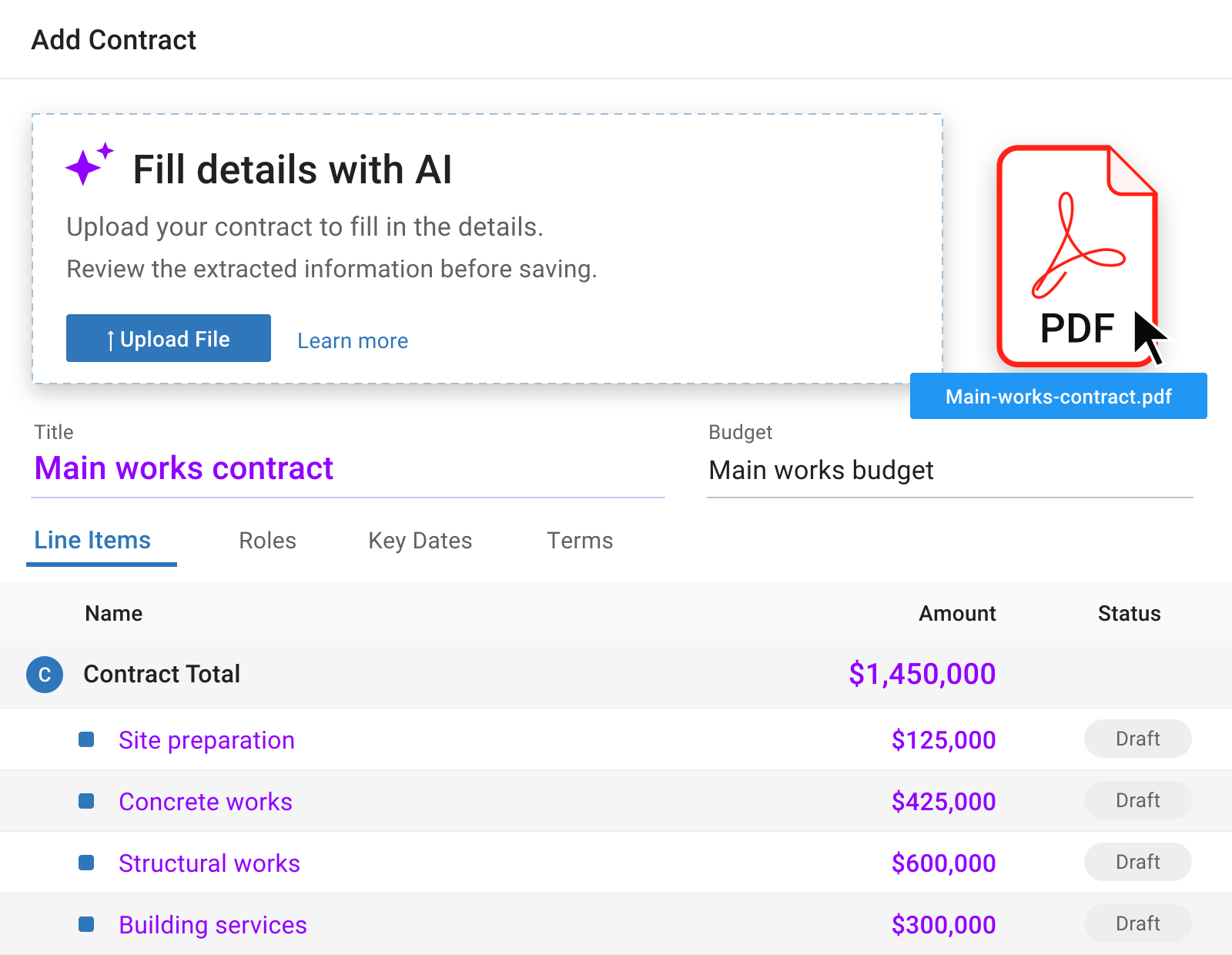
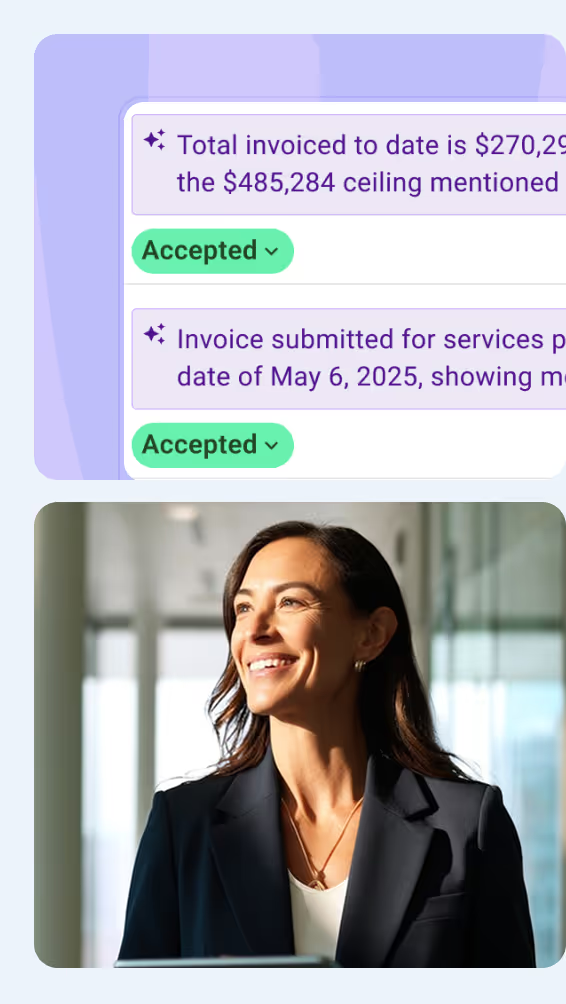
Upload contract and payment PDFs, and let Mastt AI fill in the key details. Review the extracted information before saving it to your project records.
Spend less time transferring figures from documents and more time reviewing the costs, changes, and payments that need your attention.
Explore All AI Features

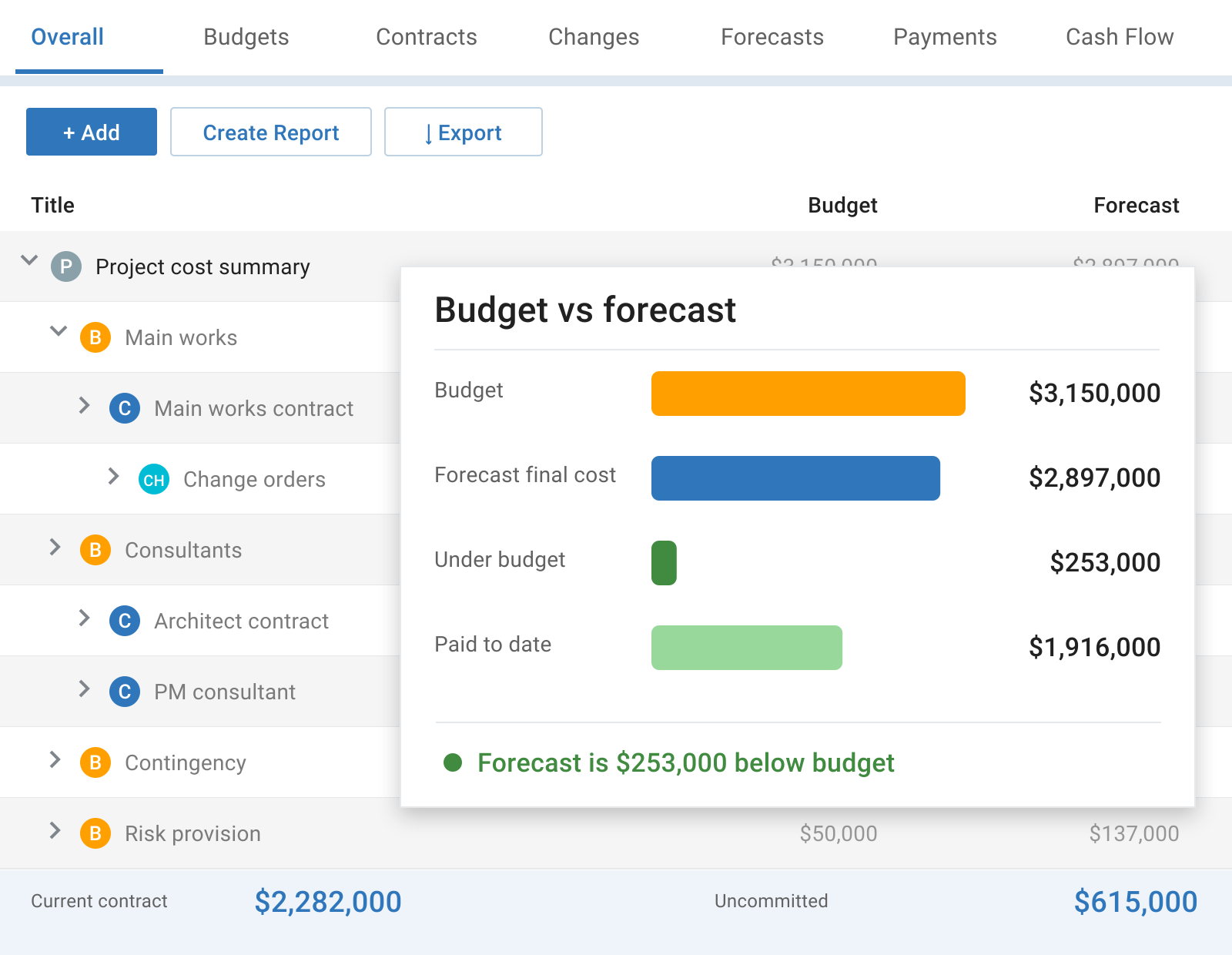
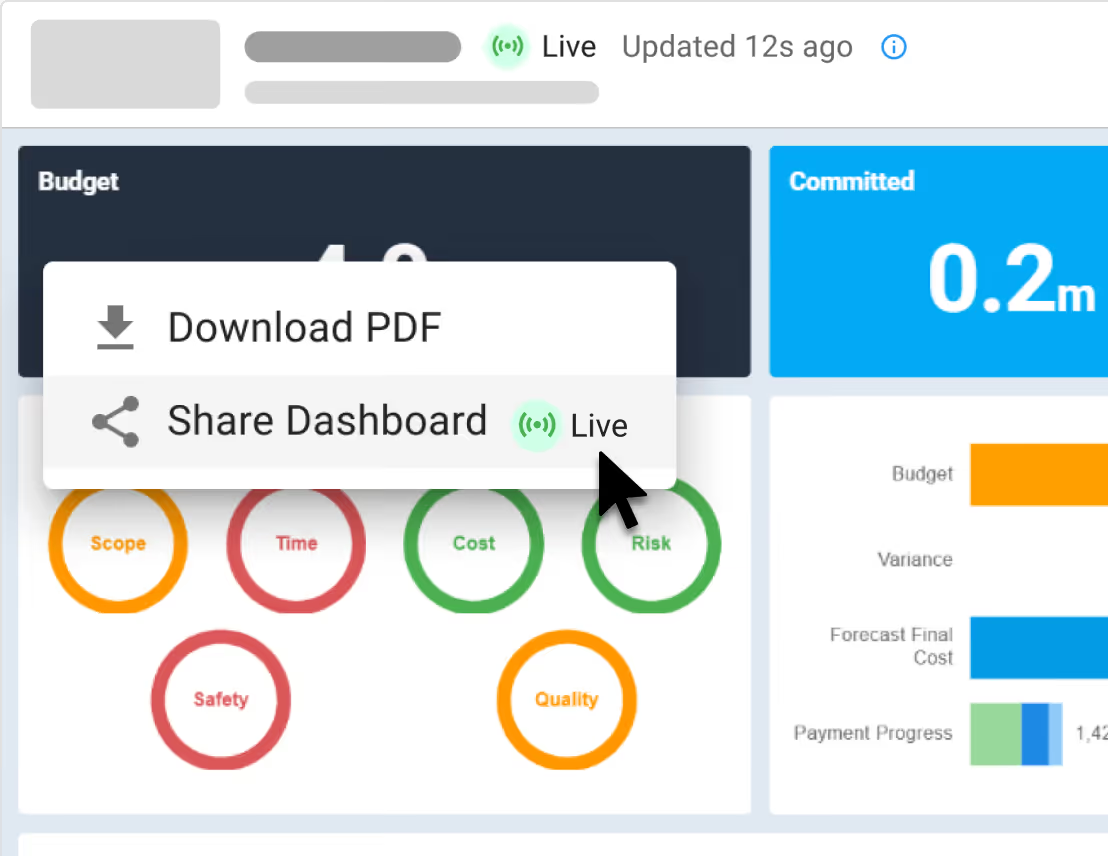
See how committed costs and payments compare with your budget, and identify variances in one live cost tracker.
Drill into the underlying contracts and changes to understand what is driving the numbers and where your team needs to act.
Explore Cost Tracker

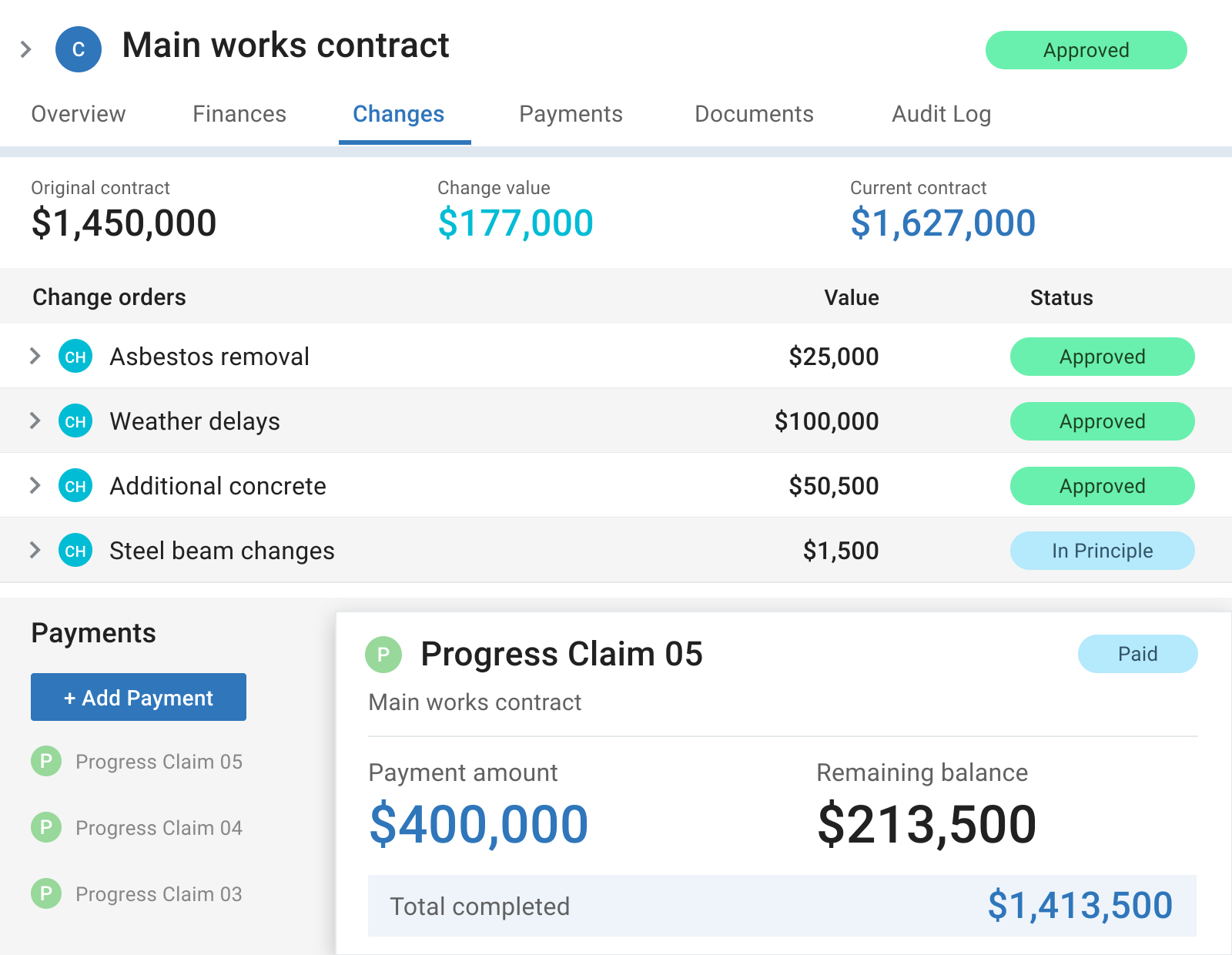
Track contract commitments and change orders alongside the project budget. Distinguish pending changes from approved amounts as the cost position evolves.
Review payment applications and progress claims against the relevant contract, with submitted amounts, approved amounts, and supporting documents in view.
Explore Contract Management
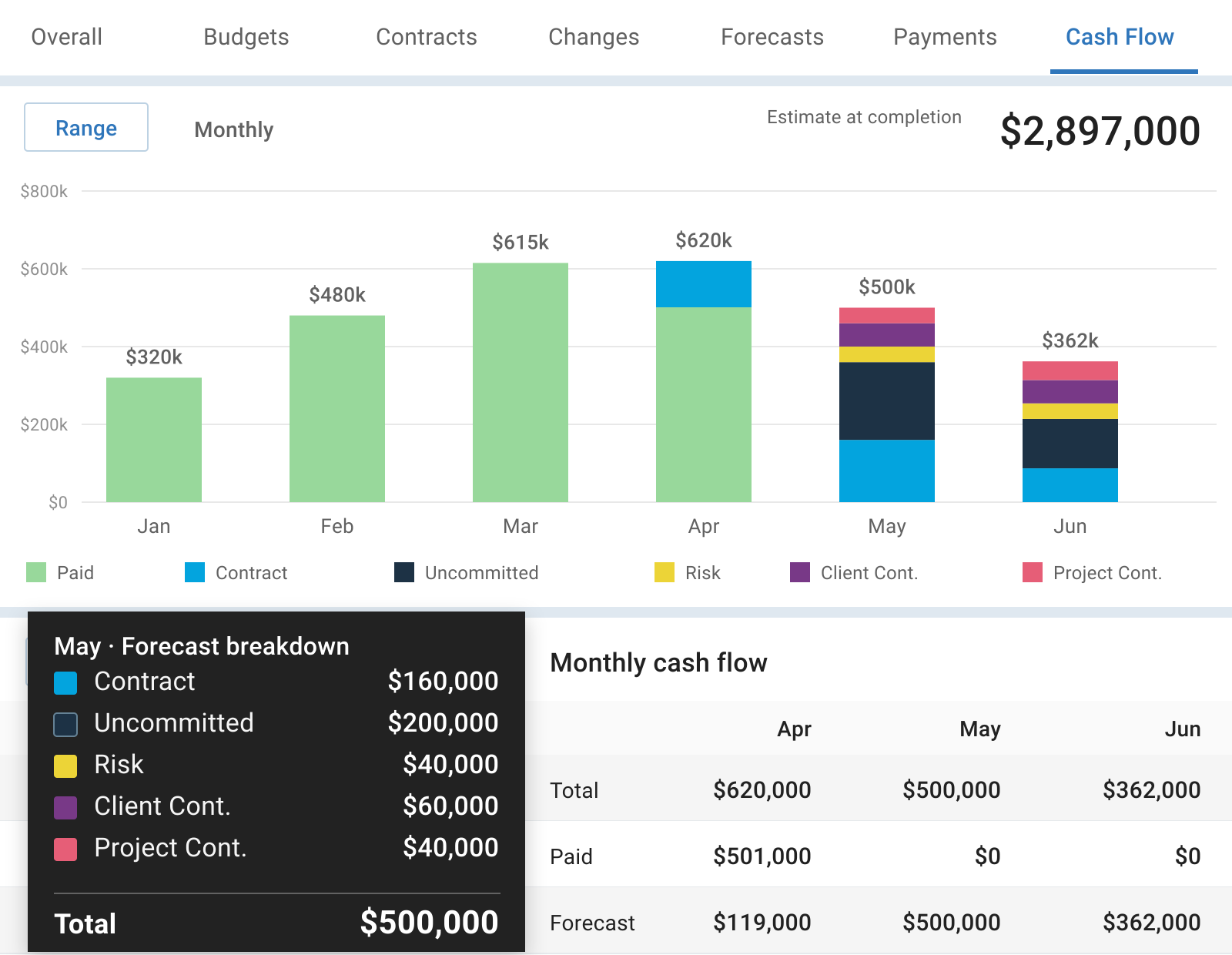
Include uncommitted costs and contingency in your forecast to understand the expected final cost and potential pressure on the budget.
Plan spending by month and compare projected cash flow with recorded payments, so you can see when funding will be needed.
Explore Cash Flow Forecasting
Explore how Mastt connects cost management with reporting, risk, schedules, and documents, supported by AI tools that help your team work with project information.

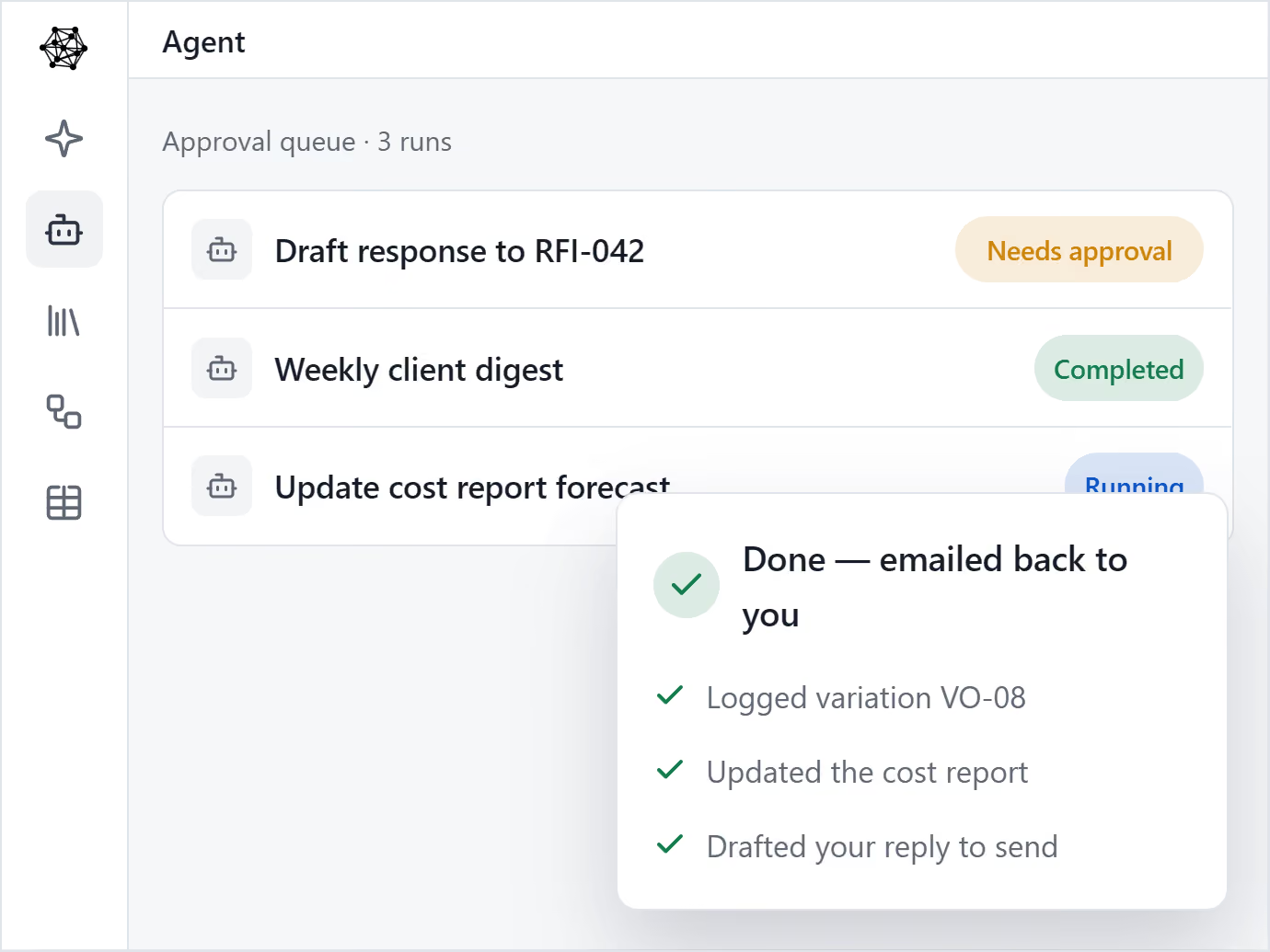
Multiply your people with AI Agents. Helps one person produce the output of many.

AI that knows your company’s templates, procedures and lessons learned.

Upload the templates you already use, and your AI Agent drafts on-brand, every time.

Set up a process once, and let Agent run it every time.

Mastt brings every project in your program into one clear, connected view.

Roll up cost, risk, schedule, and reporting from every project into one unified, real-time view.

Consistency across every project. Secure, centralized data, full audit trails, and real-time decision-making.

Mastt’s trusted AI eliminates the admin and manual standardization that slow your team down.

Keep track of projects with live, interactive reports 24/7
Fast & automated reports from project status to project portfolio reports
Capital project charts, maps, visualizations and other components out of the box!
Snapshot & store entire projects or reports for record keeping & compliance

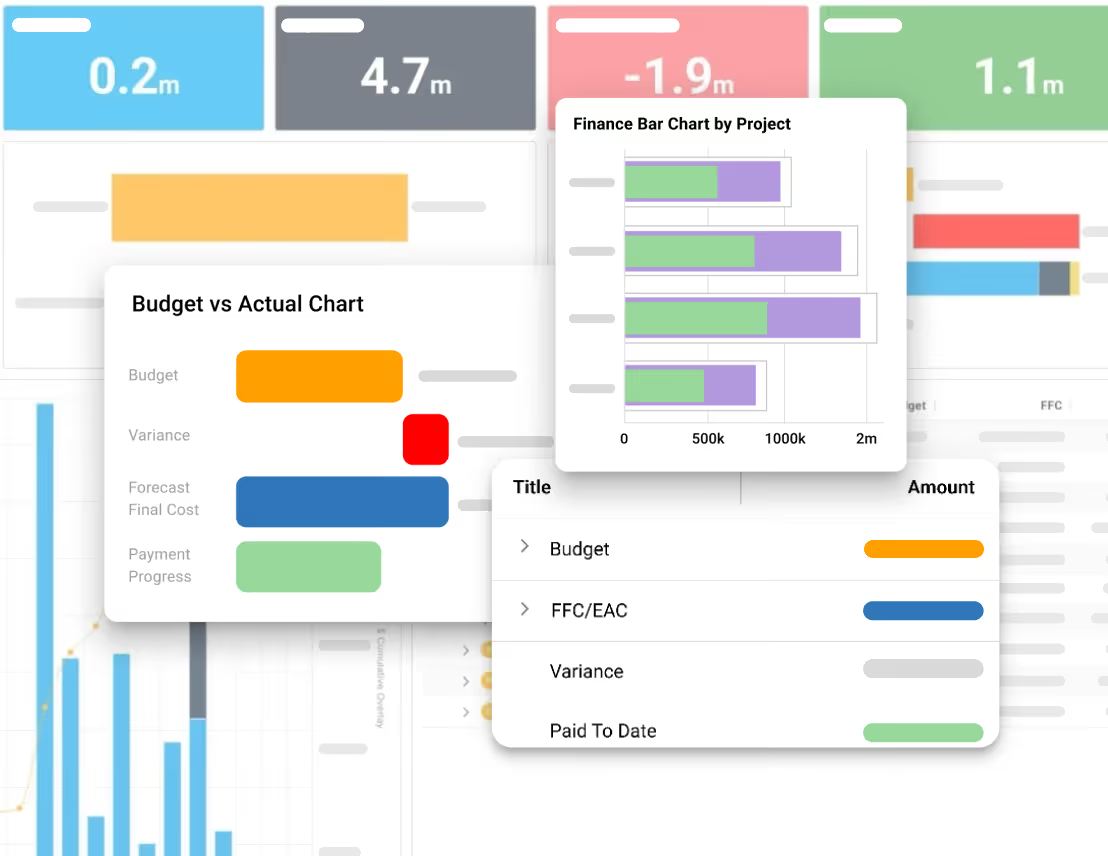
Digital ledgers and smart forms for financial precision
Track costs back to budgets and see unders/overs
Centralize all contracts & payments back to budgets

Report on cash flow actuals, forecasts, and baselines
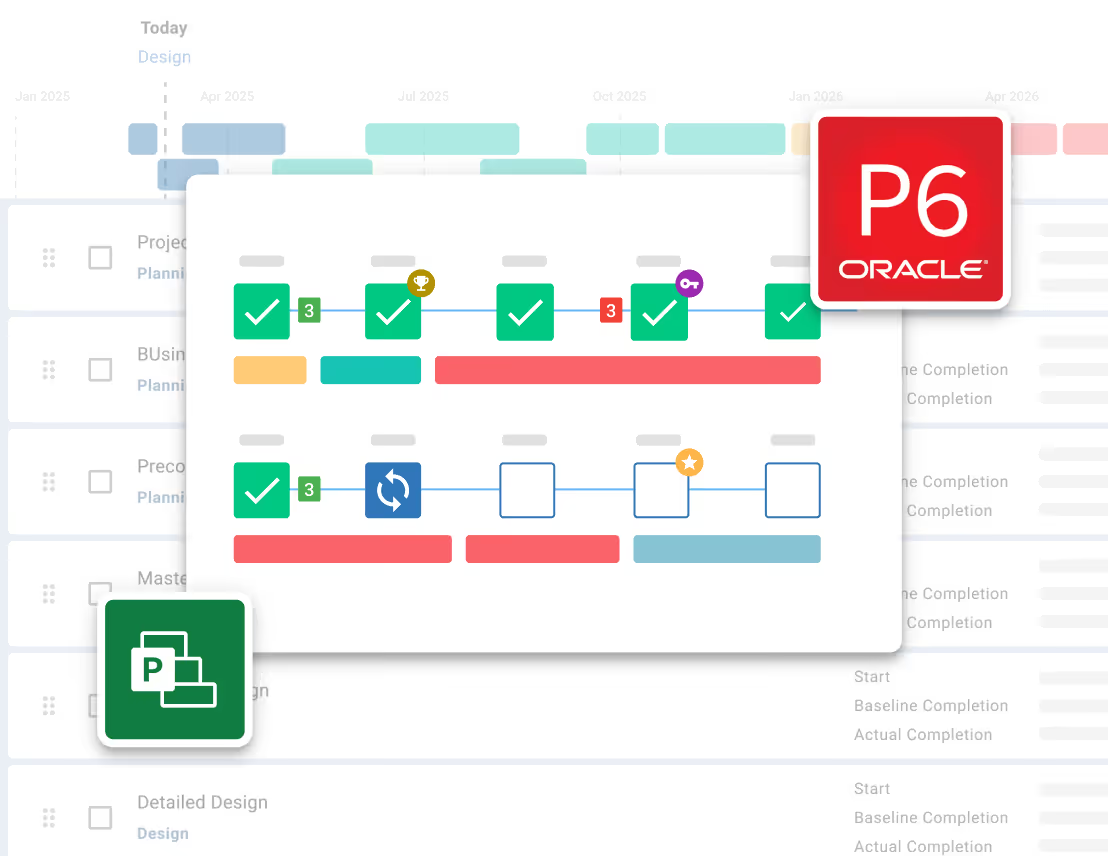
Manage the complete project lifecycle across your portfolio

Tracks your project through key milestones

Manage projects through clear phases, stages and gates
Measure performance of a portfolio of projects
Risk Management process made simple and configured to your likelihood & impact ratings
Streamline Risk Analysis on your 5x5 or 4x4 Risk Matrix and identify Treatments

Visualize Risks for fast, easy reporting and workshopping. Generate a Risk Register
Maintain Risk Registers at a Project or Program / Portfolio level


Store every contract, report and project file in one secure place.
Structure every project with clear, consistent folders your whole team can navigate.

Ask questions in plain English and get answers from your documents instantly.
See every document tied back to its source in your project - contract, payments, changes and more.
.avif)
See how construction project management professionals experience the rush of wielding true project power.
Read Case Studies

“Since moving to Mastt, we are able to report in real time so there's no delay in financial data being updated.”
Jacob Edwards, Funds Manager


Mastt gives owners, developers, consultants, and owner’s representatives a shared financial record to support funding decisions, payment reviews, and client advice.

See committed spend, forecast final costs, and budget exposure to support funding and approval decisions.
Learn more

Monitor development costs, contract changes, and cash flow to plan expenditure as your project progresses.
Learn more

Maintain consistent cost records and prepare clear financial updates that help clients understand project performance.
Learn more

Review payment applications and change requests with the contract details and supporting records needed to advise your client.
Learn more

"Mastt has been a game-changer for us. I would highly recommend Mastt to any organization looking to improve the efficiency and effectiveness of their project management processes"
Tom Booth, Mostyn Copper
See Case Studies

Get a head start on your budget, keep track of spending, and plan upcoming cash flow with these downloadable templates.
See how Mastt supports your day-to-day work, from adjusting budget allocations and reviewing payment applications to updating forecasts and preparing cost reports.

Manage Budgets, Sub-Budgets. Add, remove or transfer funds easily between budgets.
Learn more
Track construction contracts, changes, payments, and commitments with clear financial control.
Learn more
Manage change orders with software that tracks scope changes, costs, approvals, and contract impacts.
Learn more
Track forecasts and uncommitted costs with real-time budget visibility.
Learn moreManage construction invoices with software that handles billing, approvals, and payment tracking in one system.
Learn moreCapture and process invoice data automatically with AI-powered OCR.
Learn more

Automate financial project controls in a single table for projects or programs.
Learn more

Andrew Benn, WSP Technical Director
"With Mastt, our client can see the status of the project anytime, reducing back and forth queries, and not having to wait until the end of the month to receive a monthly report."
Read Case Study
Rebecca White, RPS Program Manager
"Mastt has saved our team significant time and effort in managing the financials elements of 65+projects. The team now has total visibility over their individual projects as well as the overarching program of works."
Read Case Study
Erik Maasepp, Capital Insight Senior Project Manager
"Mastt takes away a lot of user error that spreadsheets bring. With Mastt, we are able to combine multiple projects into programs or portfolios for management level analysis and direction."
Read Case Study
CAPT. Dan Foley, Army Digital Transformation Manager
"Mastt is increasing the team’s tempo and productivity by enabling real time information across our portfolio of projects. This transparency is assisting us to make informed decisions, to identify opportunities and reduce the risk."
Read Case Study
Dan Atkins, Jacobs National Program Manager
"Mastt's ability to record critical financial information as well as program forecasted delivery and milestones put Jacobs in a favourable position to our clients."
Read Case Study.webp)
Mohammed Salameh, Compass' Associate Director
"Moving to Mastt is one of the best decisions my team has ever made. It’s cost-effective, easy to use, and a quick set up."
Read Case Study.webp)
Fergus Bruce, Project Manager at WSP
"A key factor in our decision to adopt Mastt is its user-friendliness. It had to continue to empower us to work smart, allowing us to consistently deliver excellence across multiple sectors and geographic regions."
Read Case Study

Hear how Mastt customers reduce spreadsheet admin, gain clearer cost visibility, and simplify financial reporting. Their firsthand experiences show what these improvements mean for the people managing project finances and keeping clients informed.

Mastt provides standardisation of cost management tasks and centralises project cost information, which improves team collaboration, data access, budget planning, project governance, and reporting capability.

Project Manager
Mastt enables efficient and accurate forecasting and cash flow management at an individual project level, as part of a portfolio, or as part of a program of works. Communication with internal and external stakeholders is EXCELLENT. Risk management and communication of the risks at different business levels is excellent.

Associate Director
So for us, Mastt allows us to have a single source of truth, as all the costs of instructions are in one centralised location, including payment claims. Because it’s not an Excel file, it can’t be manipulated to make a number work. It kind of pulls through the true cost.

Auckland Regional Manager
Since using Mastt, it has significantly increased the efficiency and accuracy of the financial management of infrastructure projects and programs. The ability to accurately manage cash flow and forecasting enables a greater level of planning within a program of work level.
Associate Director
Great CAPEX management tool with intuitive infographics. The dashboard view of projects is something that we did not have before Mastt. I can see that it will deliver a clearer and more intuitive understanding of capital projects to executives.

Mastt was easy to use and set up. It uses a lot of cost management principles that clients and contractors would be familiar with but takes away a lot of user error that spreadsheets bring. It also has the power to combine multiple projects into programs or portfolios to filter data for management-level analysis and direction.

Associate Director
Mastt’s real-time updates allow our team to keep updated on progress and provide updates to clients whenever required. Mastt has saved our team significant time and effort by becoming a ‘one-stop shop’ for managing the financial elements of 65+ projects.

Practice Lead
Since moving to Mastt, our reporting regime has become a lot simpler. We are able to report in real time, so there's no delay in financial data being updated. The time it takes is a lot quicker, making the fund a lot more efficient for investors.

Fund Manager
Mastt allows us to complete our cost management activities in a more efficient way and gives us more time to focus on technical project management activities that we face in the role of project manager.

Project Manager
It's a great reporting tool for the college because it gives us a lot of transparency and visibility of information in regard to contracts, the contract sums, the actual spending against the variations, and where we are at.

Business Manager
It has been great to have the visibility to review our variations and ensure that we are getting value for them. We were also able to easily identify that we had circa 90k in credits, which prompted us to follow up. We are getting great value out of Mastt when we can do things like this.
Business Manager
Mastt helps reduce the opportunity for errors in cash flow and budgeting and provides insights into aggregated data and program trends that we need.

Project Director

Construction project cost management software brings budgets, contract commitments, changes, payments, and forecasts into one system. It helps owners and their project teams understand what has been committed, what has been paid, and what the completed project is expected to cost. This supports financial oversight from the initial budget through project closeout.
Mastt connects cost records so your team spends less time reconciling separate spreadsheets. Its cost tracker brings budget, contract, payment, and forecast information into a shared view, with totals that update as records change. This makes it easier to maintain a consistent financial position without manually rebuilding calculations for each report.
Yes. You can copy budget names and amounts from Excel into Mastt, reducing the need to retype each line. Mastt’s project budgeting tools support budgets and sub-budgets for organizing costs by phase, work package, or category. Your spreadsheet data needs to follow the required column format, and sub-budgets are added separately from the main budget import.
Yes. Mastt links each contract to the relevant project budget and keeps its changes and payments together. Its contract management tools let you review individual contract values alongside the combined commitments across your project. This helps you understand how separate consultant, contractor, and supplier agreements contribute to the overall cost.
Mastt compares your budget with the expected final project cost, known as the Estimate at Completion (EAC). This forecast includes committed costs and anticipated costs for remaining work. You can review the difference at project and budget-line levels to identify where costs are expected to exceed the available budget and investigate what is driving the increase.
Yes. Mastt includes forecast and pending change orders in the project’s forecast while keeping them separate from approved contract changes. Its change order management tools help you assess potential cost exposure while decisions are still being made. Approved changes then update the relevant contract value and committed costs.
Yes. Mastt lets you include forecasts for uncommitted costs, such as anticipated work and contingency allowances, alongside existing contract commitments. This gives you an expected final cost that accounts for work still to be contracted. You can refine those allowances as the scope, pricing, and contract awards become clearer.
Yes. Mastt’s cash-flow forecasting lets you plan expected payments by month and compare those projections with payments recorded as paid. You can adjust the timing as delivery plans and forecasts change. This helps your project and finance teams anticipate funding needs and understand differences between planned and actual cash outflows.
Yes. Mastt generates project cost reports using recorded budgets, commitments, changes, forecasts, and payments. Reports can show the difference between the budget and expected final cost, with breakdowns by budget line or cost category. You can export them for owner and client reviews without manually consolidating separate cost spreadsheets.
Mastt uses AI data entry to extract details from documents and help prepare contract, payment, and change order records. Its AI payment verification checks submitted documents against configured contract requirements and flags items needing attention. Your team reviews the extracted information and verification results before accepting records or approving payments.
Become superhuman with AI today. Free to start, simple to scale.

Your first project is on us — no credit card required. Get started instantly with core tools.
.svg)
Flexible month-to-month plan. Add projects as you grow and access free videos, training, and guides.
per month

Full enterprise features, advanced security, and dedicated human rollout support.

Agentic AI that gives humans an AI Agent counterpart to accelerate work, increase quality, and boost output.

At Mastt, we’re building the world’s first Agentic AI for construction project teams
Used by project leaders building the future around the globe

.svg)
.svg)
.svg)
.svg)
.svg)