

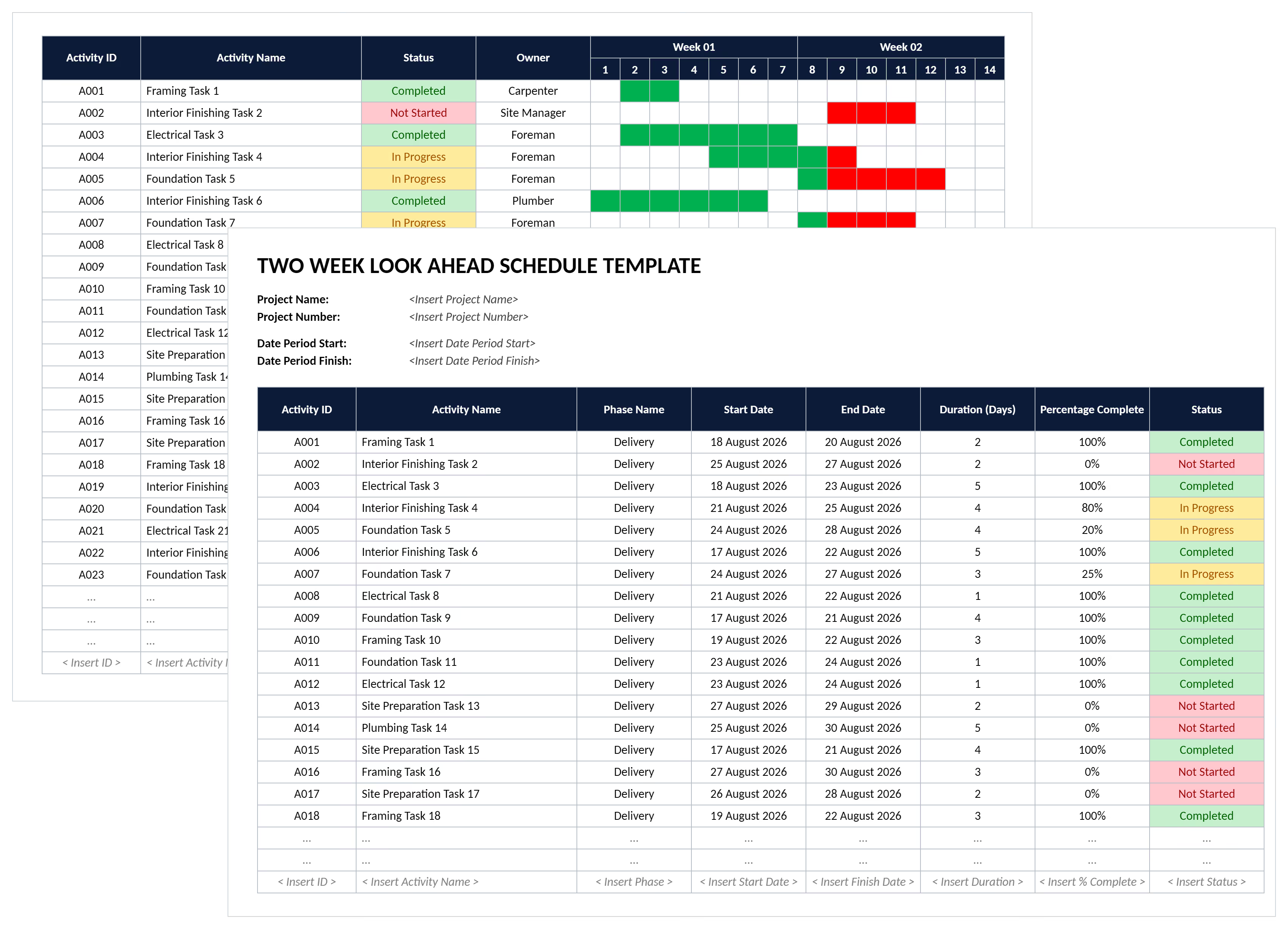

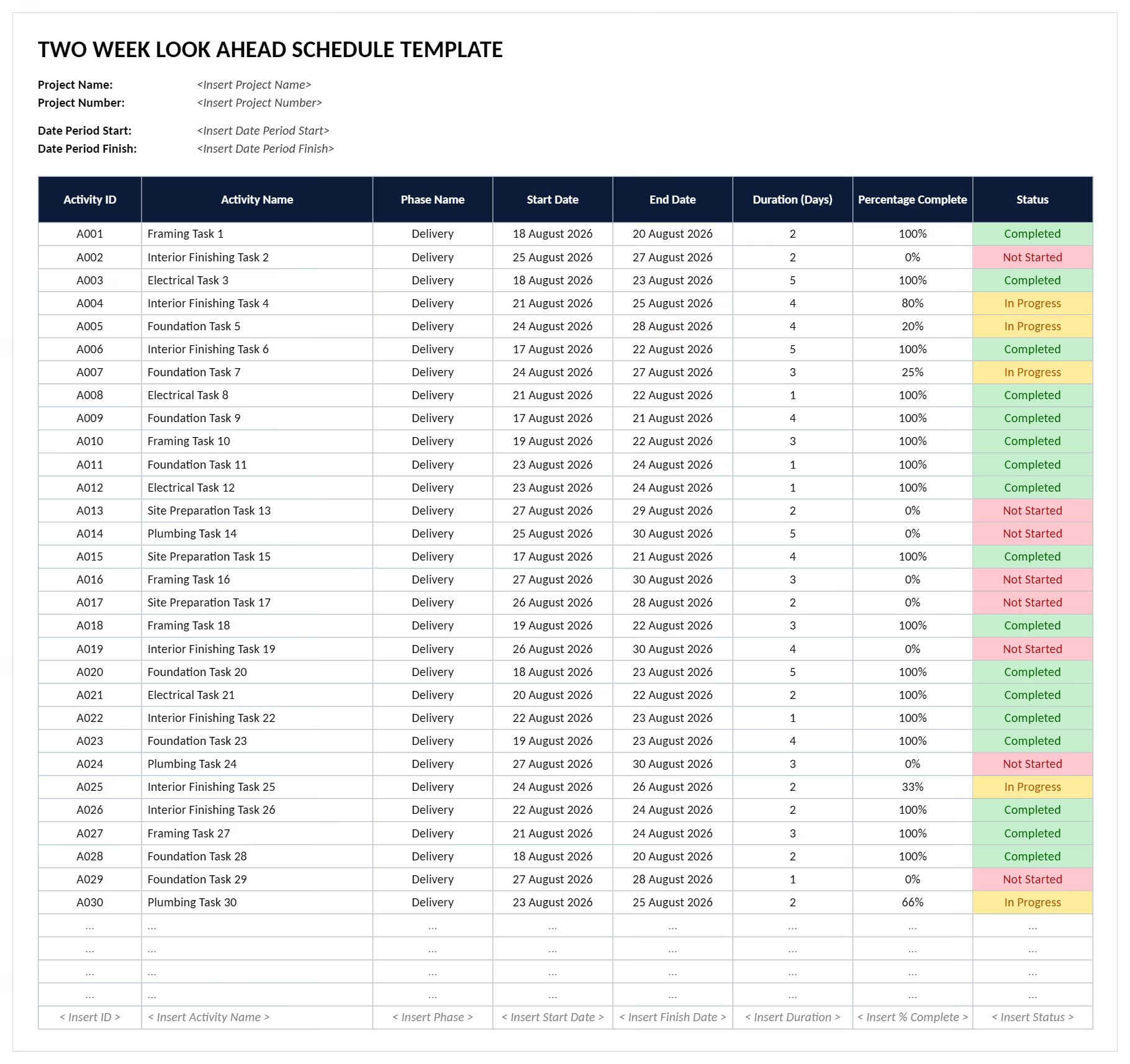
What is a 2 Week Look Ahead Template?
A 2 week look ahead template is a project scheduling document showing work planned for the next 14 days. It extracts upcoming tasks from the master schedule into daily assignments. Crew responsibilities, material requirements, and constraint removal actions get documented clearly.
Project teams use look ahead templates to bridge long-range planning and daily execution. The format focuses on making work ready. It identifies what could prevent planned activities from happening on schedule.
What's Included in Construction Look Ahead Schedules?
A construction look ahead schedule includes essential fields for coordinating near-term work activities. Each component shows crews what work happens when. It also shows who performs the work and what constraints must clear.
Standard inclusions in look ahead planning templates are:
- Activity descriptions: Specific tasks broken from master schedules into executable daily assignments for field crews.
- Scheduled dates: Start and finish dates organized by week or day within the two-week window.
- Responsible parties: Trade contractors or crew leaders assigned to activities with clear accountability established.
- Prerequisites: Upstream work that must finish first, showing task sequencing and handoffs between trades clearly.
- Constraint status: Conditions preventing work like missing permits, late deliveries, or incomplete prior activities documented.
- Resource requirements: Labor counts, equipment needs, and material quantities required to execute each planned activity.
- Location: Specific site zones, building levels, or work areas where activities occur to prevent conflicts.
- Progress tracking: Status indicators showing whether activities are on schedule, delayed, or completed as planned.
💡 Pro Tip: Include a "constraints removed by" date column in your template. Assigning promise dates creates accountability. It flags problems before they hit your weekly work plan.
Why Use a Look Ahead Schedule Template?
Look ahead schedule templates prevent coordination failures that stop productive work on construction sites. Standardized formats ensure every stakeholder sees identical information about upcoming activities. Resource requirements and potential constraints blocking progress stay visible to all parties.
Templates protect project delivery through these mechanisms:
- Catch constraints three weeks early: Systematic identification provides time to resolve permitting delays or material shortages. Inspection holds get cleared before they impact field crews.
- Eliminate trade coordination conflicts: Visualizing which trades work where reveals spatial conflicts. Superintendents can sequence work to prevent bottlenecks.
- Improve plan reliability dramatically: Projects using structured planning achieve significantly better completion rates compared to teams working from master schedules.
- Reduce rework and waste: Confirming prerequisite completion before starting downstream activities prevents costly do-overs. Crews don't discover missing steps mid-task.
- Accelerate material procurement: Early visibility into required deliveries gives suppliers adequate lead time. Expedite fees and delivery failures drop significantly.
- Support commitment-based planning: Templates document which activities crews commit to completing. This creates accountability that verbal promises never establish.
- Enable continuous improvement: Tracking which planned activities complete reveals patterns in constraint types. Teams prevent recurring problems using this data.
Teams using weekly look ahead templates can also expect fewer weather-related delays. Systematic planning identifies indoor backup work when outdoor activities can't proceed as scheduled.
How to Use a Two Week Look Ahead Construction Schedule Template
Using a two week look ahead construction schedule requires extracting activities from the master schedule. Identify constraints and coordinate with trade partners before work begins.
Follow these steps to deploy look ahead scheduling effectively:
- Extract activities from master schedule: Pull tasks scheduled for the next 14 days from your critical path method baseline. Primavera P6 or Microsoft Project timelines feed into the template format.
- Break activities into daily tasks: Decompose multi-day activities into specific daily work assignments. Crews can commit to completing these within single shifts.
- Assign responsible parties: Designate which foreman or trade contractor owns each activity. This ensures accountability for execution and progress reporting.
- Identify constraints systematically: Review each activity for potential blockers. Missing materials, incomplete prerequisites, required inspections, and equipment availability get documented.
- Assign constraint removal owners: Designate who will resolve each constraint. Include specific promise dates for when conditions will be work-ready.
- Coordinate in planning meetings: Review the populated template with all trades during weekly sessions. Confirm commitments and adjust sequences as needed throughout discussions.
- Update status throughout the week: Mark activities as started, completed, or delayed daily. Feed actual progress back into the master schedule regularly.
- Calculate plan reliability metrics: Track what percentage of planned work actually completes. Use a Percent Plan Complete (PPC) data to improve future planning accuracy.
💡 Pro Tip: Use task scheduling software to lock the first five working days of the two-week window. Only re-sequence locked tasks in the daily huddle after confirming labor, access, and materials are ready.
Who Should Use Construction Weekly Look Ahead Schedule Templates?
Weekly look ahead schedule templates serve construction professionals managing near-term coordination across multiple trades and activities. Structured formats ensure project teams maintain workflow momentum while identifying problems before they create delays.
✅ General Contractors: Coordinate subcontractor sequences and manage trade handoffs. Maintain site productivity across overlapping work packages.
✅ Construction Superintendents: Direct daily field operations, resolve conflicts between trades, and ensure crews have work-ready conditions before activities begin.
✅ Project Managers: Monitor short-term execution against master schedules, identify slippage early, and communicate progress to owners and stakeholders.
✅ Trade Contractors and Subcontractors: Plan crew assignments and coordinate material deliveries. Commit to specific work completion within the two-week window.
✅ Foremen and Crew Leaders: Break down assigned activities into daily crew tasks. Track progress against commitments and report constraints preventing planned work.
✅ Project Schedulers: Translate master schedule logic into executable field assignments. Track actual versus planned completion and update baseline schedules.
✅ Last Planner Coordinators: Facilitate pull planning sessions, manage constraint logs, and calculate plan reliability metrics across the project.
When to Use a 2 Week Look Ahead on Projects
A 2 week look ahead plan becomes essential on projects with multiple trades working in overlapping sequences. Coordination failures in these environments create costly delays without structured short-term planning. Deploy structured short-term planning at specific project moments when near-term visibility prevents problems.
Critical situations requiring look ahead schedules include:
- Active construction phases: When five or more trades work simultaneously, daily coordination prevents conflicts and maintains workflow.
- MEP coordination windows: When mechanical, electrical, and plumbing installations converge in the same spaces. Precise sequencing prevents rework.
- Critical path activities: Before starting schedule-driving work where delays cascade through downstream tasks, requiring constraint removal before beginning.
- Material delivery clusters: When multiple long-lead items arrive within the same week. Storage coordination and installation sequencing across trades become essential.
- Inspection-heavy periods: During phases requiring frequent approvals where inspection failures could stop work. Backup activities should be planned in advance.
- Weather-sensitive work: Throughout seasons when outdoor activities face interruption risk, requiring indoor alternatives when conditions prevent exterior progress.
- Startup and commissioning: When systems testing requires specific completion sequences and multiple trade coordination for integrated equipment operation.
- Project closeout periods: During punch list completion when small activities across many trades need coordination. This achieves substantial completion dates.
💡 Pro Tip: When project phase tracking shows you are entering an overlap period, run a make-ready check for permits, inspections, and long-lead deliveries before you publish the two-week look ahead.
Common Problems with 2 Week Look Ahead Schedule Template Excel Files
Manual Excel templates for construction look ahead schedules create coordination gaps and reliability problems as projects scale. Generic static spreadsheets can't keep pace with the daily changes and multi-trade complexity that characterize active construction sites.
Typical challenges undermining look ahead effectiveness include:
⚠️ Outdated activity lists within hours: Excel schedules require manual updates. Planned activities fall behind actual field conditions and revised trade sequences.
⚠️ No connection to master schedule: Spreadsheet templates don't link to Primavera or MS Project baselines. Teams manually sync activities that already exist in scheduling software.
⚠️ Lost constraint status across versions: Multiple superintendents maintain separate Excel files with conflicting constraint information. Trades remain uncertain which obstacles are actually resolved.
⚠️ Formula errors destroy calculations: Complex Excel formulas break when rows shift or columns change. Incorrect duration calculations and progress percentages go unnoticed until meetings.
⚠️ Trade coordination happens in email: Excel can't show which trades reviewed the schedule or committed to activities. Coordination happens through scattered email threads outside the template.
⚠️ No historical plan reliability data: Spreadsheets don't automatically track whether planned work actually completed. Teams can't calculate Percent Plan Complete metrics that drive improvement.
⚠️ Constraint removal tracking fails: Excel offers no workflow for assigning constraint owners or setting promise dates. Overdue resolutions that threaten weekly work plans go unflagged.
⚠️ Can't scale across project portfolio: Managing Excel templates for multiple concurrent projects means stitching together separate files. Enterprise-level coordination and lessons learned extraction become nearly impossible.
Excel schedules become stale fast. If yours hasn't been updated since Monday morning, Thursday's coordination meeting operates on old data. Stale information creates confusion about what work can actually proceed.
Best Practices for Look Ahead Planning That Drives Reliability
Effective look ahead planning requires disciplined execution following proven practices that transform templates into genuine coordination tools. Experienced teams apply these principles systematically to achieve high schedule plan completion rates and steady workflow.
☑️ Pull from completed work backward: Use reverse planning methodology where upcoming activities get defined by what prior tasks must finish. This ensures logical sequencing based on actual dependencies.
☑️ Make work ready before planning: Don't include activities in the two-week window until all constraints clear. Move non-ready work into a longer-range "make ready" backlog.
☑️ Size activities to single-day completion: Break multi-day tasks into daily increments so crews can commit to completing specific work within one shift, improving accountability.
☑️ Get explicit commitments from last planners: Require foremen and trade leads to verbally confirm they can complete assigned activities. Acknowledgment of schedule receipt isn't enough.
☑️ Track reasons for plan failures: When activities don't complete as scheduled, document root causes, not just symptoms, creating data that prevents recurring constraint types.
☑️ Calculate and share PPC weekly: Measure what percentage of planned work actually finished, displaying this metric prominently to drive continuous improvement focus.
☑️ Maintain separate make-ready horizon: Keep a 3-6 week constraint removal schedule running parallel to the two-week execution plan, ensuring future work stays ready.
☑️ Update look ahead daily in morning huddles: Spend 10 minutes each morning reviewing previous day's completions. Review current day's planned work and catch problems early.
☑️ Close the loop to master schedule: Feed actual completion dates from look ahead execution back into baseline schedules weekly. This keeps long-range plans grounded in field reality.
Execute Look Ahead Plans with Mastt
Every construction project faces coordination complexity across multiple trades working in compressed timeframes. The difference between maintaining workflow momentum and watching crews stand idle? Systematic short-term planning that identifies constraints before they stop progress.
With Mastt AI, you don't need to build scheduling frameworks from scratch or struggle with inadequate Excel templates. Describe your coordination needs, and AI generates comprehensive look ahead schedules tailored to your trade mix and site conditions.
👉 Create your 2 week look ahead schedule with Mastt AI and keep crews productive from mobilization through closeout.
.avif)
Written by
Jamie Cerexhe
A Forbes 30 Under 30 and PMI Future 50 honoree, Jamie Cerexhe is Mastt's co-founder and Chief Technology Officer. He leads the company's AI engineering, agentic pipelines, and security work, and earlier taught software development and contributed to the UNESCO Digital Skills Toolkit. At Mastt, Jamie contributes articles on AI, agentic workflows, and technology adoption in construction.

Use this FREE 2 week look ahead template to coordinate trades, remove constraints, and prevent delays. Download Excel formats that keep crews productive and plans reliable.

Top Performers Don’t Guess. They Deliver.
Cut the stress of showing up unprepared
Start for FreeTrusted by the bold, the brave, and the brilliant to deliver the future