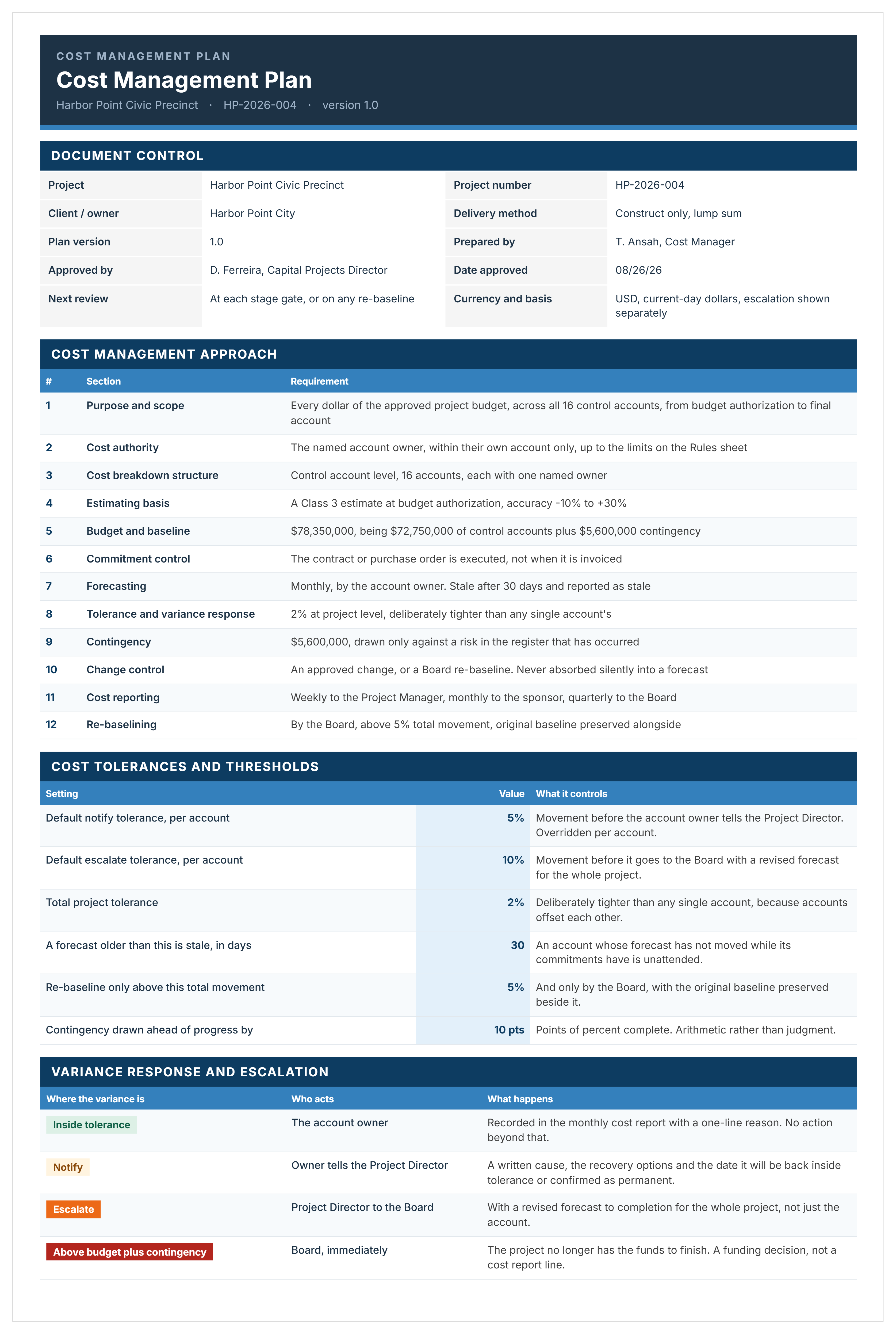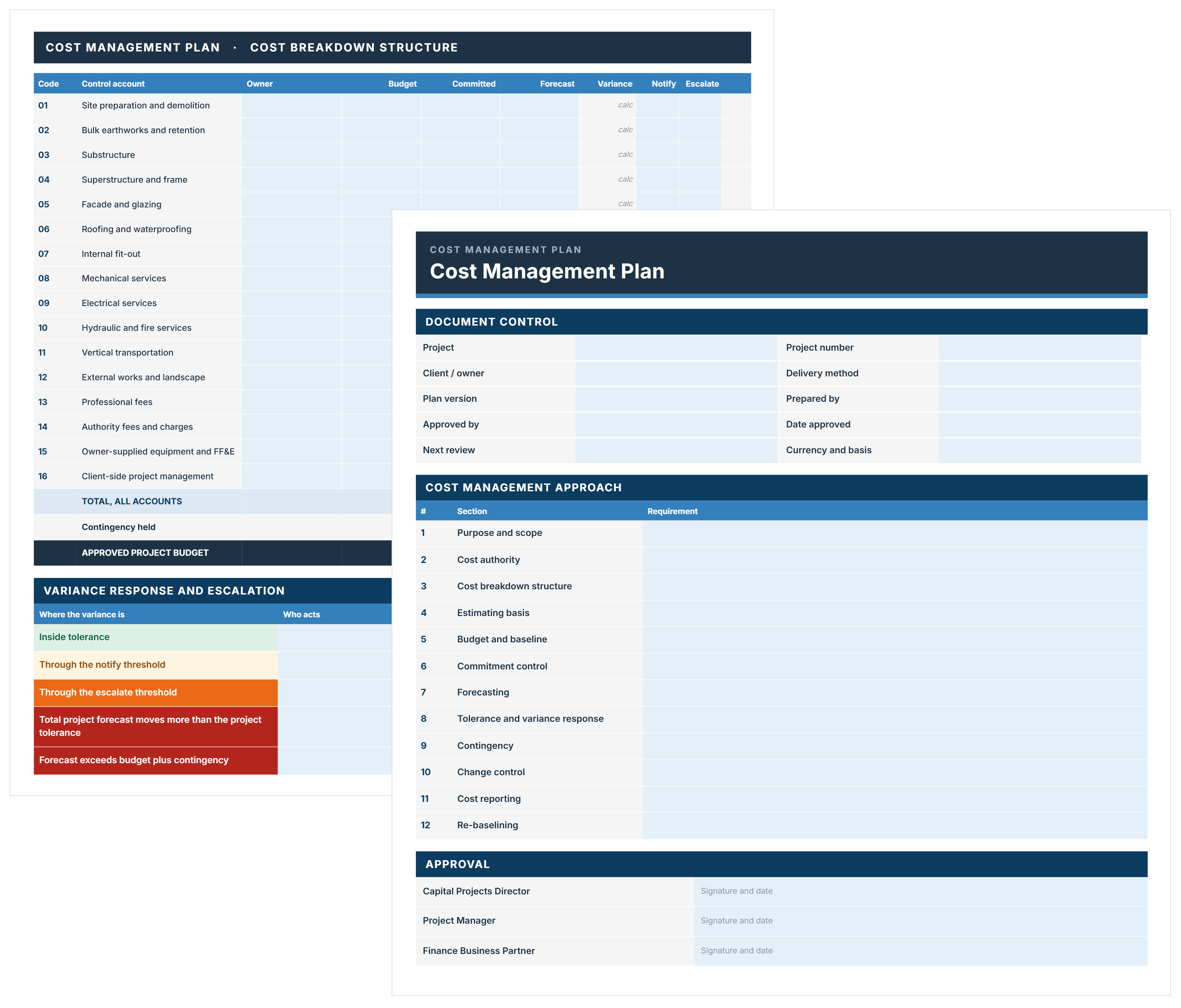
Cost management plan template showing project budget summary and cost breakdown structure.
Free Template

Cost Management Plan Template

Use this FREE cost management plan template to define how project budgets are developed, tracked, controlled, and reported across the full project lifecycle.

Templates
Word Template
Excel Template
Powerpoint Template
Cost Management Plan Template
Template by
Anna Marie Goco
Published:
May 19, 2022

What is a Cost Management Plan Template

A cost management plan template is a pre-structured document that defines how project costs are estimated, budgeted, tracked, and controlled across the project lifecycle. The cost management plan sets clear rules for managing the budget before spending begins.

The project cost management template gives project teams a shared reference for cost decisions, reporting, and approvals. Using a cost management plan helps maintain consistent budget control throughout the project, from planning to delivery.

What’s Included in a Cost Management Plan for Construction Projects

A cost management plan for a construction template outlines the specific controls used to plan, track, and approve project spending. The template focuses on practical project management plan components that guide cost decisions during project delivery.

A well-structured template for a cost management plan typically includes:

  • Budget baseline: The approved total project budget, broken down by phase or cost code, used to measure all spending.
  • Cost codes and work breakdown structure (WBS): The system that links every cost to a specific part of the project, so expenses are tracked correctly.
  • Earned value management (EVM) thresholds: The cost variance level that triggers a management review or formal change.
  • Change control process: The defined steps for requesting, reviewing, approving, and applying cost changes, with clear approval limits.
  • Cost forecasting method: How the team predicts the final project cost based on current spending and remaining work.
  • Contingency and reserve strategy: How contingency and reserve funds are set aside, released, and approved.
  • Reporting frequency and format: How often cost reports are issued, who receives them, and what information they include.
  • Approval authority matrix: Who can approve spending at different dollar amounts, from purchase orders to contract changes.
  • Cost tracking software and systems: The tools used to record actual costs, update forecasts, and produce reports.
  • Indirect cost allocation: How overhead, insurance, and other indirect costs are spread across the project.
  • Escalation and inflation assumptions: The cost increases applied to labor, materials, and services over the project timeline.
  • Procurement and vendor payment terms: The payment rules that affect cash flow, including milestones and retainage.

The cost management template should be specific enough that a new team member can follow it without needing to ask questions. It should also be flexible enough to adapt when market conditions or project scope genuinely change.

Why Use a Template for a Project Cost Management Plan

A project cost management plan template gives project teams a consistent way to control budgets before cost pressure builds. The template removes guesswork by setting clear rules for planning, approving, and tracking costs.

Templates matter for cost management because they:

  • Standardized structure: Everyone follows the same format for everything, which makes cost information easier to compare and trust across projects.
  • Faster setup: Teams start with a proven framework rather than building project cost controls from scratch, even as schedules are already moving.
  • Built-in controls: Approval thresholds, change procedures, and contingency triggers are defined upfront, reducing reliance on judgment calls later.
  • Fewer missed details: A structured template prompts teams to define cost codes, approval authority, and variance thresholds that often get skipped when time is tight.
  • Cross-project consistency: Finance teams, sponsors, and contractors see the same cost formats and approval logic, which speeds up reviews and decisions.
  • Audit-ready records: Cost decisions, changes, and contingency releases are documented clearly, creating a traceable record that holds up under review.
  • Easier handover: New project managers inherit a working cost management system instead of learning through live project mistakes.
  • Stronger stakeholder trust: Owners and sponsors see a disciplined approach to managing money, supported by documented rules rather than informal updates.
  • Scales with complexity: The same template works for small projects and large programs by adjusting detail levels and approval thresholds.
  • Earlier issue visibility: Defined forecasting methods and variance triggers make cost trends visible sooner, while corrective action is still possible.
💡 Pro Tip: Treat the cost management template as a control system. Lock the structure early, then resist changing formats mid-project. Stable cost structures make trends visible and prevent teams from hiding issues inside reworked reports.

How to Use a Template for Cost Management Plan

To use a project cost management plan template, start by setting cost rules early, applying them to real spending decisions, and enforcing them throughout delivery. Project teams customize the template to the project, agree on approvals and thresholds, and then rely on the document whenever costs are committed, changed, or reviewed.

Follow these steps to put a cost management plan template into practice:

  1. Customize the template to the project: Adjust approval limits, reporting cycles, and risk allowances to match the project size, delivery model, and contract structure.
  2. Confirm the budget baseline: Lock the approved budget and cost breakdown before procurement starts so future changes are measured against a clear reference point.
  3. Define approval authority clearly: Assign cost approval limits by role to prevent project delays, workarounds, and unauthorized spending.
  4. Set forecasting and reporting rules: Choose one forecasting method and reporting frequency so trends remain visible and comparable over time.
  5. Align change control with contracts: Match cost change thresholds to contract terms to avoid approving changes that later become disputed.
  6. Connect the template to live cost data: Use the plan alongside cost-tracking tools or an Excel project cost management template, so forecasts reflect actual spending.
  7. Review and enforce the plan consistently: Apply the same rules at every cost review, even when schedules tighten or pressure increases.
💡 Pro Tip: Roll the template out in phases. Start with the budget baseline, cost codes, and approval limits in week one. Add forecasting rules and variance thresholds once early actuals are available. A phased rollout improves adoption and calibrates controls to actual project behavior rather than assumptions.

Generate a Project-Ready Cost Management Plan Template Using Mastt AI

Mastt’s AI Assistant creates a cost management plan template by turning simple chat instructions into a structured, execution ready document. Instead of starting from a blank document, you can use Mastt’s AI to shape the plan through prompts and uploading files.

Here’s how Mastt AI supports cost management plan template creation:

🚀 Generate a template through AI chat: Describe the project type, delivery model, and budget scale, and Mastt AI produces a ready-to-use cost management plan template with defined cost controls and responsibilities.

📂 Upload existing cost plans or standards: Add approved cost management plans, governance manuals, or PDF templates, and the AI assistant aligns structure and control logic with current project requirements.

Refine the template through conversation: Adjust approval thresholds, forecasting methods, reporting cycles, and contingency rules without manually rewriting the document.

📑 Export the cost management plan template in editable formats: Download the completed template in Word or Excel for review, approval, and use alongside live cost tracking.

Creating a cost management plan with Mastt’s AI follows a simple process:

  1. Describe the cost control needs: Enter requests such as “create a cost management plan template for a commercial construction project.”
  2. Refine through conversation: Update cost baselines, approval limits, forecasting rules, and reporting structure until the template reflects how the project will operate.
  3. Export and apply: Download the cost management plan template and use it as the active cost control reference for the project team.

All work is done in a secure workspace. Teams retain control of project information and can update the cost management plan as governance, contracts, or delivery conditions change.

👉 Visit the Mastt Help Center to learn how to create cost management plan templates with Mastt’s AI Assistant.

Mastt's AI Assistant chat interface used to generate project management and cost management plan templates.

Who Should Use a Project Cost Management Plan Template

A template for project cost management plans can be utilized by anyone who makes, reviews, or approves cost decisions during a construction project. The template works best when all parties who influence budget outcomes follow the same cost rules.

The following roles benefit most from a cost management plan for construction projects:

Project managers: Use the template to control spending, manage forecasts, and enforce approval rules without constant escalation.

✅ Cost managers and quantity surveyors: Rely on the template to structure estimates, forecasts, and variance analysis in a consistent way.

Project owners and owner’s representatives: Use the cost management plan to understand how budgets are controlled and how cost decisions are escalated.

✅ Portfolio and program managers: Apply the template across multiple projects to standardize reporting and improve cost visibility.

✅ Finance and commercial teams: Use the plan to align project cost tracking with financial controls, audits, and cash flow requirements.

Contract administrators: Refer to the template when assessing payments and contract changes that affect project costs.

Cost control breaks down when different roles follow different rules. A shared cost management plan template keeps cost decisions aligned across technical, commercial, and financial teams.

When to Implement a Cost Management Plan in Construction

A construction cost management plan should be put in place before spending decisions start locking in risk. The right timing gives teams control while changes are still cheap and approvals are clear.

A project cost management template is most effective when implemented at the following points:

  • Project initiation: Define cost rules, approval limits, and reporting cycles before budgets are finalized and commitments begin.
  • Governance and setup: Align the cost management plan with project governance so authority levels and controls are clear from day one.
  • Before design development: Establish cost controls before design decisions drive scope and long-term cost exposure.
  • Ahead of procurement: Lock the budget baseline and approval process before issuing tenders or negotiating contracts.
  • At delivery handover: Reconfirm the plan when transitioning from planning into construction, when spending accelerates.

Cost plans lose value when introduced after contracts are signed or costs are already underway. Early implementation turns cost control into a proactive process rather than a reaction to overruns.

Common Problems with Free Cost Management Plan Templates in Excel

Free cost management plan templates downloaded online often fail once projects move beyond early planning. Generic templates in Excel or Word usually assume simple approval flows, flat budgets, and static forecasts. This doesn’t match how construction costs change during design, procurement, and delivery.

Common challenges with free, downloadable cost management plan templates include:

⚠️ Too generic for real projects: Free templates are designed to suit everyone, which means approval rules, cost structures, and controls rarely match project realities.

⚠️ Weak cost governance: Many Excel and Word templates lack clear approval limits or change thresholds, leaving teams to make judgment calls under pressure.

⚠️ Version control issues: Cost management plan templates in Excel often circulate across email, creating conflicting versions and unclear sources of truth.

⚠️ Manual errors and broken formulas: Editable spreadsheets rely on manual updates, increasing the risk of formula errors, overwritten data, or inconsistent assumptions.

⚠️ Poor alignment with contracts: Generic templates rarely match contract terms, leading to approved costs that later become disputed.

⚠️ Limited forecasting support: Free templates often track actuals but fail to support reliable forecasting or early trend detection.

⚠️ Hard to scale or reuse: Downloadable online templates work for small jobs but break down across larger projects or programs.

⚠️ Disconnected from live data: Excel-based plans sit outside accounting and procurement systems, forcing reconciliation and delaying visibility.

💡 Pro Tip: If using a free Excel or Word template, lock approval rules and cost structures immediately and restrict editing rights. Controlling who can change the file reduces version drift and protects the integrity of cost decisions.

Take Control of Project Costs With Mastt AI

Cost overruns rarely come from a single decision. They build up when approvals are unclear, forecasts are inconsistent, and cost changes are handled informally. Without a defined cost management plan, teams lose visibility just when financial risk is increasing.

Mastt’s AI helps teams generate cost management plans that reflect real approval limits, budget controls, and reporting cycles. The plan becomes an active reference for budget decisions, forecasting, and change control rather than a document created once and ignored.

👉 Create your cost management plan template with Mastt’s AI Assistant and keep project costs under control.

FAQs About Cost Management Plan Template

A cost management plan is not always legally required, but many owners, lenders, and public sector clients expect one. The plan helps demonstrate how budgets will be controlled, approved, and reported throughout delivery.
Yes, a project cost management plan template should be customized for each project. Approval limits, cost structures, and reporting cycles need to reflect project size, delivery model, and risk profile.
Free templates can help with basic setup, but many are too generic for construction delivery. They often lack clear approval rules, forecasting logic, and controls needed once spending increases.
Word is often used for governance and approvals, while Excel supports cost tracking and forecasting. Many teams use both, linking a written cost management plan template to live cost data.
The template should be reviewed whenever approval authority, reporting needs, or project risks change. Keeping the plan current ensures cost decisions stay aligned with how the project is actually managed.
Topic: 
Cost Management Plan Template

Written by

Anna Marie Goco

Anna is a seasoned Senior Content Writer at Mastt, specialising in project management and the construction industry. She leverages her in-depth knowledge to create valuable content that helps professionals in these fields. Through her writing, she contributes to the company's mission of empowering project managers and construction professionals with practical insights and solutions.

LinkedIn Icon
Back to top

Frequently Asked Questions

More Templates

Supercharging Construction Project Management with AI Powered Tools