

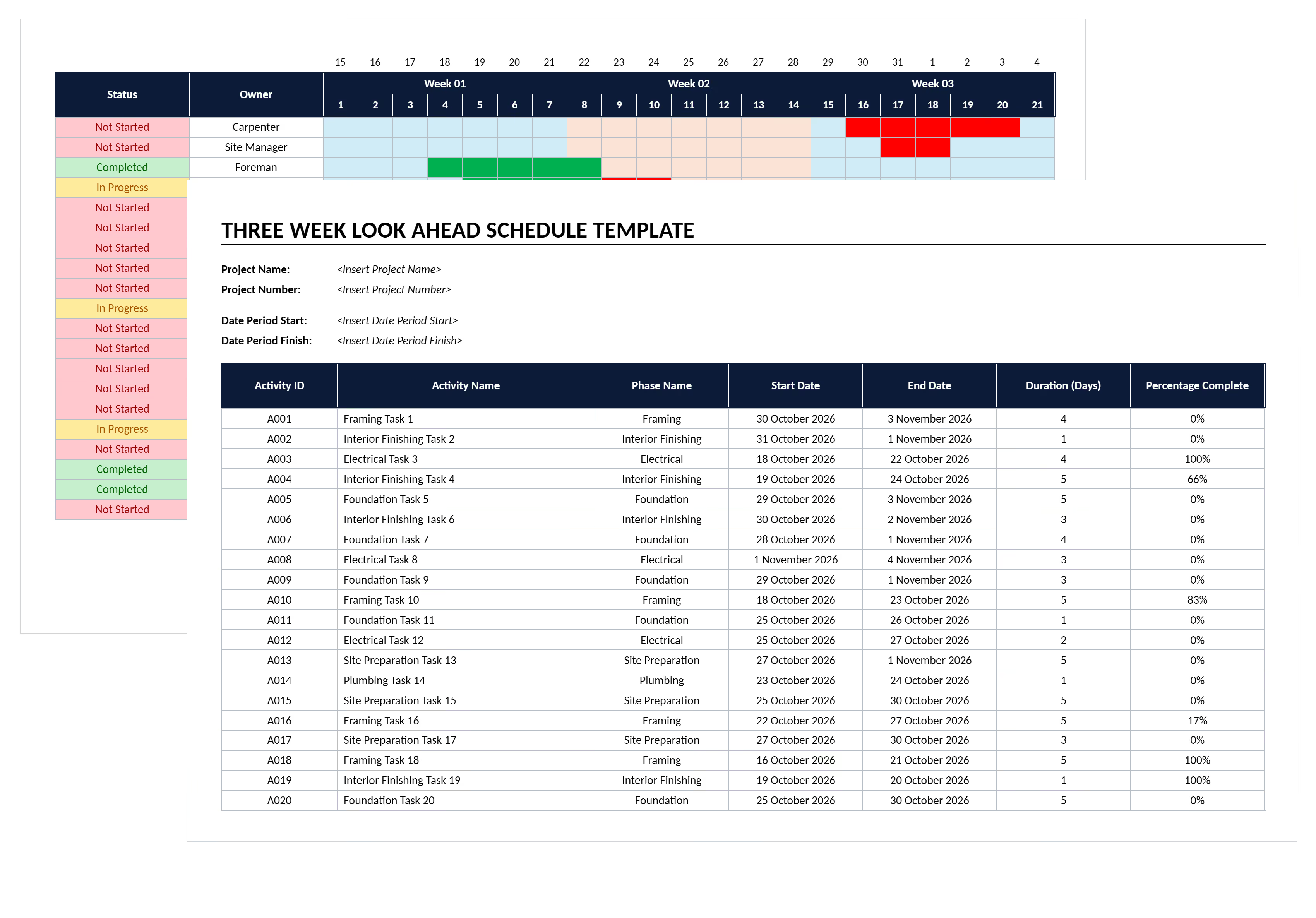

What is a 3 Week Look Ahead Template?
A 3 week look ahead template is a short-term project scheduling document forecasting construction activities over the next 21 days. It provides tactical detail beyond what master schedules show. The format maintains enough planning horizon to coordinate trades and resolve constraints proactively.
Construction teams commonly manage 3 week look ahead schedules in Excel files with weekly columns. Superintendents track task breakdowns, crew assignments, and material deliveries. Most prefer a 3 week look ahead template Excel format over specialized software for quick updates. The template bridges high-level project timelines and daily execution huddles.
Project superintendents update the schedule weekly, typically during Monday coordination meetings. As one week completes, it rolls off while a new third week adds to the planning window.
What's Included in Construction 3 Week Look Ahead Template?
A 3 week look ahead construction schedule contains tactical work planning fields organized by week and day. Each component provides visibility into crew deployment, material timing, and constraint identification needed for coordinated execution.
Standard elements in construction 3 week look ahead schedules include:
- Week breakdown: Three weekly sections with date ranges, typically Monday through Sunday, showing rolling 21-day windows.
- Task descriptions: Activities broken down from master schedules into executable work packages assigned to specific crews.
- Responsible parties: Crew assignments identifying which foreman, subcontractor, or trade partner owns each activity.
- Duration tracking: Start dates, end dates, and estimated man-days showing resource intensity for each task.
- Constraint identification: Columns flagging material shortages, permit delays, inspection requirements, or weather dependencies blocking work.
- Dependency mapping: Predecessor tasks and sequencing logic ensuring trades don't interfere with each other.
- Status indicators: Progress tracking showing not started, in progress, or complete for each activity.
- Daily resource totals: Labor hour summaries by day helping superintendents plan crew deployment across the site.
💡 Pro Tip: Link every task back to your master schedule with activity IDs. This connection prevents work from falling through cracks when the look ahead rolls forward weekly.
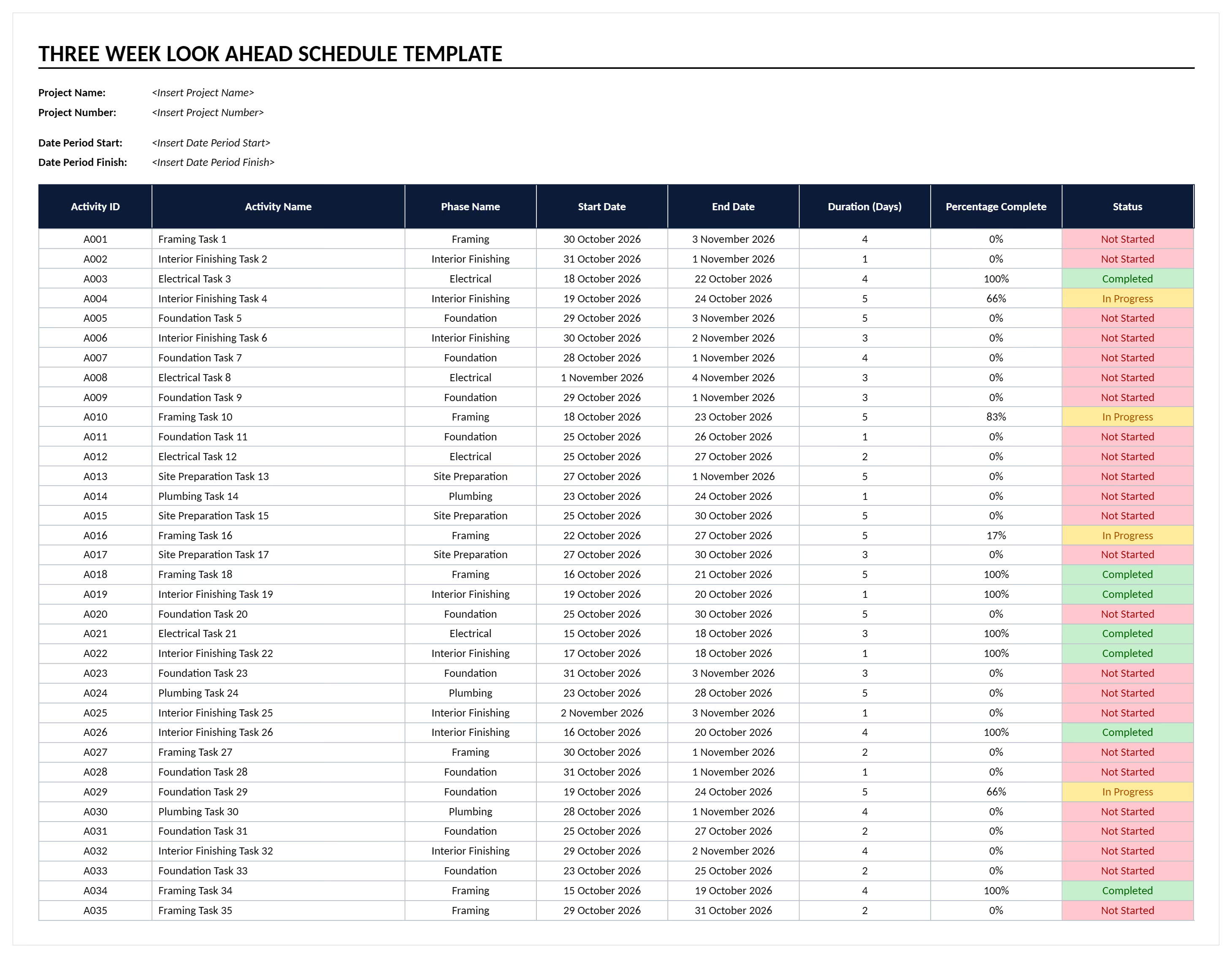
Why Use 3 Week Look Ahead Templates for Projects?
Three week planning windows provide enough lead time to coordinate subcontractors while remaining detailed enough for tactical execution. The template prevents coordination failures that delay projects when trades show up unprepared or materials arrive at wrong times.
Short-term scheduling templates strengthen project delivery through:
- Improved trade coordination: Weekly planning meetings align subcontractors on upcoming work. Crews avoid arriving when others occupy the space.
- Proactive constraint removal: Identifying material shortages three weeks ahead gives teams time to resolve issues before work stops.
- Enhanced resource allocation: Superintendents see daily labor requirements across the planning window. They deploy crews where actually needed.
- Better material coordination: Suppliers receive advance notice for deliveries. Materials arrive when crews are ready to install.
- Reduced schedule slippage: Breaking master schedule activities into weekly tasks makes progress tracking easier. Project delays become visible immediately.
- Increased accountability: Trade partners commit to specific weekly work during coordination meetings. These documented promises create expectations.
- Streamlined inspection scheduling: Knowing work completion timing three weeks ahead allows inspectors to schedule without causing delays.
Teams using weekly look ahead planning complete projects faster than those managing day-to-day reactively. The difference lies in anticipating coordination needs rather than resolving conflicts after they occur.
How to Use 3 Week Look Ahead Templates in Excel
Using a 3 week look ahead template Excel format effectively requires systematic weekly updates. Incorporate field feedback and adjust for actual progress. Start by populating the template with activities pulled from your master schedule. Then refine weekly based on constraints and completion rates.
Follow these steps to maximize 3 week look ahead template effectiveness:
- Extract activities from master schedule: Identify tasks scheduled to start within the next three weeks. Break them into daily or weekly work packages.
- Assign trade responsibilities: Designate which foreman, subcontractor, or crew owns each activity. Ensure every task has clear accountability.
- Identify constraints immediately: Flag materials not yet delivered, permits pending approval, or inspections requiring scheduling. Address these before work can proceed.
- Sequence work logically: Arrange tasks so trades don't interfere with each other. Respect dependencies between electrical, mechanical, and finishing work.
- Hold weekly coordination meetings: Gather all trades working in the next three weeks. Review progress, update the schedule, and assign new commitments.
- Update based on field reality: Adjust durations, sequences, and resource needs based on what actually happened versus what was planned.
- Roll the window forward: As week one completes, remove it from the schedule, shift weeks two and three forward, and add a new third week.
- Maintain constraint logs separately: Track who's responsible for removing each constraint. Document when it must be resolved to keep work flowing.
💡 Pro Tip: Schedule your coordination meeting for Monday mornings before trades mobilize. This timing ensures everyone starts the week aligned on priorities and constraint status.
Who Should Use Rolling 3-Week Construction Schedules?
Short-term scheduling formats serve construction professionals managing tactical coordination across multiple trades and subcontractors. Rolling look ahead schedules ensure everyone works from current plans rather than outdated master schedules.
✅ Project Superintendents: Coordinate daily crew deployment, manage trade sequencing, and resolve constraints before they cause delays.
✅ General Contractors: Align subcontractor schedules, track commitment reliability, and maintain accountability for weekly work promises.
✅ Project Managers: Monitor short-term execution against master schedule milestones, identifying when tactical delays threaten strategic deadlines.
✅ Foremen and Trade Partners: Understand upcoming work requirements, plan material orders, and coordinate crew availability across overlapping activities.
✅ Subcontractors: See when general contractors need specific trades on site, enabling capacity planning and preventing idle crews.
✅ Project Schedulers: Translate master schedule outputs into tactical formats field teams actually use for daily coordination and progress tracking.
✅ Project Owners: Gain visibility into near-term work activity, plan site visits, and verify project momentum matches master schedule commitments.
When to Use 3 Week Look Ahead Construction Schedule Template
Deploy three week planning formats whenever project complexity requires coordinating multiple trades simultaneously. The template becomes essential during construction phases where daily sequencing mistakes cause expensive delays and rework.
Critical moments for 3 week look ahead scheduling include:
- Construction phase kickoff: Establish tactical coordination rhythm before trades begin working, preventing coordination failures during early mobilization.
- High-density activity periods: Apply detailed weekly planning when multiple trades occupy the same space, requiring precise sequencing to avoid conflicts.
- Critical path activities: Use look ahead schedules for work directly affecting project completion, ensuring constraints get removed before delays cascade.
- Milestone approach phases: Deploy three week windows during the final push toward substantial completion when small delays threaten handover dates.
- Complex MEP coordination: Implement tactical scheduling when mechanical, electrical, and plumbing trades install simultaneously, requiring precise sequence control.
- Fast-track project delivery: Apply rolling schedules when compressed timelines demand tight coordination between design completion and construction execution.
- Subcontractor-heavy projects: Use weekly planning when managing eight or more trade partners who must sequence work without interfering.
Teams following Lean Construction methodologies apply look ahead schedules as the "Make-Ready Planning" phase within Last Planner System (LPS) workflows. This positions the three week window between phase pull planning and weekly work commitments.
💡 Pro Tip: Start using look ahead schedules two weeks before major trade stacking occurs. This lead time establishes coordination habits before the complexity hits.
Common Problems with Generic Look Ahead Templates in Excel
Free downloadable 3 week look ahead template Excel spreadsheets and basic Word documents create coordination problems that undermine short-term planning effectiveness. Generic PDF formats lack the project-specific structure needed for actual field coordination across construction trades.
Typical challenges with manual 3 week scheduling templates:
⚠️ Version control chaos: Multiple Excel files circulate via email with different activity lists, leaving teams working from conflicting schedules.
⚠️ Outdated immediately: Static spreadsheets require manual updates every week, falling behind actual progress within days after coordination meetings.
⚠️ Formula errors destroy accuracy: Complex Excel calculations break when rows get added or deleted, creating incorrect resource totals nobody catches until crews show up wrong.
⚠️ No real-time collaboration: Team members can't edit simultaneously, forcing sequential updates that delay schedule distribution to trade partners.
⚠️ Generic structure mismatches: Free Word and PDF downloads contain activities unrelated to your trades, requiring extensive reformatting before use.
⚠️ Disconnected from master schedules: Standalone Excel templates don't link to Primavera P6 or Microsoft Project, forcing manual transcription that introduces mistakes.
⚠️ Limited mobile access: Spreadsheets stored on desktop computers prevent field access, leaving superintendents without current schedules during site coordination.
⚠️ Lost constraint tracking: Basic templates lack structured fields for documenting who owns each constraint and when removal must occur.
Teams relying on downloadable Excel look ahead templates spend four to six hours weekly on manual updates and reformatting. This administrative burden consumes time superintendents should spend coordinating trades and solving field problems.
💡 Pro Tip: If you must use Excel templates, establish strict file naming with dates and save to shared drives. Version "LookAhead_2024-11-18.xlsx" prevents teams from using last week's schedule accidentally.
Best Practices for 3 Week Look Ahead Scheduling
Effective tactical planning requires disciplined weekly updates and active trade partner participation. Following proven practices transforms look ahead schedules from paperwork exercises into genuine coordination tools.
☑️ Update religiously every week: Hold coordination meetings the same day and time weekly, making schedule updates predictable and building commitment habits.
☑️ Involve actual last planners: Include the foremen and crew leaders who execute work, not just project managers, ensuring commitments come from people doing the work.
☑️ Focus on constraints first: Begin coordination meetings by identifying what's blocking upcoming work, then assign responsibility and deadlines for removal.
☑️ Link tasks to master schedule: Maintain activity ID connections between look ahead details and master schedule milestones, preventing tactical work from drifting off strategy.
☑️ Track commitment reliability: Measure Percent Plan Complete (PPC) by counting how many promised tasks actually finish, using data to improve planning accuracy.
☑️ Keep detail appropriate: Break activities into work requiring one to three days, avoiding micro-scheduling that becomes impossible to maintain.
☑️ Document decisions immediately: Record constraint ownership and removal commitments during meetings, not afterward when details fade from memory.
☑️ Distribute schedules same day: Send updated look ahead schedules to all trades within hours of coordination meetings while information stays current.
💡 Pro Tip: Photograph site conditions during weekly walks before coordination meetings. These images help trades visualize sequencing when discussing upcoming work during planning sessions.
.avif)
Written by
Jamie Cerexhe
A Forbes 30 Under 30 and PMI Future 50 honoree, Jamie Cerexhe is Mastt's co-founder and Chief Technology Officer. He leads the company's AI engineering, agentic pipelines, and security work, and earlier taught software development and contributed to the UNESCO Digital Skills Toolkit. At Mastt, Jamie contributes articles on AI, agentic workflows, and technology adoption in construction.

Use this FREE 3-week look-ahead template to bridge master schedules and daily work. Coordinate trades, sequence subcontractors, and identify constraints three weeks ahead.

Top Performers Don’t Guess. They Deliver.
Cut the stress of showing up unprepared
Start for FreeTrusted by the bold, the brave, and the brilliant to deliver the future