


What is a Capital Project Dashboard?
A capital project dashboard is a purpose-built reporting tool that consolidates budgets, schedules, and risks for large, high-value projects into one clear view. It turns detailed project data into visuals that make performance easy to track and share.
Unlike generic dashboards, a capital project dashboard is built for the demands of capital projects. It connects financials, milestones, and governance requirements to provide transparent oversight from planning to closeout.
What’s Included in a Capital Project Dashboard?
A capital project dashboard brings together the critical information needed to manage delivery, finances, and risks on complex projects. Instead of scattered reports, it presents the essentials in one structured view that is easy to interpret.
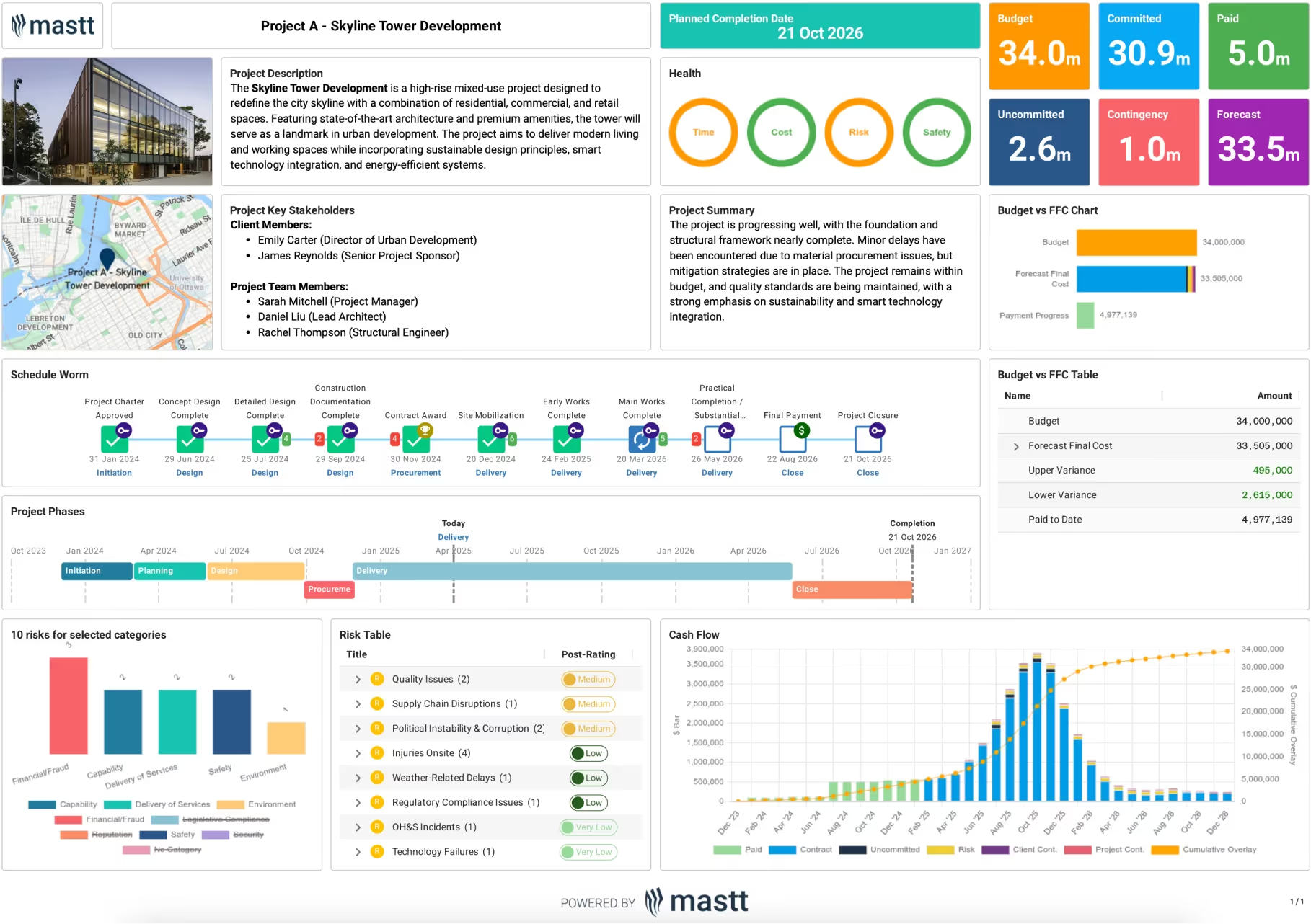
Key components of a capital project dashboard typically include:
- Project overview: A summary of the project description, objectives, and key stakeholders.
- Completion date: A prominently displayed target date for delivery.
- Health indicators: Visual status on time, cost, risk, and safety performance.
- Financial breakdown: Budget, committed spend, paid-to-date amounts, uncommitted funds, contingency, and forecast final cost.
- Budget vs. forecast charts: Side-by-side comparisons showing variances and payment progress.
- Schedule and milestones: A timeline of major approvals, contract awards, construction phases, and closeout activities.
- Project phases tracker: A high-level view of initiation, planning, design, procurement, delivery, and closure stages.
- Risk overview: Charts and tables showing top risks, likelihood, and mitigation measures.
- Cash flow chart: A time-phased view of payments, commitments, uncommitted costs, and cumulative spend.
💡 Pro Tip: The most effective capital project dashboards don’t just display figures. They should also integrate cost, schedule, and risk data to ensure that any change automatically updates the overall picture.
Why Use a Capital Project Dashboard?
Capital projects demand rigorous oversight because they involve large budgets, long timelines, and strict governance requirements. A dashboard for capital project provides a reliable way to keep all of those moving parts aligned by consolidating information into one connected view.
With a capital project dashboard, project teams can:
- Improve visibility: Gain a clear view of budgets, schedules, and risks without piecing together multiple reports.
- Streamline reporting: Replace manual spreadsheets with automated charts that refresh as project data changes.
- Support governance: Maintain an auditable record of approvals, costs, and risk updates to meet compliance standards.
- Detect issues early: Identify delays, budget pressures, or emerging risks before they impact delivery.
- Align stakeholders: Ensure owners, managers, and contractors work from the same live data across the project lifecycle.
A capital project dashboard is most powerful when it becomes part of the governance framework. Embedding it into monthly reporting cycles or board reviews ensures stakeholders always make decisions based on live, verified data.
How to Use a Capital Project Dashboard
To use a dashboard for a capital project effectively, start by setting it up with accurate baseline data and then make it part of your regular reporting cycle.
Here’s how to make capital project dashboards effective:
- Select key areas to track: Focus on the essentials for capital projects, such as budget position, cash flow, milestone progress, and top risks.
- Set the baseline: Enter approved budgets, contract values, risk registers, and milestone dates. These benchmarks create the reference point for tracking performance.
- Assign responsibility: Decide who will maintain updates on financials, schedules, and risks so that information remains accurate.
- Update regularly: Refresh the dashboard at key points such as monthly governance reviews, funding checkpoints, or stage gates.
- Use drill-downs: Explore data by work package, phase, or location to uncover the drivers behind overall performance.
- Adapt as the project evolves: Add new KPIs, refine categories, or adjust visuals as the scope and reporting needs change.
💡 Pro Tip: In capital projects, dashboards work best when they mirror governance structures. Linking updates to board cycles or investor reviews ensures stakeholders always see the most current and relevant data.
Get the Best-Fit Capital Project Dashboard with Mastt AI
Capital projects generate substantial volumes of financial, schedule, and risk data, that can quickly overwhelm traditional reporting methods. Mastt’s AI Dashboard Creator solves this by creating a tailored capital project dashboard that organizes everything in one clear view.

When to Use a Capital Project Dashboard
A capital project dashboard is most effective at the major checkpoints that shape how projects are funded, governed, and delivered. It provides the clarity stakeholders need when decisions carry the most significant impact.
You’ll get the most impact when using the capital project dashboard during:
- Early project planning and feasibility: Present baseline budgets, schedules, and risks before funding commitments are made.
- Board and investor approvals: Demonstrate financial position and delivery readiness to secure confidence and backing.
- Stage gates and governance reviews: Supply directors and executives with live data to guide progress into the next phase.
- Contract awards and changes: Show how procurement outcomes and scope changes affect budgets and timelines.
- Risk escalation and compliance checks: Provide evidence of risk controls and audit-ready records when scrutiny is highest.
- Portfolio and program reviews: Compare performance across multiple capital projects to inform resourcing and strategy.
- Contract closeout and final reporting: Capture financial, contractual, and risk outcomes for lessons learned and future planning.
💡 Pro Tip: Treat the project dashboard as the single reference point during all major reviews so every decision is grounded in the same, consistent data.
Common Problems with Manual Capital Project Dashboards
Relying on spreadsheets, Word documents, or static PDFs to manage capital projects often creates blind spots. These tools aren’t built for the scale of capital delivery, and they rarely provide the real-time insight needed for governance and oversight.
⚠️ Scattered files: Budgets in Excel, schedules in separate documents, and risk registers in PDFs make it hard to bring everything together.
⚠️ Slow updates: Manual entry across spreadsheets means data is already outdated by the time reports are shared.
⚠️ No detail behind the numbers: Static dashboards in PowerPoint or PDF formats can’t connect top-level KPIs back to contracts, milestones, or risks.
⚠️ Inconsistent formats: Different teams track information in their own ways, making portfolio-level comparisons unreliable.
⚠️ Lack of accountability: When multiple versions of the same spreadsheet circulate, it’s unclear which one reflects the truth.
💡 Pro Tip: For capital projects, even small reporting gaps can undermine governance and investor confidence. Moving to a connected dashboard reduces those risks by ensuring data is current, traceable, and consistent across the entire project lifecycle.
Managing Capital Projects at Scale with Mastt
Capital projects operate at a scale where manual tools like Excel, Word documents, and PDFs simply can’t keep pace. With budgets often in the hundreds of millions and delivery timelines stretching over years, even small reporting delays can erode confidence with boards, funders, and regulators.
Mastt is built for this scale. Our capital project management software connects budgets, contracts, risks, and schedules in one live platform. Mastt removes version issues and gives leaders real-time insights when decisions matter most.

Written by
Jackson Row
Jackson Row joined Mastt's founding North American team in 2023, implementing the platform for US government agencies and Fortune 500 organizations. He holds a Bachelor of Engineering in civil and mining engineering from UNSW and began his career as a construction cadet on civil projects in Sydney. At Mastt, he contributes articles on payment and client-side project management.

Use this FREE Capital Project Dashboard Template to oversee large-scale projects with confidence. Track budgets, schedules, risks, and compliance in one connected report.

Top Performers Don’t Guess. They Deliver.
Cut the stress of showing up unprepared
Start for FreeTrusted by the bold, the brave, and the brilliant to deliver the future