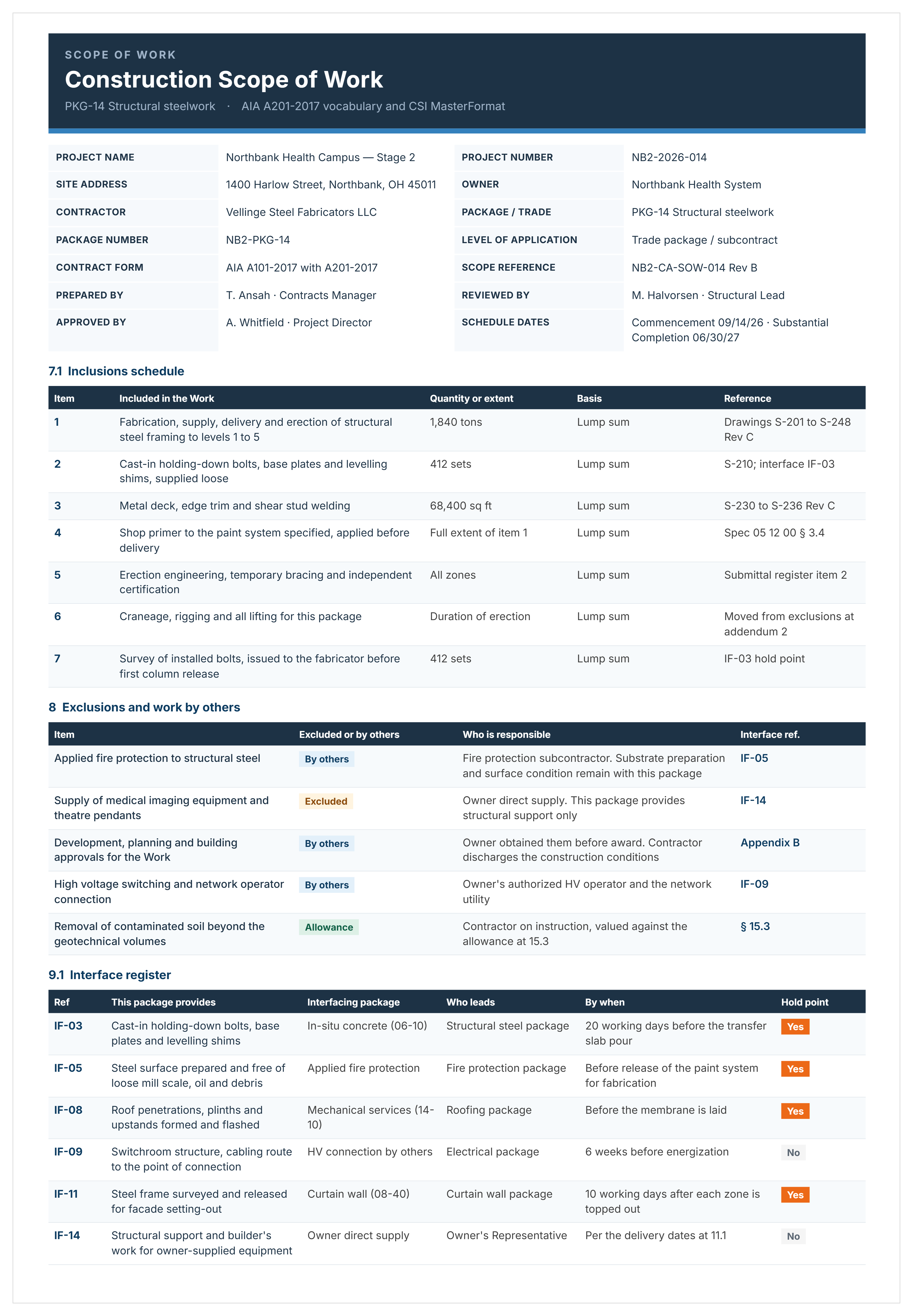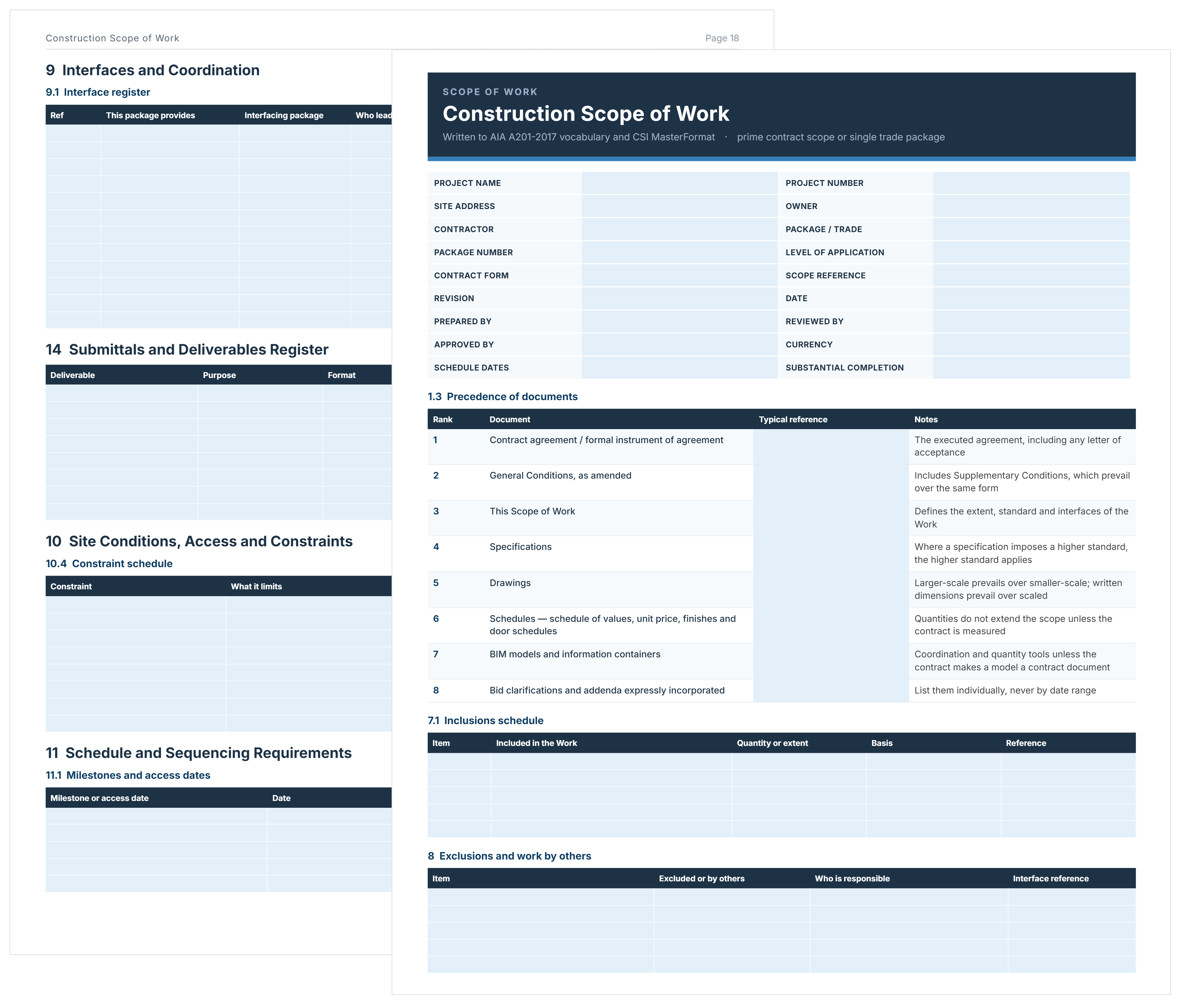
What is a Construction Scope of Work Template?
A construction scope of work template is a structured document that defines all tasks, deliverables, and responsibilities a contractor must complete. Project managers use it to set clear expectations before contracts or purchase orders are issued. It ensures every party understands the project scope, limits, and required outcomes.
The construction SOW template includes sections for project requirements, inclusions, exclusions, and performance standards. It may also outline technical specifications, milestones, site conditions, and quality criteria. These details keep construction documents, contractor bids, and approvals aligned under one clear framework.
By stating exactly what’s in or out of scope, the template helps prevent disputes and manage costs. Project teams use it to verify payments, control change orders, and ensure contract compliance. This makes construction delivery more transparent, consistent, and efficient across all stages.
What's Included in a Scope of Work Template for Construction?
A scope of work template in construction includes predefined sections that capture all project inclusions in detail. These sections outline the work, materials, and deliverables contractors must provide, ensuring nothing required is overlooked.
Here's what a professional construction SOW templates include:
- Project Information: Location, owner details, project type, contract value, and delivery timeline
- Detailed Work Requirements: Specific tasks, construction activities, and methods contractors must perform
- Technical Specifications: Material standards, performance criteria, code compliance, and quality requirements
- Deliverables and Submittals: Warranties, as-built drawings, testing reports, O&M manuals, and training documents
- Exclusions Framework: Clear statements of work outside the contractor’s responsibility
- Site Conditions and Constraints: Access limits, working hours, utilities, and coordination requirements
- Acceptance and Testing Criteria: Measurable standards for inspections and payment approval
- Schedule and Milestones: Completion deadlines, key dates, and coordination timeframes
💡 Pro Tip: The most effective templates include prompts or examples in each section. Questions like “What materials are not allowed?” or “What existing conditions affect this work?” help ensure complete and accurate documentation.
Why Use a Construction Scope Template?
A construction scope template helps contractors and project teams avoid omissions that lead to costly rework and disputes. It provides a clear, structured format for documenting every inclusion, assumption, and exclusion before bid submission or contract award.
Using a standardized scope template offers several practical advantages during bidding and contract preparation:
- Prevents Costly Omissions: Comprehensive checklists ensure no critical work items are missed during bid development. Even one overlooked item can turn a profitable bid into a loss.
- Saves Time: Prebuilt formatting saves 3-5 hours per scope document, allowing estimators to focus on pricing accuracy and content quality.
- Improves Consistency: Standardized layouts make bids easier for owners to review and compare, building client confidence and organizational credibility.
- Provides Legal Protection: Built-in exclusions and assumption fields reduce scope creep and help defend against claims for undocumented work.
- Reduces Errors: Prompted fields remind users to complete all required sections, preventing incomplete or inconsistent submissions.
For example, a contractor using a structured construction scope of work template can submit accurate, polished bids faster across multiple projects. This consistency strengthens client trust, improves internal reviews, and reduces the risk of disputes after contract execution.
💡 Pro Tip: Maintain different scope templates for residential and commercial projects. Residential templates emphasize finish selections, while commercial templates focus on MEP coordination and technical compliance.
How to Use a Construction SOW Template?
Using a construction project scope of work template involves completing each section with project-specific details to create clear, comprehensive documentation for contractors. Follow these steps to use the template effectively:
- Select the Right Template Version: Choose residential, commercial, or specialty templates matching your project type and complexity level.
- Complete Project Information: Fill in location, owner details, contract type, and project value in the header section.
- Define Specific Work Items: Populate the work description section with project-specific tasks, breaking down by trade or phase.
- Specify Materials and Standards: Document exact materials, manufacturers, grades, and quality standards required for your project.
- Set Qualification Standards: Record licenses, certifications, insurance, and other contractor qualifications.
- List All Deliverables: Identify submittals, tests, warranties, as-built drawings, and closeout documents.
- Detail Critical Exclusions: Use the exclusions section aggressively to state what's not included, protecting against scope assumptions.
- Clarify Site Assumptions: Document assumptions about site conditions, access, utilities, and factors affecting work execution.
- Include Schedule Information: Add project duration, milestone dates, sequencing requirements, and any time-sensitive conditions.
- Review for Completeness: Check every template section is addressed before issuing to owners or subcontractors for pricing.
💡 Pro Tip: Populate the exclusions section first, before defining what's included. This forces you to think about potential gaps and assumptions upfront rather than treating exclusions as an afterthought.
Create Your Construction Scope of Work Template with Mastt AI
Mastt AI generates construction scope of work documents in seconds, eliminating the manual work of formatting Word files or building Excel spreadsheets from scratch. Here's what you can do with Mastt AI:
🚀 Generate scope documents instantly: Create structured documents in Word or Excel covering work requirements, deliverables, exclusions, and acceptance criteria automatically.
📂 Customize for your project: Adapt content for residential, commercial, or infrastructure contracts through conversational AI guidance in your preferred format.
⚡ Upload existing drafts: Import preliminary Word docs or Excel spreadsheets and let AI organize, reformat, or enhance them into professional contractor documents.
📑 Export in contractor-ready formats: Download your construction scope of work template Word or Excel file, then convert to PDF using free online converters if needed.
🎯 Refine through conversation: Adjust sections, add project-specific requirements, or modify language until the document matches your needs perfectly.
Mastt AI applies construction industry knowledge to structure your scope documents, ensuring comprehensive coverage of contractor requirements and obligations.
Here's how to get started:
- Describe your project needs: Type requests like "create a commercial construction scope of work for HVAC package in Word" into the Mastt AI chat.
- Customize with AI: Adjust work items, exclusions, deliverables, or technical requirements through natural conversation until the document is complete.
- Export your document: Download the finished construction scope of work template Word or construction scope of work template Excel file ready to issue to contractors.
Every conversation stays private and secure within your Mastt workspace. You control document creation, customization, and distribution with complete confidence.
👉 Learn more in the Mastt Help Center and start creating professional scope documents today.

Who Should Use a Scope of Work Construction Template?
A scope of work construction template is essential for construction professionals responsible for defining contractor requirements, managing project delivery, or administering contracts.
These roles rely on scope templates:
✅ Project Managers: Define contractor deliverables, establish scope baselines, and coordinate requirements across multiple contract packages throughout project delivery.
✅ Project Owners: Set clear expectations for what contractors must deliver and evaluate whether bids address all required work comprehensively.
✅ Contract Administrators: Issue contracts with documented requirements, process scope changes, and resolve disputes using the original scope as reference.
✅ PMO Leaders: Standardize how scope is documented across project portfolios ensuring consistent requirements definition and quality control.
✅ Construction Managers: Coordinate technical requirements between trades and ensure contractors understand how their work interfaces with other packages.
✅ Procurement Specialists: Issue standardized scope documents to contractors during competitive bidding ensuring all proposals address identical requirements.
✅ General Contractors: Review owner-issued scopes to understand requirements and create detailed sub-scopes when procuring subcontractors for trade packages.
✅ Asset Managers: Document operational requirements, maintenance obligations, and handover deliverables contractors must provide beyond project completion.
When to Use a Construction Scope of Work Template?
A construction scope of work template should be deployed at specific project phases where documented requirements prevent disputes and enable accurate contractor pricing.
Use the template at these critical project moments:
- Early Design Phases: Start defining scope during design development for residential or commercial projects to identify requirement gaps while changes remain inexpensive.
- Pre-Procurement Planning: Prepare comprehensive templates before issuing bid invitations ensuring all contractors receive identical requirement documentation.
- Competitive Bidding: Issue standardized templates to multiple contractors enabling direct proposal comparison across identical scope definitions.
- Negotiated Contracts: Use templates during contractor negotiations to document agreed requirements, exclusions, and performance standards clearly.
- Design Completion: Finalize scope templates when construction documents are complete to capture all technical requirements contractors must meet.
- Contract Package Breakdown: Create separate templates for each trade package on commercial or infrastructure projects defining boundaries between scopes.
- Scope Change Evaluation: Reference the original template when contractors request additional payment to determine whether work was included initially.
- Subcontractor Procurement: General contractors use templates to define sub-trade requirements on residential, commercial, or specialty construction projects.
- Progress Payment Reviews: Compare completed work against template requirements when authorizing contractor payment applications throughout delivery.
- Project Closeout: Verify contractors delivered all template requirements including warranties, documentation, and training before final payment.
💡 Pro Tip: For phased projects, update and reissue the template at each phase boundary. Scope creep often occurs between phases when requirements aren't explicitly redefined for continuing contractors.
Common Problems with Construction Scope of Work Templates in Excel and Word
Excel and Word construction scope templates create operational challenges that impact requirement clarity and contract administration, especially when relying on free downloadable versions.
Manual templates introduce these costly problems:
⚠️ Version Control Failures: Word files get edited by multiple team members creating numerous versions without clear authority on current requirements.
⚠️ Missing Critical Sections: Free downloadable templates from generic sources lack construction-specific sections for exclusions, site conditions, or acceptance criteria.
⚠️ Time-Consuming Setup: Even with free Excel downloads, customizing templates for project-specific needs consumes 3-5 hours per contract package.
⚠️ Collaboration Bottlenecks: Emailing PDF files between reviewers prevents simultaneous editing and creates approval delays when multiple stakeholders need input.
⚠️ Lost Template Files: Downloaded templates disappear in email threads or network folders with no centralized repository for team access.
⚠️ Limited Reusability: Free templates aren't easily searchable or adaptable, forcing teams to download and recreate documents for each new project.
⚠️ Static PDF Limitations: Converting finalized Word documents to PDF for distribution makes subsequent updates difficult when scope requirements change.
💡 Pro Tip: If you're using Word or Excel templates, create a master version stored in a shared drive with clear version control. Make copies for each project rather than editing the master directly.
Simplify Your Construction Scope Documentation with Mastt AI
Manual scope template development drains project management time while introducing requirement gaps that contractors exploit through claims. Mastt AI generates comprehensive construction scope of work templates in seconds with the structure and clarity that prevent disputes and protect budgets.
Stop wrestling with Word files and Excel spreadsheets that create version control problems across your team. Create professional scope documents that contractors understand, stakeholders approve, and your projects actually need.
👉 Start creating construction scope of work templates with Mastt AI today and eliminate the manual work slowing your procurement process.