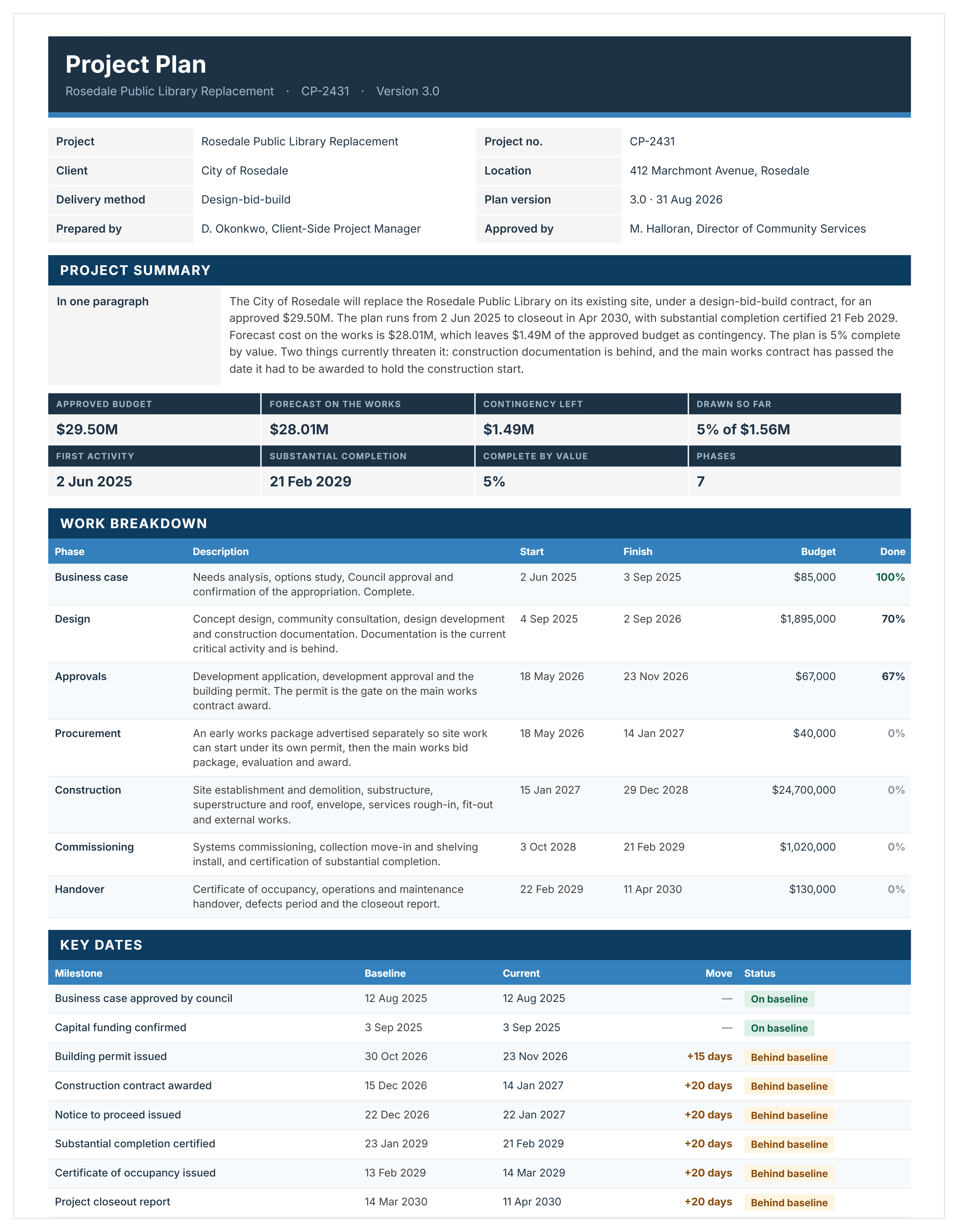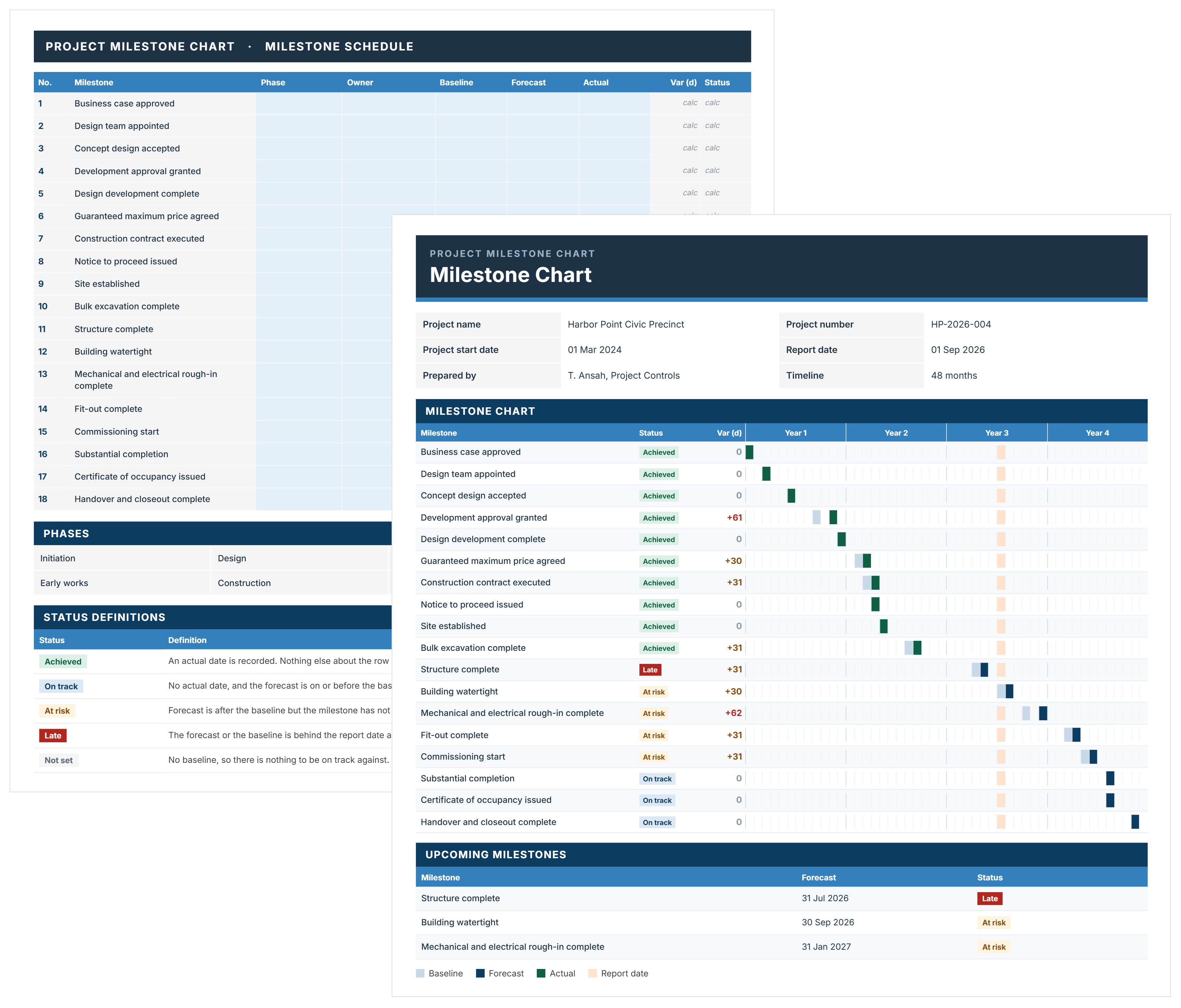
Construction project plan template showing project overview, goals, duration, and stakeholder roles.
Free Template

Project Plan Template

Use this FREE project plan template to define scope, roles, timelines, and controls before construction activities begin.

Templates
Word Template
Excel Template
Powerpoint Template
Project Plan Template
Template by
Doug Vincent
Published:
Apr 19, 2024

What is a Project Plan Template

A project plan template is a pre-structured planning document that defines how construction projects will be delivered, managed, and controlled from initiation through completion. The planning template sets out the project scope, objectives, roles, governance structure, and control processes before work begins.

In construction, a project plan gives teams a shared planning structure from the outset. The format supports coordinated decision-making and clear project plan visualization across cost, schedule, and risk.

What’s Included in a Construction Project Plan Template

A project plan template for construction brings together the full set of project management plan components required to control delivery from day one. The document focuses on how decisions are made, who owns each control, and how performance is tracked across the project lifecycle.

Here’s what a construction project plan template typically includes:

  • Project overview: Defines the purpose, success criteria, and high-level constraints in a format that stakeholders can review quickly.
  • Scope definition: Documents what is included, excluded, and assumed to prevent scope drift once procurement or construction begins.
  • Governance and roles: Sets decision authority, escalation paths, and accountability across the owner, project manager, consultants, and contractors.
  • Project plan visualization: Maps key milestones, phases, and dependencies so teams understand how the project moves from project planning to completion.
  • Schedule framework: Establishes milestone logic, approval points, and reporting cycles without locking teams into an early detailed program.
  • Cost management approach: Defines budgets, cost tracking methods, approval thresholds, and change control rules tied to real project data.
  • Risk and issue management: Identifies known risks, assigns ownership, and documents how risks are tracked, reviewed, and escalated.
  • Communication and reporting: Specifies who reports what, how often, and in which format to avoid informal updates and missed decisions.
  • Document control: Specifies where project records live, who can edit them, and how versions are managed across teams.

Each section should link directly to how the project will be run day to day, including who signs off, when reviews occur, and what triggers action. Leaving approval limits or review cycles vague almost always leads to delays once construction pressure builds.

Why Use a Template for a Project Plan

A project plan template gives project teams a consistent way to plan project delivery without starting from a blank page. The structure helps teams focus on decisions, controls, and responsibilities rather than formatting documents.

Here’s why experienced teams rely on project planning templates:

  • Faster project setup: A ready-to-use project planning template shortens early planning by removing repetitive drafting work.
  • Clear ownership from day one: Defined roles and approval paths reduce confusion once cost and schedule pressure increase.
  • Stronger cost and schedule control: Standard sections force early agreement on budgets, milestones, and reporting cycles.
  • Fewer gaps in planning: A basic project plan template prompts teams to address risk, change, and governance that are often overlooked.
  • Easier collaboration across parties: A shared project plan template creates a common reference point for owners, contractors, and consultants.
  • More reliable reviews and approvals: Consistent structure makes reviews faster and reduces back-and-forth caused by missing information.

Teams with experience know that most project issues trace back to weak planning, not poor execution. Using a project plan template creates discipline around decisions that are hard to fix later. Skipping or rushing planning often shifts effort into firefighting during construction.

How to Use a Project Plan for Construction Template

To use a project plan template effectively, start by completing the project overview and governance sections first. Those sections define decision authority, approval limits, and reporting expectations before scope, schedule, or cost details are finalized.

Here’s a practical way to use a construction project plan template effectively:

  1. Start with the project overview: Define objectives, constraints, and success measures using a structure everyone agrees on.
  2. Confirm scope boundaries: Clearly state inclusions and exclusions to avoid later debate during procurement or construction.
  3. Assign governance and authority: Name decision-makers, approval limits, and escalation paths before contracts are signed.
  4. Set milestone and reporting rules: Establish how progress will be tracked and how the project plan visualization will be shared with stakeholders.
  5. Define cost and change controls: Document budget structure, change thresholds, and approval timing to protect cost certainty.
  6. Align risk and issue management: Agree on how risks are reviewed, who owns mitigation actions, and when issues escalate.
  7. Review and validate with key parties: Walk through the completed template with delivery teams, not just leadership, to confirm the plan reflects real workflows.

Teams often treat a project plan as a one-time exercise. In practice, the document should stay active throughout the project, with updates tied to formal reviews or stage gates. Informal edits and side agreements quickly weaken the value of the plan.

Generate a Project Plan Template Using Mastt AI

Mastt’s AI Assistant builds a project plan template from your chat request, turning it into a structured, ready-to-use planning document. Instead of drafting sections manually, teams describe how the project will be planned, governed, and controlled, and the AI shapes the template around those inputs.

Here’s how Mastt’s AI supports project plan template creation:

🚀 Generate a project plan template through AI chat: Describe the project setup, and AI produces a structured project plan template with defined roles and control points.

📂 Upload existing plans or standards: Add approved project plans and governance manuals, and the AI aligns structure and planning logic to match internal standards.

Refine template content through conversation: Adjust approval rules, reporting cycles, cost controls, and escalation paths without manually editing a project plan template.

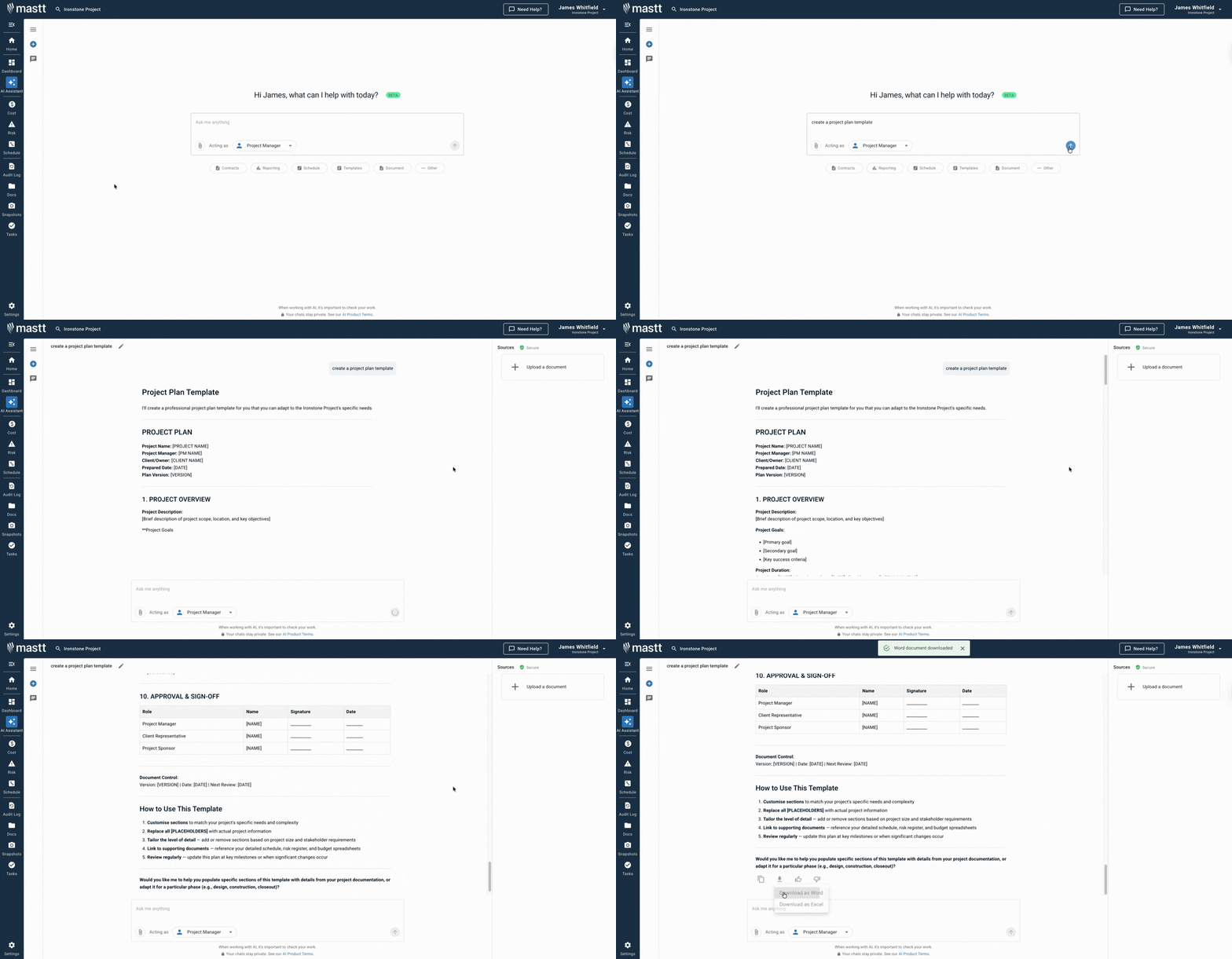
📑 Export the project plan template in editable formats: Download the completed project plan template in Word or Excel for review, approval, and ongoing project use.

Creating a project plan template with Mastt’s AI Assistant follows a clear workflow:

  1. Describe the project need: Enter requests such as “create a construction project plan template for a commercial building or infrastructure project.”
  2. Refine planning rules through chat: Update governance roles, approval thresholds, reporting cadence, and project plan visualization until the template reflects how the project will operate.
  3. Export and apply the template: Download the project plan template in Excel or Word and use it as the team's active planning reference.

All interactions occur in a secure workspace controlled by the project team. Project data remains private and stays within the project environment.

👉 Visit the Mastt Help Center to learn how to create and refine project plan templates using Mastt’s AI Assistant.

Mastt AI Assistant interface used to generate and manage construction project plan templates.

Who Should Use Construction Project Plan Templates

Project plan templates for construction are best suited for people responsible for scope decisions, cost control, scheduling, and approvals on active projects. The template works when owners, project managers, and delivery teams operate under the same planning and governance rules from the start.

A project plan for construction is especially useful for:

Project owners and developers: Define delivery expectations, approval authority, and reporting requirements before contracts are executed.

Project managers: Translate scope, cost, and schedule requirements into clear controls that guide daily decision-making.

Construction managers: Coordinate sequencing, milestones, and responsibilities across multiple trades and work packages.

✅ Design managers and consultants: Align design deliverables with project milestones, approvals, and budget constraints.

Contract administrators: Apply consistent change, payment, and approval processes tied to the project plan.

✅ Portfolio and program managers: Standardize planning controls across multiple building or infrastructure projects.

Teams that involve all decision-makers during project planning reduce friction later. The document works best when every role understands not only responsibilities but also where authority begins and ends.

When to Implement a Project Plan

A project plan should be put in place before decisions start affecting contracts, budgets, or delivery commitments. The right timing creates clarity early, when changes are still cheap, and control is easiest.

Use a project plan at the following points:

  • Project setup: Define governance, roles, and planning rules before procurement or consultant engagement begins.
  • Early design development: Lock scope boundaries and approval paths while design choices still shape cost and schedule.
  • Pre-procurement: Align packaging strategy, milestones, and decision authority before issuing tenders or RFPs.
  • Contract execution: Ensure all parties operate under the same planning and approval rules from day one.
  • Major scope or funding changes: Reconfirm governance and controls when project conditions shift materially.
💡 Pro Tip: Finalize the project plan before issuing any contract with pricing exposure. Once commitments are made, planning documents lose leverage and become hard to enforce.

Common Challenges With Free Project Plan Templates in Word

Many teams download a simple project plan template and assume the planning work is done. Problems usually surface once real approvals, changes, or cost decisions appear.

Common issues with free, generic templates include:

⚠️ Too simple for real governance: Basic project plan templates rarely include clear approval limits, role authority, or escalation rules.

⚠️ Fragmented formats: Mixing project plan templates in Word, Excel, and PDF creates gaps between planning assumptions and live controls.

⚠️ Uncontrolled edits: Free project plan template in Word files gets duplicated and changed without visibility, leading to conflicting versions.

⚠️ Static and hard to maintain: Project plan templates in PDF format discourage updates when scope, budget, or delivery conditions change.

⚠️ Surface-level completeness: Generic templates look finished but fail to hold up when tested against real change or dispute scenarios.

💡 Pro Tip: Treat any free or downloadable project plan template as a draft. Validate every approval and reporting rule against a real project scenario before relying on the document.

Simplify Project Planning with Mastt

Strong project outcomes depend on clear planning rules that define scope, authority, and controls before delivery pressure sets in. Projects that struggle often lack a shared plan for how decisions, changes, and risks will be managed.

With Mastt’s AI, teams generate a complete project plan template in minutes instead of assembling documents section by section. Describe the project setup, and the AI produces a structured, construction-ready project plan aligned to governance, cost, and schedule needs.

👉 Try Mastt’s AI Assistant and create a project plan template that supports clear decisions and controlled delivery.
FAQs About Project Plan Template

A project plan template defines how the project will be managed and controlled, while a schedule shows when work activities occur. Construction teams use the project plan to guide decisions and the schedule to track progress.
A free project plan template in a Word file can work for early planning or small projects, but larger projects usually need more defined governance and controls. Generic templates often require significant modification to suit complex delivery environments.
The level of detail should match the size and risk of the project. The template should be detailed enough to guide approvals and reporting, without locking the team into decisions that are not yet confirmed.
Yes. A building project plan template often requires different controls than infrastructure or program-level projects. Using one generic template across all project types can create gaps in governance and approval authority.
Approval should occur before procurement or contract execution begins. Once pricing or scope commitments are made, changes to planning rules become difficult to enforce.
Topic: 
Project Plan Template

Written by

Doug Vincent

Doug Vincent is the co-founder and CEO of Mastt.com, leading the charge to revolutionize the construction industry with cutting-edge project management solutions. With over a decade of experience managing billions in construction projects, Doug has seen the transformative power of the industry in building a better future. A former program manager, he’s passionate about empowering construction professionals by replacing outdated processes with innovative, AI-driven tools. Under his leadership, Mastt serves global clients, including governments, Fortune 500 companies, and consultants, delivering solutions that save time, enhance visibility, and drive efficiency. Doug also mentors entrepreneurs and shares insights on LinkedIn and YouTube.

LinkedIn Icon
Back to top

Frequently Asked Questions

More Templates

Supercharging Construction Project Management with AI Powered Tools