

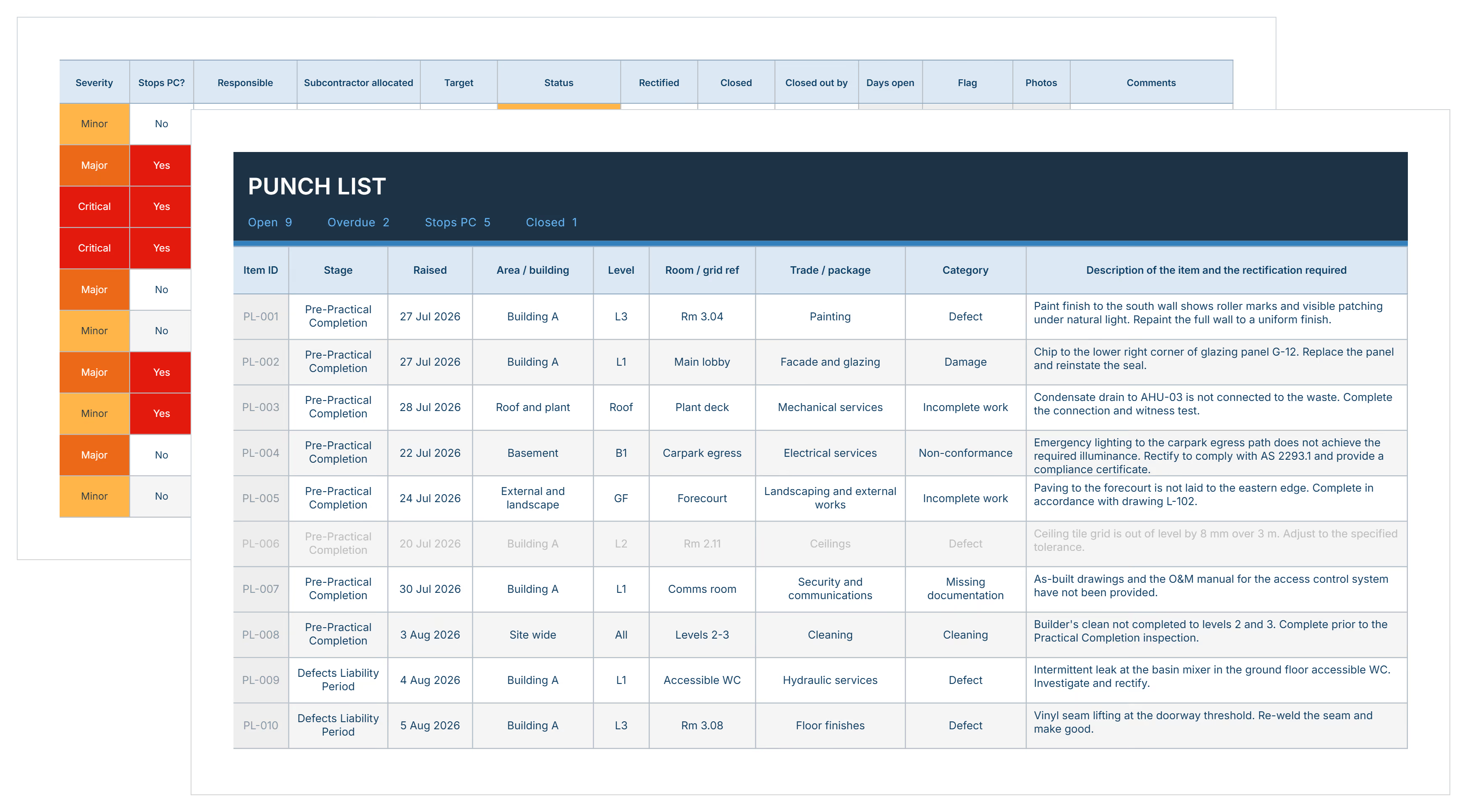

What is a Construction Punch List Template?
A punch list template is a pre-formatted document contractors use to record incomplete or defective work requiring correction before project closeout. It provides ready-made columns for item descriptions, locations, responsible parties, due dates, and completion status.
Punch list templates organize final inspection findings into trackable formats. General contractors document work not conforming to contract specifications. Project owners review lists before releasing retainage payments typically held at 5-10% of contract value.
The punch list creates accountability between owners, architects, and contractors during final walkthroughs. It transforms verbal observations into written records that prevent payment disputes at substantial completion.
What's Included in Construction Punch List Templates?
A construction punch list template captures every detail needed to document, assign, and verify completion of remaining work items. Each field ensures nothing gets overlooked during project handover to owners.
Standard components most punch list templates include:
- Item Number: Sequential identifier tracking each deficiency for reference in communications and documentation.
- Location Details: Specific room, floor, or area where work needs correction, preventing confusion across large sites.
- Work Description: Clear explanation of what requires fixing, from paint touch-ups to non-functional HVAC systems.
- Trade Responsible: Subcontractor or specialty contractor assigned to correct the item, ensuring accountability.
- Priority Level: High, medium, or low designation indicating which items block certificate of occupancy versus cosmetic fixes.
- Due Date: Completion deadline aligned with project closeout schedule and owner occupancy requirements.
- Status Tracking: Current progress from "Not Started" through "In Progress" to "Complete" with verification dates.
- Photo Documentation: Space for attaching images showing deficiencies and completed corrections for dispute resolution.
- Notes Field: Additional context about materials, specifications, or coordination requirements affecting the correction.
💡 Pro Tip: Add a "blocks CO" column to immediately identify items preventing certificate of occupancy. Building inspectors won't issue occupancy permits until life-safety items are resolved, regardless of cosmetic work remaining.
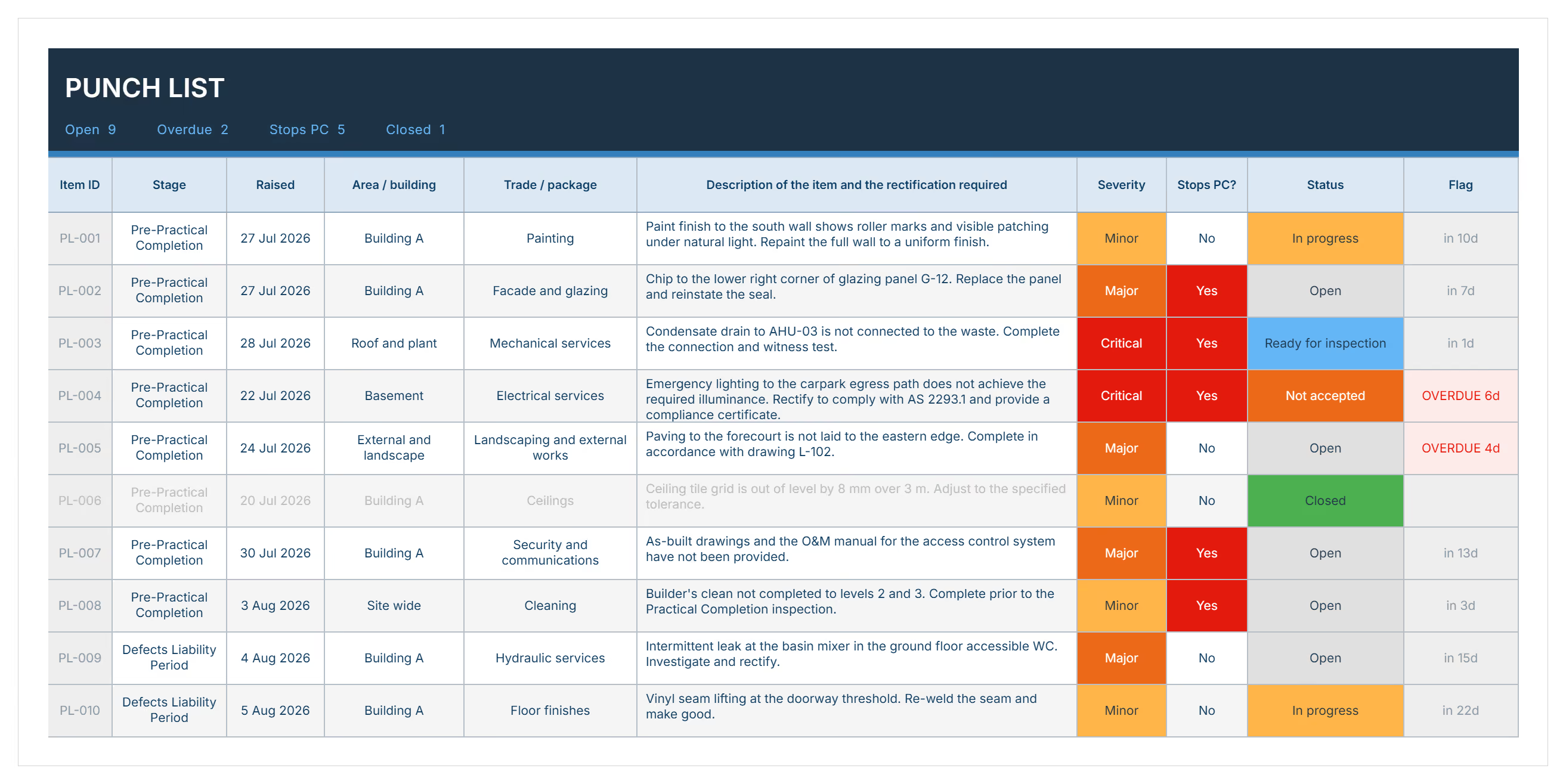
Why Use a Punch List Construction Template?
Using a punch list construction template prevents the documentation chaos that delays final payment and project handover. Consistent formats eliminate the miscommunication causing contractors and owners to argue about completion standards.
Templates for construction punch list protect project delivery through:
- Faster retainage release: Clear completion documentation helps owners process final payments within contract timelines instead of withholding funds indefinitely.
- Reduces payment disputes: Written records of agreed-upon deficiencies prevent claims that items were "never mentioned" during walkthroughs.
- Coordinates multiple trades: Subcontractors see exactly which items belong to them, eliminating finger-pointing over responsibility.
- Tracks completion progress: Status updates show how close the project is to final acceptance without chasing verbal confirmations.
- Supports occupancy permits: Building inspectors review organized lists faster than scattered notes, accelerating certificate of occupancy approvals.
- Creates audit trails: Dated completion records protect contractors if owners claim work wasn't finished before taking possession.
- Prevents scope creep: Defined lists stop owners from adding new work disguised as punch items without change orders.
- Improves team efficiency: Standardized formats eliminate time wasted reformatting spreadsheets for each project closeout.
Consider a contractor managing closeout on three concurrent projects. Without a punch list template, each uses different formats creating confusion. With consistent documentation, teams process items faster and collect final payments sooner.
How to Use a Punch List Template?
Using a punch list template effectively requires systematic completion during final walkthroughs and consistent updates as corrections occur. The process transforms inspection observations into actionable work assignments that drive project completion.
Follow these steps for effective punch list deployment:
- Schedule the final walkthrough: Coordinate the inspection with owner, architect, and general contractor once substantial completion is claimed.
- Inspect systematically by area: Walk through each space methodically rather than jumping randomly between locations to avoid missing items.
- Document every deficiency immediately: Record items in the template during the walkthrough while observations are fresh and context is clear.
- Assign trade responsibility: Identify which subcontractor must correct each item and verify their contact information for notifications.
- Set realistic deadlines: Establish completion dates allowing reasonable time for material procurement and coordination without excessive delays.
- Prioritize critical items: Flag work blocking certificate of occupancy or owner move-in separately from cosmetic corrections.
- Distribute to all parties: Share the completed template with owner, architect, general contractor, and affected subcontractors immediately after walkthrough.
- Update status regularly: Mark items complete as work finishes and require photo verification before removing items from tracking.
- Conduct verification walkthrough: Schedule final inspection confirming all items meet specifications before requesting retainage release.
💡 Pro Tip: Conduct an internal pre-punch walkthrough 2 weeks before the owner inspection. Fix obvious items before architects and owners see them, reducing the official list length and demonstrating quality commitment.
Who Should Use a Contractor Punch List Template?
A punch list template serves construction professionals managing project closeout across all delivery phases. It ensures systematic progress tracking regardless of project size or complexity.
✅ General Contractors: Coordinate final corrections across multiple subcontractors while maintaining documentation for retainage release and owner approval.
✅ Project Managers: Track completion status against schedules, ensuring certificate of occupancy deadlines are met without surprises.
✅ Subcontractors: Receive clear assignments showing exactly which items require correction before final payment release from general contractors.
✅ Project Owners: Document work not meeting specifications before releasing final payments or taking building occupancy.
✅ Architects and Designers: Verify work matches approved construction drawings and specifications during certification of substantial completion.
✅ Construction Managers: Oversee closeout quality across multiple concurrent projects with consistent documentation standards.
✅ Construction Superintendents: Manage daily correction work and coordinate trade access for final finishing tasks.
✅ Residential Builders: Present professional documentation to homeowners showing attention to detail and commitment to quality delivery.
When to Use a Project Punch List Template?
Make sure to use a punch list template at specific milestones when formal deficiency documentation becomes necessary for closeout progression. Timing affects how effectively the format controls completion quality.
Deploy punch list during these critical phases:
- Substantial completion milestone: When projects reach the threshold where owners can occupy buildings despite minor remaining work.
- Pre-final inspection scheduling: Two weeks before owner walkthroughs to capture internal corrections needed before official review.
- Certificate of occupancy applications: When building department inspections require documented correction plans for permit approval.
- Phased turnover events: On multi-building projects where completed sections transfer to owners while other areas continue construction.
- Rolling punch list adoption: Throughout construction phases when teams address deficiencies continuously rather than accumulating items until closeout.
- Final walkthrough coordination: During scheduled inspections with owners, architects, and building officials documenting remaining work.
- Retainage release requests: When contractors formally request final payment and need documented proof of completion compliance.
- Warranty period commencement: At project handover establishing baseline conditions for future defect disputes during warranty periods.
💡 Pro Tip: Start your punch list template during rough-in inspections for a zero punch list approach. Document items immediately when discovered rather than waiting until final walkthrough, preventing massive lists that delay closeout.
Challenges with Free Punch List Templates in Excel and Word
Free downloadable punch list templates in Excel, Word, or generic online formats create tracking problems as projects progress toward closeout. Static documents can't adapt to the coordination complexity large projects demand.
Typical issues undermining closeout effectiveness:
⚠️ Limited customization options: Generic free formats include irrelevant fields while missing project-specific columns like permit compliance flags.
⚠️ Version control chaos: Multiple team members download separate Excel copies, creating conflicting lists with unknown current status.
⚠️ No photo integration: Word documents and basic spreadsheets lack embedded image capabilities, forcing separate photo management.
⚠️ Poor subcontractor coordination: Free formats don't notify responsible trades when items are assigned, requiring manual emails.
⚠️ Calculation errors in Excel: Manual formulas for completion percentages break when rows are added or deleted.
⚠️ Printable PDF limitations: Static downloadable PDFs work for distribution but can't be edited without complete recreation.
⚠️ Missing priority indicators: Generic online formats lack visual priority coding to identify items blocking occupancy permits.
⚠️ No completion verification: Free Word formats don't require photo proof before marking items complete.
⚠️ Difficult filtering and sorting: Basic spreadsheets struggle handling hundreds of items across multiple trades.
💡 Pro Tip: If relying on free Excel templates, lock the header row and create dropdown lists for status fields. This prevents accidental deletions and ensures consistent data entry across all users updating the template.
Best Practices for Punch List Management
Effective punch list management requires disciplined execution beyond simply filling out templates. Experienced project teams apply these proven methods that transform closeout from crisis management into controlled delivery:
☑️ Conduct internal reviews first: Walk the project with your own team 1-2 weeks before owner inspections, fixing obvious items before architects document them.
☑️ Photograph everything immediately: Take timestamped photos during walkthroughs showing both deficiencies and completed corrections for dispute protection.
☑️ Assign single-point responsibility: Designate one person managing the master list, preventing duplicate entries and conflicting status updates across team members.
☑️ Set aggressive but realistic deadlines: Allow adequate time for material delivery and coordination while maintaining urgency that drives prompt completion.
☑️ Prioritize occupancy-critical items: Separate life-safety and code compliance items from cosmetic work, focusing resources on certificate of occupancy requirements first.
☑️ Require verification walkthroughs: Don't accept verbal confirmations that items are complete - physically verify each correction meets specifications.
☑️ Update status daily during closeout: Maintain current completion tracking during the final 30 days when punch work accelerates significantly.
☑️ Communicate completion to all parties: Notify owners, architects, and building officials promptly when critical items are resolved, accelerating approval processes.
☑️ Document owner-requested additions: When owners identify new work during walkthroughs, clearly mark these as potential change orders requiring contract amendments.
Accelerate Project Closeout with Mastt AI
Every construction project concludes with final corrections bridging substantial completion to final payment release. The difference between smooth handovers and extended closeout battles often traces back to documentation quality.
With Mastt's AI, you generate comprehensive formats in minutes rather than hours. Describe your closeout requirements, and AI builds customized documentation ready for final walkthroughs and owner approvals.
👉 Create your punch list template with Mastt's AI Assistant today and accelerate the path from substantial completion to final payment release.

Written by
Jefbeck Eje
Jefbeck is an SEO Specialist at Mastt who creates optimized content for the construction project management industry. Focused on delivering accurate and actionable insights, Jef combines SEO expertise with industry knowledge to enhance visibility, build authority, and drive engagement. His work ensures Mastt remains a trusted resource for construction professionals seeking reliable information.

Use this FREE punch list template to track incomplete work and secure final payment. Download customizable formats in Word or Excel for professional project closeout documentation.

Top Performers Don’t Guess. They Deliver.
Cut the stress of showing up unprepared
Start for FreeTrusted by the bold, the brave, and the brilliant to deliver the future