


What is a Report Template?
A report template is a pre-structured document that sets out the sections a report needs, so each new report starts from a working format rather than a blank page. It fixes the order, the headings and the numbering, leaving you to write the content.
The value is consistency because a reader who receives reports in the same structure every time knows where to find the summary, where the findings sit, and where the recommendations are. Reports written from scratch each time bury those in different places, and readers stop looking.
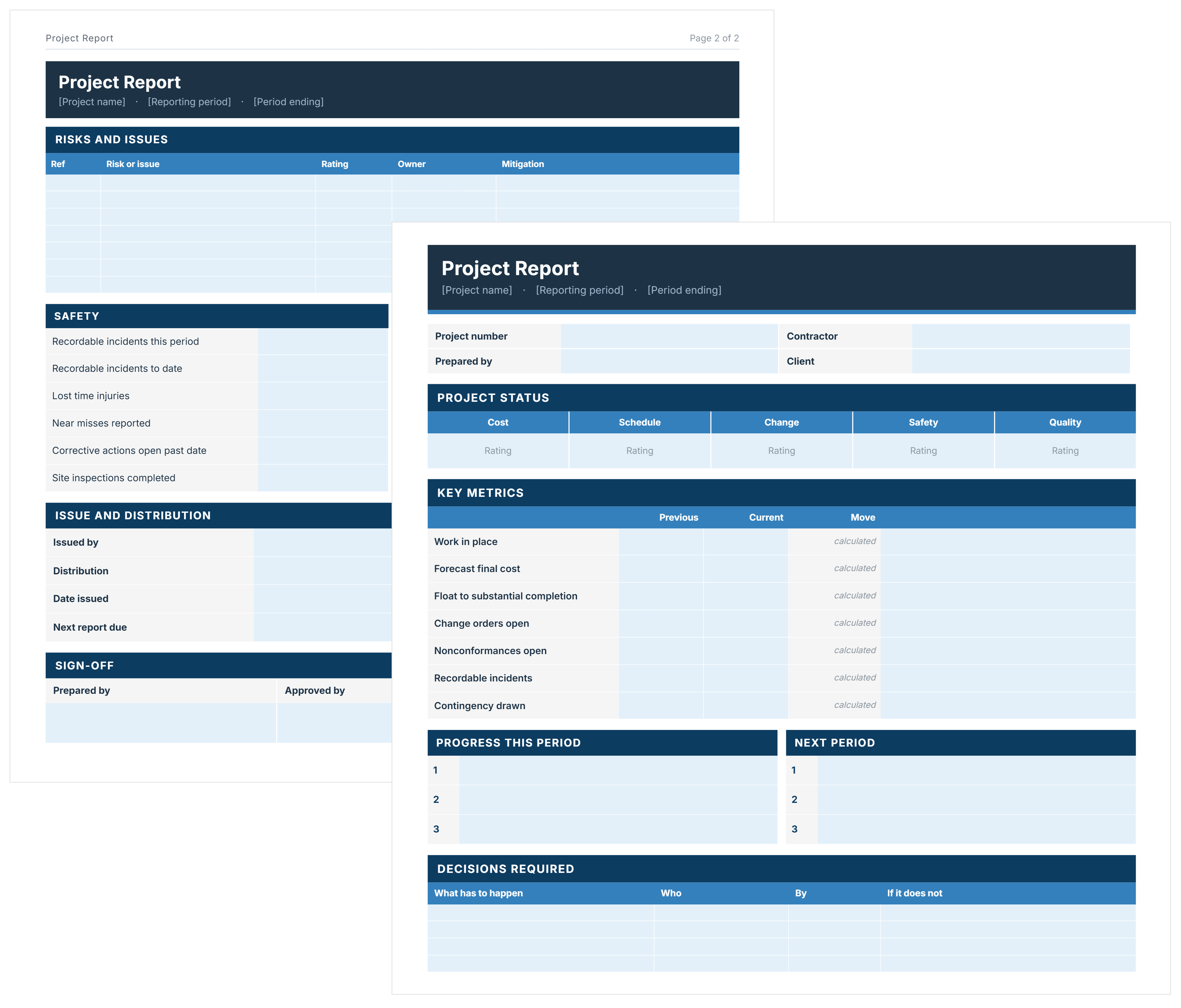
Specific report types have their own structure. Our Project Report Template adds status ratings, cost position and decisions required, and the Monthly Report Template in Word fixes the reporting cycle.
Report Format in Word: The Standard Structure
A standard report format runs: title page, contents, executive summary, introduction, methodology, findings, conclusions, recommendations, then appendices and references.
Not every report needs all twelve. A short internal report may run title page, summary, findings and recommendations. What matters is keeping the order, because readers move through a report expecting it.
In Word, build the format once using heading styles rather than manual formatting. Styles drive the contents page, the numbering and the navigation pane.
What to Include in a Professional Report Template
Four things separate a professional report from a document that happens to contain information: it names who wrote it, it says what version it is, it states its scope, and it ends in recommendations somebody owns.
- Author and approver: Both, by name and role. A report nobody is named on cannot be relied on later.
- Version and date: Reports get revised and circulated. Without a version number, two readers can be looking at different documents and not know it.
- Distribution: Who received it. This matters when a decision is questioned months later.
- Scope, stated as an exclusion: What the report covers and what it deliberately does not. The second half is what prevents an argument about a gap.
- Recommendations with owners: A recommendation nobody owns is an observation. Name the person and the date.
- Consistent numbering: Sections and subsections numbered so a reader can reference 4.2 rather than "the bit about costs".
The executive summary carries the most weight. Many readers read only that page and the recommendations, so it has to work as a standalone document.
Report Template Example
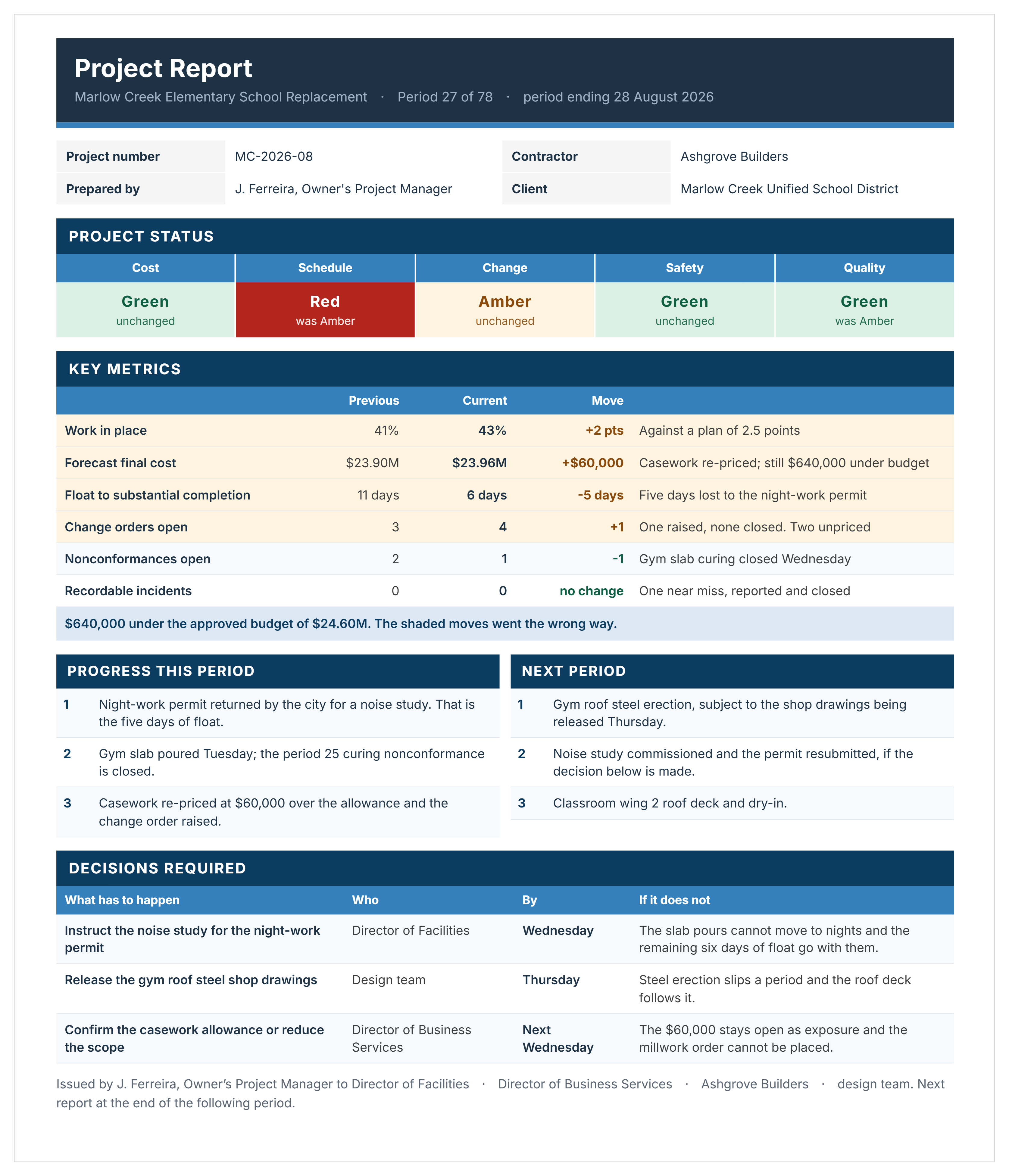
Here's an example of a completed report template in Word doc, showing status ratings, key metrics and the decisions the reader has to make.
How to Write a Report Using This Word Template
Write the summary last. You cannot summarize a report you have not finished, and every summary written first has to be rewritten anyway.
- Complete the title page, including the version, the date and who the report is issued to.
- Set the scope in the introduction, including what the report does not cover.
- State the methodology, so a reader can judge how much weight the findings carry.
- Write the findings without interpretation, keeping analysis separate.
- Draw the conclusions, answering the question the report was asked.
- Write the recommendations, each with an owner and a date.
- Move supporting detail into appendices rather than leaving it in the body.
- Write the executive summary.
- Update the table of contents, which generates from the heading styles.
- Check the version number and the distribution list before issuing.
Keep the formatting plain. Consistent heading styles, one font, and readable tables do more for a report than a designed cover, because the reader is looking for the answer rather than the presentation.
A Word template is filled in by hand every time. Construction reporting software stores the report structure and builds it from live data, so the same pack is not reassembled each cycle.
Related Articles and Templates
Explore these resources for project reporting, progress tracking, status updates, and stakeholder communication:

Written by
Jackson Row
Jackson Row joined Mastt's founding North American team in 2023, implementing the platform for US government agencies and Fortune 500 organizations. He holds a Bachelor of Engineering in civil and mining engineering from UNSW and began his career as a construction cadet on civil projects in Sydney. At Mastt, he contributes articles on payment and client-side project management.

FREE report template in Word, laid out in the standard professional format. Title page, contents, executive summary, findings, conclusions, and recommendations.

Top Performers Don’t Guess. They Deliver.
Cut the stress of showing up unprepared
Start for FreeTrusted by the bold, the brave, and the brilliant to deliver the future