

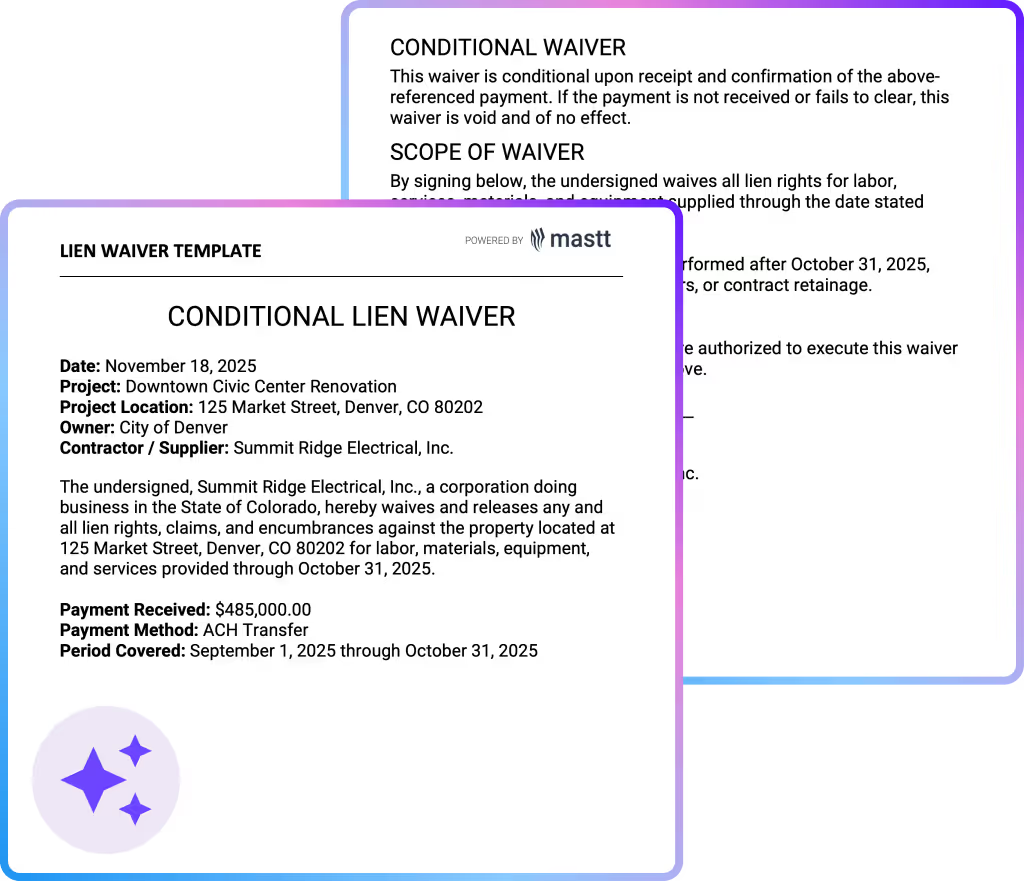

What is a Lien Waiver Template?
A lien waiver template is a standardized construction document used to confirm that a contractor or subcontractor has waived the right to file a lien after receiving payment. The template also sets clear boundaries on which portion of the work is covered, how much has been paid, and whether lien rights are waived conditionally or unconditionally.
In construction projects, lien waivers help formalize payment exchanges and reduce uncertainty around future claims. Using a consistent format ensures lien releases align with contract terms and conditions, payment timing, and project records rather than informal email confirmations or ad hoc documents.
Standard Lien Waiver Templates Used in Construction
Lien waiver templates fall into a few standard categories based on payment timing and scope. Selecting the right type matters because each version releases lien rights differently and at different points in the payment cycle.
The most commonly used lien waiver template types include:
- Conditional lien waiver template: Used when payment has been approved but not yet received. Lien rights are released only if and when the stated payment clears.
- Unconditional lien waiver template: Used after payment is confirmed. Lien rights are released immediately, regardless of any future issues with the payment.
- Partial lien waiver template: Applies to a specific payment period or portion of work. Lien rights remain in place for unpaid work, retention, or future claims.
- Final lien waiver template: Used at project closeout once all work is complete and all payments, including retainage and change orders, are settled.
Project teams often issue unconditional waivers too early or use final waivers before all financial issues are resolved. Clear naming and consistent use of each lien waiver template type helps prevent accidental over-release of lien rights, especially on long projects with overlapping payment cycles.
What’s Included in Lien Waiver Templates
A construction lien waiver template contains specific payment, project, and party details that define exactly which lien rights are being released. Each field helps limit risk and prevent disputes during payment processing.
A complete lien waiver template typically includes the following elements:
- Project details: Project name, site address, and reference numbers that tie the waiver to a specific construction contract and payment cycle.
- Payee information: Legal business name of the contractor or subcontractor waiving lien rights, including ABN or company registration details where required.
- Payer information: Entity making the payment, often the project owner, head contractor, or developer, listed exactly as shown in the contract.
- Payment amount: The dollar value covered by the waiver, aligned to the approved progress claim or final account amount.
- Payment period or scope of work: Clear dates or work descriptions that define what portion of the project the waiver applies to, which is critical for partial lien waiver templates.
- Waiver type: Explicit identification of whether the document is a conditional lien waiver template or an unconditional lien waiver template.
- Partial or final designation: Confirmation of whether the waiver releases lien rights up to a certain date or acts as a final lien waiver template for the entire project.
- Signature and date fields: Authorized signatory details and execution date to confirm when the lien rights are released.
- Governing law or jurisdiction: Reference to the applicable state or regional requirements that determine enforceability.
💡 Pro Tip: Before issuing any waiver, match the payment amount in the lien waiver template to the approved payment certificate, not the invoice value. Payment certificates reflect what the project has accepted, which protects both parties if disputes arise later.
Why Use a Template for Lien Waivers
Utilizing a lien waiver template reduces the risk of missing critical information or using incorrect waiver language. Standardized templates help ensure consistency across progress payments and final accounts.
Project teams rely on lien waiver templates for several practical reasons:
- Reduce payment risk: A consistent format ensures lien rights are waived only for the amount and work actually paid, which protects both cash flow and legal position.
- Avoid wording mistakes: Templates prevent casual edits to waiver language that can unintentionally convert a conditional lien waiver template into an unconditional one.
- Speed up approvals: Project owners and project managers review familiar layouts faster, which keeps progress payments moving.
- Improve audit confidence: Standardized lien waiver templates create a clear paper trail that aligns with payment certificates, contracts, and cost reports.
- Control partial releases: Templates make partial lien waiver templates easier to manage by clearly defining cutoff dates and work scope.
- Reduce rework across teams: Contractors and subcontractors avoid repeated back-and-forth caused by missing details or rejected formats.
For project owners and project managers, templates improve confidence that lien releases align with actual payment events. For contractors and subcontractors, templates clarify when lien rights are retained versus released.
How to Use a Lien Waiver Template
Utilizing lien waiver templates starts with selecting the correct waiver type based on payment timing. Conditional lien waiver templates are used when payment is expected, while unconditional lien waiver templates are used once payment is received.
Follow these steps to use a lien waiver that holds up in real payment reviews:
- Identify the correct waiver type: Choose a conditional lien waiver when payment is expected but not yet received, and an unconditional lien waiver only after funds clear.
- Confirm the payment scope: Define the pay application period or work cutoff date so the waiver applies only to work covered by the payment.
- Match the payment amount: Use the approved pay application amount, not the invoice total or scheduled value.
- Add accurate project and party details: List the legal names of the owner, contractor, and subcontractor exactly as shown in the contract.
- Select partial or final status: Mark the waiver as partial for progress payments or final only when all work, retainage, and change orders are settled.
- Review waiver language before signing: Check that conditional and unconditional wording has not been altered or merged.
- Execute after verification: Sign and date the waiver only once payment timing and terms are confirmed.
When using a lien waiver, always ensure it is from the approved pay application or draw request, not from emails or invoices. Treat the waiver as an extension of the payment record. If the numbers or dates do not match exactly, do not issue the waiver.
Generate a Lien Waiver Template Using Mastt AI
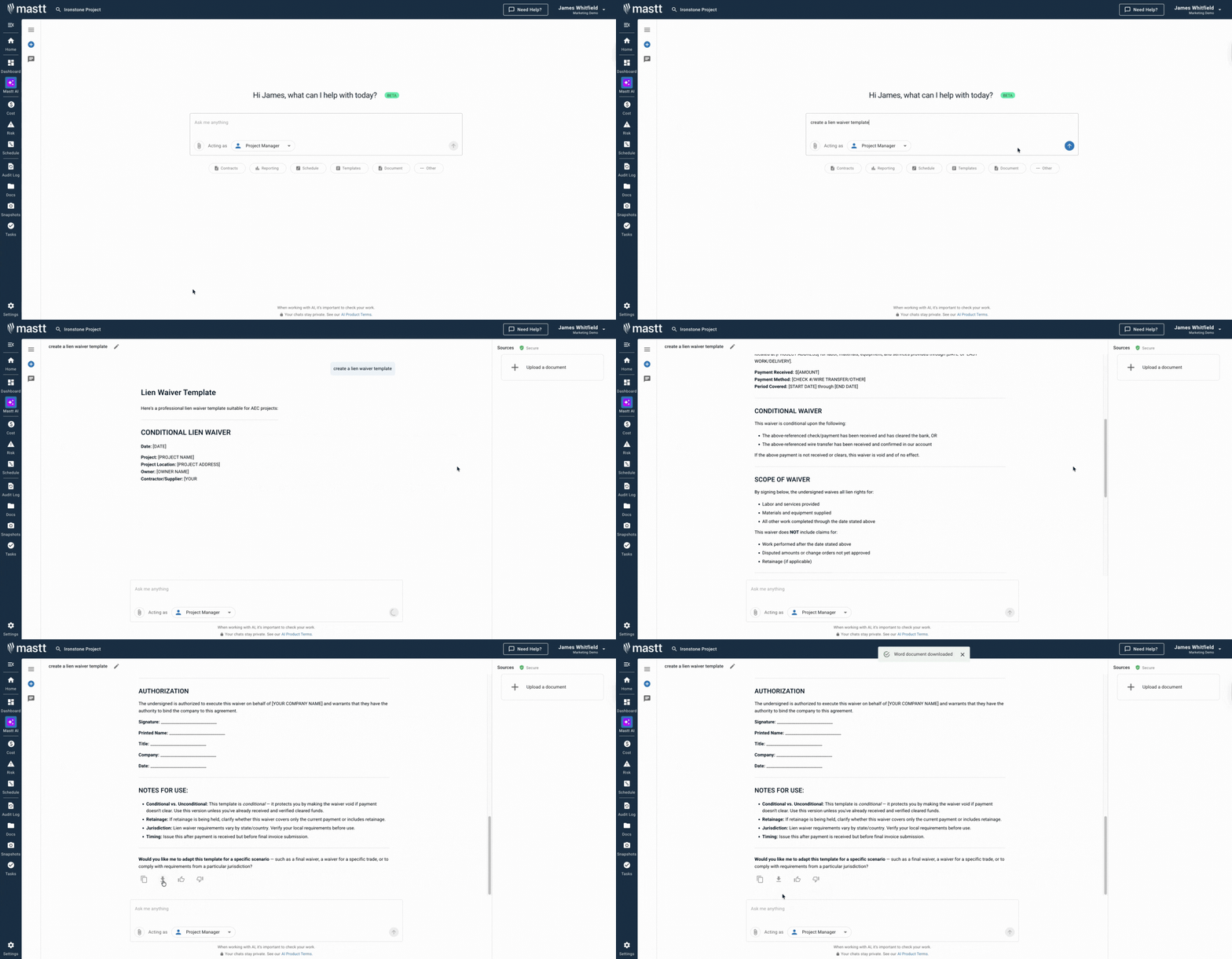
Mastt's AI Assistant removes the manual work that slows down lien waiver preparation and review. Instead of copying old Word files or fixing formatting errors, teams generate lien waiver templates directly from approved project and payment data.
Here’s how Mastt's AI enhances lien waiver creation for construction teams:
🚀 Auto-populate key fields: AI extracts contract names, schedule data, payment amounts, and parties from your project workspace and feeds them directly into a lien waiver template.
⚡ Reduce manual errors: Your pay applications, approved amounts, and dates are pulled from the same cost data Mastt uses for reporting, so the generated template matches certified records.
📂 Stay compliant with contract terms: Mastt AI checks payment and contract details during template creation, giving you confidence that the waiver reflects contractual requirements before execution.
📂 Upload existing PDFs: Add lien waiver PDFs from past projects and let the AI reference the format and layout when generating new templates.
📑 Export editable files: Download completed lien waiver templates in Word or Excel for final review, signature, and sharing with stakeholders.
Generating a lien waiver in Mastt AI is straightforward:
- Describe the template required: Enter prompts such as “create a conditional lien waiver for a progress payment” or “generate a final lien waiver for project closeout” directly in the chat.
- Upload reference documents if needed: Add existing lien waiver PDFs from past projects so Mastt's AI can follow the same structure or wording.
- Refine through conversation: Adjust waiver type, payment period, dollar amount, or party details until the document reflects the approved payment record.
- Export and issue: Download the lien waiver template in Word format, ready for execution and submission.
Every conversation remains private within your secure Mastt workspace. Project data stays under your control, and lien waivers are generated only from the information you choose to apply.
👉 Visit the Mastt Help Center to learn more about creating construction lien waiver templates with Mastt AI.
Who Should Use Construction Lien Waiver Templates
A lien waiver template is relevant to anyone involved in payment approvals or financial risk control. The document supports clear handover of lien rights at every payment stage.
The following roles typically use a construction lien waiver template:
✅ Contractors: Release lien rights only for paid work while protecting unpaid change orders, retention, and disputed amounts.
✅ Subcontractors: Confirm payment without giving up lien rights tied to future work or unresolved claims.
✅ Project owners: Verify that each payment reduces exposure to mechanics’ liens before approving the next draw.
✅ Project managers: Check that lien waivers match the pay application period, approved amount, and contract terms.
✅ Contract administrators: Keep payment records clean, consistent, and defensible for audits and closeout.
💡 Pro Tip: Require subcontractors to submit lien waivers using the same template before approving each progress payment. Enforcing one format early prevents last-minute rework and protects lien positions at project closeout.
When to Use a Lien Waiver Template for Construction
Lien waiver templates are used at key payment points throughout a construction project. Partial lien waiver templates support progress payments, while conditional lien waiver templates are common before funds are cleared.
Project teams typically use lien waiver templates at the following points in the payment process:
- Progress payments: Issue a partial lien waiver template with each approved pay application to release rights only up to the stated cutoff date.
- Before payment is received: Use a conditional lien waiver template when payment is approved, but funds have not yet cleared.
- After payment clears: Use an unconditional lien waiver template once the payment is confirmed in the bank.
- Retention releases: Issue a lien waiver template when retainage is paid, even if all other work was previously waived.
- Project completion: Use a final lien waiver template only after all work, change orders, and payments are fully settled.
- Disputed or revised payments: Reissue a lien waiver template when payment values or periods change after initial approval.
Issuing waivers too early or using unconditional language before funds clear can permanently release lien rights. Teams that tie lien waiver issuance to formal payment milestones avoid these gaps and reduce last-minute closeout disputes. Final lien waivers are typically issued at project closeout, once all amounts have been paid and accepted.
Common Problems with Lien Waiver Templates in Word or Docs
Many project teams rely on free downloadable lien waiver templates in Word or Docs to move payments along quickly. Those files often fall apart once payment details change, or more than one person edits the document.
The most common problems with lien waiver templates in Word or Docs include:
⚠️ Outdated payment values: Free downloadable templates are often reused, leaving old amounts in place after pay applications are revised or partially approved.
⚠️ Incorrect waiver type: Generic templates blur conditional and unconditional language, which can release lien rights earlier than intended.
⚠️ Unclear work cutoff periods: Pre-filled or loosely edited templates fail to define dates or scope clearly, weakening partial lien waivers.
⚠️ Overwritten legal language: Small edits to standard clauses in Word or Docs can change the legal effect of the waiver without being noticed.
⚠️ Version confusion: Multiple saved copies of the same free template circulate, and the wrong version gets signed or submitted.
⚠️ No link to payment approval: Downloadable templates sit outside the payment process, making it hard to confirm what the waiver actually covers.
⚠️ Manual rework at closeout: Final lien waivers often need to be rebuilt because earlier generic templates no longer match final payment values.
💡 Pro Tip: Lock waiver language in your Word or Docs templates and allow edits only to names, dates, and payment fields. If the payment value changes after approval, regenerate the waiver from source data instead of revising the file by hand.
Manage Lien Waivers with Mastt AI
Construction payments often stall when lien waivers are unclear, inconsistent, or rebuilt from old files. Small mistakes in waiver language, payment scope, or timing can create real exposure late in the project.
Mastt AI generates consistent lien waiver templates through guided prompts, removing the need to rebuild or heavily edit Word files. It aligns with the correct waiver type and payment stage, which can be refined and issued with confidence.
👉 Generate lien waiver templates with Mastt AI and bring more control and clarity to the construction payment process.

Written by
Anna Marie Goco
Anna is a seasoned Senior Content Writer at Mastt, specialising in project management and the construction industry. She leverages her in-depth knowledge to create valuable content that helps professionals in these fields. Through her writing, she contributes to the company's mission of empowering project managers and construction professionals with practical insights and solutions.

Use this FREE lien waiver template to document payment releases accurately, reduce lien-related disputes, and support clean financial closeout across construction projects.

Top Performers Don’t Guess. They Deliver.
Cut the stress of showing up unprepared
Start for FreeTrusted by the bold, the brave, and the brilliant to deliver the future