

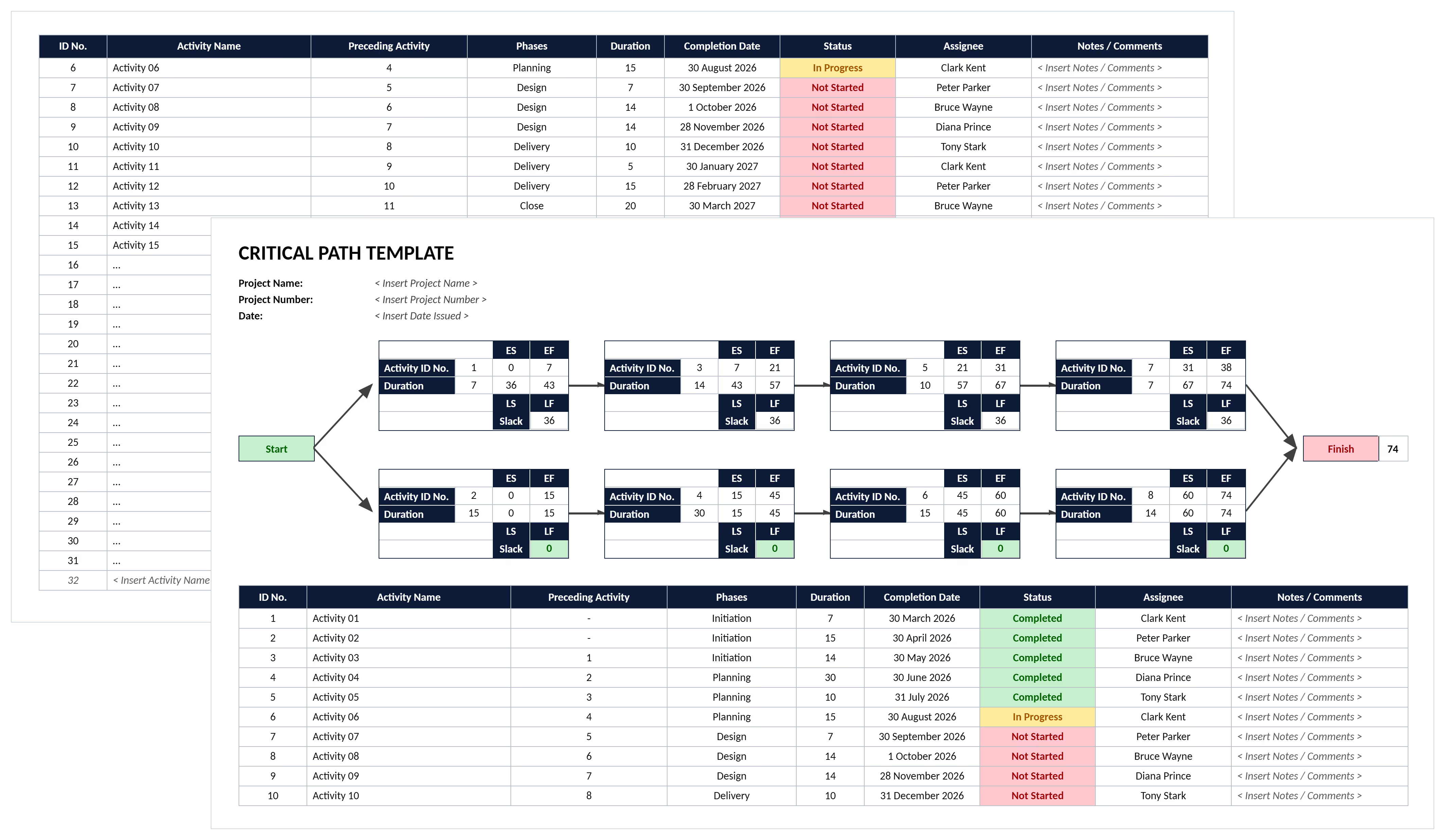

What is a Critical Path Template?
A critical path template is a structured document identifying the longest sequence of dependent activities determining minimum project duration. It provides ready-made frameworks with columns and formulas for organizing tasks by scheduling impact.
The template calculates forward pass (earliest starts) and backward pass (latest finishes) to reveal float. Activities with zero float form the critical path requiring closest monitoring.
Project teams use critical path analysis templates to forecast realistic completion dates. They identify which activities cannot be delayed without impacting overall project delivery.
What's Included in Critical Path Analysis Templates?
CPM templates contain essential scheduling fields needed to calculate the longest path through project networks. Standard components of critical path templates include:
- Activity List: Task descriptions organized by work breakdown structure, trade, or phase.
- Duration Estimates: Time required for each activity measured in working days.
- Dependencies: Predecessor and successor relationships showing finish-to-start, start-to-start, or finish-to-finish connections.
- Early Dates: Early start and early finish calculated through forward pass methods.
- Late Dates: Late start and late finish determined through backward pass calculations.
- Total Float: Scheduling flexibility showing days activities can shift without delaying completion.
- Free Float: Buffer before impacting successor activities, useful for coordinating trades without affecting others.
- Critical Path Indicators: Flags showing which activities have zero float and drive schedules.
- Resource Assignments: Labor, equipment, and crew allocations tied to specific activities.
- Constraint Dates: Fixed dates for permit approvals, material deliveries, or client milestones.
- Milestone Dates: Key delivery points like substantial completion or permit approvals.
- Variance Tracking: Fields comparing planned versus actual dates to measure schedule performance.
💡 Pro Tip: Lock float calculation formulas with Excel cell protection before distribution. Teams accidentally overwrite formulas when entering durations, breaking critical path calculations completely.
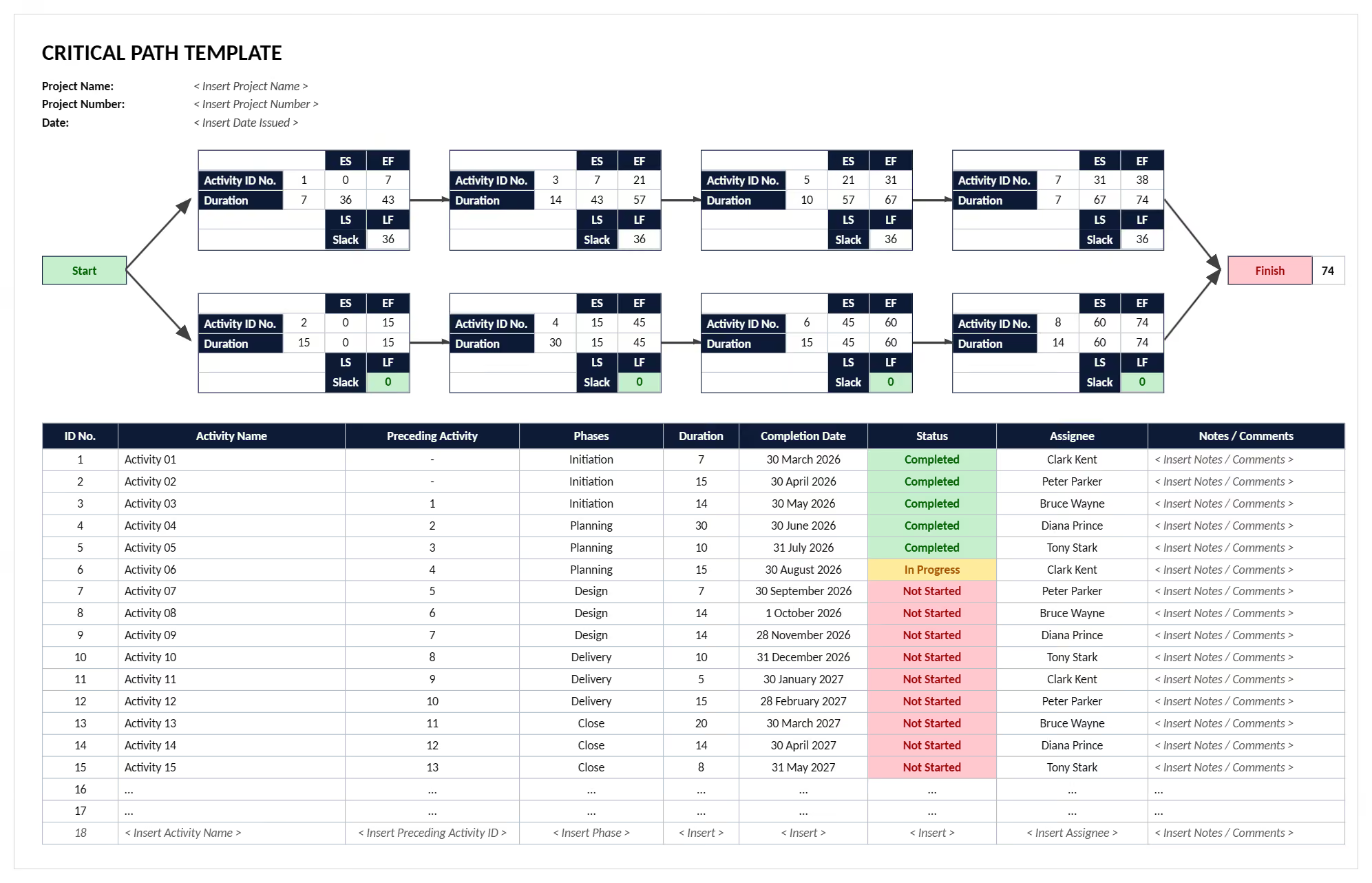
Why Use a Critical Path Analysis Template?
Critical path templates ensure teams apply consistent CPM methodology when forecasting completion dates. Schedule accuracy improves because templates:
- Prevents optimistic scheduling: Forces realistic duration estimates rather than hoping everything finishes early.
- Reveals hidden bottlenecks: Dependency mapping exposes which activities must finish before others start.
- Enables accurate forecasting: Forward and backward pass calculations produce mathematically correct completion dates.
- Identifies scheduling flexibility: Total float calculations show which activities have shift capacity.
- Supports resource decisions: Knowing schedule-driving activities helps teams allocate labor and equipment first.
- Coordinates multiple trades: Sequencing logic prevents contractors from showing up before their predecessors finish.
- Enables early delay detection: Tracking actual versus planned dates on critical activities flags problems immediately.
- Improves change management: Templates quickly recalculate how new activities impact longest paths.
- Supports schedule recovery: Float analysis reveals which non-critical activities can shift to accelerate critical work.
- Facilitates better bidding: Contractors using CPM templates during construction estimating produce realistic schedules.
- Enhances stakeholder trust: Professional scheduling analysis demonstrates competent project management to owners and lenders.
- Reduces disputes: Documented analysis supports time extension requests when project delays occur.
Teams using critical path analysis templates complete projects closer to original forecasts. Those relying on simple Gantt charts without dependency logic often miss completion dates.
How to Create and Use Templates for Critical Path Analysis
Creating an effective critical path template requires building frameworks that capture activity relationships and automate calculations. Start with clear work breakdown structure defining all project work.
Follow these proven steps:
- List all activities: Break scope into individual tasks for scheduling and estimation. Use consistent naming and trade groupings.
- Estimate durations: Assign realistic timeframes based on crew productivity and site conditions. Consider weather, access constraints, and learning curves.
- Define dependencies: Document which activities must finish before others start. Include finish-to-start, start-to-start, and finish-to-finish relationships where appropriate.
- Identify constraints: Note fixed dates for permit approvals, material deliveries, or owner-imposed milestones.
- Calculate early dates: Perform forward pass from day one through each dependency chain. This determines earliest possible starts and finishes.
- Calculate late dates: Execute backward pass from project end date subtracting durations. This reveals latest allowable dates without delaying completion.
- Compute total float: Subtract early finish from late finish for each activity. Positive float shows scheduling flexibility.
- Identify free float: Calculate buffer before impacting successors, useful for independent activity shifts.
- Highlight critical activities: Flag all tasks with zero float driving project timeline. These require closest monitoring.
- Update regularly: Revise durations weekly as work progresses and recalculate paths. Track baseline versus actual performance.
💡 Pro Tip: Run a weekly schedule health check using construction project scheduling software for open ends and negative float. Fix logic before updating progress.
When to Use a Project Critical Path Template
Deploy templates for critical path whenever projects involve complex activity dependencies where timing coordination determines delivery. These moments range from initial planning through active construction phases.
Critical moments include:
- Baseline schedule development: Create initial schedules during project planning establishing original paths.
- Construction bidding: Demonstrate realistic scheduling understanding when submitting proposals to owners.
- Contract negotiations: Support schedule discussions with CPM analysis proving timelines are achievable.
- Resource allocation decisions: Determine which activities require premium labor or equipment based on criticality.
- Weekly schedule updates: Revise durations as work progresses and recalculate paths.
- Weather delay assessment: Quantify schedule impacts from conditions affecting critical path activities.
- Change order evaluation: Analyze how scope additions impact longest paths and completion dates.
- Permit approval planning: Sequence activities around regulatory milestones that cannot shift.
- Schedule compression decisions: Evaluate fast-tracking or crashing options when projects fall behind.
- Subcontractor coordination meetings: Review dependency logic ensuring trades understand sequencing requirements.
- Time extension documentation: Support requests with analysis demonstrating how delays impacted completion.
- Recovery planning: Develop corrective strategies focusing resources on critical activities.
💡 Pro Tip: Schedule complexity, not project size, determines when analysis becomes necessary. Small renovations with sequential dependencies often require CPM methodology more than large parallel projects.
Problems with Free Downloadable Critical Path Templates in Excel and Word
Free critical path templates in Excel, Word, and PowerPoint formats create scheduling problems undermining efficiency. Generic downloads require significant customization before suiting specific dependencies.
Common issues include:
⚠️ Broken calculation formulas: Excel templates from free sites contain errors producing incorrect path identification.
⚠️ Missing dependency logic: Simple spreadsheet templates lack relationship mapping for true calculations.
⚠️ No network visualization: Word and Excel formats can't generate precedence diagrams helping teams understand connections.
⚠️ Limited activity capacity: Generic templates designed for 50-100 activities break on projects requiring 500+ tasks.
⚠️ Inconsistent date formatting: Templates mixing calendar days and working days produce unrealistic forecasts.
⚠️ No constraint handling: Free templates can't accommodate fixed permit dates or material delivery restrictions.
⚠️ No resource leveling: Free downloadable templates ignore crew availability showing impossible schedules.
⚠️ Poor integration capability: Standalone Excel files can't export to scheduling software when complexity requires upgrading.
⚠️ Outdated methodology: PowerPoint templates often show simplified PERT concepts rather than current CPM practices.
⚠️ Version control chaos: Multiple team members editing separate Excel files creates conflicting schedules.
⚠️ Manual update burden: Every change requires recalculating formulas manually consuming hours.
⚠️ No what-if analysis: Static templates can't model alternative sequences or compression scenarios quickly.
💡 Pro Tip: If using free downloaded Excel and Word templates, name schedule files with version numbers and dates for traceability. During disputes, proving which activities were critical when requires documented evolution.
Best Practices for CPM Template Development
Effective templates require smart design balancing calculation accuracy with practical usability. Essential CPM development practices include:
☑️ Use consistent naming conventions: Standardize descriptions with trade, location, and task identifiers.
☑️ Limit dependency types: Use finish-to-start relationships for 90% of links.
☑️ Establish realistic estimates: Base timeframes on actual crew productivity and historical data.
☑️ Include weather allowances: Add non-work days for expected delays in exterior work.
☑️ Build in approval durations: Allocate realistic timeframes for permit reviews and owner decisions.
☑️ Add reasonable float buffers: Include 5-10% contingency on total duration for unforeseen issues.
☑️ Create activity detail standards: Define how much breakdown is appropriate before schedules become unmanageable.
☑️ Validate logic relationships: Trace network diagrams ensuring dependencies reflect actual construction sequencing.
☑️ Establish baseline protocols: Lock original schedules and track changes separately for clear comparison.
☑️ Update progress weekly: Revise actual dates every week and recalculate float.
☑️ Test calculation accuracy: Manually verify critical path on sample activities before distributing templates.
☑️ Document schedule changes: Maintain logs explaining why durations or dependencies shifted.
.avif)
Written by
Jamie Cerexhe
A Forbes 30 Under 30 and PMI Future 50 honoree, Jamie Cerexhe is Mastt's co-founder and Chief Technology Officer. He leads the company's AI engineering, agentic pipelines, and security work, and earlier taught software development and contributed to the UNESCO Digital Skills Toolkit. At Mastt, Jamie contributes articles on AI, agentic workflows, and technology adoption in construction.

Use this FREE critical path template to identify and analyze schedule-driving activities and prevent project delays. Map dependencies, calculate float, and forecast completion dates with CPM methodology.

Top Performers Don’t Guess. They Deliver.
Cut the stress of showing up unprepared
Start for FreeTrusted by the bold, the brave, and the brilliant to deliver the future