


What is a Project Cost Template
A project cost template is a structured cost report that lists the projected and actual expenses for a construction project. A project costing template organizes budget amounts, committed costs, payments, and forecast costs so the team can track the current cost position in one place.
Most project teams use a template to keep cost items consistent across reporting cycles. The template also helps trace costs back to cost codes or work packages, which makes reviews and approvals easier when contracts change, invoices come in, or scope shifts.
What’s Included in a Project Costing Template
A project cost tracking template consolidates all the core financial details needed to monitor spending and track progress. The template outlines a clear cost breakdown structure, including planned costs, committed amounts, and actual expenses.
Standard components in a template for effective project cost management have the following fields:
- Project details: Records core information, including project name, client, and site location, to keep cost data clearly attributed.
- Cost breakdown: Groups expenses by cost codes, trades, or work packages to align reporting with how the project is managed.
- Planned start date: Shows when each cost item or work package is expected to begin.
- Planned end date: Identifies the intended completion date for the related cost activity.
- Budget amount: Defines the approved cost limit for each item before work starts.
- Actual cost to date: Displays the amount already spent against each cost item.
- Committed cost: Reflects contracted or approved costs that have not yet been paid.
- Forecast to complete: Estimates the remaining cost required to finish the work.
- Variance: Highlights the difference between the approved budget and the projected final cost.
💡 Pro Tip: Set cost codes and reporting categories at the start of the project and lock the structure early. Mid-project changes to cost groupings often break historical comparisons and make variance tracking unreliable.
Why Use a Template for Managing Project Costs
A project costing template provides a consistent way to track projected costs and actual expenses, avoiding gaps or double-handling. The same structure also makes cost reporting faster because every update follows the same logic across project budgets, commitments, payments, and forecasts.
Teams use a project cost template for practical reasons that show up on real projects:
- Cost visibility: Shows budget, committed cost, actual cost, and forecast in one view, so overruns surface earlier.
- Fewer errors: Reduces missed line items and broken formulas that often happen in a manual project cost tracking spreadsheet.
- Faster reporting: Speeds up monthly construction reporting because cost data sits in a repeatable format.
- Clear approvals: Makes change reviews easier because the template shows cost impact against the approved budget.
- Cleaner handovers: Helps new team members understand cost status quickly because the structure stays consistent.
- Better construction forecasting: Improves estimate-to-complete accuracy by separating committed exposure from paid amounts.
A good template also helps conversations with stakeholders. Project owners and project managers can discuss the same numbers in the same format, without re-explaining how the figures were built.
How to Track Project Costs in Mastt
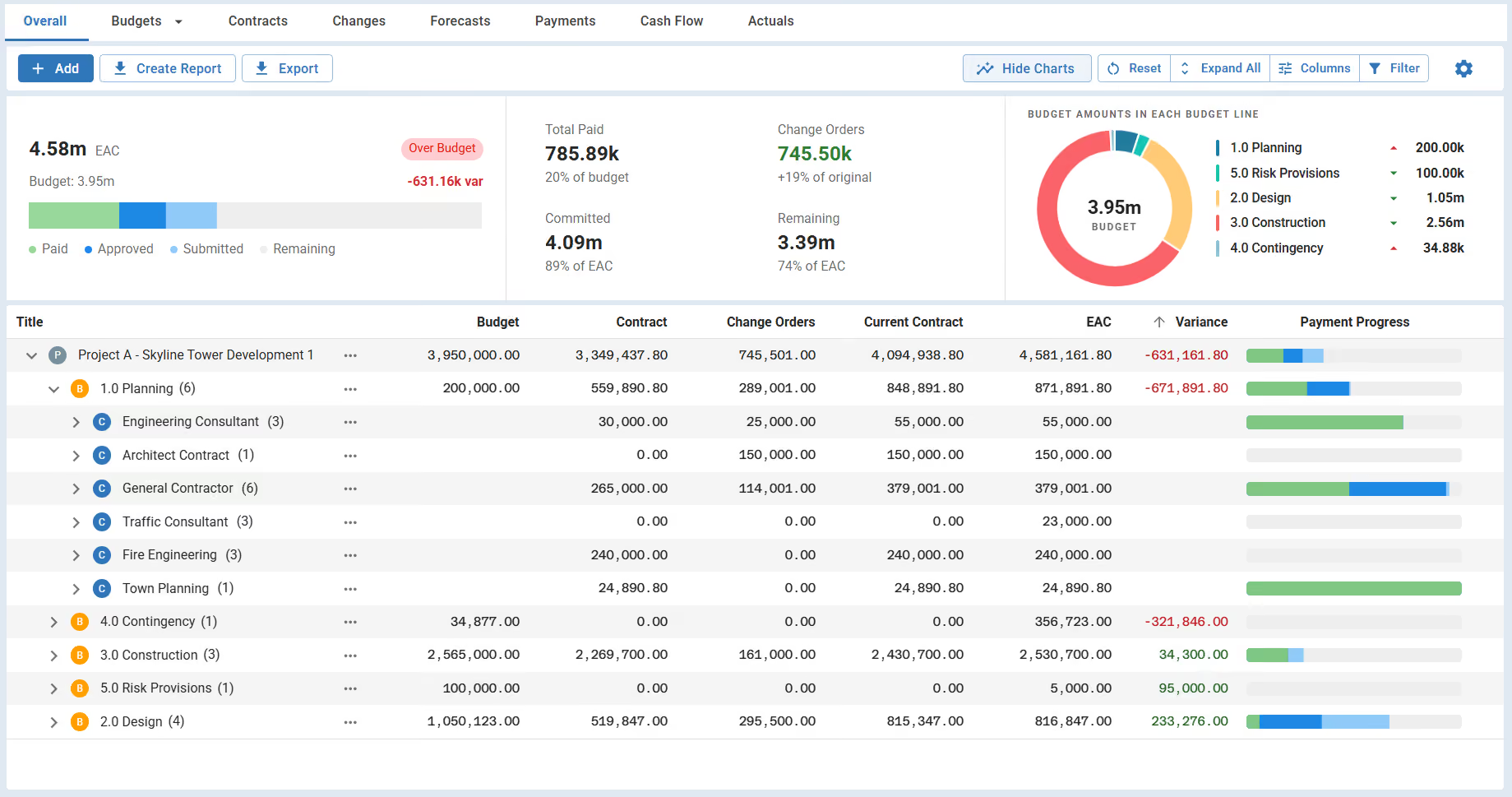
Keep project cost tracking in Mastt’s Cost Module by logging budget updates, contract commitments, change orders, forecasts, and payments as the work progresses. When each entry is tied to the correct cost line, the cost view stays current for day-to-day reviews and reporting without rebuilding spreadsheets.
Here's how you can manage project costs day-to-day in Mastt:
📊 Build budget lines by trade, package, or cost code so reporting matches how the project is managed.
🧾 Add contracts and commitments against the right budget lines to keep costs visible.
📝 Record approved change orders against the affected budget lines so cost movement stays traceable.
🔮 Update forecast-to-complete for remaining work so the estimate at completion stays realistic.
💳 Record payment requests and pay apps so cash flow and remaining exposure stay clear.
📤 Export the current cost view in professional PDFs when a stakeholder needs a snapshot for a review meeting.
Here’s how to use Mastt’s Cost Module for tracking your project cost:
- Open the Cost Overall page: Go to the project, select Cost from the side navigation, and Mastt opens the Overall view.
- Set up Budgets and Adjustments: Add the approved budget using + Add → Budget, then record adjustments as required.
- Add Contracts: Create contracts using + Add → Contract so committed value stays visible alongside the budget.
- Record change orders and forecasts: Add Change Orders for approved contract changes and use + Add → Forecast to project remaining costs.
- Track payments and payment progress: Add payments using + Add → Payment and review payment progress indicators on the Cost Overall page.
- Customize the view and export reports: Use the ⋮ menu to lock in a reporting layout, then export either the current view or all data.
When to Use a Project Costing Sheet
Utilize a project cost template whenever a construction team needs a clear view of planned costs versus committed and actual costs. A template is also useful when approvals or funding decisions depend on current numbers.
Typical points in a project where a project cost template helps include:
- Budget setup and approval: Confirm cost limits by trade, package, or cost code before work ramps up.
- Contract award and procurement: Check remaining budget and committed exposure before signing the new scope.
- Monthly reporting cycles: Update actuals and forecasts to support owner reporting and internal reviews.
- Change order review: Show the cost impact against the right budget line before approval.
- Stage gate and funding checks: Validate the forecast and contingency before moving into the next phase.
- Cash flow planning: Align upcoming payments with expected progress to avoid rushing approvals.
- Contract closeout and final account: Reconcile final costs and document the end-of-project cost position.
💡 Pro Tip: Set a fixed “cut-off” date for cost updates each reporting cycle, then freeze the numbers for review. A locked reporting snapshot prevents mid-meeting changes, protects decision quality, and makes trend tracking meaningful from month to month.
Common Challenges with Managing Project Cost in Excel
Project cost tracking spreadsheets or Excel often break down when the project gets busy, and cost updates fall behind. Errors also creep in when multiple spreadsheets track the same numbers in different ways, slowing down and making reporting less reliable.
Common mistakes teams run into with manual project cost tracking include:
❌ Too many versions of the truth: Separate Excel files and spreadsheets for budget, commitments, and payments create mismatched totals and extra reconciliation work.
❌ Mixing committed and actual costs: Blending contracts with paid invoices hides future exposure and makes the forecast harder to trust.
❌ Late change order updates: Waiting to update an Excel tracker until month-end distorts variance and makes the cost position look healthier than it is.
❌ Broken formulas and links: One edit can quietly change totals, especially when spreadsheets rely on nested formulas and external links.
❌ Inconsistent cost codes: Different naming and coding across files forces manual mapping during reporting and audits.
❌ No clear audit trail: Excel change history rarely provides the full story, making it hard to confirm who changed a number, when the change occurred, and why.
💡 Pro Tip: If the team uses Excel, protect cost control by separating budget, committed cost, actual cost, and forecast into dedicated columns and locking formulas on a single “report” tab. Limit edits to input cells only, then require a brief note next to every forecast change so reviewers can trace why the number changed.
Take Control of Project Costs in Mastt
Moving from disconnected spreadsheets to a single cost view makes cost control simpler and easier to explain. Mastt’s Cost Module keeps projected costs and actual costs tied to the same budget lines, so cost reviews stay clear, and reporting stays consistent as the project changes.

Written by
Jackson Row
Jackson Row joined Mastt's founding North American team in 2023, implementing the platform for US government agencies and Fortune 500 organizations. He holds a Bachelor of Engineering in civil and mining engineering from UNSW and began his career as a construction cadet on civil projects in Sydney. At Mastt, he contributes articles on payment and client-side project management.

Use this FREE project cost template to manage construction project costs with a clear, consistent structure. Organize and track every projected and actual cost from early budgeting through final closeout.

Top Performers Don’t Guess. They Deliver.
Cut the stress of showing up unprepared
Start for FreeTrusted by the bold, the brave, and the brilliant to deliver the future