

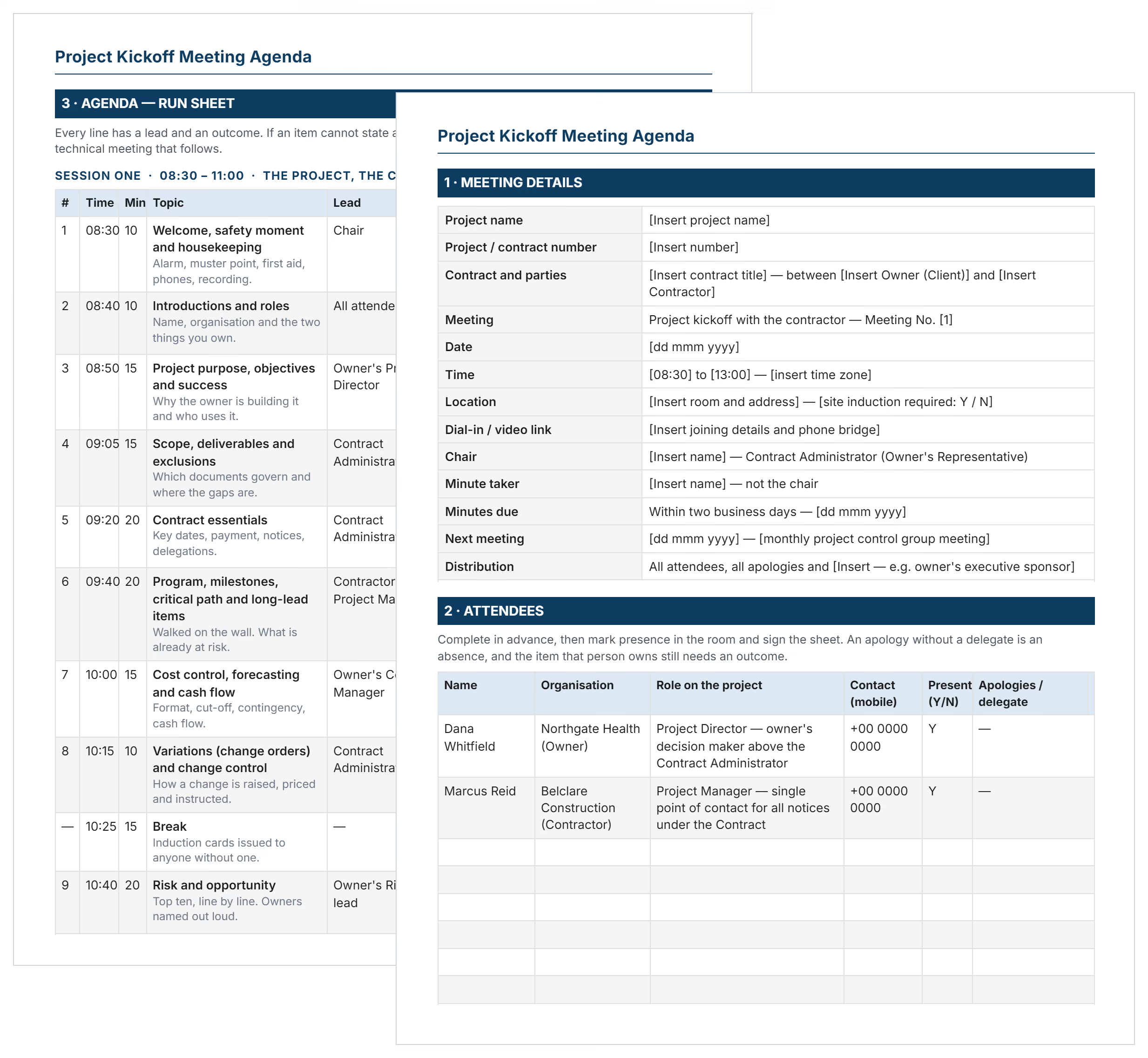

What is a Project Kickoff Meeting Template?
A project kickoff meeting template is a pre-formatted document outlining topics for the first official meeting. It provides ready-made sections for introductions, scope, timeline, and role assignments.
Project teams use agenda templates to ensure complete topic coverage during launch. The template captures essential discussion points the project team needs before execution. It creates consistency so every team starts with identical foundations. A kickoff agenda is used once, at launch; the recurring weekly and daily sessions that follow run off a project meeting agenda template.
Templates come in Word, Excel, PowerPoint, and Google Doc formats. Choose based on distribution needs and collaboration preferences.
Project Kickoff Meeting Agenda Items
Effective kickoff meeting agendas contain core components that orient teams and establish project boundaries. These items create shared understanding before work begins.
Standard agenda items for project kickoffs include:
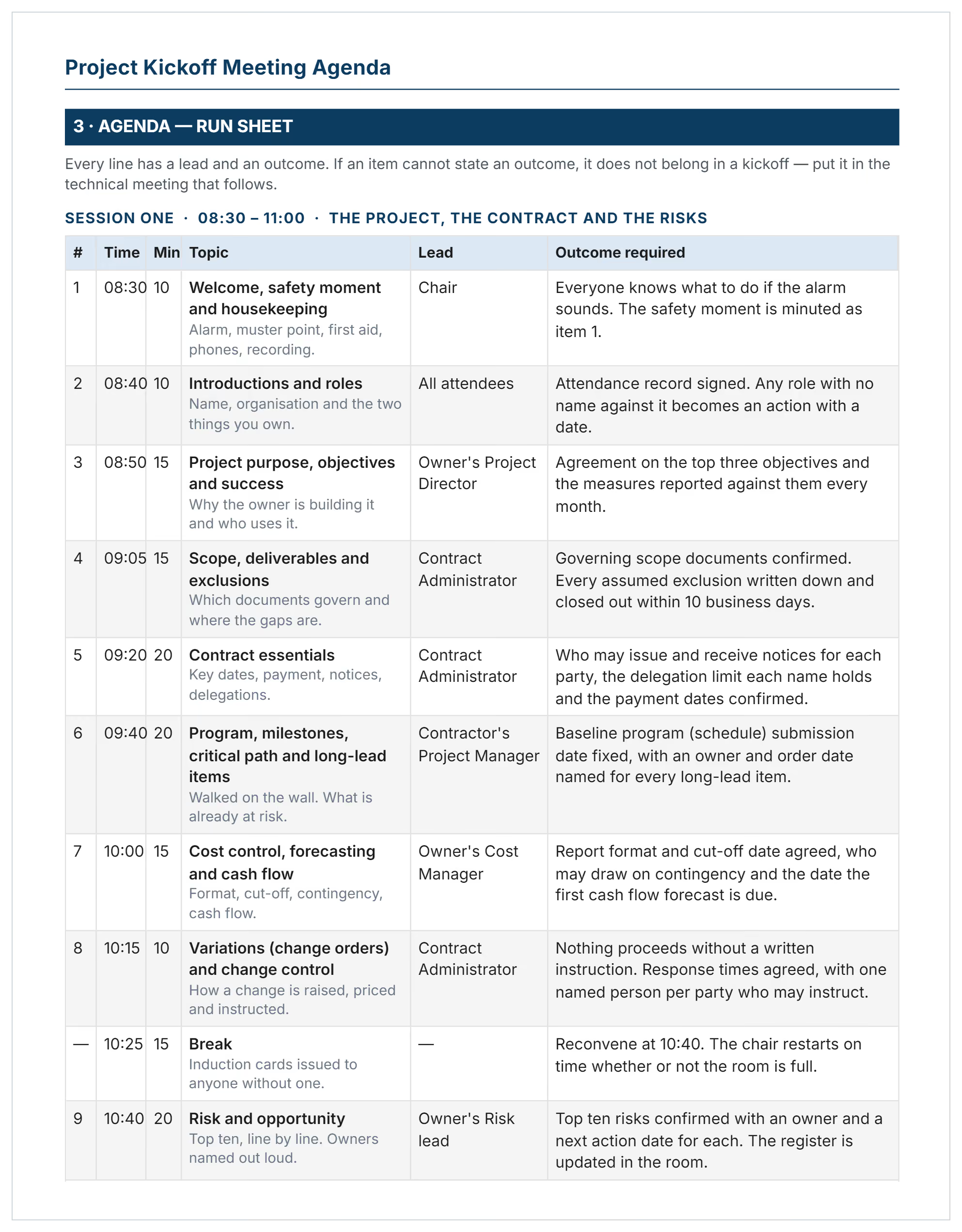
- Meeting logistics: Date, time, location, duration, and participant list with roles clearly identified for accountability.
- Introductions and icebreakers: Team member names, responsibilities, contact information, and brief background establishing working relationships.
- Project background: Business justification, problem solved, strategic alignment, and sponsor involvement in project overview demonstrating commitment.
- Project scope overview: Deliverables included, boundaries defining what's excluded, assumptions documented, and constraints acknowledged upfront.
- Goals and success metrics: Project goals with measurable project objectives, KPIs, and "done" definition agreed upon.
- Timeline and milestones: Project timeline showing phases, critical delivery dates, task dependencies, and approval gates.
- Roles and responsibilities: RACI matrix showing who's Responsible, Accountable, Consulted, and Informed for each project deliverable.
- Communication plan: Meeting frequency, status reporting methods, collaboration tools, escalation procedures, and decision-making authority defined clearly.
- Risk assessment: Potential issues identified, mitigation strategies discussed, contingency budgets allocated, and risk owners assigned.
- Budget overview: Cost estimates, funding sources, spending authority limits, and change order procedures establishing financial controls.
- Next steps and action items: Specific tasks assigned, responsible parties named, due dates set, and follow-up meeting scheduled.
💡 Pro Tip: Place "what's NOT included" immediately after scope discussion. Teams often assume features are in scope when they're not, causing disputes later when expectations diverge from reality.
Why Do You Need a Project Kickoff Meeting
Teams need kickoff agendas because unstructured project meetings waste time and miss critical alignment. A template prevents scope confusion that derails budgets and schedules later.
Agendas strengthen project launches by:
- Ensuring complete coverage: Pre-defined sections prevent forgetting essential topics like risks or communication protocols.
- Maintaining meeting focus: Time allocations keep discussions productive, preventing tangents that consume hours without decisions.
- Creating documentation standards: Consistent agenda formats ease project comparisons, helping portfolio managers identify patterns.
- Establishing stakeholder expectations: Written agendas distributed beforehand let participants prepare questions, reducing explanation time.
- Building team confidence: Professional agendas demonstrate preparation, signaling to stakeholders that leadership takes delivery seriously.
- Reducing post-meeting confusion: Documented discussion points serve as reference when members forget earlier decisions.
- Accelerating team alignment: Agendas force clarity on ambiguous topics early, preventing rework from misunderstood requirements or unclear objective statements.
- Supporting executive oversight: Standardized agendas help senior leaders assess whether projects launched properly.
Without agendas, kickoffs become information broadcasts where leaders talk but teams don't engage. Documented agendas create accountability that survives personnel changes.
How to Build and Use Your Meeting Agenda for Project Kickoff
Creating effective kickoff agendas requires identifying your project type, gathering stakeholder input, and allocating time. Start by reviewing your project charter and scope documentation.
Follow these steps to build and deploy your agenda:
- Select your meeting format: Determine if you need separate internal project kickoff meetings and external client kickoffs based on complexity.
- List all required attendees: Include sponsor, project manager, core leads, stakeholders, and anyone with decision authority.
- Define meeting duration: Allocate 60-90 minutes for straightforward projects, 2-3 hours for complex initiatives.
- Add standard agenda sections: Include introductions, background, scope, timeline, roles, communication, risks, budget, Q&A, next steps.
- Customize for project specifics: Add construction safety protocols, sprint planning for Agile teams, or compliance requirements.
- Assign topic owners: Designate who presents each section - sponsor for background, PM for scope, lead for approach.
- Distribute agenda 48 hours early: Send pre-read materials including charter, scope documentation, and schedules so participants arrive prepared.
- Designate note-taker and timekeeper: Assign someone other than facilitator to capture decisions, ensuring documentation doesn't slow pace.
- Build in buffer time: Reserve 15-20 minutes for questions and unexpected discussions that emerge during first meetings.
- Schedule follow-up actions: Plan post-kickoff activities like updating the project plan, distributing meeting minutes, and conducting team retrospectives.
💡 Pro Tip: Send a calendar invite with agenda attached, not email with PDF attachment. Calendar invites appear in schedules automatically, reducing "didn't see it" excuses from busy stakeholders.
Who Creates and Uses Construction Project Kickoff Agendas
The project manager typically creates kickoff agendas, but anyone leading project initiation benefits from meeting structures. Construction teams especially need agendas addressing site logistics, safety requirements, and subcontractor coordination.
Key roles using construction kickoff agendas include:
- ✅ Project Managers: Lead internal team and external client meetings, ensuring stakeholders understand scope, timeline, and deliverables.
- ✅ General Contractors: Run pre-construction meetings covering site access, permits, inspections, deliveries, and trade sequencing.
- ✅ Construction Managers: Facilitate coordination between owners, designers, contractors, and specialty trades before groundbreaking.
- ✅ Program Managers: Orchestrate multi-project kickoffs addressing portfolio dependencies, shared resources, and strategic alignment.
- ✅ Client-Side Representatives: Review contractor-prepared agendas, ensuring owner concerns about budget, quality, and schedule get addressed.
- ✅ Subcontractors: Use agendas when leading trade-specific kickoffs for MEP installations or specialty work.
- ✅ Consultants and Advisors: Prepare agendas for client engagements, demonstrating professionalism and establishing clear expectations.
Even team leads without PM titles benefit from agendas when launching departmental initiatives. Clear meeting structures improve outcomes regardless of project size.
When to Prepare Your Project Management Kickoff Meeting
Kickoff meetings happen after project approval but before execution begins. The Project Management Institute (PMI) recommends scheduling kickoffs when plans are complete and stakeholders are ready to commit.
Critical timing for kickoff preparation includes:
- After charter approval: Once sponsors authorize the project, schedule kickoffs within 1-2 weeks to maintain momentum.
- Following budget allocation: Wait until funding is confirmed to avoid false starts where teams mobilize without secured resources.
- Before detailed planning: Hold high-level kickoffs early during project planning, then conduct working sessions once task assignments develop. This separates strategic alignment from tactical operations meetings.
- During contract finalization: For construction projects, schedule pre-construction meetings after signing but before site mobilization.
- When team assignments complete: Ensure all key participants are identified and available before setting dates.
- Between phases on long projects: Multi-year initiatives benefit from phase kickoffs resetting expectations as scope evolves.
- After significant changes: When major scope adjustments, budget revisions, or leadership transitions occur, re-kickoff to realign.
💡 Pro Tip: Agendas should be prepared and distributed 48-72 hours before meetings. Last-minute agendas signal poor planning and reduce participant preparation.
Project Kickoff Meeting Agenda Best Practices
Effective kickoff agendas balance comprehensiveness with focus, covering essential topics without overwhelming participants. These practices improve meeting outcomes and team alignment, whether you're running a structured project kickoff play or adapting agendas to your organization's needs.
☑️ Limit attendees to decision-makers: Include only those with direct accountability or approval authority. Large meetings dilute focus and slow progress.
☑️ Front-load critical topics: Discuss scope, timeline, and roles in the first 45 minutes when energy is highest and late arrivals haven't disrupted flow.
☑️ Use visuals over dense slides: Present Gantt charts, RACI matrices, and organizational charts instead of text-heavy presentations that lose attention quickly.
☑️ Reserve final 20 minutes for Q&A: Allow uninterrupted discussion time after formal presentations, capturing concerns teams might otherwise raise later through multiple emails.
☑️ Record meetings when remote: Asana, Monday.com, and Slack integrate with Zoom recordings, letting absent team members catch up without separate status meetings.
☑️ Send same-day meeting notes: Distribute decisions and action items within 4 hours while discussions remain fresh in participants' minds.
☑️ Include parking lot for deferred topics: Acknowledge important but off-topic questions without derailing the agenda, showing respect while maintaining schedule discipline.
Common Mistakes with Project Kickoff Meeting Agendas
Even experienced project managers make agenda mistakes that reduce kickoff effectiveness. These errors cause confusion, waste time, and reduce team confidence in leadership.
⚠️ Skipping time allocations: Agendas listing topics without minutes assigned run long, forcing rushed decisions on critical items.
⚠️ Overloading with detail: Dense agendas covering every task overwhelm participants. Focus on high-level alignment, saving details for working sessions.
⚠️ Ignoring pre-work requirements: Agendas failing to specify what participants should review beforehand result in meetings spent explaining background.
⚠️ Missing role clarity: Agendas that don't show who presents each section create awkward silences and flow confusion.
⚠️ Forgetting remote participants: Agendas without virtual access details exclude distributed teams, signaling they're less important.
⚠️ Lacking next-step specificity: Agendas ending at "wrap-up" without defined action items, owners, and due dates leave teams uncertain.
⚠️ Using jargon without definitions: Agendas referencing WBS, RACI, or ConsensusDocs without explanation alienate unfamiliar stakeholders.
⚠️ Scheduling back-to-back meetings: Agendas with no buffer time force rushed starts and abrupt endings, reducing relationship-building opportunities.
💡 Pro Tip: Test your agenda by explaining it to someone unfamiliar with the project. If they can't follow the flow, your team won't either.
Launch Projects with Clarity Using Professional Agendas
Every successful project starts with alignment on goals, scope, and execution approach. Project success depends on kickoff quality that establishes clear expectations from day one.
Professional agendas create the structure needed for productive first meetings. They ensure critical topics get addressed, decisions get documented, and teams leave with clear direction.
👉 Try Mastt's AI today and generate your project kickoff meeting agenda that sets your projects up for success from day one.

Written by
Jefbeck Eje
Jefbeck is an SEO Specialist at Mastt who creates optimized content for the construction project management industry. Focused on delivering accurate and actionable insights, Jef combines SEO expertise with industry knowledge to enhance visibility, build authority, and drive engagement. His work ensures Mastt remains a trusted resource for construction professionals seeking reliable information.

Use this FREE project kickoff meeting agenda template to launch projects confidently and avoid costly mistakes. Stop wasting time in chaotic meetings. Align your team on goals, roles, and timelines from day one.

Top Performers Don’t Guess. They Deliver.
Cut the stress of showing up unprepared
Start for FreeTrusted by the bold, the brave, and the brilliant to deliver the future