

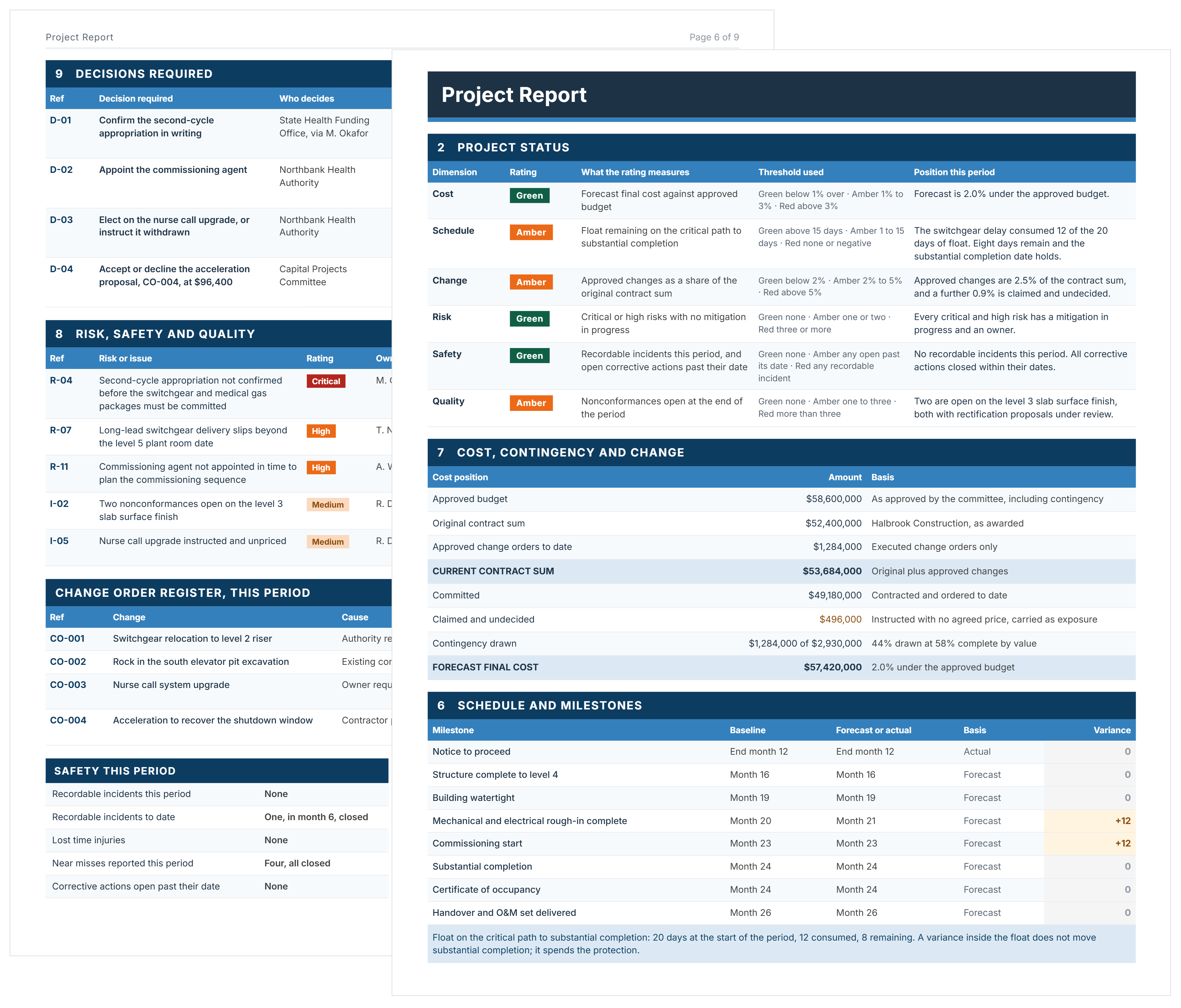

What is a Project Report Template?
A project report template is a pre-structured document for reporting a project's status to whoever funds or governs it. It covers where the project stands on cost, schedule, risk and quality, what moved this period, and what decisions are needed next.
A project report template gives you the structure, so each period you update the content rather than rebuild the document. Most are issued monthly, some quarterly, and the same structure carries across the project's life. For reporting on a fixed monthly cycle, use the monthly report template in Word.
Project Report Format: What to Include
A standard project report format opens with the project's identity and current status, then works through progress, schedule, cost and risk, and closes with what the reader has to decide. Governance reports also carry a distribution list and a sign-off, because a report nobody is named on cannot be relied on later.
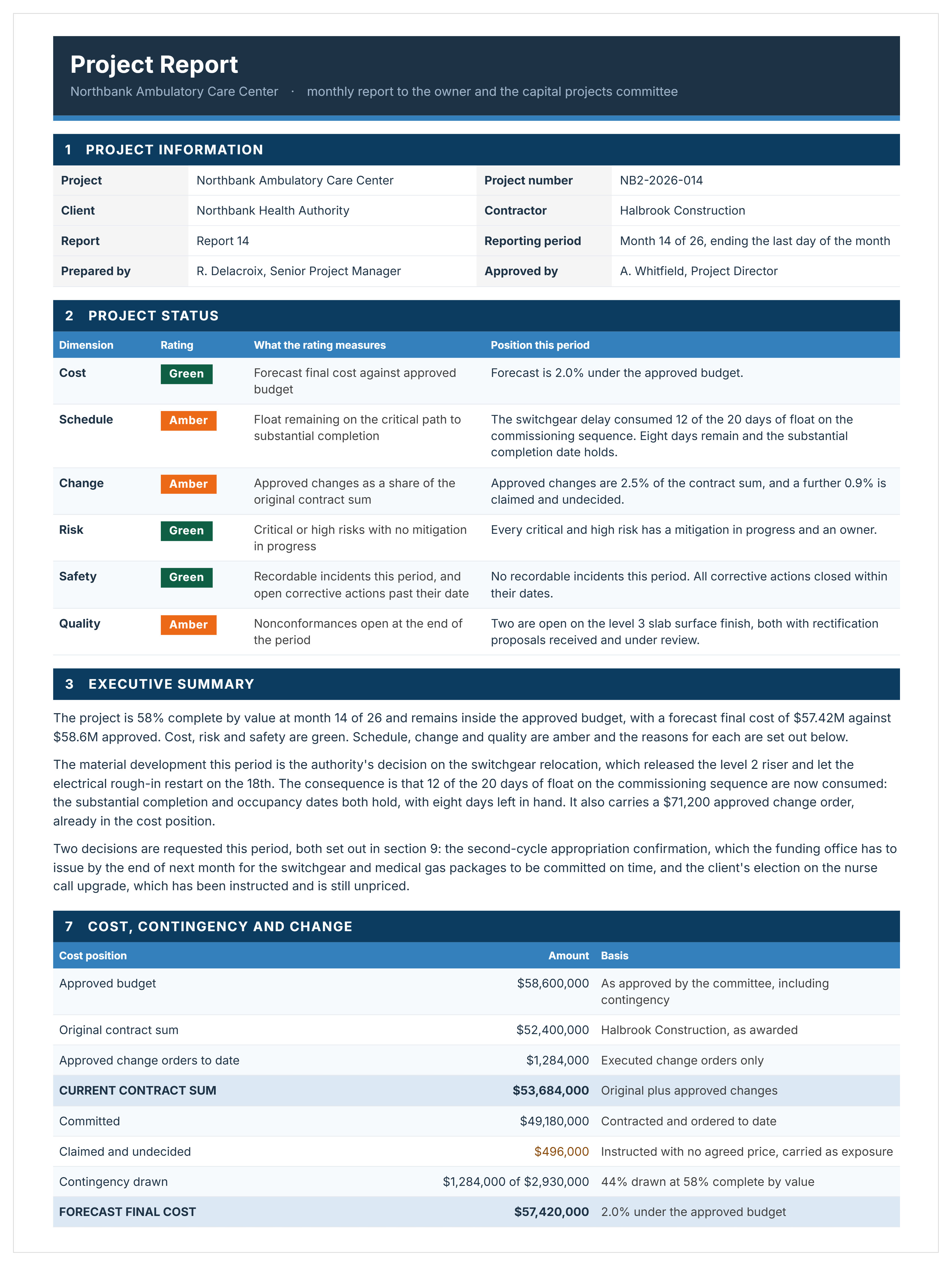
This template covers that format across ten sections.
A sign-off block follows, recording who prepared the report, who approved it, and the date the figures are current to.
How to Use This Project Report Template in Word
Replace every number and every sentence. The structure is what transfers, not the content.
- Complete the project information block, including the reporting period and the distribution list.
- Agree your status thresholds with whoever receives the report, before the first one is issued.
- Rate each status dimension against those thresholds, and state the position that produced the rating.
- Fill in the body sections: goals, progress, schedule, cost, risk.
- List the decisions you need, each with an owner, a date and the consequence of missing it.
- Complete the look ahead, including what would change the report.
- Write the executive summary last, once you know what the report says.
The file's own guidance adds two rules worth following: report the exception rather than the diary, and keep every figure deriving from one set of inputs so the totals in different sections agree.
A template is filled in from scratch every reporting period. Capital project management software keeps the same report structure cycle to cycle and pulls the numbers from live project data, so the report is assembled rather than rewritten.
How This Template Publishes the Test Behind Each Status Rating
Most project reports show a color with nothing behind it. This template prints the test and the threshold next to every rating, so a reader can check the color rather than accept it.
Six dimensions, each with a stated test:
The file carries worked thresholds for each, but they are illustrative. Set your own and agree them with whoever receives the report before the first one is issued.
Related Articles and Templates
Explore these resources for project reporting, status updates, performance tracking, and stakeholder reporting:
.avif)
Written by
Doug Vincent
Doug Vincent is the co-founder and CEO of Mastt, the AI capital-project management platform used by governments, Fortune 500 companies, and consultancies across APAC, North America, and MENA. Before founding Mastt in 2019, he spent a decade at RPS delivering more than $2 billion in capital works, including the $2.1B Defence Navy Infrastructure program, and holds a CPSPM certification with the AIPM. He contributes content and speaks on AI in capital project delivery at Mastt.

FREE project report template in Word, filled in throughout so you can see the level of detail expected. Ten sections in the correct format, from project information to look ahead.

Top Performers Don’t Guess. They Deliver.
Cut the stress of showing up unprepared
Start for FreeTrusted by the bold, the brave, and the brilliant to deliver the future