

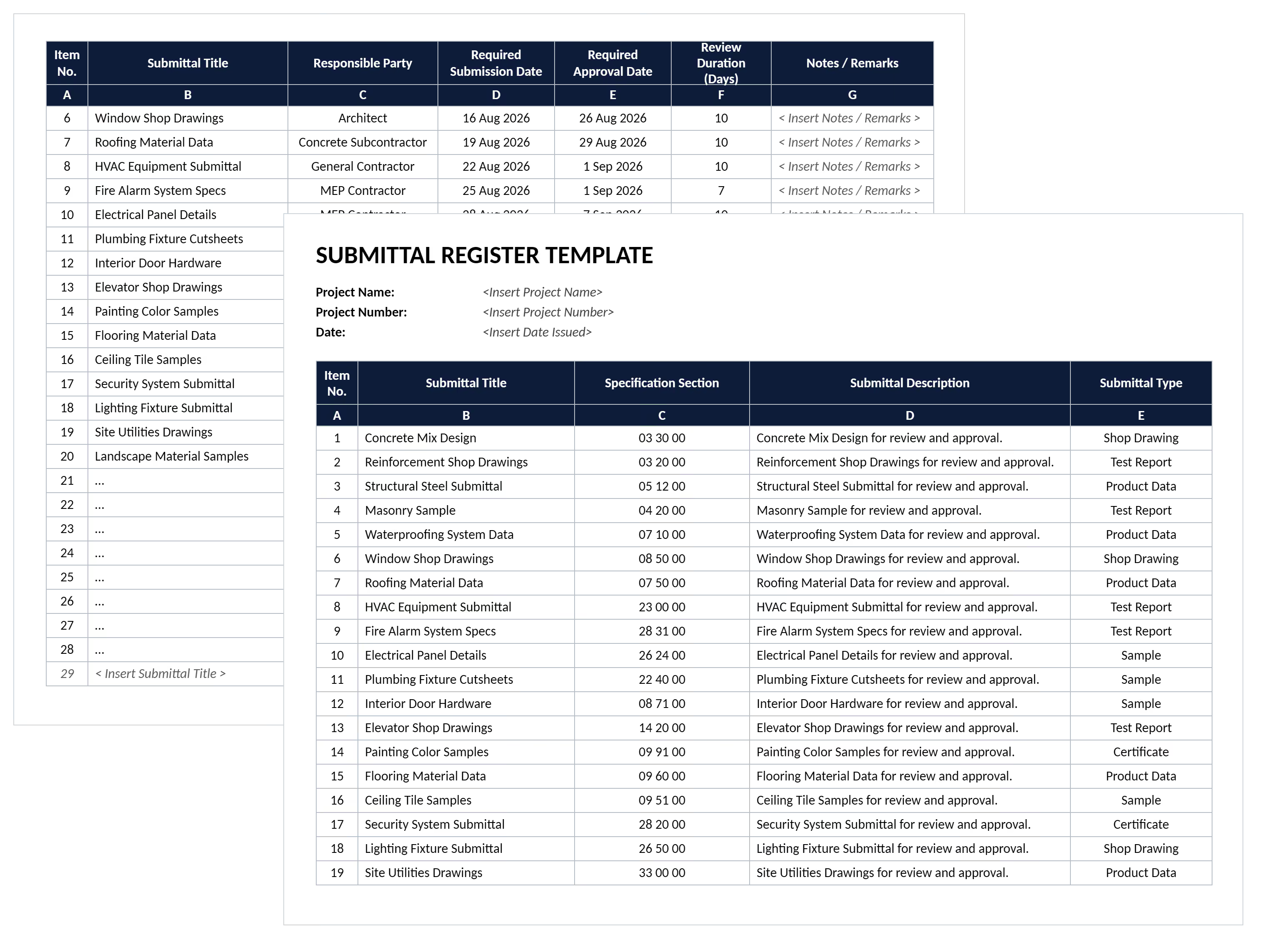

What is a Submittal Register Template?
A submittal register template tracks construction submittals from submission through final approval. It provides pre-formatted columns for submittal numbers, specification sections, and review status. The template also captures responsible parties and critical dates throughout the submittal workflow.
Project teams use submittal registers to maintain visibility over shop drawings and product data. Material samples and equipment information requiring design team approval get tracked systematically. The template creates a centralized system where general contractors, subcontractors, and consultants monitor progress.
Standardizing submittal information eliminates coordination confusion that causes fabrication holds and installation delays. Project managers identify approval bottlenecks before they impact the construction schedule.
A register defines what must be submitted; once those items start moving through review, teams track approval status in a construction submittal log template.
What's Included in Construction Submittal Registers?
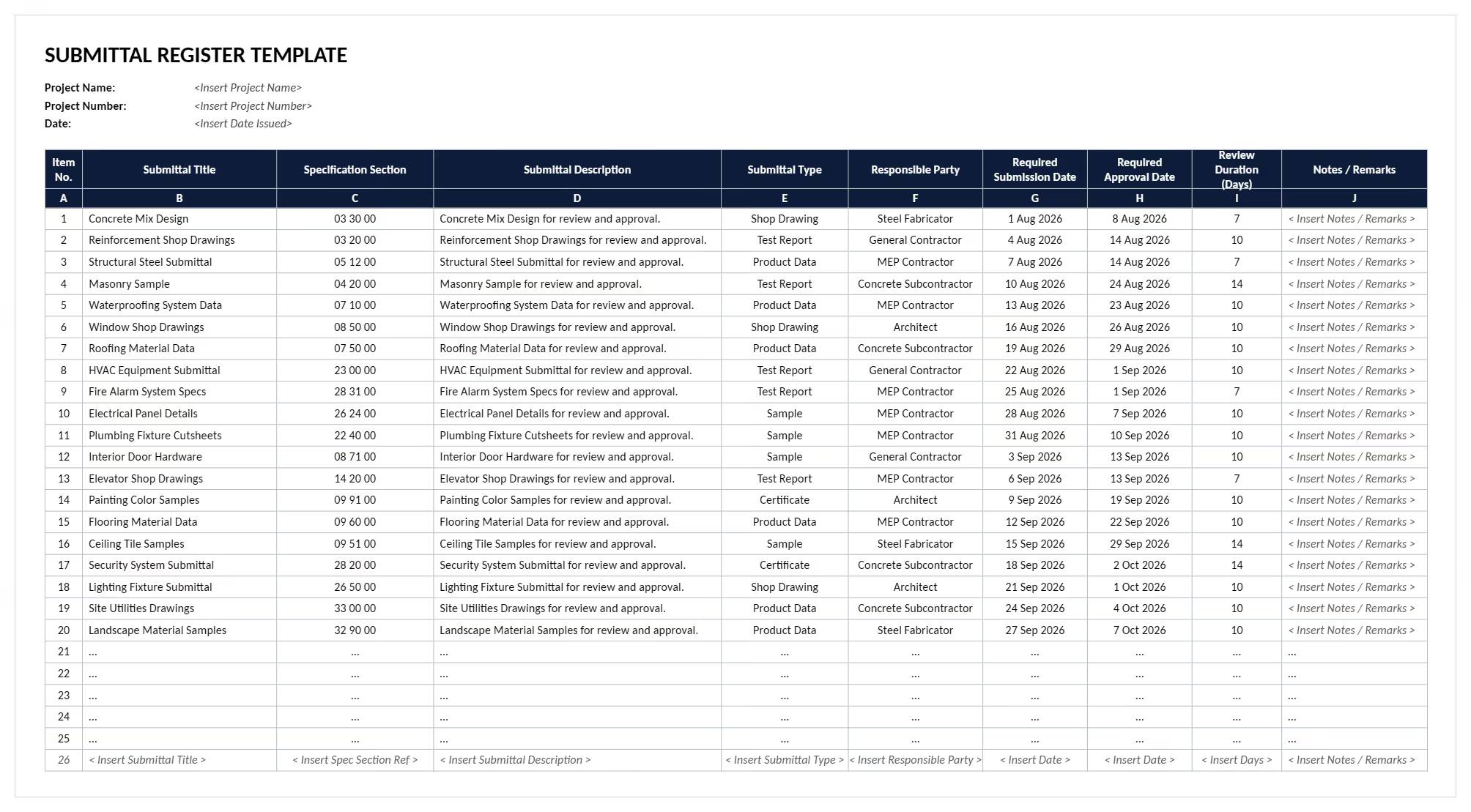
Construction submittal registers contain essential tracking fields for each submittal's approval journey. The template captures specification references, submittal details, and responsible parties. Review timing and approval status get documented for complete project records.
Key components in a submittal register template include:
- Submittal Number: Unique identifier linking each submittal to contract specifications and project documentation systems.
- Specification Section Reference: CSI division and section number connecting submittals to contract requirements and design intent.
- Submittal Description: Clear title identifying the specific shop drawing, product data, material sample, or equipment information.
- Submittal Type: Category designation including shop drawings, product data, material samples, test reports, or closeout documentation.
- Submitting Party: Subcontractor or supplier name showing who prepared and submitted the documentation for review.
- Date Submitted: When the submittal entered the review workflow, establishing timeline accountability for approval cycles.
- Review Status: Current approval state including submitted, under review, approved, approved as noted, or rejected status.
- Date Returned: When consultants or designers completed their review and returned comments to the construction team.
- Ball-in-Court Indicator: Shows which party currently holds responsibility for action, preventing submittal packages from stalling indefinitely.
💡 Pro Tip: Include a "Ball in Court" field in your submittal register showing who currently holds responsibility - subcontractor, consultant, or owner. This single field eliminates 90% of the "whose desk is it on?" questions during coordination meetings.
Why Use a Template for Submittal Tracking?
Submittal register templates prevent coordination breakdowns that delay procurement and create installation holds. Standardized formats ensure every team member records submittal information identically. This eliminates version control chaos from informal tracking methods.
Templates strengthen submittal management through systematic tracking by:
- Eliminating approval bottlenecks: Visual status tracking reveals which submittals are stalled with consultants and designers.
- Preventing duplicate submissions: Sequential submittal numbering stops teams from resubmitting the same shop drawings repeatedly.
- Maintaining specification compliance: Direct links between submittals and CSI sections ensure contract requirements get addressed.
- Accelerating review cycles: Complete submittal packages move through design team reviews faster than incomplete submissions.
- Protecting schedule milestones: Early visibility into long-lead equipment submittals prevents delivery delays that push substantial completion dates.
- Creating defensible audit trails: Complete submittal records document what was submitted, when reviews occurred, and who approved.
- Reducing resubmittal loops: Tracking revision numbers and prior comments helps teams address design intent on first resubmission.
- Supporting coordination across trades: Central registers show how mechanical, electrical, and plumbing (MEP) submittals interact, preventing field conflicts.
Teams managing 200+ submittals across multiple trades can't rely on memory or email chains. Templates provide the systematic tracking that keeps materials flowing and crews working.
How to Use a Submittal Register Template?
Using a submittal register template effectively requires populating it during preconstruction planning. Follow these steps to implement submittal register templates in your projects:
- Review contract specifications: Extract every submittal requirement from specification sections including shop drawings and product data.
- Pre-populate the register: Create submittal line items with specification references, descriptions, and responsible parties before mobilization.
- Assign submittal numbers sequentially: Use consistent numbering that links to specification sections for easy project file location.
- Record submission timing: Put the exact date when subcontractors deliver each submittal package for transmittal.
- Track review workflows: Update status fields as submittals move from submitted to under review to approved.
- Document return dates: Record when reviewed submittals return with comments and calculate actual review cycle duration.
- Monitor resubmittal requirements: Flag rejected items requiring revision and track how many cycles each submittal needs.
- Coordinate with procurement: Link approved submittals to material orders and fabrication schedules, ensuring installations proceed after approvals.
💡 Pro Tip: Pre-populate your register with all required submittals before construction starts. Teams that wait to add submittals as they arrive miss 30-40% of required items until field conflicts force last-minute submissions.
Who Should Use a Submittal Register?
Submittal registers serve anyone coordinating shop drawings, product data, and material approvals. They prevent communication breakdowns that delay fabrication and create costly installation holds.
✅ General Contractors: Coordinate submittal packages from multiple subcontractors and track design team review timing effectively.
✅ Project Managers: Monitor approval cycles, identify review bottlenecks early, and align procurement with construction schedules.
✅ Subcontractors: Track when shop drawings and product data were submitted and manage resubmittal requirements.
✅ Contract Administrators: Maintain complete submittal records, verify specification compliance, and document approval workflows for closeout requirements.
✅ Construction Managers: Oversee submittal coordination across project phases and ensure design intent verification occurs properly.
✅ MEP Coordinators: Track equipment data submittals for mechanical, electrical, and plumbing systems with long lead times.
✅ Client-Side Project Managers: Monitor consultant review timing, verify material selections, and maintain quality assurance throughout delivery.
💡 Pro Tip: Assign one person as submittal manager for the entire project. Distributed ownership sounds collaborative, but submittals fall through cracks without a single throat to choke when approvals stall.
When to Use a Template for Submittal Register?
Deploy submittal register templates whenever construction documentation requires systematic tracking through review workflows. The template becomes essential when contract specifications identify submittal requirements that could delay work.
Critical moments to implement a submittal register template include:
- Contract award and mobilization: Establish the register immediately after contract execution and extract all submittal requirements.
- Preconstruction coordination: Build the complete submittal schedule during planning meetings and identify long-lead approval items.
- Subcontractor procurement: Provide the register to trades during contract negotiation, clarifying which submittals they must prepare.
- Design development phases: Track submittal requirements even during design-build delivery where specifications evolve as construction documents develop.
- Throughout active construction: Update the register weekly as new submittals get prepared, submitted, reviewed, and approved.
- Before major procurements: Reference the register before ordering equipment or materials and confirm approvals are in place.
- During coordination meetings: Review submittal status with all trades and identify approval bottlenecks before delays occur.
- Project closeout preparation: Verify all required submittals were submitted and approved, collecting warranties and operation manuals.
Start your register during preconstruction, not after mobilization. Teams that wait spend the first month chasing specification requirements.
Common Problems with Submittal Register Template in Excel
Submittal register template Excel files create tracking problems that multiply as project complexity increases. Manual spreadsheets require constant updating that teams neglect during busy construction phases. Everyone ends up working from outdated information.
⚠️ Version control chaos: Multiple Excel copies circulate via email, creating conflicting submittal status across teams.
⚠️ Manual update failures: Teams forget to record submittal returns, leaving registers showing outdated "under review" status.
⚠️ Formula errors destroy accuracy: Complex Excel formulas break when rows get inserted, producing incorrect cycle times.
⚠️ No real-time visibility: By the time registers get updated, submittal approvals have changed and bottlenecks emerged.
⚠️ Lost specification links: Excel registers rarely maintain live links to specification sections, forcing manual cross-referencing.
⚠️ Resubmittal tracking gaps: Spreadsheets struggle to show submittal revision history clearly, hiding how many review cycles occurred.
⚠️ Disconnected from RFI coordination: Excel can't show relationships between submittals and RFIs, missing opportunities to resolve both.
⚠️ Approval workflow confusion: Static spreadsheets don't capture ball-in-court status dynamically, leaving teams uncertain about responsibility.
If your Excel register hasn't been updated in three weeks, it's actively harmful. Teams make procurement decisions based on stale approval status.
Streamline Submittal Tracking with Mastt AI
Managing submittal coordination shouldn't mean chasing Excel spreadsheets or reformatting tracking documents constantly. Construction teams need systematic visibility into which submittals are approved, which are stalled. They need to know which submittals threaten to delay critical path work.
From small commercial builds to complex infrastructure delivery, Mastt AI delivers tracking structures effectively. These structures prevent the approval bottlenecks causing fabrication delays and installation holds across the industry.
👉 Start creating professional submittal registers with Mastt AI today and stop losing time to coordination chaos.

Written by
Jackson Row
Jackson Row is the Growth & North American Market Lead at Mastt. With a background in risk modeling, cost forecasting, and integrated project delivery, he helps capital project owners work smarter and faster. Jackson’s work supports better tools, better data, and better outcomes across the construction industry.

Use this submittal register template to track shop drawings, product data, and samples through approval. Organize specification references, review statuses, and dates in one document to prevent installation delays.

Top Performers Don’t Guess. They Deliver.
Cut the stress of showing up unprepared
Start for FreeTrusted by the bold, the brave, and the brilliant to deliver the future