
Post author:
Anna Marie Goco

Construction project cost tracking helps teams monitor spending against the budget. Explore tools, methods, and best practices for tracking commitments, actual costs, and changes.
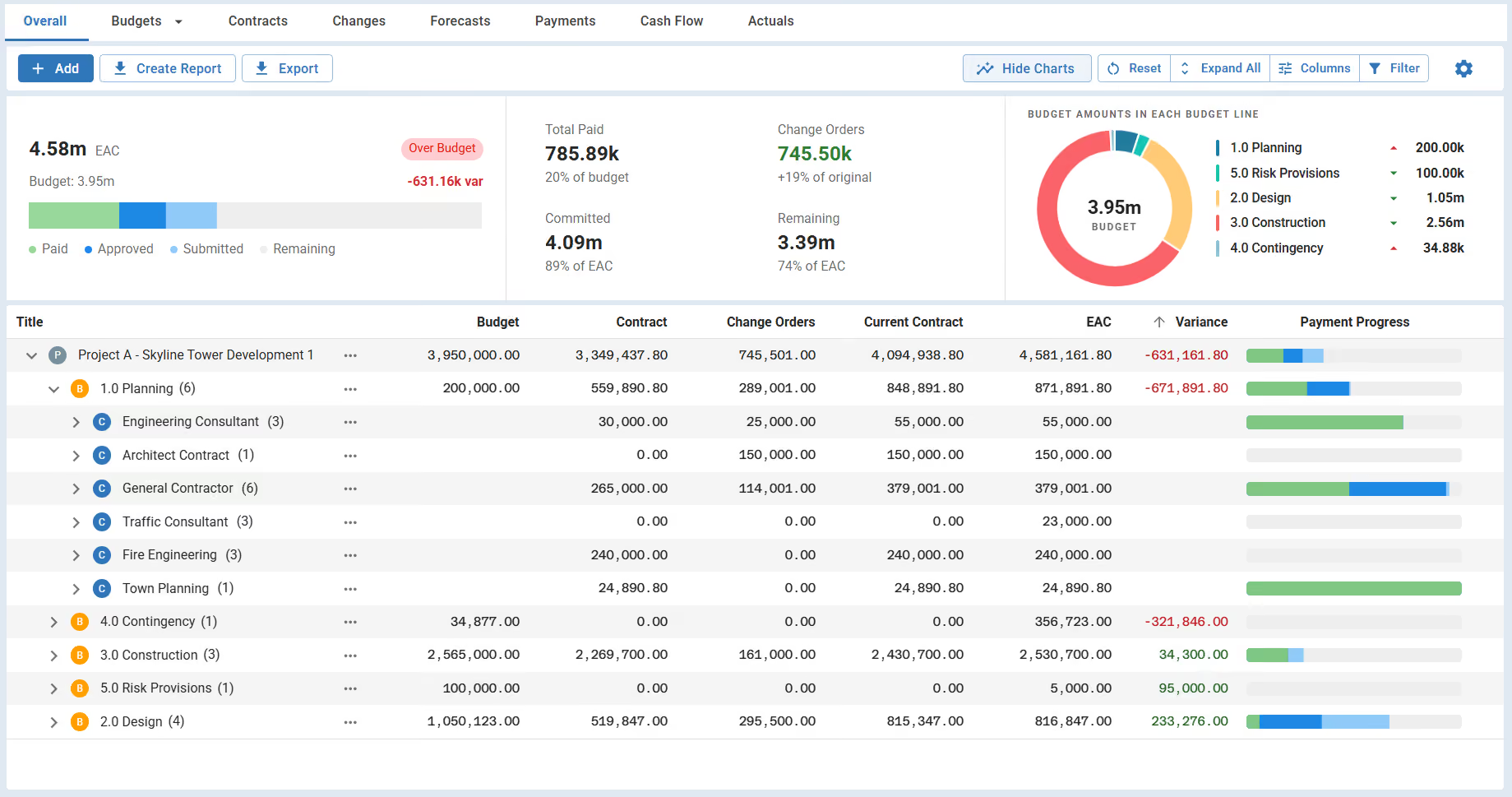
Use this FREE Construction Cost Tracker Template to monitor budgets, actuals, and cost variances. Track contracts, change orders, EAC, and payment progress for better cost control across your project.
Construction project cost tracking is the ongoing process of recording, reviewing, and managing project costs as work happens. It gives project teams a clear view of labor, materials, equipment, and other job costs so spending stays aligned with the project budget.
In this guide, you’ll learn how construction project cost tracking works and which costs matter most. We’ll also cover common methods, practical best practices, and the tools to keep cost tracking under control.
Construction project cost tracking is the continuous process of recording, reviewing, and controlling project costs as work is performed. It tracks actual spending against the approved project budget so project managers can see where money is going and act before costs get out of control.
The process covers all cost data tied to a construction project. This includes labor, material, equipment use, subcontractor payments, and other project expenses. Costs are recorded as they occur, which gives the project team real-time visibility into job costs and overall project finances.
Accurate construction cost tracking also supports better day-to-day decisions. When cost data is up-to-date, project managers can adjust staffing, sequencing, or purchasing before small issues turn into cost overruns. Without reliable tracking, even well-planned projects can quickly lose financial control.

Cost tracking, cost estimating, and cost forecasting serve different purposes at different points in a construction project. Construction estimating predicts what a project should cost, tracking records what it is actually costing, and forecasting uses current cost data to predict where the final cost will land.
Estimating happens before work starts and sets the initial budget. Cost tracking begins once the project is underway and records actual spending for labor, materials, and equipment. Forecasting looks forward. It uses tracked cost data and remaining work to predict future costs and potential overruns.
Construction cost tracking gives project teams control while work is still underway. It turns raw cost data into signals project managers can use to protect the project budget, cash flow, and final margin.
Here are the core reasons cost tracking is essential for construction projects:
Without reliable cost tracking, project budgets become reactive. Issues surface late, options shrink, and corrective action costs more. Strong cost tracking keeps financial control tied to daily project activity instead of month-end reports.
Construction projects should track all direct, indirect, and committed costs that affect the project budget. This includes costs already spent, costs in progress, and costs that are approved but not yet invoiced.
Tracking these costs consistently allows project teams to connect spending directly to work performed. It also makes cost data easier to audit, explain to stakeholders, and use during reviews.

Cost tracking in a project begins with establishing a clear budget and cost structure. Then record costs as work happens and review them on a fixed schedule so issues surface early. The process should give project managers a clear view of actual cost, committed cost, and remaining budget at all times.
Load the approved project budget before any labor or purchasing begins. Build cost codes that match how the project will actually be built, not how it is reported in accounting. Misaligned cost codes make cost data hard to use in the field.
Keep cost codes tight and consistent. Too many codes slow down entry and create errors. Too few hide problem areas. A good rule is to track costs at the level where decisions are made, not at the level where invoices are processed.
Labor costs should be logged every day, not at the end of the week. Daily entry keeps productivity issues visible and prevents hours from being misallocated across tasks.
Require foremen to review labor entries before submission. Small mistakes in time coding compound quickly and distort job cost reports within the first few weeks of a project.
Record material usage and equipment time when they happen, not when invoices arrive. This gives project managers early insight into overuse, waste, or idle equipment.
Tie material and equipment costs to specific work areas or phases. General cost buckets hide trends and make it harder to correct problems while work is still active.
Enter purchase orders and subcontracts as committed costs as soon as they are issued. Committed costs represent real financial exposure, even before invoices are received.
Review commitments weekly against remaining budget. Projects that track only paid costs often underestimate final cost until it is too late to adjust.
Compare actual and committed costs to the project budget at the same time each week. Consistency matters more than frequency. Skipped reviews break cost awareness fast.
Use cost reviews to drive decisions, not just reporting. If cost data does not lead to action, the tracking process is failing.
💡 Pro tip: Lock cost tracking to a hard weekly cutoff and treat late entries as project risk. When anything misses the cutoff, cost visibility breaks immediately, and decisions are made on false numbers. The fastest way to lose control of costs is to review last week’s work with incomplete data.
Construction teams track project costs using structured methods that organize spending by job, activity, or output. The right method depends on project size, contract type, and how closely costs need to be tied to field activity.
Most projects use more than one method at the same time. Job costing provides the overall picture, while cost codes, time tracking, and commitments add detail where control matters most. Combining methods improves accuracy and reduces blind spots in cost data.
Cost tracking is ultimately the responsibility of the project manager. While several team members contribute data, the project manager owns cost control and is accountable for how cost information is used to manage the project.
Cost tracking responsibilities typically fall to these roles:
✅ Project manager: Owns the cost tracking process, reviews cost data, manages variances, and makes budget decisions.
✅ Field supervisors and foremen: Provide labor hours, equipment usage, and daily job cost inputs from the site.
✅ Accounting or finance team: Records invoices, payments, and expenses so financial data stays accurate and current.
✅ Project engineers or coordinators: Maintain cost codes, purchase orders, and documentation tied to project costs.
✅ Project owner and owner’s representatives: Use cost reports and forecasts to manage risk, cash flow, and portfolio-level performance.
Cost tracking fails when ownership is unclear. When the project manager does not actively own the process, cost data becomes delayed, incomplete, or purely administrative. Clear responsibility ensures cost information stays accurate and usable for decision-making.
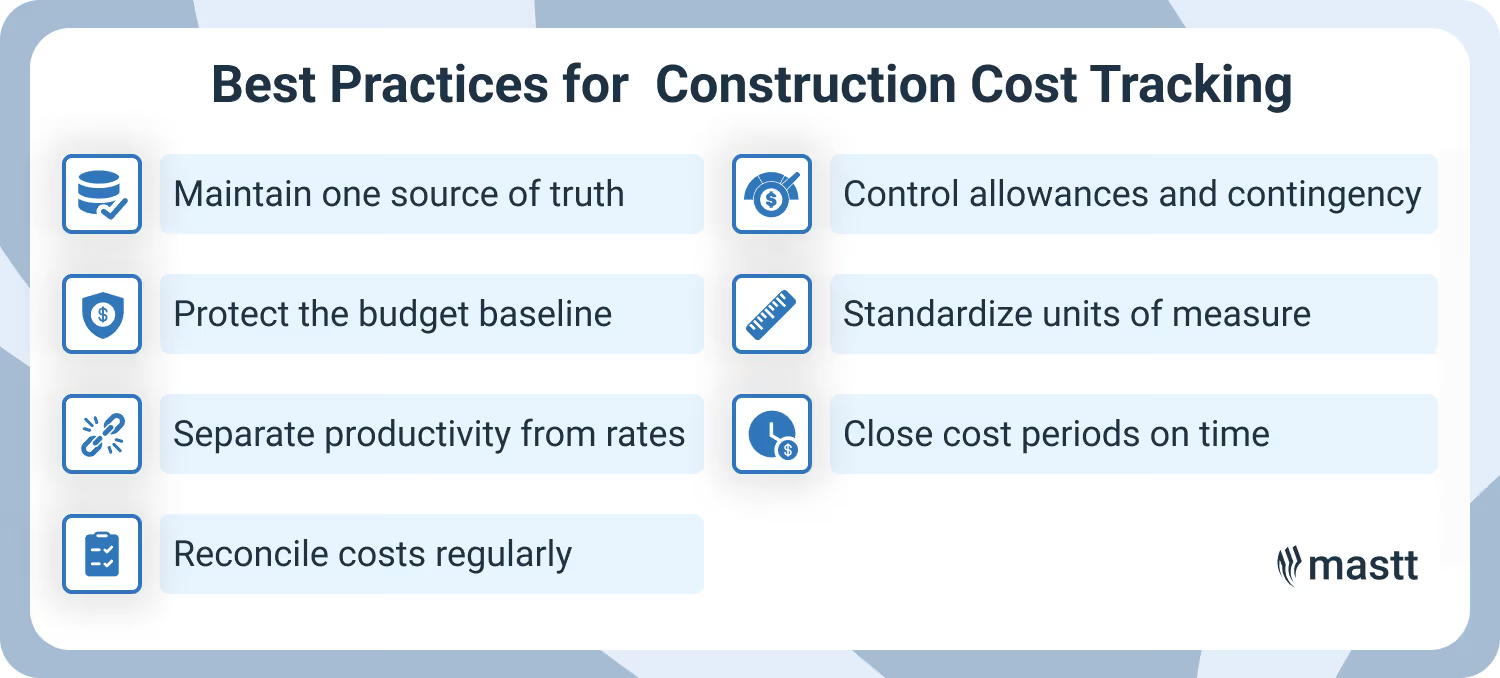
Effective cost tracking relies on repeatable practices that keep cost data accurate, comparable, and usable for decisions. The most important best practice is maintaining a single, consistent source of truth for all project cost data. Without it, even well-designed tracking processes break down.
☑️ Enforce one source of truth for cost data
Use a single system as the official record for project costs. Labor, materials, equipment, commitments, and changes should all flow into the same cost structure. When teams track costs in parallel tools, numbers drift, and confidence in reports collapses.
☑️ Lock the original budget and protect the baseline
Freeze the approved budget before the first cost is logged and treat it as untouchable. If the budget moves informally, cost variance loses meaning fast. Require every adjustment to go through a formal revision so performance issues stay visible.
Keep a separate record of each budget version. This allows project managers to see whether cost changes came from scope growth or execution problems.
☑️ Separate productivity issues from rate changes
Track quantities and hours independently from labor and material rates. When costs rise, this separation makes it clear whether crews are underperforming or prices are shifting.
Review productivity weekly, not monthly. Early drops in output almost always appear in quantities before they show up as budget overruns.
☑️ Reconcile field costs with accounting on a fixed cadence
Match field-entered costs with accounting records every period, not just at month-end. This catches missing invoices, double entries, and miscoded costs before reports go out. Assign one person to resolve discrepancies immediately.
☑️ Track allowances and contingencies as controlled funds
Log allowances and contingency usage as soon as costs are committed. Waiting until money is spent creates the illusion of an available budget that no longer exists. Also, set approval rules for contingency use. Treat it as managed risk capital, not a buffer for poor planning or execution.
☑️ Standardize units of measure across the project
Use consistent units for quantities, labor, and production tracking across all reports. Mixed units slow analysis and hide productivity trends. Standard units also allow cost data to roll up cleanly for benchmarking and future estimating.
☑️ Close cost periods on schedule
Set a hard close date for each cost period and avoid reopening it unless there is a material error. Period discipline protects trend analysis and keeps accountability clear.
Late changes should also be logged as adjustments in the next period. This preserves historical accuracy and makes cost movement easier to explain.
💡 Pro tip: Separate cost tracking reviews from progress meetings. When cost reviews get folded into schedule updates, financial issues are often rushed or ignored. A short, dedicated cost review each week keeps budget decisions deliberate instead of reactive.
Most construction cost tracking issues come down to timing. When teams record costs late, labor and material overruns don’t show up until decisions are already locked in.
Late tracking creates a chain reaction. Missed entries distort cost reports, delayed reviews weaken decisions, and small overruns grow quietly. Avoiding these mistakes keeps cost tracking tied to real project activity instead of historical cleanup.
Construction teams use field tools, accounting systems, and project cost management software to keep project costs visible and controlled. The value of each tool depends on how well it captures costs in real time and connects them back to the project budget.
Common tools used for construction project cost tracking include:
💡 Pro tip: Use construction project management software like Mastt to manage budgets, committed costs, forecasts, and approved changes in one place. Mastt is built for project controls, which means cost tracking stays tied to approvals, scope changes, and reporting.
Reliable cost-tracking software should show where project funds stand right now and where they are headed. It should support real decisions during delivery, not just produce reports after the fact.
When evaluating construction cost tracking software, focus on these capabilities:
Software does not fix weak processes. The right system reinforces cost discipline by making it easy to enter costs correctly and hard to bypass approvals or tracking rules. When software aligns with how teams work, cost tracking becomes part of daily project control instead of an administrative task.
💡Pro tip: During software selection, ask vendors to walk through a real cost overrun scenario. If the system cannot clearly show when and why costs went off track, it will not protect your budget in live projects.
Construction project cost tracking is effective when reviewed often and tied directly to how work is delivered in the field. Projects stay on budget when teams track actual, committed, and remaining budgets in real time and act before options close.
If you need stronger control across budgets and cost reporting, Mastt provides a construction project management software built for teams managing complex projects. It keeps cost tracking aligned with scope, approvals, and forecasts, so decisions are based on a single source of truth.
Written by
Anna Marie Goco is a Senior Content Producer at Mastt, writing for cost estimators, cost engineers, project managers, and owner's representatives. She has completed TAFE NSW short courses in construction contract administration and project management, and holds Google's Foundations of Digital Marketing and E-commerce certificate.


Contributions from

Cut the stress of showing up unprepared
Start for FreeTrusted by the bold, the brave, and the brilliant to deliver the future

.avif)


