

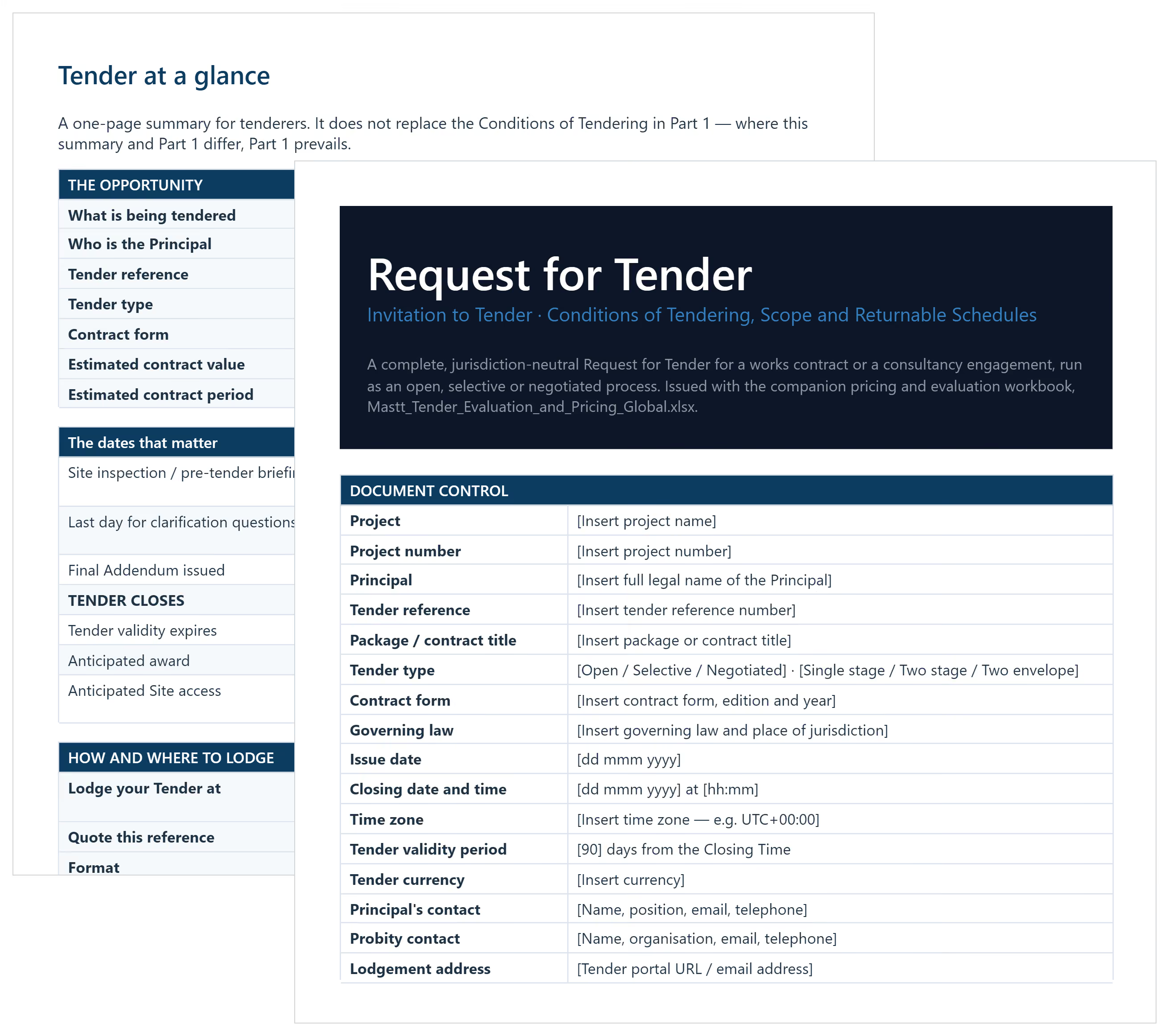

What is a Tender Document Template?
A tender document template is a pre-built framework for formal construction bids. It provides ready-made sections for scope, pricing, tendering conditions, and compliance attachments.
Both principals and contractors use a tender document throughout the procurement process. Principals use it to invite bids from the market. Contractors use it to structure their tender response and submission.
Common formats of tender documents are Word, PDF, and Excel. Word is for drafting, PDF for final lodgement, and Excel for Bill of Quantities (BOQ).
What's Included in a Construction Tender Document?
Tender submission templates cover everything needed to run or respond to a bid. Components vary by project type and contract value.
Most construction tender documents and packages include these sections:
- Tender Notice: Project summary, key dates, contacts, and an Acknowledgement of traditional custodians where required.
- Scope of Works: Detailed description of what contractors or suppliers are asked to deliver.
- Conditions of Tendering: Rules governing the process, probity obligations, and non-conforming tender treatment.
- Evaluation Criteria: Weightings applied to price, safety, methodology, and delivery capability.
- Pricing Schedules: BOQ, schedule of rates, or lump sum breakdowns by trade.
- Draft Contract: Commercial terms based on standard forms like AS 4000-1997, AS 2124, or GC21.
- Compliance Attachments: WHS plan, insurance certificates, modern slavery statement, and licences.
- Returnable Schedules: Completed programme, milestones, methodology statements, and personnel details.
💡 Pro Tip: Lock your exclusions section and apply edit access controls. Most post-award variations trace back to inclusions never defined upfront.
How to Use This Tender Document Template in Word
Complete Document Control first, then settle the evaluation weightings before anything else goes out. Those weightings cannot change once the Closing Time passes, so agreeing them late is the most expensive mistake available.
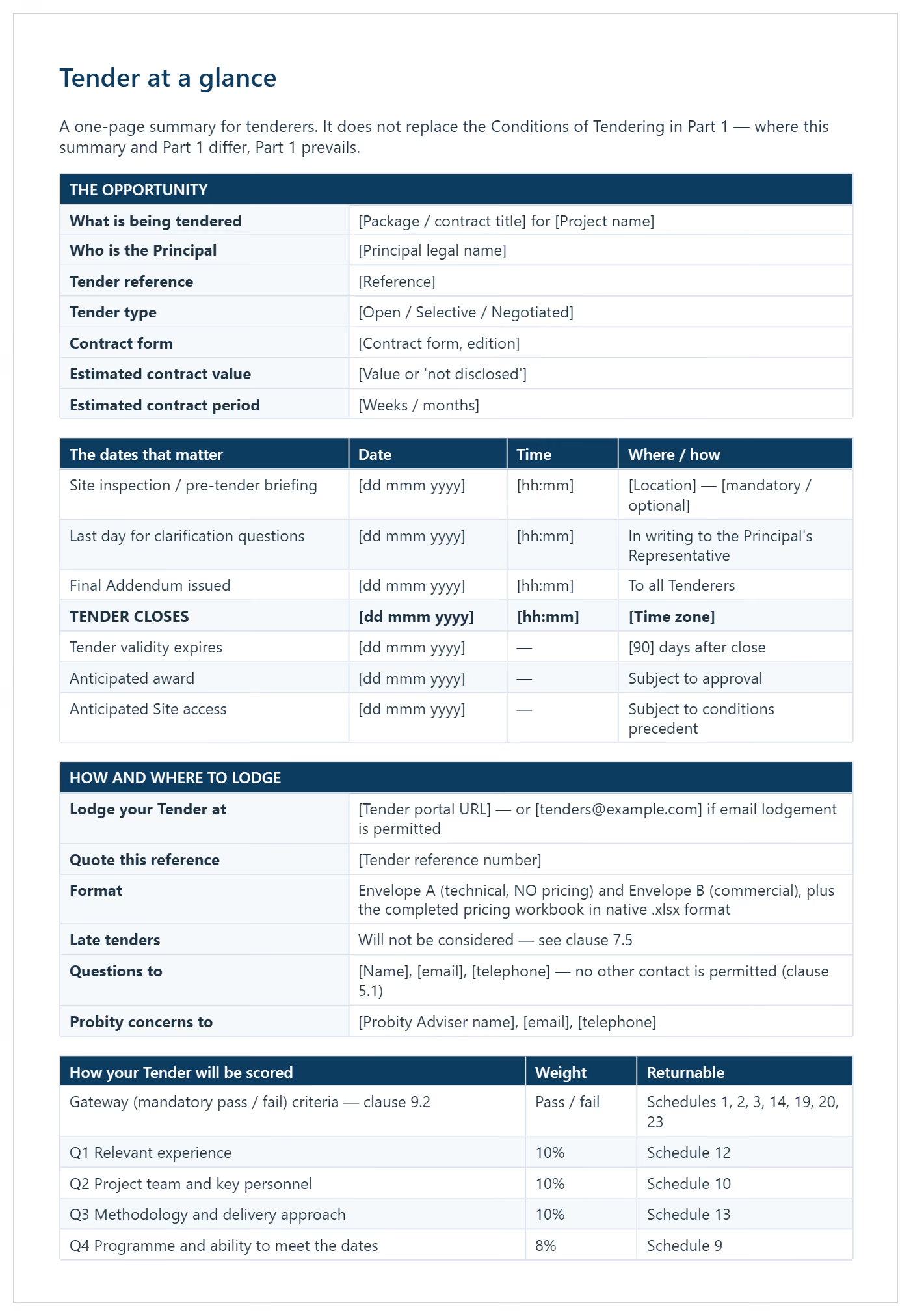
- Complete Document Control with the project, Principal, tender reference, package title, contract form, governing law, issue and closing dates, time zone, tender validity period and lodgement address
- Choose your tender type and delete the alternatives that do not apply: open, selective or negotiated, single or two stage, single or two envelope, works or services
- Settle and approve the evaluation weightings in clause 9.3, then have them signed off before issue
- Complete Tender at a glance as the one-page summary for tenderers, keeping it consistent with Part 1
- Work through the Conditions of Tendering, replacing placeholders and deleting the grey italic drafting notes once acted on
- Select which of the 23 returnable schedules apply to this package and delete the rest
- Have a qualified adviser in the governing law jurisdiction review the clauses on tender documents, lodgement, evaluation and award
- Complete the companion pricing workbook, then delete the Principal's evaluation sheets before it goes to tenderers
- Update the table of contents by selecting all and pressing F9, then log every Addendum in the register before close
The addenda register is what protects the process. Every Addendum forms part of the Request for Tender, tenderers must acknowledge each one in Schedule 1, and an unacknowledged addendum is a standard ground for setting a tender aside at evaluation.
Why Use a Tender Template for Construction Projects?
A tender document template saves time and lifts bid quality on every job. It removes the need to rebuild documentation from scratch. Here's why it matters for procurement:
- Saves time: Reuse proven sections rather than starting from scratch on every tender response.
- Fewer errors: Pre-built sections reduce omissions that result in non-conforming bids.
- Compliance protection: Templates built around Australian procurement rules reduce disqualification risk.
- Evaluator confidence: Organised submissions are easier to score against stated criteria.
- Scope clarity: Defined inclusions and exclusions reduce post-award disputes and variations.
- Faster turnarounds: Most Australian tenders close in 4-6 weeks. A template helps you respond quickly.
- Credibility: Consistent quality across submissions builds your track record with clients and agencies.
Consistency across bids builds your reputation with clients and agencies. The right template becomes your edge in a competitive field.
💡 Pro Tip: Use your tender evaluation criteria weightings as a writing guide. If safety is 20% of the scoring, make it 20% of your written effort, not a generic policy attachment.
When to Issue or Use a Document for Tenders?
Issue a tender document once your scope is clear enough for competitive bids. Releasing too early forces addenda and wastes time for everyone involved.
Timing depends on project stage, contract value, and procurement model. Here are the key triggers:
- When design is 50-70% complete: Issuing too early forces addenda that overburden potential suppliers.
- Before mobilisation deadlines: Allow enough lead time to run the full tender process properly.
- After EOI (Expression of Interest) shortlisting: Selective tenders follow EOI, then go to shortlisted firms only.
- Above state procurement thresholds: Most Australian states require formal tendering above set contract value limits.
- When procuring goods alongside works: Construction tenders often cover materials and goods, not just labour.
- At the start of each project phase: Multi-stage projects need separate tender documents for design and construction.
- At annual panel renewal: Many state bodies, including those across Western Australia, run prequalification panel refreshes annually.
💡 Pro Tip: Set a tender close time of 2:00 PM rather than 5:00 PM. It gives your team hours to handle late queries or portal upload issues before the cut-off, not minutes.
Best Practices for Construction Tender Documentation
Good documentation discipline separates compliant, winning bids from rejected ones. These practices come from real tendering experience across Australian construction contracts.
Apply these across every bid you prepare, regardless of contract size:
☑️ Build a bid library: Keep a central store of capability statements, project case studies, and team bios ready to reuse across submissions.
☑️ Separate technical and pricing volumes: Evaluators score each component differently. Mixing them creates confusion and costs marks.
☑️ Run a compliance checklist pre-submission: Confirm ABN, licences, and ISO certifications are attached before uploading. Missing documentation means instant disqualification.
☑️ Mirror the RFT's headings in your response: This makes scoring easier for evaluators and directly reduces clarification requests post-lodgement.
☑️ Don't overlook low risk criteria: Evaluators deduct marks for thin or vague detail even in lower-weighted sections.
☑️ Flag assumptions clearly: Undisclosed assumptions become contractual obligations once the award is made.
☑️ Get legal advice on complex indemnities: Uncapped liability clauses and unfair contract terms under Australian Consumer Law are real risks in standard form contracts.
Common Problems with Manual Tender Proposals in Word
Manual tender proposals built in Word cause repeated, avoidable problems. These issues don't just waste time. They lose bids.
Working from static Word files creates risk at every stage:
⚠️ Version control failures: Teams working off different Word copies often price from outdated documents.
⚠️ Missed addenda: Without a central system, addenda get missed and a tender submission becomes non-conforming.
⚠️ Compliance gaps: Forgotten declarations or missing WHS plans get a bid rejected outright.
⚠️ Inconsistent pricing: Manual BOQ errors are common when multiple team members edit the same file.
⚠️ Generic responses: Copy-pasted capability statements fail to score well against project-specific criteria.
⚠️ Last-minute scrambles: Poor preparation leads to rushed attachments and incomplete returnable schedules.
⚠️ Buyer confusion: Evaluators move on quickly from disorganised or poorly presented Word documents.
These issues compound when managing multiple construction tenders at once. The Security of Payment Act also affects your rights post-award.
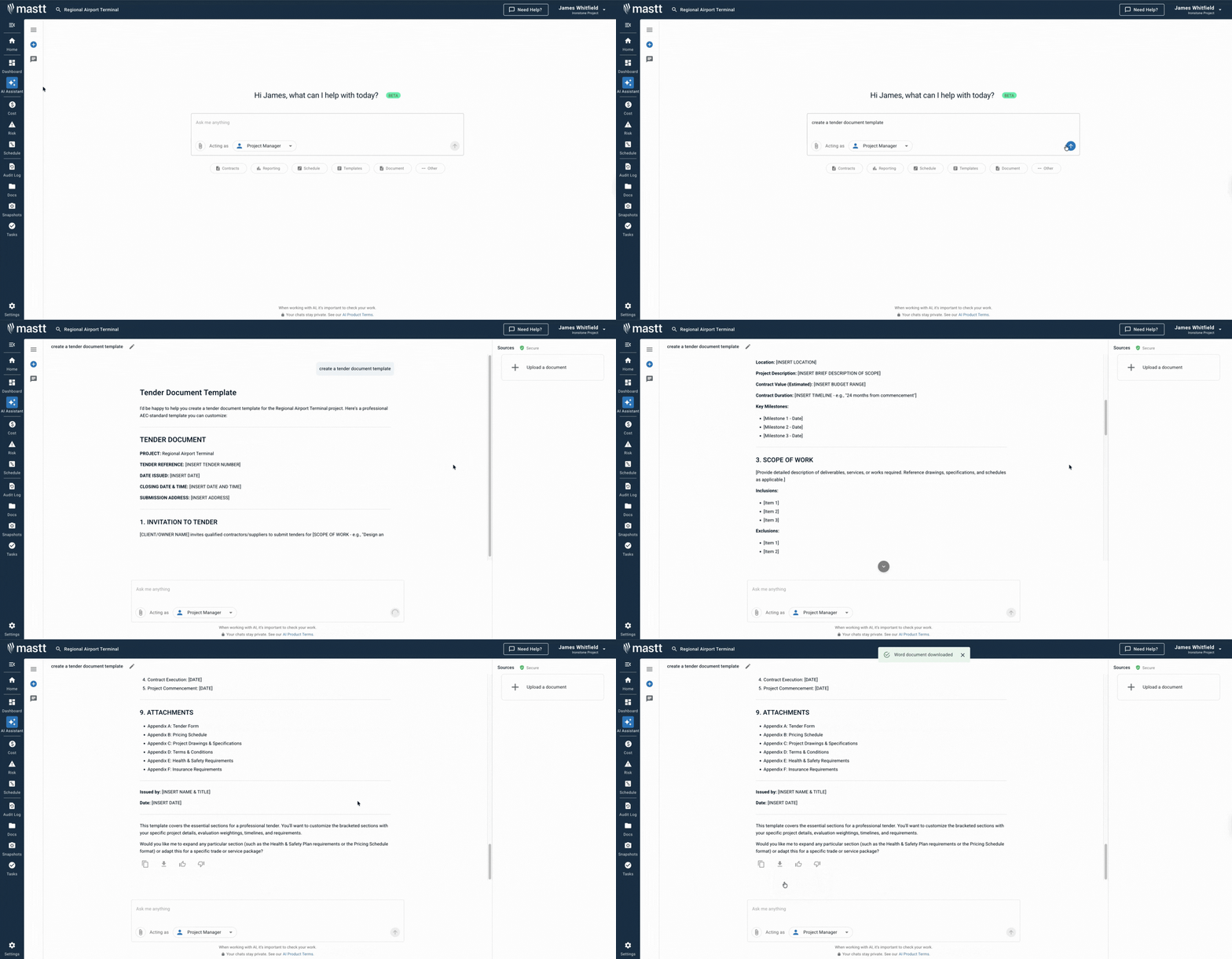
With Mastt's AI Assistant, generate a tailored tender from your project description. Upload your RFT and let AI extract what's needed. Then refine through conversation to match your bid strategy.
Related Articles and Templates
Explore these resources for tender preparation, bid pricing, proposals, and contractor selection:
.avif)
Written by
Doug Vincent
Doug Vincent is the co-founder and CEO of Mastt, the AI capital-project management platform used by governments, Fortune 500 companies, and consultancies across APAC, North America, and MENA. Before founding Mastt in 2019, he spent a decade at RPS delivering more than $2 billion in capital works, including the $2.1B Defence Navy Infrastructure program, and holds a CPSPM certification with the AIPM. He contributes content and speaks on AI in capital project delivery at Mastt.

Use this FREE tender document template to prepare and win competitive construction bids. Cover scope, pricing, conditions, and compliance in one ready-to-use framework.

Top Performers Don’t Guess. They Deliver.
Cut the stress of showing up unprepared
Start for FreeTrusted by the bold, the brave, and the brilliant to deliver the future