


What is a Construction Cost Report Template?
A construction cost report template is a ready-made document for tracking project costs. It shows budget, committed, actual, and forecast costs side by side. Each cost item sits against its cost code or work package.
Many teams start with a construction cost report template Excel file. The template gives you a repeatable layout to reuse each reporting cycle.
What's Included in a Project Cost Report Template?
A project cost report template contains the core fields for tracking project finances. These fields link your budget to commitments, payments, and forecasts.
For a deeper breakdown, see what to include in a construction cost report.
Here's what a strong cost report includes:
- Budget: The approved baseline cost for each item or cost code.
- Committed cost: Contract values and purchase orders already locked in with vendors.
- Change orders: Approved change orders that shift contract scope and cost.
- Actual cost: Money spent to date, drawn from invoices and certified payments.
- Forecast to complete: The remaining cost expected to finish outstanding work.
- Estimate at Completion (EAC): Total forecast cost combining commitments and remaining work.
- Variance: The gap between budget and EAC, flagged when negative.
- Payment progress: Amounts paid, approved, and pending against each contract.
💡 Pro Tip: Track committed cost separately from actual cost. Many overruns hide in commitments you've approved but not yet paid.
Why Project Teams Rely on Construction Cost Reports
Construction cost reports give teams an early warning on budget overruns. Clear numbers help you defend spend decisions to owners and lenders. A construction cost report template makes that warning system repeatable.
Here's what that visibility delivers:
- Comparing budget against forecast exposes cost pressure before it escalates.
- Clear figures move change orders and payments through approval faster.
- Tracking used versus available contingency keeps reserves from slipping.
- Transparent reporting cuts back-and-forth during funding and board reviews.
- Live commitments and actuals make your EAC far more reliable.
- Linking change orders shows how each scope shift hits the budget.
- Payment progress feeds a clearer cash flow forecast.
- A clear cost record answers questions when numbers get challenged.
💡 Pro Tip: Report variance as a percentage, not only a dollar figure. A 2% slip on a large budget is still a serious number.
Who Should Use a Cost Report Template
Owner's representatives and cost engineers rely on cost reports most. But the report helps anyone accountable for a project budget.
These roles get the most from a cost report template:
- ✅ Owner's representatives: Report financial status to owners and project boards for funding.
- ✅ Client-side project managers: Track budget against commitments and forecast across the project.
- ✅ Cost engineers and estimators: Maintain cost codes, update forecasts, and reconcile actuals by line.
- ✅ General contractors: Report cost status, manage change orders, and submit pay applications.
- ✅ Project controls managers: Watch EAC, variance, and cash flow across complex scopes.
- ✅ Project accountants: Confirm actual costs, retainage, and payment status at month-end.
- ✅ Program managers and PMOs: Roll cost reports up across a portfolio of projects.
How to Build and Maintain a Construction Cost Report
Building a reliable cost report starts with a clear budget by cost code. These steps follow the Project Management Institute's PMBOK Guide for cost control.
Follow these steps to build and maintain your construction cost report template:
- Set the budget: Split the total budget into trades by cost code. Many US teams use CSI MasterFormat from the Construction Specifications Institute.
- Record committed costs: Enter contract values and purchase orders as they're awarded.
- Log change orders: Add approved change orders so current contract values stay accurate.
- Capture actual costs: Pull spend from invoices and certified progress payments.
- Update the forecast: Adjust forecast to complete for each open item.
- Calculate EAC and variance: Combine commitments with remaining work, then compare against budget.
- Review contingency: Track drawdowns so you know what reserve remains.
- Distribute the report: Share the current cost position with owners and stakeholders each cycle.
💡 Pro Tip: Tie each cost line to your Schedule of Values. The American Institute of Architects (AIA) publishes the G702 pay application. Matching the two keeps your report and billing in sync.
Generate Live Cost Reports in Mastt's Cost Module
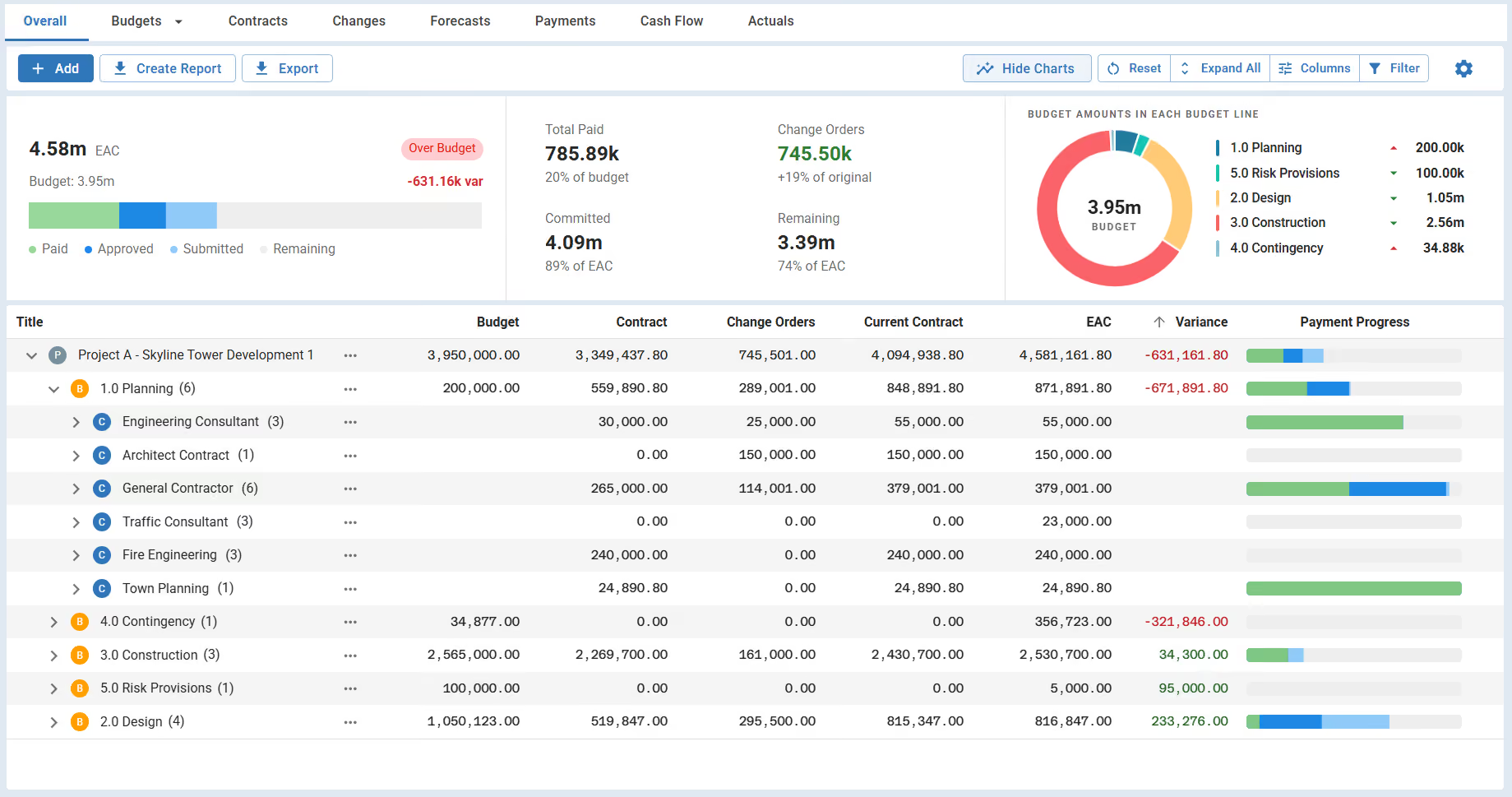
You can generate your cost report directly in Mastt's Cost Module. It connects budgets, contracts, change orders, payments, and forecasts in one live view. No more stitching numbers from separate spreadsheets the night before a board meeting.
With Mastt's Cost Module, you can:
🚀 See the whole financial picture: The Overall view shows budget, commitments, forecast, and EAC together.
📊 Track variance automatically: Mastt calculates the gap between budget and EAC in real time.
📂 Drill into any cost line: Expand rows to explore contracts, change orders, and payments by cost code.
🔄 Update once, reflect everywhere: Log a payment or change order, and the report refreshes instantly.
📥 Export board-ready reports: Use Create Report to download a filtered cost report as a professional PDF.
Here's how to get started:
- Open the Cost tab: In your project, click Cost in the side navigation bar.
- Set up budgets: Add your project budget, then split it into sub-budgets by cost code.
- Add contracts and change orders: Link each contract to its budget, and log changes as approved.
- Record payments: Process progress payments so paid, approved, and pending amounts stay current.
- Create your report: Filter the view you need, then use Create Report to download it.
👉 Learn more about the Cost Overall page in the Mastt Help Center.
When to Issue a Construction Project Cost Report Template
Issue a construction cost report template at every major cost milestone. Most projects report monthly, though high-risk phases may need weekly updates.
Reach for a construction project cost report template at moments like these:
- Run one at each monthly reporting cycle for owners, lenders, and the board.
- Issue an update after approving change orders that move the forecast.
- Prepare one before a funding draw to justify the next drawdown.
- Produce one at stage gates to confirm cost health before the next phase.
- Send one the moment overruns appear, so the team can act fast.
- Reconcile final costs, retainage, and open change orders at contract close-out.
- Bring a current one to every board or stakeholder meeting.
💡 Pro Tip: Lock your report date each month and hold it. Owners trust a steady rhythm more than a perfect report that lands late.
Cost Reporting Mistakes and Best Practices
Most cost reporting problems trace back to manual, disconnected spreadsheets. The table below pairs the common mistakes with what experienced teams do instead.
Take Control of Project Costs with Mastt
Cost control decides whether a project lands on budget or slips into overrun. Clear, current reporting is what keeps that decision in your hands.
With Mastt's Cost Module, your construction cost report template is built in. It stays current as budgets, contracts, and payments change.
👉 Take control of your project costs with Mastt today!
.avif)
Written by
Doug Vincent
Doug Vincent is the co-founder and CEO of Mastt, the AI capital-project management platform used by governments, Fortune 500 companies, and consultancies across APAC, North America, and MENA. Before founding Mastt in 2019, he spent a decade at RPS delivering more than $2 billion in capital works, including the $2.1B Defence Navy Infrastructure program, and holds a CPSPM certification with the AIPM. He contributes content and speaks on AI in capital project delivery at Mastt.

Use this FREE cost report template to track every construction project cost in one view. See where money goes, catch overruns early, and report with confidence.

Top Performers Don’t Guess. They Deliver.
Cut the stress of showing up unprepared
Start for FreeTrusted by the bold, the brave, and the brilliant to deliver the future