

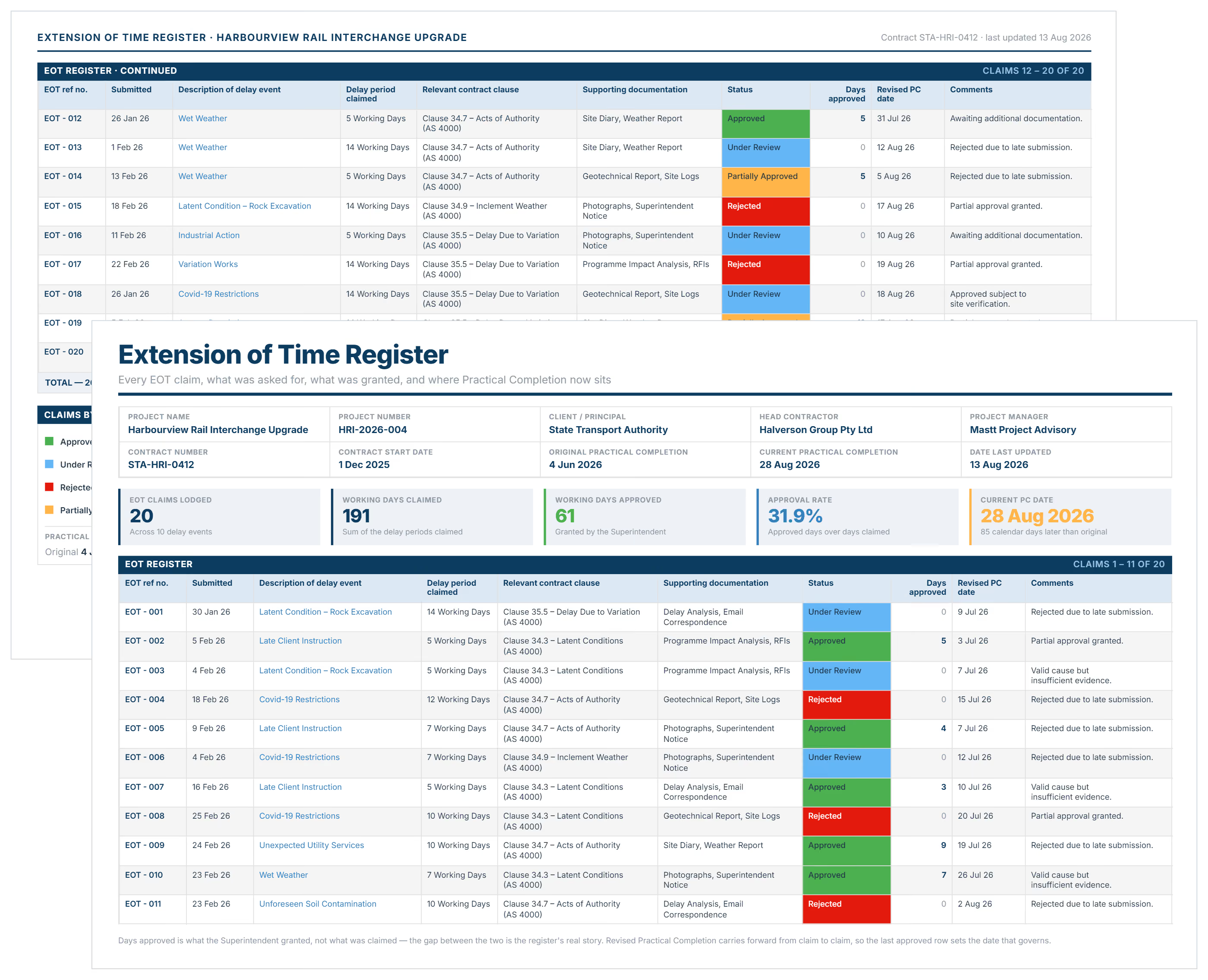

What is an Extension of Time Register Template?
An extension of time register template is a pre-structured document tracking all project time extension requests. It records delay causes, notification dates, approval decisions, days requested versus granted, and revised completion dates.
The register maintains a centralized record of every EOT request from initial notice through final decision. It documents compliance with contract requirements while creating the audit trail needed when defending time extensions.
Project teams use EOT tracking templates to demonstrate proper notification procedures. The register becomes the primary reference when reviewing time impacts, calculating liquidated damages exposure, or resolving disputes.
What's Included in EOT Registers?
Construction EOT registers contain the essential fields for tracking time extension requests and approvals throughout project delivery. Standard fields in a time extension register include:
- EOT reference number: Sequential identifier linking to supporting documentation, change orders, and approval correspondence.
- Delay event description: Specific occurrence triggering the request like owner-directed changes, unforeseen conditions, or weather delays.
- Notice submission date: When contractor notified owner or architect of delay, demonstrating timely notification per contract terms.
- Days requested: Calendar or working days requested on initial submission, calculated using schedule analysis and program impacts.
- Days approved: Actual extension granted after review, often differing from requested duration based on assessment findings.
- Revised completion date: New substantial or practical completion date calculated from approved extension, adjusting schedule baseline.
- Request status: Current position in review workflow - submitted, under review, approved, partially approved, or rejected.
- Supporting documentation: Links to substantiation including updated schedules, weather records, RFIs, and owner instructions.
- Review completion date: When assessment was finalized, tracking compliance with contractual response timeframes specified in agreements.
- Cost entitlement: Whether EOT includes delay costs or time relief only, based on contract provisions and delay cause.
- Notes and conditions: Assessment rationale, concurrent delay considerations, or conditions attached to approved extensions by reviewers.
💡 Pro Tip: Add a "response deadline" column showing when contract requires review completion. Missing deadlines often triggers additional entitlements, and tracking these dates strengthens your position during disputes.
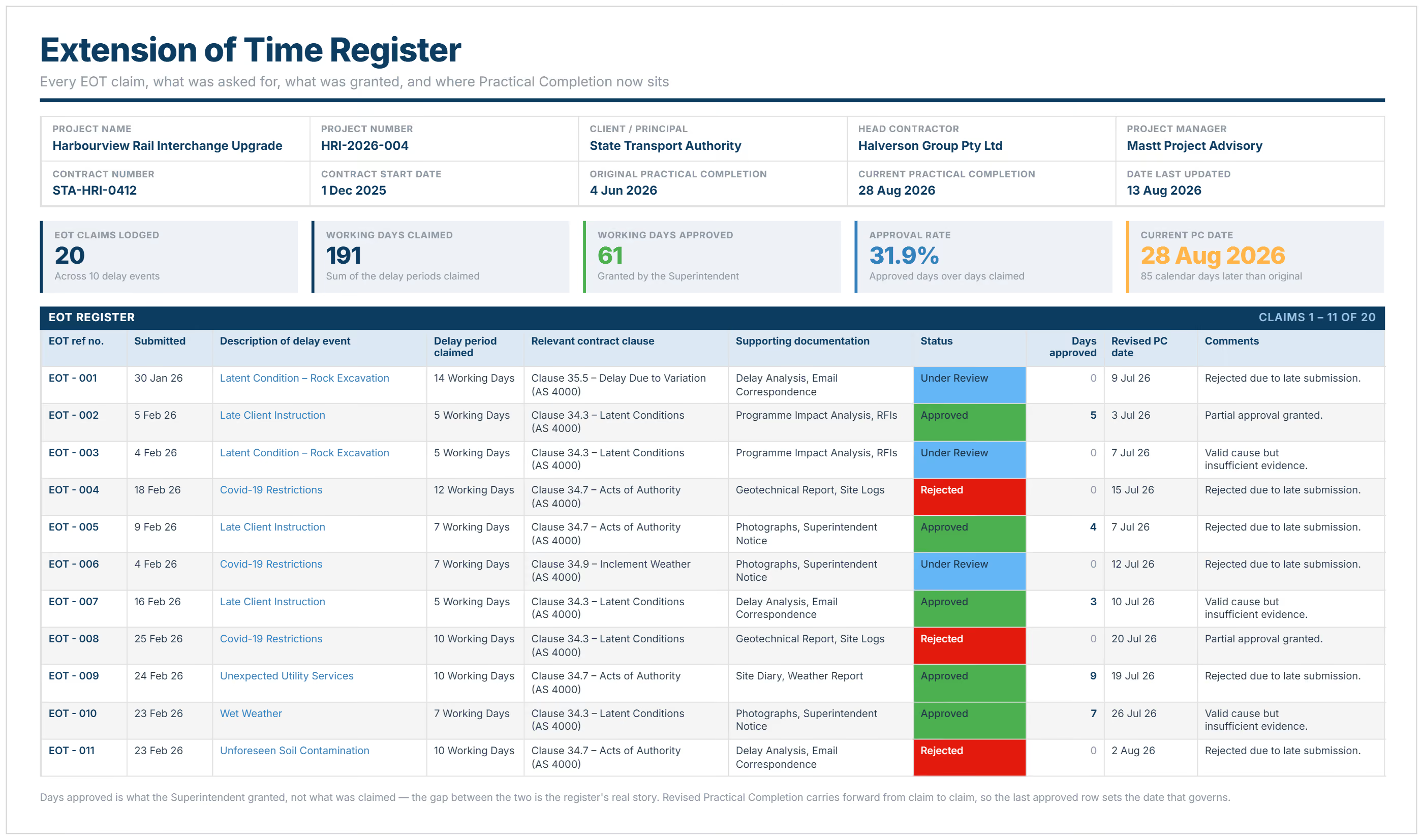
Why Use an EOT Register Template?
Using an EOT tracking template prevents lost time extensions due to incomplete documentation. Systematic tracking ensures every notice, substantiation requirement, and review response is recorded when managing schedule changes.
Time extension registers strengthen schedule management because they:
- Prevents procedural rejections: Documentation proves notifications met contractual timing requirements, stopping rejections based on late notice.
- Tracks review compliance: Records decision dates against contract deadlines, highlighting when responses breach specified timeframes.
- Quantifies liquidated damages exposure: Running totals show financial impact when actual completion extends beyond revised baseline dates.
- Manages concurrent delays: Separates owner-caused delays from contractor delays, ensuring proper responsibility assignment per contract terms.
- Creates dispute defense: Complete audit trails defend schedule positions during mediation, arbitration, or litigation proceedings.
- Identifies delay patterns: Reveals recurring causes like information delays or access restrictions requiring escalation to owners.
- Links delay costs separately: Tracks which extensions include compensation entitlements, ensuring contractors document prolongation expenses properly.
- Documents critical path impacts: Records which delays actually affected completion dates versus non-critical activities not warranting extensions.
- Demonstrates mitigation efforts: Shows contractor actions to minimize delay impacts, supporting good faith performance under agreements.
- Facilitates schedule updates: Provides data for revising construction programs, adjusting resource allocation, and communicating revised milestones.
💡 Pro Tip: Update your register within 24 hours of any delay event, even if detailed analysis takes weeks. Early entries prove awareness if notification timing later gets questioned during reviews or disputes.
How to Use a Construction EOT Register Template
To effectively utilize an EOT register template, you should complete each row for every delay event, entering the occurrence date, notification timing, and days requested. Update status fields as reviews progress and maintain links to all supporting schedules and documentation.
Follow these steps to maintain an effective EOT log:
- Set up the register structure: Establish columns for reference numbers, delay causes, notice dates, and approval status.
- Log each delay immediately: Record when you notified the reviewing party, even before calculating exact time impacts.
- Assign unique reference numbers: Create sequential identifiers linking each delay to supporting schedules and correspondence records.
- Document delay causes precisely: State specific contractual grounds like unforeseen conditions, owner-directed changes, or weather events exceeding baselines.
- Link substantiation documents: Attach updated schedules, weather data, RFI registers, and owner instructions supporting each request thoroughly.
- Monitor review response dates: Track when assessments are due per contract, flagging breaches of specified response timeframes.
- Update approval status regularly: Record decisions (approved, rejected, or partial approvals) with rationale documented for future reference.
- Calculate cumulative impacts: Maintain running totals showing aggregate extensions versus original completion date and current exposure levels.
- Archive completed requests: Retain registers throughout warranty periods and statutory limitation periods for potential future reference needs.
💡 Pro Tip: Fill in the delay event description and notice date first, then add placeholder rows for days requested while you complete schedule analysis. This ensures you capture the notification timing even if detailed substantiation takes weeks to prepare.
Who Should Use an EOT Tracking Template?
Project managers and contract administrators are the primary users of EOT register templates for managing schedule obligations. But they're valuable for anyone involved in schedule management, from field documentation through commercial administration:
✅ Contract Administrators and Architects: Review time extension requests fairly whilst tracking response deadlines and maintaining impartial records per contracts.
✅ Project Managers and Construction Managers: Monitor schedule impacts, coordinate delay mitigation, and report revised completion forecasts to owners consistently.
✅ Commercial Managers and Cost Consultants: Link time extensions to delay costs, manage change orders, and coordinate payment implications.
✅ General Contractors and Project Directors: Track liquidated damages exposure, escalate review delays, and manage owner-caused disruptions affecting schedules.
✅ Planning Engineers and Schedulers: Analyze critical path impacts, update programs following approved extensions, and substantiate requests with schedule analysis.
✅ Legal Teams and Dispute Consultants: Review compliance with contract requirements, prepare litigation documentation, and advise on schedule-related risks.
✅ Project Controls Teams: Integrate schedule data with cost tracking, forecast completion dates, and report time performance metrics to stakeholders.
💡 Pro Tip: Designate one person as register owner even when multiple people submit requests. Fragmented records across different spreadsheets destroy your audit trail when disputes require reconstructing complete delay history.
When to Use an EOT Register
An extension of time log should be established during project mobilization before construction activities commence. Early setup ensures every delay gets captured from day one, preventing retrospective reconstruction attempts undermining credibility.
Critical situations requiring active EOT register maintenance include:
- Contract award and mobilization: Establish tracking systems immediately so notices can be submitted within required timeframes from project start.
- Owner-caused access delays: Document when site access is restricted, delayed, or withheld contrary to contract obligations. Track these owner actions affecting schedule baselines.
- Design information delays: Track when RFIs remain unanswered beyond response periods or when design changes arrive late affecting schedules.
- Change order processing delays: Record time between change identification and formal authorization, especially when work suspends pending approval decisions.
- Unforeseen condition discoveries: Log encounters with unexpected ground conditions, contamination, or existing utilities not shown on drawings.
- Weather event impacts: Document extreme weather, rainfall, or temperatures exceeding baseline conditions defined in contract provisions.
- Material supply disruptions: Track delays caused by extended lead times, supplier failures, or force majeure events affecting deliveries.
- Regulatory approval delays: Record when permits, inspections, or utility approvals take longer than reasonable expectations per jurisdictions.
- Review period monitoring: Monitor response timeframes against contract requirements, noting breaches affecting compliance with specified procedures.
- Schedule update cycles: Revise registers monthly or following major milestones, ensuring delay documentation aligns with current program status.
- Payment review meetings: Reference registers when discussing schedule impacts on payment schedules, retention release, and final account settlements.
Maintain your register throughout construction phases and into warranty periods. Schedule disputes often emerge years after completion during final account negotiations or legal proceedings.
Common Problems with Generic EOT Register Template in Excel
Static Excel spreadsheets downloaded as EOT register templates create documentation gaps undermining time extension requests during reviews. Generic formats lack the project-specific fields and compliance tracking needed for professional schedule management.
Typical problems include:
⚠️ Missing notification compliance tracking: Basic templates don't calculate days between delay occurrence and notice submission, risking procedural rejections.
⚠️ No review response monitoring: Generic registers omit fields tracking whether assessments occurred within contractual timeframes per agreements.
⚠️ Incomplete delay cause categories: Downloaded templates use broad headings not matching contract-specific qualifying delay definitions and provisions.
⚠️ Lost substantiation links: Excel files store request data without connecting to supporting schedules, weather records, or documentation.
⚠️ Version control disasters: Multiple people editing shared spreadsheets create conflicting reference numbers, duplicate entries, and lost updates.
⚠️ Inadequate status tracking: Simple registers lack workflow stages showing requests moving through submission, assessment, approval, and dispute phases.
⚠️ No concurrent delay handling: Basic templates don't separate owner-caused delays from contractor delays, complicating responsibility analysis.
⚠️ Poor audit trail visibility: Manual Excel entries don't record who made changes when, destroying credibility during legal proceedings.
⚠️ Calculation errors: Formula mistakes in running totals or cumulative days misrepresent liquidated damages exposure to senior management.
⚠️ Limited schedule integration: Standalone registers don't link to planning software, requiring manual reconciliation with program updates constantly.

Written by
Jackson Row
Jackson Row joined Mastt's founding North American team in 2023, implementing the platform for US government agencies and Fortune 500 organizations. He holds a Bachelor of Engineering in civil and mining engineering from UNSW and began his career as a construction cadet on civil projects in Sydney. At Mastt, he contributes articles on payment and client-side project management.

Use this extension of time register template to track delay events and document EOT requests systematically. Maintain defensible records that protect against liquidated damages and prevent documentation failures costing valid extensions.

Top Performers Don’t Guess. They Deliver.
Cut the stress of showing up unprepared
Start for FreeTrusted by the bold, the brave, and the brilliant to deliver the future