


What is a Construction Daily Log?
A construction daily log is the running record of what happened on a jobsite each day: crew on site, labor hours, work performed, weather, hours lost and why. One row per day, kept by one person, usually the superintendent, for the life of the job.
It is a continuous record rather than a set of documents. Every day gets a line, including the days nothing happened, because a log with holes in it cannot be relied on later. If you need a formal report issued and signed each day rather than a running log, the construction daily report template does that job instead.
What's Included in This Construction Daily Log Template
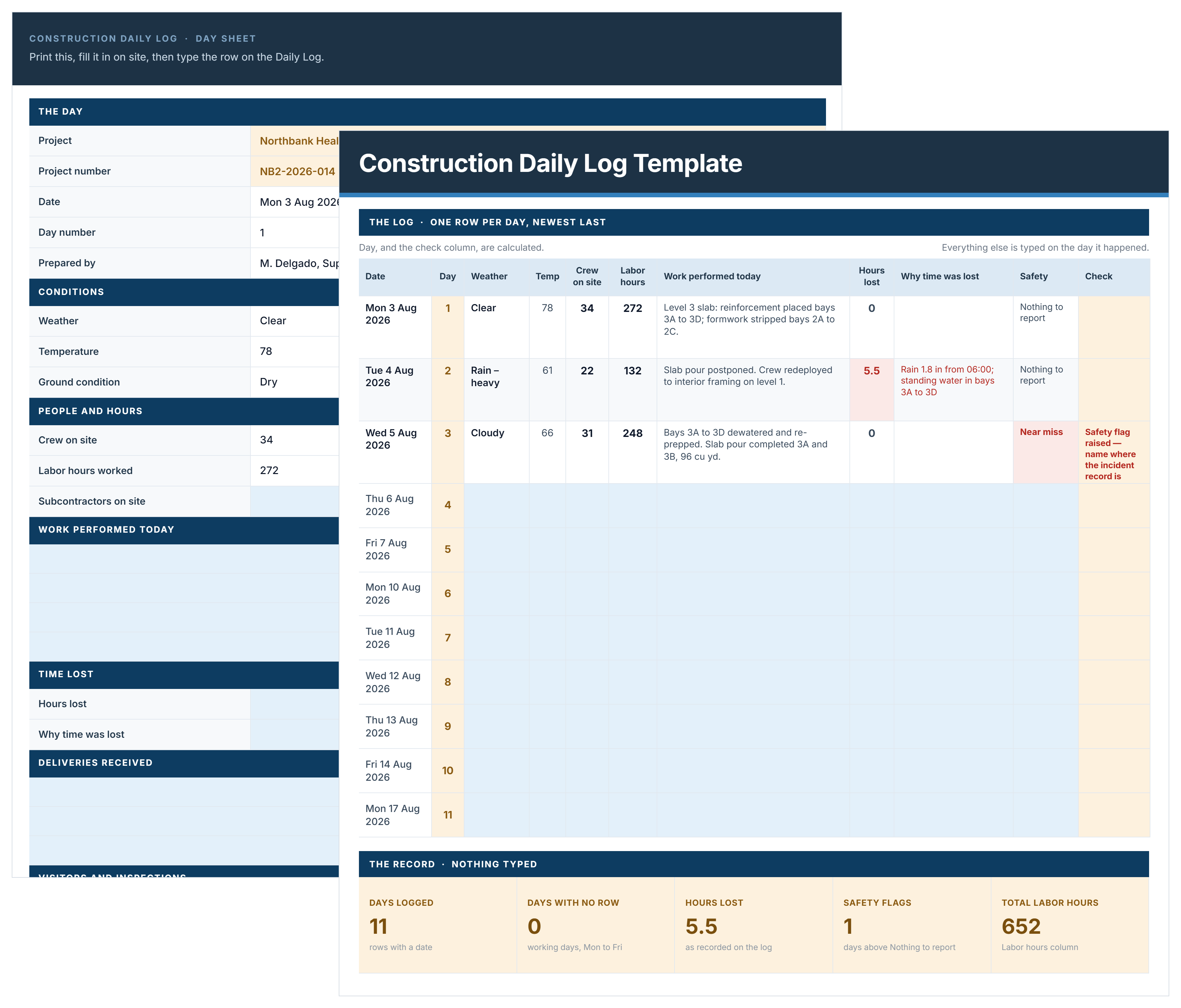
This construction daily log template includes the dates, conditions, who was there, what got built, what stopped it, and who wrote it down.
Beyond the log itself, this template holds a printable Day Sheet, a dashboard that calculates days logged, days with lost time, labor hours and average crew, and editable dropdown lists for weather, ground conditions and safety.
Construction Daily Log Example
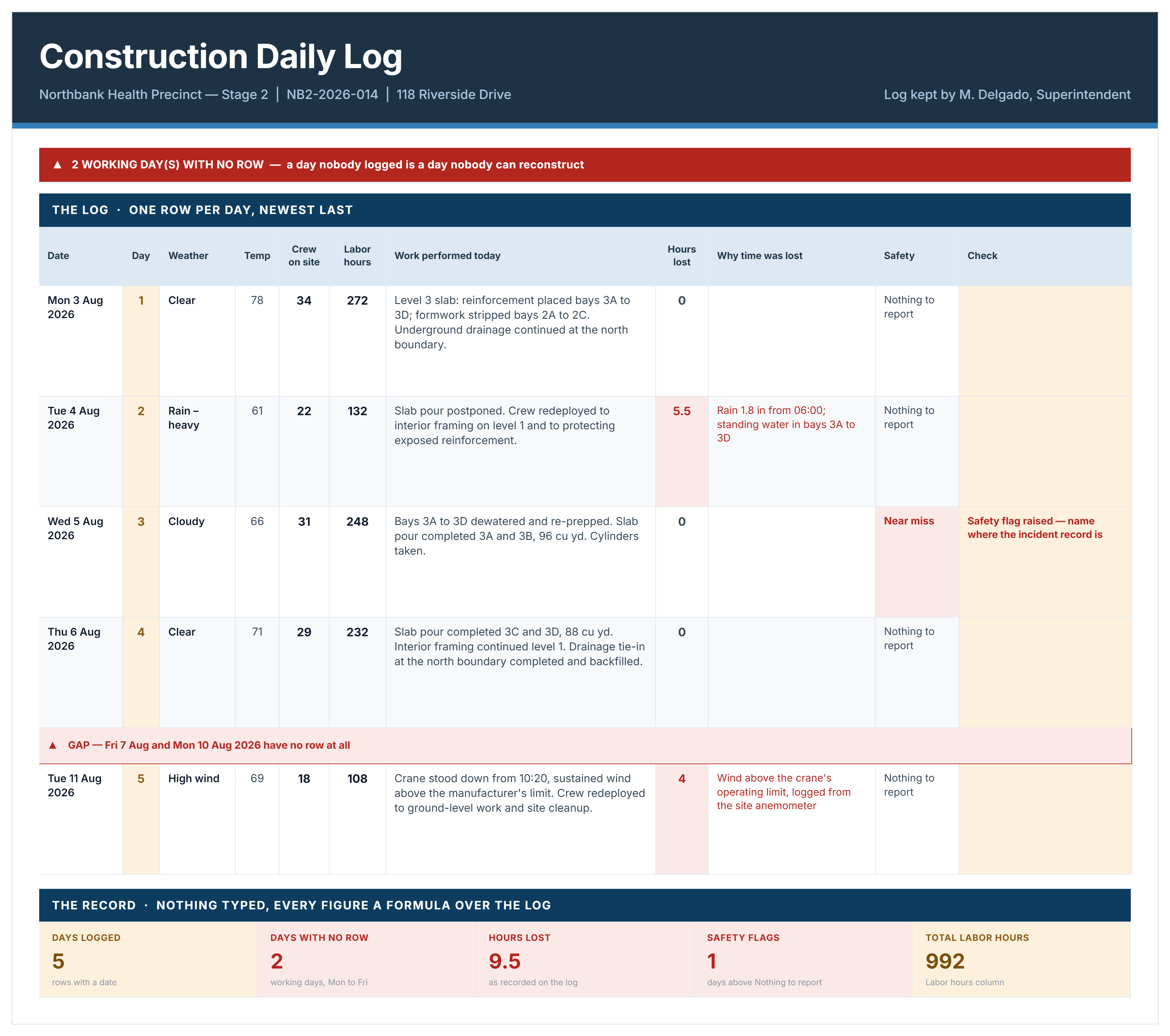
Here's an example of a completed construction daily log, showing five logged days on a health precinct project.
How to Keep a Construction Daily Log
Fill it in the same day, from what you saw. A log written on Friday for the whole week is a reconstruction, and it reads like one.
- Set up the project, jobsite address, general contractor and who keeps the log, once.
- Add one row per day, newest last, on the day it happened.
- Write what happened rather than what was planned, naming the area, the quantity and the trade.
- Record hours lost as a number with the cause beside it, since one without the other proves nothing.
- Log the days nothing happened, because those are the rows the gap check cannot invent for you.
- Record verbal instructions the day they are given, then confirm them in writing separately.
- Name who wrote each row, since an unsigned log is a document with no author.
- Do not edit history. Correct a later row rather than rewriting an earlier one, and note the correction and its date.
The log records the site. Cost against budget, milestones and risk are a separate report, which construction reporting software builds from live project data.
Why Gaps in a Daily Log Matter
A gap is a working day between your first and last entry that has no row at all. The workbook counts them and names the first one, which is the single most useful thing it does.
Gaps matter because a log is only as good as its continuity. A record with missing days invites an obvious question: what else was not written down? A run of complete entries showing routine days, quiet days and bad days reads as a genuine contemporaneous record. A log with three weeks missing in the middle reads as something assembled after the fact.
The fix is unglamorous. Log the day nothing happened. A row that says the site was closed, or that two crew did cleanup and nothing else, takes twenty seconds and closes a hole nobody can close for you later.
Daily Log Books and Printable Log Sheets
Plenty of superintendents still write the log by hand before anyone types it, and that is fine as long as the paper version and the file end up saying the same thing.
The workbook includes a Day Sheet, a one-page printable form carrying the same fields as a single row of the log. Print a stack, keep them on the truck or in the site office, fill one in through the day, then type the row that evening.
Keeping the completed sheets in a binder alongside the file gives you two records that corroborate each other, which is worth more than either one alone.
Related Articles and Templates
Explore these resources for construction daily records, site reporting, safety, and delay documentation:

Written by
Jackson Row
Jackson Row joined Mastt's founding North American team in 2023, implementing the platform for US government agencies and Fortune 500 organizations. He holds a Bachelor of Engineering in civil and mining engineering from UNSW and began his career as a construction cadet on civil projects in Sydney. At Mastt, he contributes articles on payment and client-side project management.

FREE construction daily log template and Excel. One row per day, one file per job, and a gap check that names the first working day nobody logged.

Top Performers Don’t Guess. They Deliver.
Cut the stress of showing up unprepared
Start for FreeTrusted by the bold, the brave, and the brilliant to deliver the future