

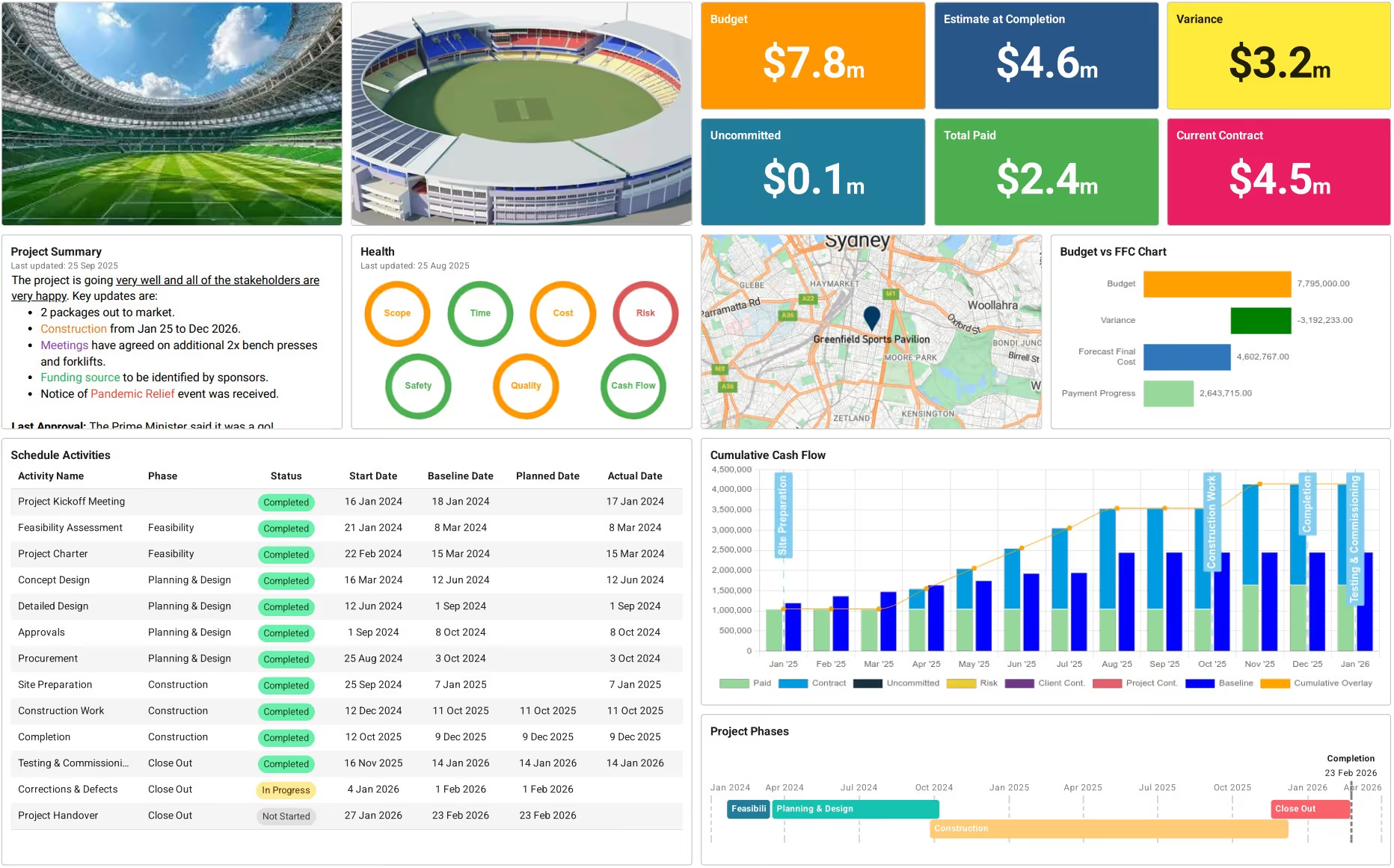

What is a Construction Progress Report Template?
A construction progress report template is a pre-structured document that captures completed work, schedule status, and budget performance during a specific reporting period. It provides a framework for documenting project activities, milestones achieved, and challenges encountered on construction sites.
The template contains sections for project overview, work completed to date, schedule variance, budget status, safety incidents, quality issues, and upcoming activities. Project managers use it to communicate progress to owners, lenders, and stakeholders while supporting payment applications.
Construction teams rely on progress report templates to maintain consistent documentation across reporting cycles. The structured format ensures critical information appears in every submission supporting draw requests and payment certificates.
What's Included in Progress Report Templates for Construction?
Construction progress report templates contain essential tracking fields that document project performance during each billing cycle. The template organizes project data into clear categories for stakeholder review and payment application support.
Standard components included in progress reporting formats are:
- Project Identification: Contract number, project name, site address, reporting period dates, and submission information.
- Executive Summary: High-level status overview showing percent complete, schedule position, and budget vs actual performance.
- Work Completed This Period: Activities finished during the reporting cycle with quantities, completion dates, and earned value calculations.
- Schedule Status: Progress against baseline showing planned versus actual dates, critical path activities, and lookahead schedule.
- Budget Performance: Costs to date, committed amounts, forecast final cost, and variance against approved budget.
- Schedule of Values: Line-item breakdown matching AIA G702/G703 payment application showing completion percentage per work category.
- Safety Performance: Incident reports, near misses, OSHA recordables, safety meetings held, and corrective actions taken.
- Quality Issues: Non-conformance reports, punch list items, inspection results, and resolution status for deficiencies.
- Change Orders: Approved modifications, pending requests, and cumulative impact on project budget and milestone completion dates.
💡 Pro Tip: Include a "next period forecast" section comparing this month's planned activities to what actually happened. When three consecutive reports show optimistic forecasts that don't materialize, it signals schedule problems needing immediate attention.
Why Construction Teams Use Templates for Progress Reporting
Construction progress report templates eliminate the inconsistency that undermines stakeholder confidence and delays payment approvals. Standardized reporting ensures every submission contains the data owners need for informed decision-making.
Templates strengthen project controls through systematic tracking:
- Accelerates payment approvals: Complete reports with lien waivers and supporting documentation reduce owner review time significantly.
- Reveals schedule slippage early: Consistent baseline comparisons tracking work completed to date expose delay trends before critical path disruption.
- Prevents budget surprises: Regular variance reporting between budget vs actual identifies cost overruns while contingency remains available.
- Demonstrates contractor competence: Professional documentation showing milestone completion signals management capability that strengthens relationships.
- Supports draw requests: Lenders approve funding faster when progress reports verify completion against approved payment schedules.
- Creates defensible records: Documented progress with retainage tracking protects contractors during disputes by establishing clear activity timelines.
- Improves team coordination: Shared visibility into project status aligns subcontractors, consultants, and field crews on priorities.
- Enables proactive intervention: Early warning of quality or safety issues allows corrective action before problems escalate.
Teams using structured templates complete projects faster than those with inconsistent reporting because problems surface early enough for effective response.
How to Develop a Construction Project Progress Report
Creating effective progress reports requires gathering current data from field operations, accounting systems, and construction project scheduling software before compiling information into standardized formats. Start by confirming which reporting period the submission covers and the submission deadline.
Build comprehensive progress documentation through these proven steps:
- Gather field activity logs: Collect daily reports, work tickets, delivery receipts, and inspection records covering the reporting period.
- Update schedule progress: Mark completed activities, record actual finish dates, and calculate percent complete for in-progress tasks.
- Compile cost data: Extract committed costs, actual expenditures, retainage withheld, and change order values from accounting systems.
- Document safety performance: Record incidents, near misses, toolbox talks held, and corrective actions implemented during the period.
- Photograph work completed: Capture progress photos showing work areas before and after activities, tagged with dates and locations.
- Identify upcoming activities: List tasks scheduled for next period with planned start dates and resource requirements.
- Calculate completion percentages: Determine project status using earned value or physical measurements against Schedule of Values.
- Validate against payment applications: Cross-reference reported progress to payment certificates and draw requests ensuring consistency.
💡 Pro Tip: Take your progress photos from the exact same positions each period. When owners see monthly time-lapse progression from identical angles, it creates visual proof of pace that cuts through any debate about whether you're actually advancing.
Build Your Construction Progress Report with Mastt's AI
Mastt's AI dashboard generator eliminates the spreadsheet chaos that makes construction reporting an administrative burden instead of a management tool. Instead of formatting Excel sheets or stitching together disconnected data sources, generate integrated dashboards pulling from live project information.
Build your construction progress report to:
🚀 Create complete dashboards instantly: Generate structured layouts tracking budget, schedule, risks, and milestones in one connected view.
📊 Visualize performance trends: Display actual versus planned progress with charts showing variance over time without manual graphing.
📂 Link to live project data: Connect reports to budgets, contracts, payment applications, and risk registers so updates flow automatically.
⚡ Customize for stakeholder needs: Adjust sections for owner, lender, or internal audiences with appropriate detail levels and metrics.
🎯 Export presentation-ready reports: Generate professional PDFs for distribution while maintaining live dashboard access for your team.
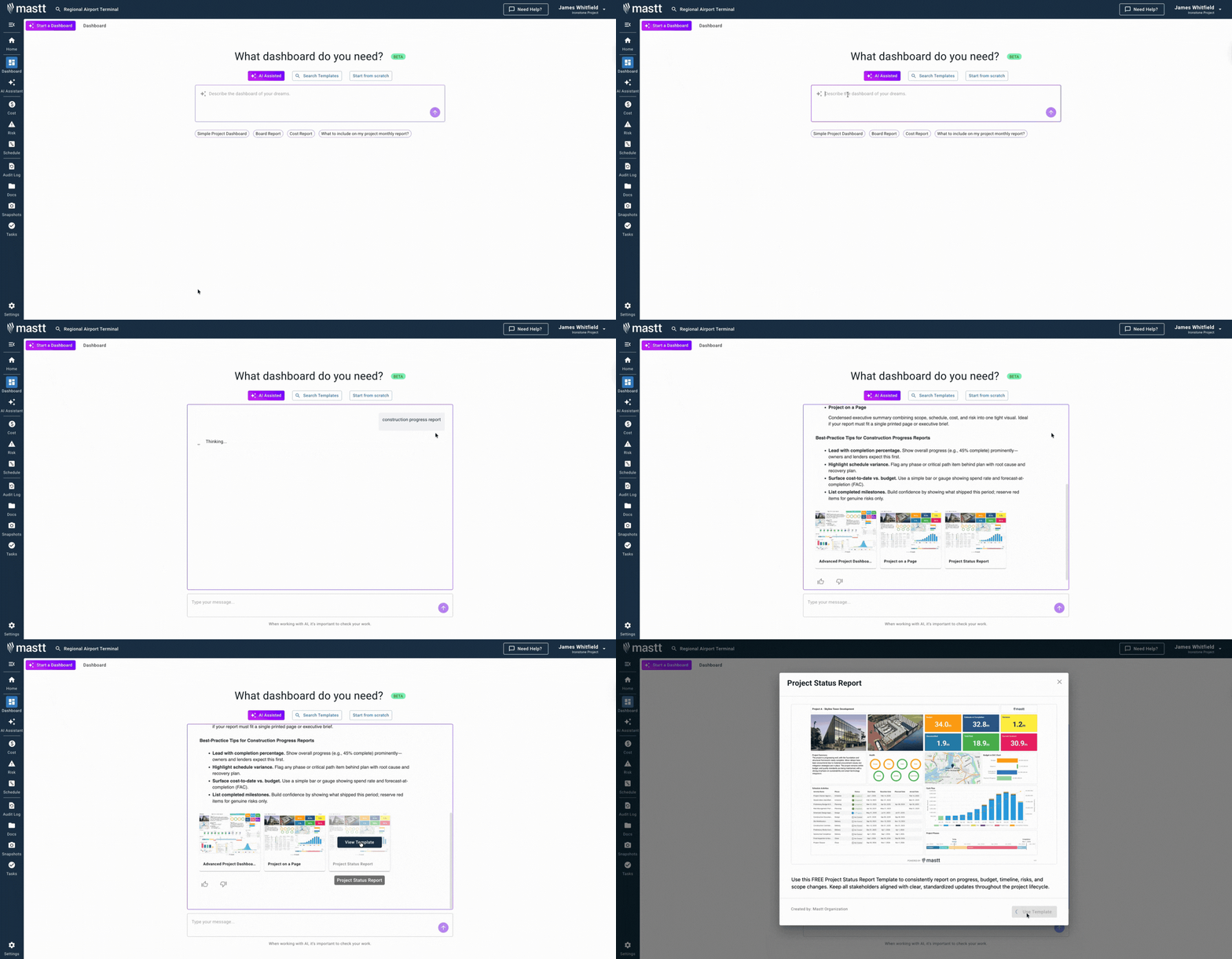
Here's how to get started with dashboard generator:
- Open AI Template Studio: From your Mastt dashboard, select Start a Dashboard and choose AI Assisted.
- Describe your reporting needs: Type "construction progress report template" or describe specific metrics your stakeholders require.
- Preview recommended templates: Review suggested layouts, click Preview to see structure, and select the best fit.
- Customize and launch: Click Use This Template, add project data, and adjust sections as reporting requirements evolve.
Find more guidance in Mastt's help page for maximizing dashboard effectiveness.
Who Should Use Construction Project Progress Reports?
Project managers preparing monthly submissions are the primary users of construction progress reports. But they're valuable for anyone needing visibility into project status, performance trends, or payment justification.
✅ General Contractors: Submit progress reports to owners documenting work completed, supporting payment applications, and demonstrating schedule adherence.
✅ Project Owners and Developers: Review contractor submissions to verify progress claims before processing payments and releasing funding.
✅ Construction Superintendents: Compile field activities into structured reports showing daily accomplishments, crew productivity, and material consumption.
✅ Project Managers: Prepare comprehensive status updates for internal reviews, owner meetings, and lender reporting requirements.
✅ Client-Side Project Managers: Validate contractor reports against independent observations, confirming accuracy before recommending payment approval.
✅ Lenders and Funding Bodies: Require verified progress documentation before approving construction draws or releasing committed capital.
✅ Subcontractors: Submit progress reports to general contractors tracking trade-specific completion supporting their own payment requests.
✅ Construction Managers: Coordinate reporting across multiple trades, consolidating status into integrated project-level submissions.
When to Issue Construction Progress Reports
Construction progress reports should be prepared at the end of each reporting period before payment applications get submitted. Timing aligns with contract billing cycles, typically monthly, though some projects require weekly or biweekly reporting.
Deploy progress reporting during these critical moments:
- Monthly billing cycles: Prepare reports matching payment application timing so progress documentation supports requested amounts.
- Milestone completion events: Issue reports when significant achievements occur, documenting completion for partial payment release.
- Owner meeting schedules: Submit reports before scheduled reviews providing stakeholders current information for informed discussions.
- Lender draw requests: Prepare documentation when requesting construction financing draws showing progress justifying fund release.
- Schedule delay situations: Increase reporting frequency when projects fall behind, demonstrating recovery efforts and revised completion forecasts.
- Change order negotiations: Issue updated reports when scope modifications occur, establishing baseline for measuring future progress.
- Safety incident responses: Prepare immediate reports following serious accidents documenting circumstances, actions taken, and corrective measures.
💡 Pro Tip: Submit progress reports 72 hours before payment application deadlines, not simultaneously. Owners who review progress independently before seeing billing are 3x more likely to approve payments without additional questions or documentation requests.
Best Practices for Construction Progress Reporting
Effective progress reporting requires disciplined execution following proven practices that transform compliance documents into genuine management tools. Experienced project teams apply these principles systematically:
☑️ Use consistent measurement methods: Calculate percent complete the same way every period whether cost-based, unit-based, or weighted milestones.
☑️ Photograph from identical positions: Take progress photos from the same locations each cycle creating visual time-lapse proof.
☑️ Cross-reference payment applications: Ensure reported completion matches values in payment certificates and Schedule of Values.
☑️ Update immediately after period close: Prepare reports within 48 hours while activities are fresh in team memory.
☑️ Include forward-looking forecasts: Show next period's planned activities with crew sizes and equipment needs for resource coordination.
☑️ Document obstacles transparently: Report delays and challenges honestly with proposed solutions rather than hiding problems.
☑️ Maintain supporting documentation: Attach delivery tickets, inspection reports, and test results substantiating reported work completed to date.
☑️ Review with field teams first: Validate activities with superintendents before submitting using AIA or ConsensusDocs standard forms.
Challenges with Manual Progress Report Formats
Manual construction progress reports in Excel, Word, or PDF formats create coordination problems that undermine their value as management tools. Static documents can't keep pace with dynamic construction environments.
⚠️ Disconnected from field data: Excel templates require manual entry from daily logs, creating transcription errors and delays.
⚠️ Outdated baseline comparisons: Word documents don't link to live schedules, so progress against project timeline reflects obsolete plans.
⚠️ Inconsistent calculation methods: Different team members measure percent complete differently in spreadsheets, creating confusion about actual status.
⚠️ Version control chaos: Multiple Excel files circulate with conflicting data as changes occur between draft and final submission.
⚠️ Missing photo documentation: Progress photos stored separately from reports get lost or mismatched to wrong periods.
⚠️ No variance trend analysis: PDF formats prevent tracking performance patterns showing earned value over multiple reporting periods.
⚠️ Slow stakeholder distribution: Emailing Word documents to multiple parties creates delays and prevents simultaneous review.
⚠️ Limited payment integration: Free downloadable formats don't connect to Schedule of Values or PMI-standard cost tracking.
💡 Pro Tip: If you must use Excel or Word, create one master file per project rather than separate files per period. Add new tabs or sections chronologically so historical performance stays visible, making trends obvious during owner reviews.
Transform Progress Reporting with Mastt
Every project needs reliable progress visibility connecting field activities to schedule performance and budget consumption. The difference between proactive management and reactive firefighting often traces back to reporting quality.
With Mastt, you generate integrated progress dashboards in minutes rather than spending hours reformatting spreadsheets. Live data connections ensure stakeholders always see current status without manual updates.
👉 Build your construction progress report with Mastt's AI and turn compliance documentation into strategic project intelligence.

Written by
Jackson Row
Jackson Row is the Growth & North American Market Lead at Mastt. With a background in risk modeling, cost forecasting, and integrated project delivery, he helps capital project owners work smarter and faster. Jackson’s work supports better tools, better data, and better outcomes across the construction industry.

Use this construction progress report template to track actual progress against planned milestones. Identify schedule delays, budget variances, and risks before they derail delivery.

Top Performers Don’t Guess. They Deliver.
Cut the stress of showing up unprepared
Start for FreeTrusted by the bold, the brave, and the brilliant to deliver the future