


What is a Construction Project Cost Tracking Template?
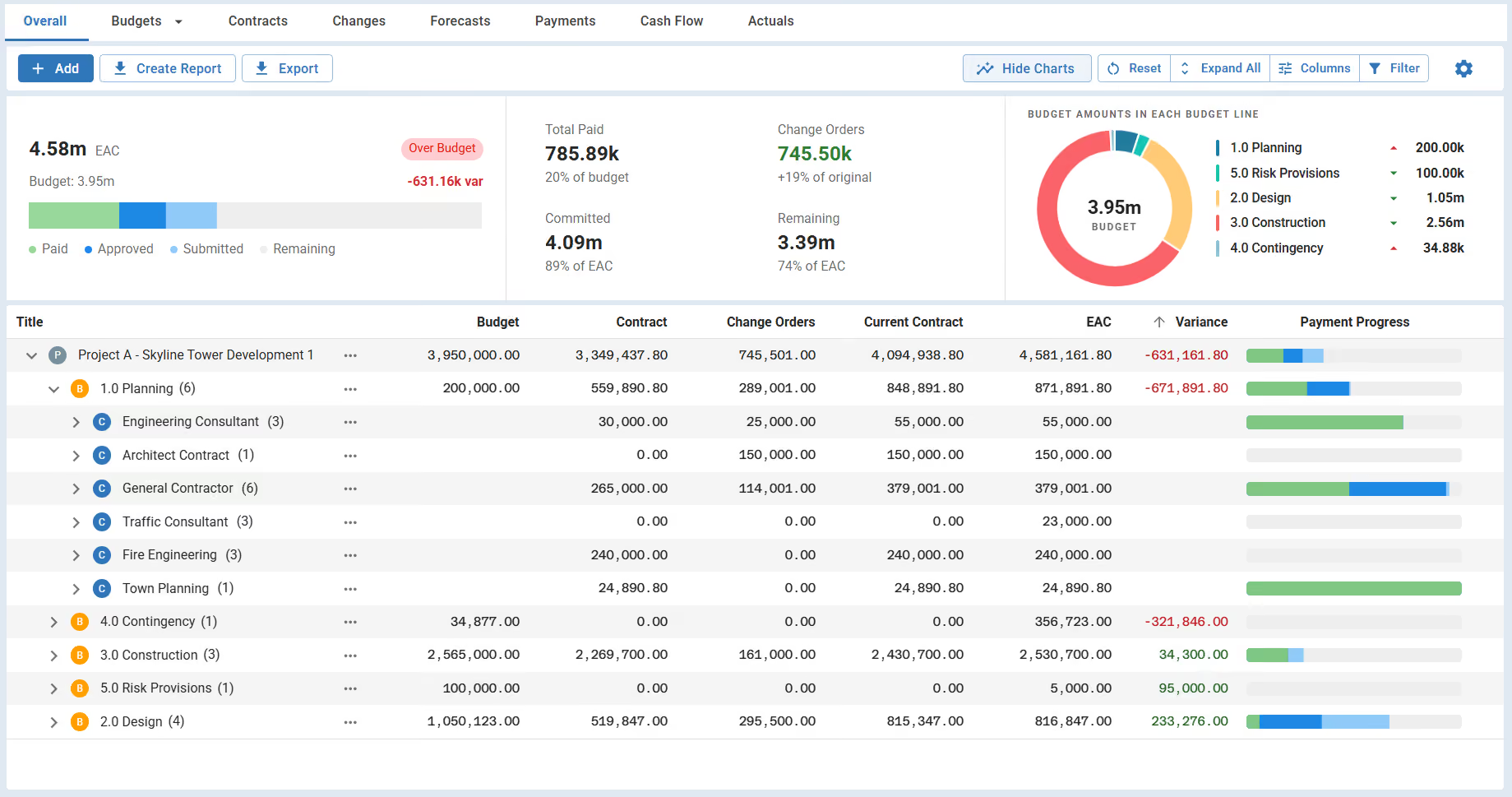
A construction project cost tracking template records all costs against an approved budget. It covers budget line items, contracts, change orders, and payment progress. Most include a forecast column for the expected final cost.
Project teams use construction project tracker to compare actual costs vs. budgeted costs as work progresses. Without it, cost pressure builds silently, and overruns appear too late to fix.
What's Included in a Construction Project Cost Tracker?
A cost tracker template covers every financial element needed to monitor spending. From contract award through final payment, it holds the core data for reporting.
Most construction cost tracker templates include these fields:
- Project details: Project name, contract type, owner, and site location.
- Original budget: The approved cost allocated to each cost code or work package.
- Contract value: Awarded contract amounts linked to each budget line.
- Change orders: Approved scope changes and their impact on contract commitments.
- Current contract value: Original contract plus all approved change orders.
- Uncommitted amounts: Budget not yet tied to a contract, including contingency allocation.
- Estimate at Completion (EAC): Live forecast of the total expected project cost.
- Payment progress: Amounts paid, certified, and remaining across all active contracts.
💡 Pro Tip: Add a "pending change orders" column alongside your approved ones. Tracking pending scope separately keeps your cost-to-complete estimate clean. It also prevents premature budget consumption before formal approval.
Why Construction Teams Need a Structured Cost Tracking System
A construction project cost tracking template gives teams the financial control they need. Without it, cost pressure builds quietly between reporting cycles.
Good cost tracking matters because it:
- Enables cost overrun detection: Budget variances surface before they become unrecoverable.
- Supports change order decisions: Cost impact visibility helps owners approve or reject changes faster.
- Speeds up the monthly cost report: Consistent data means less formatting and more analyzing.
- Enforces cost code discipline: Costs aligned to CSI MasterFormat divisions are easier to audit.
- Keeps original cost lines clean: Separating original and adjusted budgets prevents financial distortion.
- Reduces time on owner reporting: Structured data cuts down the hours spent building stakeholder reports.
- Strengthens lender and board confidence: Accurate numbers build trust with those funding the project.
💡 Pro Tip: Lock the cost baseline the day it's approved. Post-approval shifts are budget adjustments, not silent edits. That distinction protects your variance data during AACE-standard audits and owner reviews.
How to Set Up and Use Your Construction Cost Tracker
Setting up a cost tracker starts with clean data before contracts are signed. The structure you build early shapes everything that follows.
Follow these steps to set up and maintain your tracker throughout the project:
- Define your cost breakdown: Organize costs by trade package or CSI MasterFormat division. This becomes your work breakdown structure (WBS).
- Enter the approved budget: Log original amounts for each cost code before contracts are awarded.
- Add active contracts: Record each contract value linked to the correct budget line.
- Set up a change order log: Track approved, pending, and rejected change orders from day one. Clean change order tracking keeps committed exposure accurate.
- Record payment progress: Log invoiced, certified, and paid amounts for each contract regularly.
- Calculate EAC: Add contract totals and forecast to complete for each budget line item.
- Monitor cost variance: Compare EAC against the original budget on a set schedule. See our guide to construction project cost tracking for deeper guidance.
- Set your financial reporting cadence: Weekly updates keep data reliable for owner and board reporting.
💡 Pro Tip: Decide your update schedule before work starts. Pick weekly or bi-weekly and commit to it. Teams that update reactively end up with cost data no one trusts when it matters most.
Manage Construction Project Cost Tracking in Mastt
With Mastt's construction cost tracking software, your spreadsheets becomes a live, connected dashboard. Budgets, contracts, change orders, and payments all stay in sync. No manual updates. No broken formulas.
Here's what you can do:
🚀 See every cost in one view: Budgets, contracts, change orders, forecasts, and payments are connected across all budget lines.
📊 Track variance automatically: Mastt calculates budget vs. EAC in real time. Green means under budget. Red flags overruns instantly.
⚡ Log change orders in one click: The approved contract value updates automatically as each change is approved.
📋 Monitor subcontractor payment tracking: Visual payment bars show paid, certified, submitted, and remaining amounts at a glance.
🎯 Export reports without manual formatting: Generate professional PDF cost reports or export to Excel in seconds.
Here's how to get started:
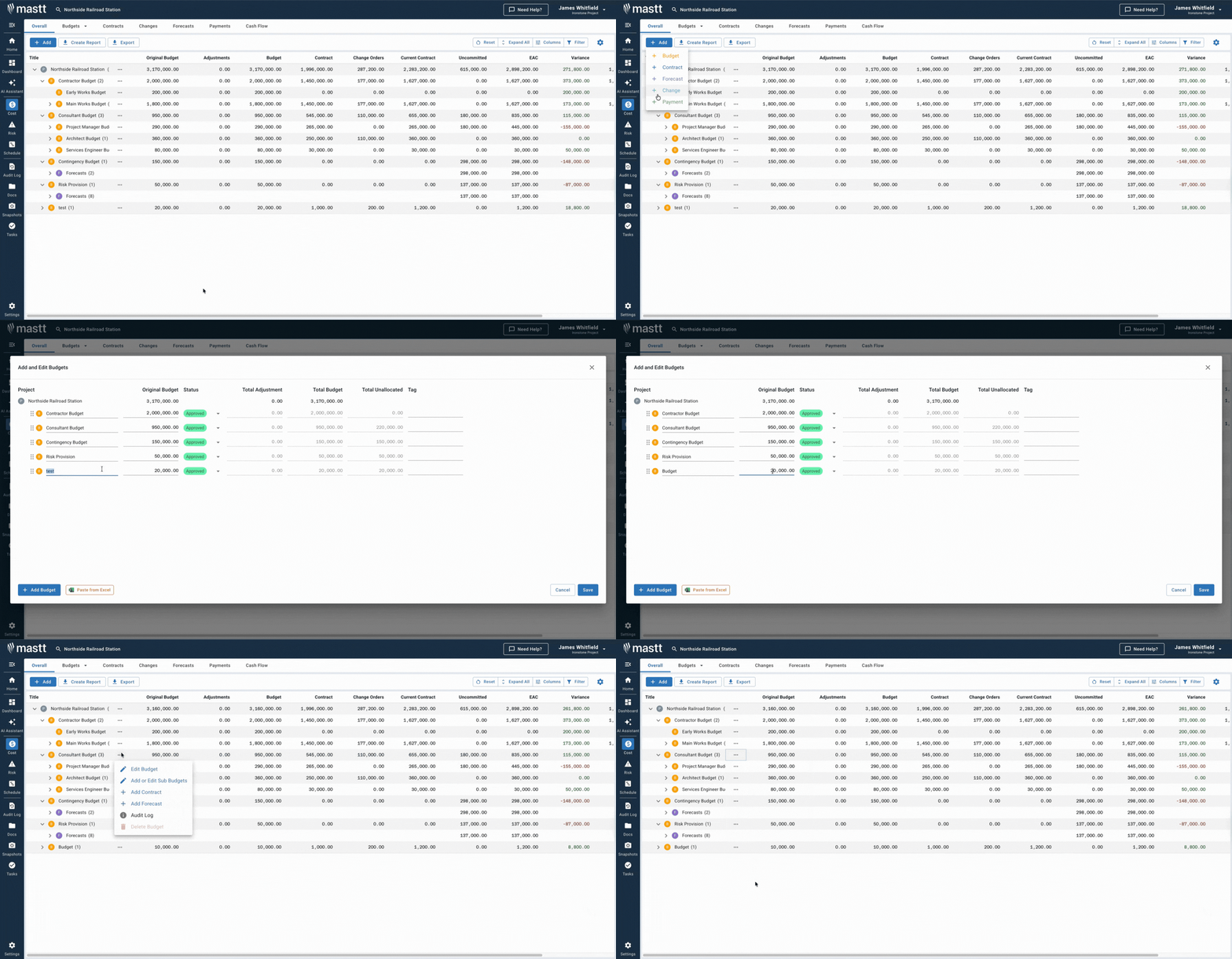
- Go to your project and click Cost in the side navigation bar.
- The dashboard opens to the Overall view, showing your full cost position.
- Click + Add to create budgets, contracts, change orders, or payments.
- Use column filters and pin columns to focus on what matters for your reporting.
- Click Create Report or Export to share financials with stakeholders.
👉 See how the Cost Overall page works in the Mastt Help Center
Who Should Use a Construction Project Cost Tracker?
The project manager is primarily responsible for maintaining the cost tracker. But anyone with a financial stake in delivery needs reliable cost data.
✅ Owner's Representative: Monitors capital budgets and protects the owner's financial interests across all contractors.
✅ Project Owner: Reviews EAC data to approve funding and manage investment risk.
✅ Project Controls Manager: Tracks cost performance visibility using earned value management (EVM). Cost Performance Index (CPI) reporting keeps financial performance transparent.
✅ Cost Estimator: Compares original cost estimates against actuals as the project progresses.
✅ Construction Contract Administrator: Tracks AIA G702 billing, change order logs, and payment certifications.
✅ General Contractor: Monitors job costs and subcontractor commitments against the approved contract budget.
✅ PMO Lead: Enforces consistent cost tracking across a portfolio of capital projects.
When to Use a Construction Project Cost Tracking Template
Start using your cost tracker the moment the project budget is approved. It stays active through every phase, right through final closeout.
Use it at these key project moments:
- When the project budget is approved and cost codes are assigned.
- Before awarding contracts, to check available uncommitted budget.
- After each change order approval, to update the committed cost register.
- During monthly reporting cycles for board or owner stakeholder updates.
- When reviewing pay applications against the progress payment schedule.
- On GMP contract projects where tight cost-to-GMP tracking is essential.
- At major milestones like design completion, procurement close, or construction start.
- During project closeout, to reconcile final costs against the baseline.
💡 Pro Tip: Don't wait until the first pay application to open your cost tracker. Set it up during procurement, before contracts are awarded. That way, your committed exposure is visible from the day the first contract is signed.
Best Practices for Construction Budget Tracking
A reliable construction project cost tracking template needs consistent habits behind it.
☑️ Lock the baseline on approval: Never edit original budget lines. Use adjustment columns for any post-approval changes.
☑️ Align with CSI MasterFormat: Division-based cost codes make audits and cross-project analysis easier.
☑️ Separate pending from approved changes: Mixed data distorts your EAC and committed exposure figures.
☑️ Log payments when certified: Delayed entry disrupts your cost monitoring process and creates financial blind spots.
☑️ Assign one owner per cost code: Clear ownership prevents duplication and keeps data reliable.
☑️ Review weekly, not just monthly: Monthly-only cycles miss cost pressure building between reports. Track project variance proactively.
☑️ Track management reserve separately: Keep it at the project level for clear project financial control.
PMI's PMBOK treats these as core cost management discipline, not optional practices. Explore project cost control to go deeper.
Common Problems with Manual Cost Tracking Spreadsheets in Excel
Excel-based cost tracking creates real risk as projects scale.
⚠️ Version control problems: Multiple team members saving separate copies leads to conflicting cost data.
⚠️ Broken formulas: One wrong cell reference corrupts EAC calculations across the whole workbook.
⚠️ No real-time cost data: Excel doesn't update when a change order is approved or a payment is processed.
⚠️ Disconnected from contracts: A construction project cost tracking spreadsheet can't link to live contract values.
⚠️ No audit trail: There's no record of who changed a number or when it was changed.
⚠️ Slow reporting cycles: Reformatting cost data for owner reports burns hours every month.
⚠️ Hidden overruns: Without automatic variance alerts, budget overruns stay buried until it's too late.
⚠️ Inconsistent cost codes: Different team members categorize costs differently, breaking portfolio reporting.
💡 Pro Tip: Before relying on any construction project cost tracking template Excel file, verify it separates original budget from approved changes. If it doesn't, your variance data will be wrong from the very first change order.
Take Control of Your Construction Project Financials with Mastt
Most projects start with a spreadsheet. But as contracts and change orders accumulate, manual tracking becomes a liability.
Mastt's construction project cost management software gives your team live cost data and automatic variance alerts. Clean reports are ready to share without manual formatting. Everything stays connected, from budget approval through final payment.
👉 Stop chasing numbers across spreadsheets. Track every budget, contract, and change order in real time with Mastt's cost tracker.

Written by
Jefbeck Eje
Jefbeck is an SEO Specialist at Mastt who creates optimized content for the construction project management industry. Focused on delivering accurate and actionable insights, Jef combines SEO expertise with industry knowledge to enhance visibility, build authority, and drive engagement. His work ensures Mastt remains a trusted resource for construction professionals seeking reliable information.

Use this FREE construction project cost tracking template to monitor budgets, contracts, change orders, and payments. Catch cost overruns early and keep your project finances under control.

Top Performers Don’t Guess. They Deliver.
Cut the stress of showing up unprepared
Start for FreeTrusted by the bold, the brave, and the brilliant to deliver the future