




An AI agent can complete an assigned task by working out the steps and using the tools it needs. In construction, this could mean gathering project information and preparing documents for someone to review. Choosing the wrong task can leave your team checking more work than the agent saves. This article covers practical agentic AI use cases in construction project managment and a six-step way to choose the first one.
What Are Agentic AI Use Cases in Construction?
Agentic AI use cases in construction are workflows that AI agents can plan and carry out without constant human prompting. The agent works toward a defined outcome, using project information and tools to decide which steps are needed.
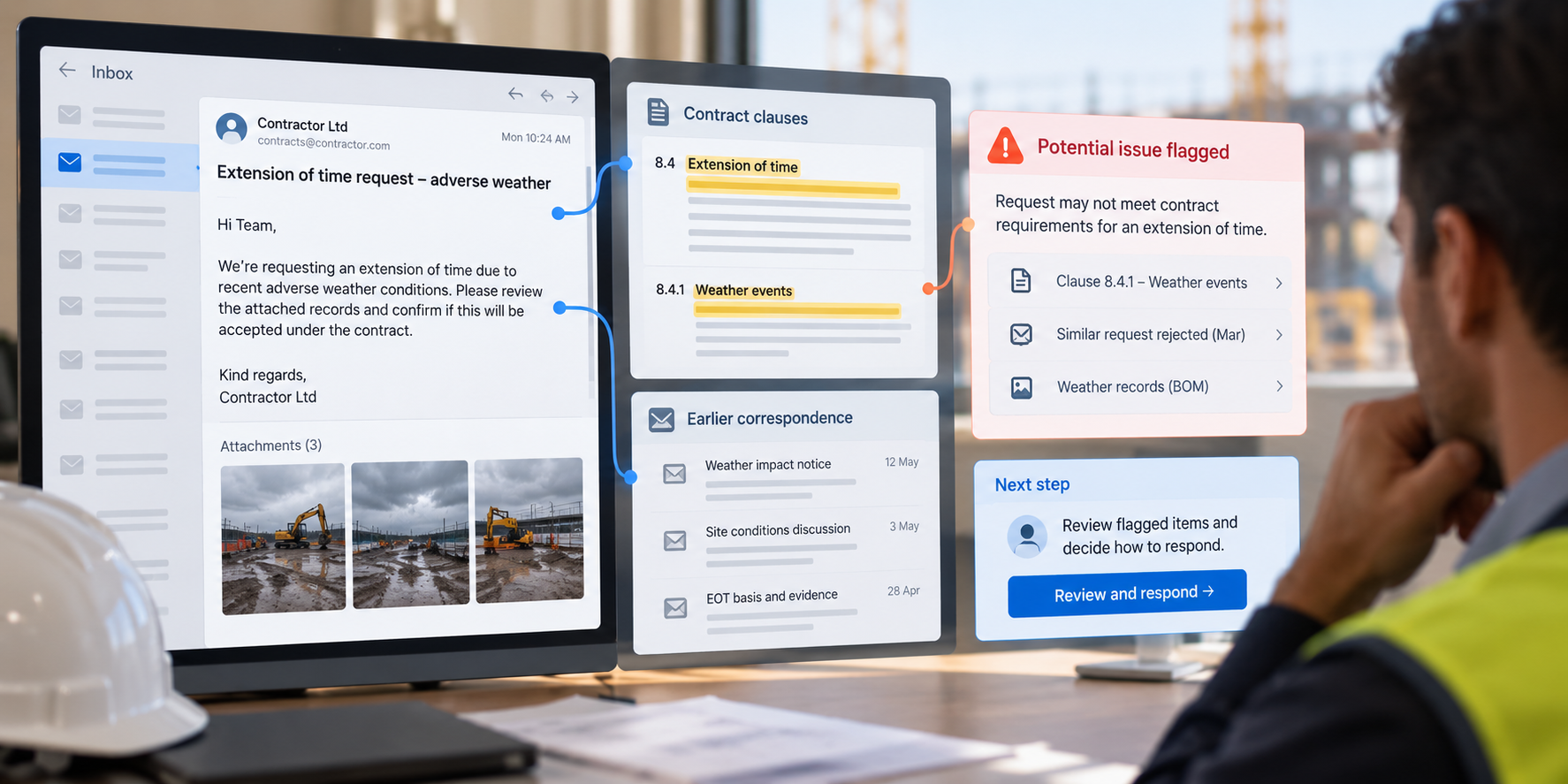
For example, preparing a draft extension of time notice could require site records, weather information, and relevant contract clauses. An AI agent could gather those inputs and use the company’s template to prepare the notice. If a required detail is missing, it could search an approved source or ask the team for clarification.
The value comes from handling the steps between receiving a request and producing something the team can review. Tasks that require interpreting information and adapting the next action are candidates for agentic AI. Predictable tasks, such as sending a reminder on a set date, are usually better suited to rule-based automation.
AI agent adoption is still at an early stage. In Mastt’s State of AI in Construction Project Management 2026 survey, 9.3% of respondents reported using AI agents, while 46.3% planned to start. For teams considering that next step, identifying a suitable task gives those plans a practical starting point.
Examples of AI Agent Use Cases in Construction Project Management
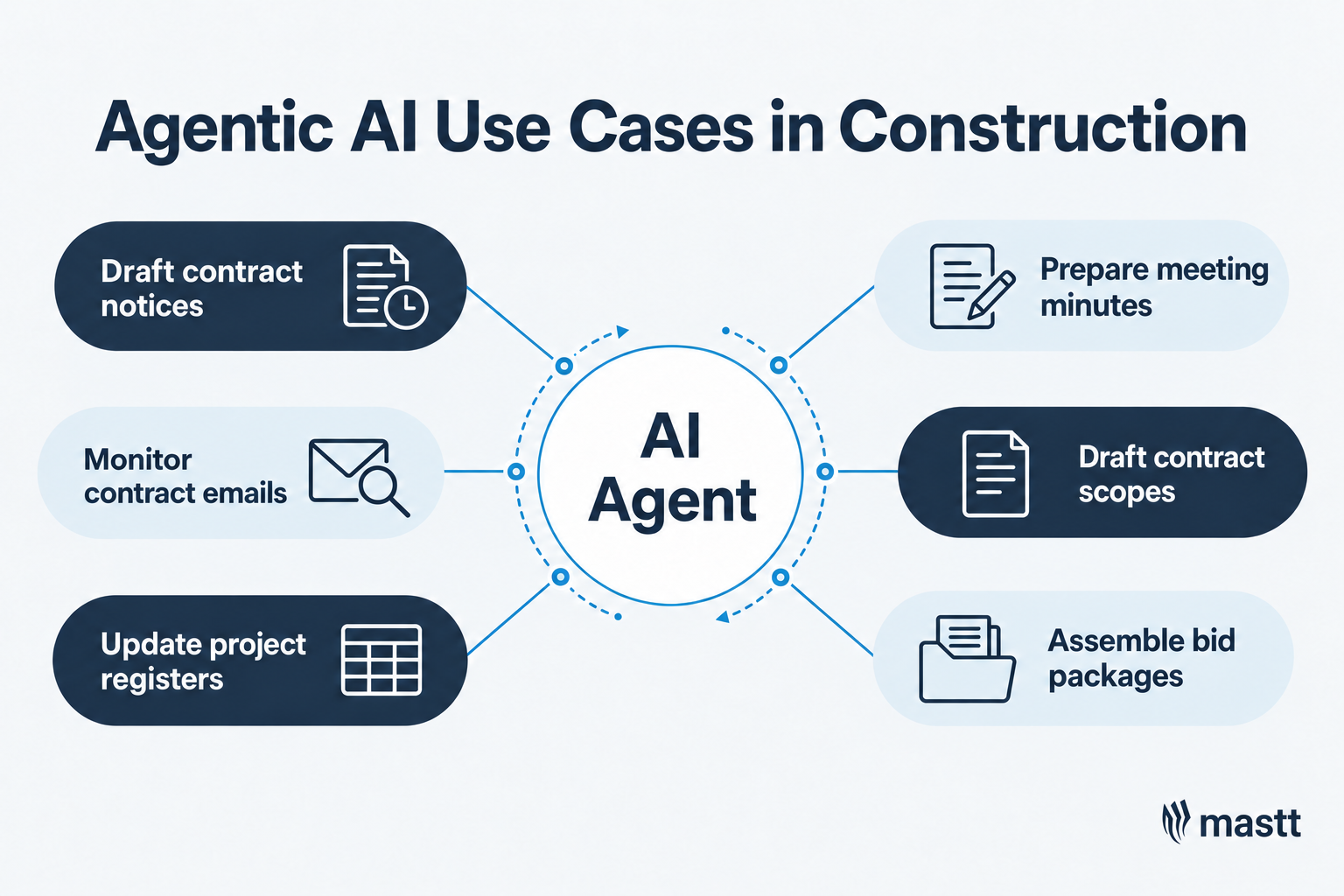
Agentic AI use cases in construction include drafting contract notices, monitoring correspondence, and assembling bid packages. Their suitability depends on the information available, the systems an agent can access, and the review required before its work is used.
These agentic AI examples and use cases show what teams could delegate and which decisions still need human review.
1. Drafting extension of time notices
An agent could use a site report to gather weather records and relevant contract clauses, then prepare a draft extension of time notice. It would flag missing supporting information for the team to resolve. Before issue, the reviewer checks the evidence and whether the notice meets contractual requirements.
2. Monitoring contract-related emails
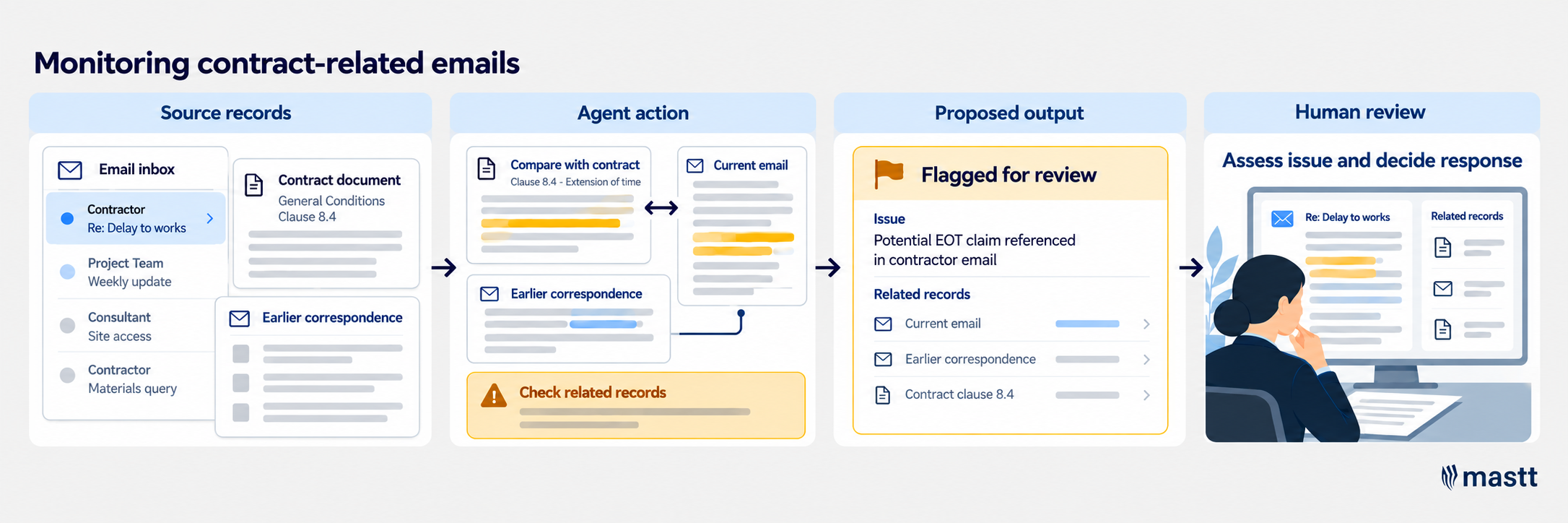
An agent could review incoming messages against a brief for a specific contract, retrieving earlier correspondence when more context is needed. It would flag potential issues with supporting references so the team can assess their significance and decide how to respond.
3. Maintaining project registers
An agent could read incoming correspondence and determine whether it relates to an existing record or requires a new entry. It would prepare a proposed update and flag unclear references or conflicting details. The team resolves those questions and approves changes where required.
4. Preparing meeting minutes
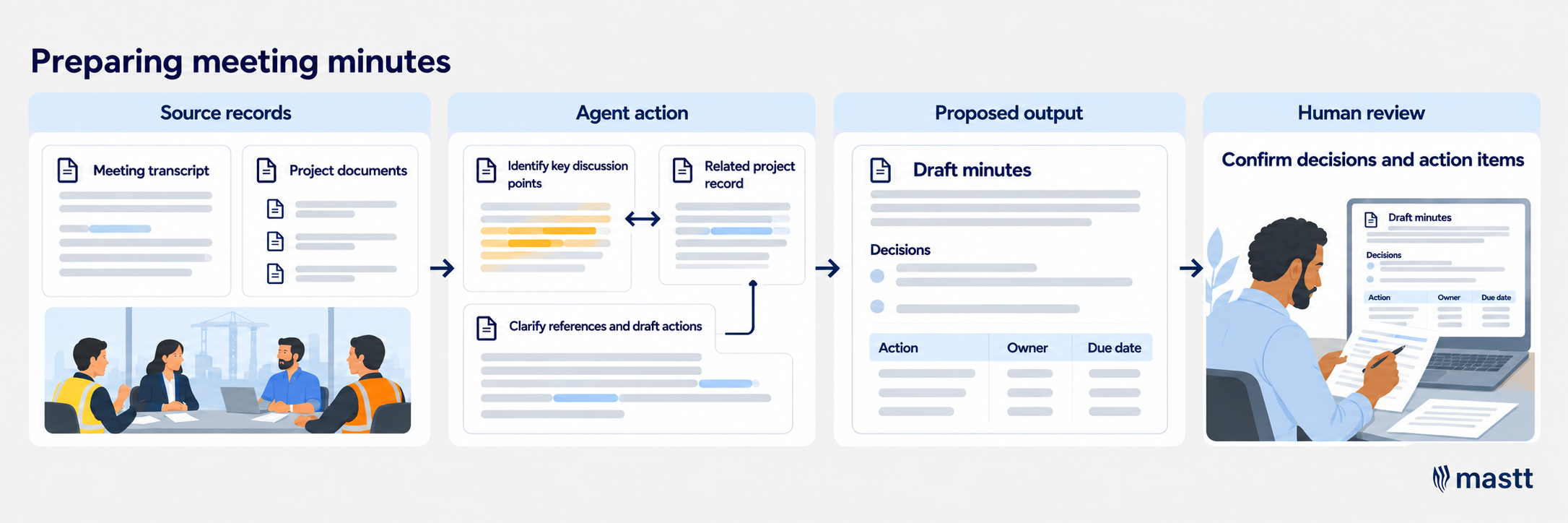
An agent could draft meeting minutes using meeting records and saved formatting preferences. It could consult project documents to clarify references while flagging unresolved details. The reviewer confirms that decisions and action items reflect the meeting, including the responsible people and deadlines.
5. Drafting scopes from contracts
An agent could locate relevant contract requirements and prepare a draft scope. Where a requirement refers to another document, it could retrieve that document or flag it as missing. The team checks scope completeness, exclusions, and consistency with the contract.
6. Assembling bid packages
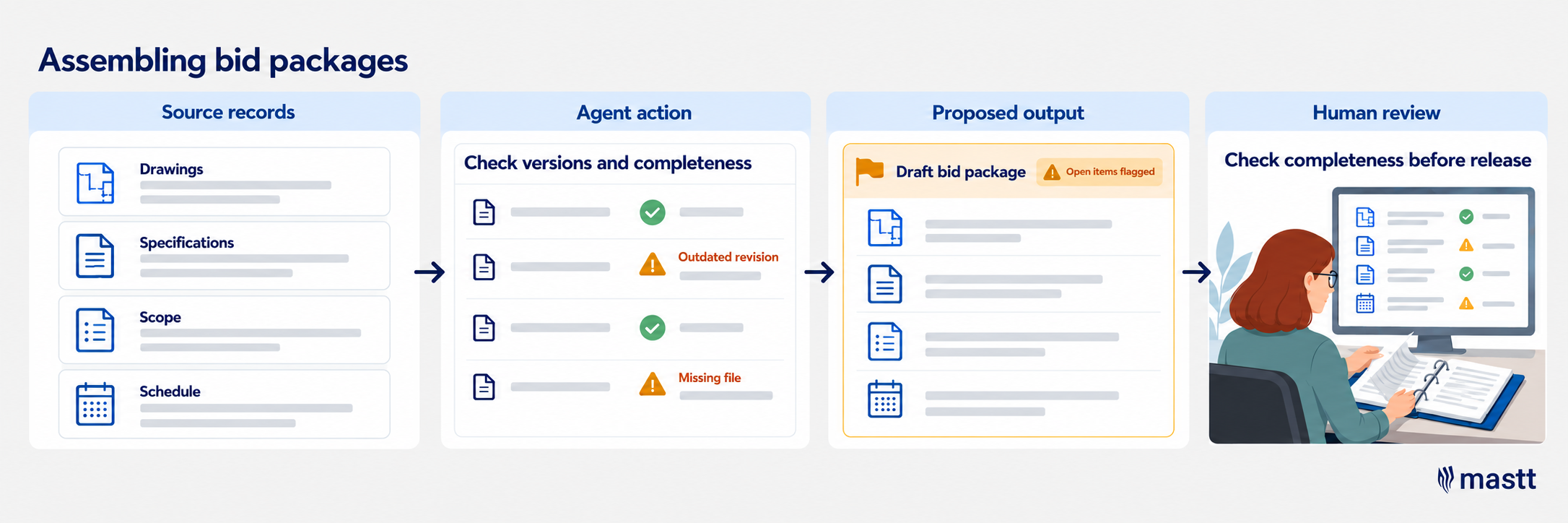
Bid preparation is one of the agentic AI use cases in procurement worth assessing when document collection causes delays. An agent could gather documents against an approved list and investigate missing references or conflicting revisions. It would return a draft package with unresolved items clearly identified.
7. Reviewing schedule progress
An agent could compare site records and progress reports with the current construction schedule. Where activity updates conflict, it could retrieve supporting records and flag discrepancies. The team verifies actual progress and assesses the effect on dependencies and completion dates.
8. Reviewing payment applications
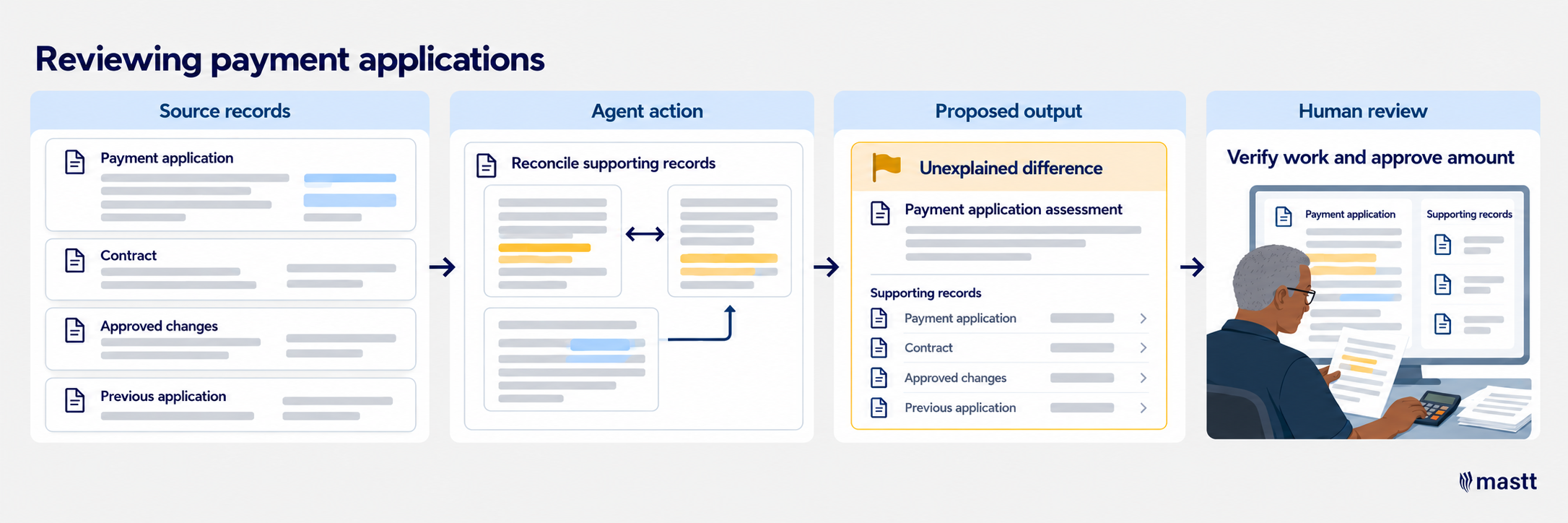
An agent could compare payment applications with contract terms, approved change orders, and previous applications. It would retrieve supporting records and flag unexplained differences for assessment. The reviewer verifies the work claimed and determines the amount to approve.
9. Handling incoming RFIs
An agent could log an incoming request for information, gather relevant project context, and prepare a draft response. It could also update the RFI register and file supporting attachments. The responsible technical reviewer checks the response for accuracy and completeness before issue.
10. Reviewing construction submittals
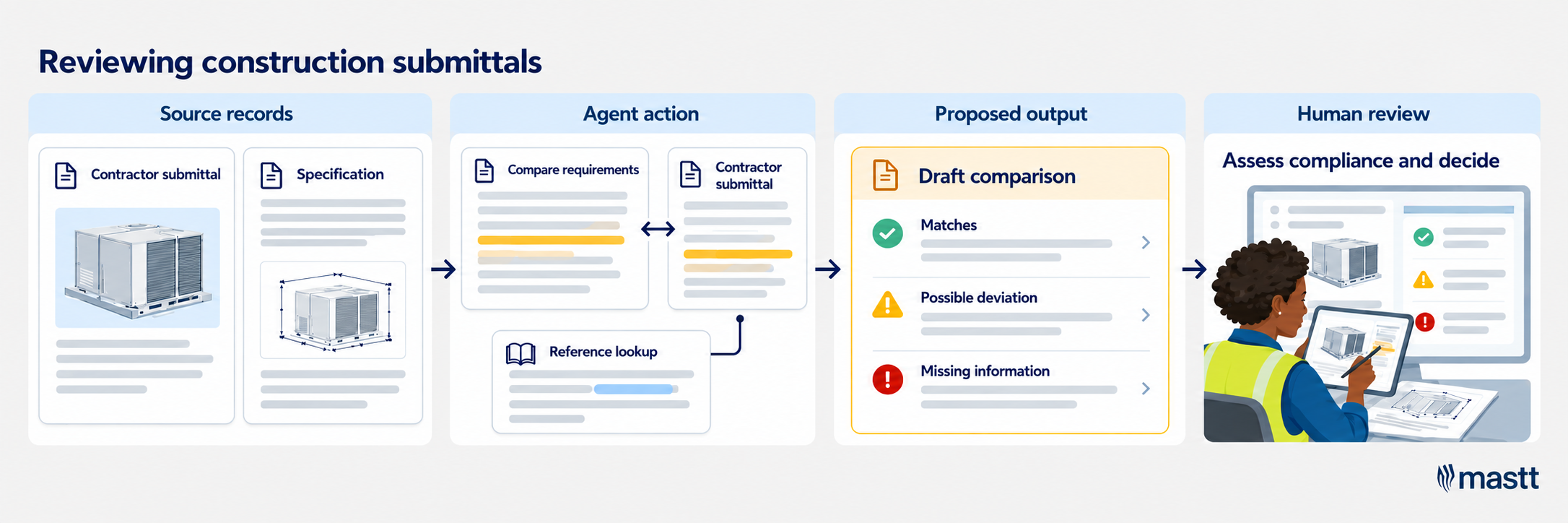
An agent could compare a contractor’s submittal with the relevant specifications and retrieve referenced documents where further detail is needed. It would prepare a comparison highlighting possible deviations and missing information. The responsible reviewer assesses those findings and determines whether the submission meets project requirements.
How To Choose Agentic AI Use Cases for Your Construction Team?
Choose a task whose expected benefits justify the cost of setup, ongoing use, and human review. The following steps help you assess agentic AI workflow automation use cases within everyday project work.
Step 1: Choose a recurring problem worth solving
Start with work that regularly takes time away from other project responsibilities. Speak with the people doing that work and use incoming emails to uncover the tasks those requests create.
Ask team members which tasks take the most effort and what makes them time-consuming. Use these questions to guide the discussion:
- Which requests repeatedly send you searching through project folders?
- Where do you manually compare information held in different systems?
- Which submissions regularly need clarification before work can continue?
- What administrative work builds up before reporting or bidding deadlines?
As team members explain the work, record how often it occurs and which activities take the most time. For example, preparing documents for construction bidding may take hours because approved records are difficult to locate. If an agent can identify and retrieve those records, it could reduce the preparation effort.
When measuring that effort, separate time spent working from time spent waiting. If the package is already complete and awaiting the owner’s approval, faster document assembly will not resolve the delay.
Step 2: Confirm the task benefits from an agent
Once you understand the workload, examine the decisions involved in completing it. Ask the team member to describe an exception they recently handled and explain how it changed their next step.
For example, an email may refer to a revised submission without providing the original reference. Completing the register update could require searching earlier correspondence and comparing attachments to identify the correct record.
Record those decision points alongside the actions they trigger. This shows whether the assignment needs an agent to investigate and adapt, or whether established rules can handle it.
Keep straightforward, rule-based tasks in conventional workflows. Multiple systems or file formats alone do not establish a need for an agent. The stronger candidates involve recurring interpretation that affects how the work proceeds.
Step 3: Check whether the required information and access are available
For the tasks still on your shortlist, trace the resources a person uses to complete them. Include company instructions and templates, along with the project records needed to produce the output.
Check the following before treating a candidate as ready:
- Source quality: Can the team identify current, approved records and resolve conflicting versions?
- System access: Can the proposed agent retrieve the required information through supported connections or approved tools?
- Permissions: Is that access appropriate for the person requesting the work?
- Instructions: Are client requirements and company procedures documented?
For example, a request received in Outlook may refer to approved drawings held in a separate project system. Access to the email alone would leave the agent without the records needed to complete the assignment.
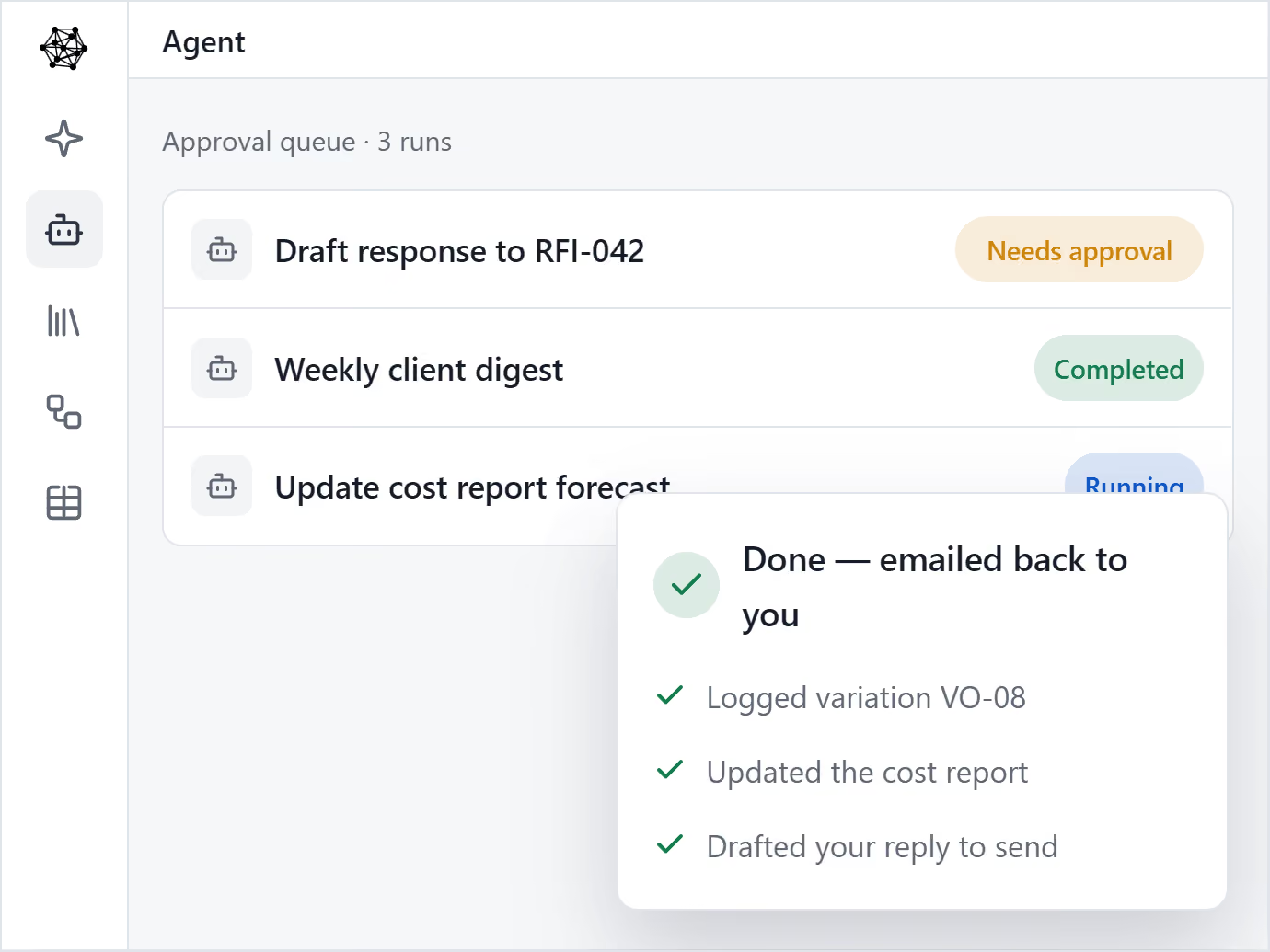
When assessing a tool, check whether it can access the records your chosen task requires. Mastt AI Agent, for example, works from tasks and attachments forwarded by email and the records held in your Mastt workspace. Ask the provider to demonstrate the relevant connections and explain any access limitations.
Use these findings to separate candidates that are feasible now from those that need preparation. Missing client instructions may be something the team can resolve. An unavailable connection to a required system may justify deferring the use case.
Step 4: Choose a scope the team can review and control
Next, define what the agent should return and where its authority ends. For example, “prepare proposed register updates with links to the source correspondence” gives the reviewer a specific output to check.
Assess whether the reviewer can identify a mistake before it affects other project work. A proposed update can be checked before it enters a shared register. An automatic change may already influence a report or another team member’s actions.
Agree on the controls the assignment needs:
- Reviewer: Name the role responsible for checking the result.
- Evidence: Specify the source references or attachments required for verification.
- Approval: Identify actions that need authorization, including external communication.
- Escalation: Define unresolved issues the agent must return to the team.
Monthly reporting shows why this boundary matters. Alongside gathering information, the project manager interprets events, considers relationships between the parties, and decides what to recommend. When selecting a reporting use case, define which preparation tasks can be delegated and which judgments remain with that person.

Step 5: Compare the expected benefit with the full effort and cost
When deciding how to prioritize use cases for agentic AI, compare feasible candidates by expected benefit and total cost. Include the work that remains with the team, since checking and correcting outputs affects how much time is released.
Use the same criteria for each candidate:
A simple calculation can make the remaining workload visible:
Estimated net time saved = current working time − remaining human work, including review, corrections, and monitoring.
Calculate this over a consistent period, such as a typical week, and label untested assumptions as estimates. Keep one-time setup costs separate from recurring costs so the comparison shows both the initial investment and ongoing benefit.
Also explain how the released time would be used. For example, it could give a contract administrator more capacity to investigate outstanding issues without reducing payroll spending.
Step 6: Select one use case and record why it comes first
Use the comparison to select your first candidate. If two offer similar benefits, favor the one with fewer dependencies and less disruption to established work.
Capture the decision in a short selection brief containing:
- The problem and specific task being delegated.
- The expected output and required information sources.
- The owner, permitted actions, and approval points.
- The current workload and expected improvement.
- The reason it takes priority and the assumptions that need checking.
Before committing resources, discuss the selection with the people who will use and review the agent’s work. Confirm that the expected improvement matters to them and that the assignment fits their responsibilities. Keep the other candidates on the shortlist with a reason for deferring each, so the team can reconsider them when access, workload, or costs change.
Choose a Use Case With a Clear Purpose
The best agentic AI use cases give construction teams more time for work that needs their expertise. Start by reviewing a recurring task with the person who handles it. Identify where an agent could reduce the workload, account for the checking that remains, and decide whether the expected improvement justifies the cost.
.avif)
Written by
Doug Vincent
Doug Vincent is the co-founder and CEO of Mastt, the AI capital-project management platform used by governments, Fortune 500 companies, and consultancies across APAC, North America, and MENA. Before founding Mastt in 2019, he spent a decade at RPS delivering more than $2 billion in capital works, including the $2.1B Defence Navy Infrastructure program, and holds a CPSPM certification with the AIPM. He contributes content and speaks on AI in capital project delivery at Mastt.

.avif)
Contributions by
Jamie Cerexhe
A Forbes 30 Under 30 and PMI Future 50 honoree, Jamie Cerexhe is Mastt's co-founder and Chief Technology Officer. He leads the company's AI engineering, agentic pipelines, and security work, and earlier taught software development and contributed to the UNESCO Digital Skills Toolkit. At Mastt, Jamie contributes articles on AI, agentic workflows, and technology adoption in construction.
Project Governance Template
Use this FREE project governance template to establish decision authority and prevent scope disputes. Define approval hierarchies, escalation paths, and stakeholder roles before execution begins.

Walk Into Every Meeting With Confidence, Clarity, and Control
No one wants to look unprepared, blindsided, or uncertain in front of stakeholders — but that’s exactly what happens without Mastt.
Start for FreeTrusted by the bold, the brave, and the brilliant across governments, Fortune 500s, and the world’s best in delivering the future

