


What Is an AI Readiness Checklist?
An AI readiness checklist is a scored list of criteria for adopting AI. Each criterion states a condition, such as an approved AI policy. Each rating needs evidence, so intentions don't count.
Our version of the checklist is built for project owners and PM firms. Its 44 criteria also cover project data, contracts, and client permissions. The checklist is the scoring tool for an AI readiness assessment.
What's Included in this AI Readiness Checklist Template?
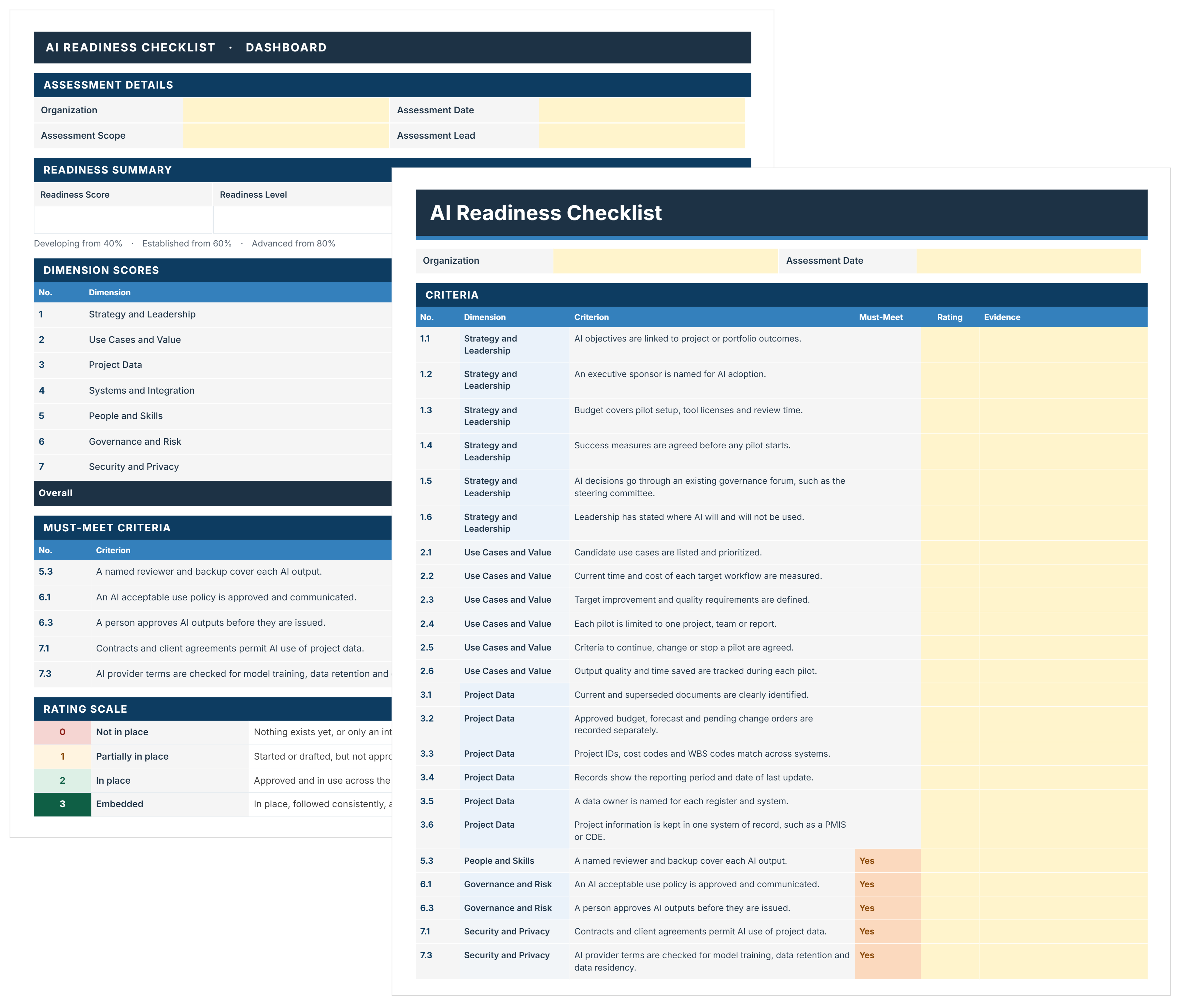
The AI readiness checklist template is one Excel workbook with six sheets.
Yellow cells are inputs, and everything else calculates as you type. The Rating Profile shows how each dimension's criteria are rated. The Use Case Matrix plots each use case by readiness and value.
Page 2 of the Dashboard ranks the top use cases by Priority Score. The workbook has no macros or add-ins.
Does this Checklist align with NIST AI RMF or ISO/IEC 42001?
Yes, the criteria map to both, but the checklist isn't a certification.
Criterion 6.6 asks whether your approach follows one of these frameworks. ISO/IEC 42001 certification needs an external audit, which this checklist does not replace.
The 44 AI Readiness Criteria in 7 Dimensions
The checklist rates 44 AI readiness criteria across seven dimensions. RICS ranks skills (46%), integration (37%), and data quality (30%) as top barriers. Mastt's 2026 State of AI report puts accuracy and trust first, at 29.6%.
Five criteria are must-meet. They decide the Pilot Gate, a go or no-go check before any pilot.
1. Strategy and Leadership
Leadership sets the purpose, sponsor, and budget before any pilot starts.
- 1.1 AI objectives are linked to project or portfolio outcomes.
- 1.2 An executive sponsor is named for AI adoption.
- 1.3 Budget covers pilot setup, tool licenses, and review time.
- 1.4 Success measures are agreed before any pilot starts.
- 1.5 AI decisions go through an existing governance forum, such as the steering committee.
- 1.6 Leadership has stated where AI will and will not be used.
Evidence: an approved AI strategy, sponsor sign-off, and a funded pilot budget.
2. Use Cases and Value
Every AI use case must prove its value against a measured baseline.
- 2.1 Candidate use cases are listed and prioritized.
- 2.2 Current time and cost of each target workflow are measured.
- 2.3 Target improvement and quality requirements are defined.
- 2.4 Each pilot is limited to one project, team, or report.
- 2.5 Criteria to continue, change, or stop a pilot are agreed.
- 2.6 Output quality and time saved are tracked during each pilot.
Evidence: a ranked use case list, baseline timings, and agreed stop criteria.
3. Project Data
AI that reads a superseded drawing as current gives a confident, wrong answer. These six criteria cover AI data readiness for project records.
- 3.1 Current and superseded documents are clearly identified.
- 3.2 Approved budget, forecast, and pending change orders are recorded separately.
- 3.3 Project IDs, cost codes, and WBS codes match across systems.
- 3.4 Records show the reporting period and date of last update.
- 3.5 A data owner is named for each register and system.
- 3.6 Project information is kept in one system of record, such as a PMIS or CDE.
PMIS means project management information system. CDE means common data environment, a term from ISO 19650.
Evidence: a document register with revision status and a reconciled cost report.
💡 Pro Tip: Test 3.1 live. Ask a project engineer to pull the current revision of one drawing. If nobody finds it within a minute, 3.1 is not a 2.
4. Systems and Integration
AI agents and other AI tools must reach your systems without breaking controls. Under 4.4, AI agent permissions must follow each user's access rights. For AI agent readiness, pair these five with 6.3, 6.4, and 7.6.
- 4.1 Project systems are listed: PMIS, cost, schedule, document control, and ERP.
- 4.2 A controlled export or API exists for each data source.
- 4.3 IDs, dates, and revision status survive transfer between systems.
- 4.4 Access restrictions carry over to connected AI tools.
- 4.5 Records stay usable if the AI tool is replaced.
Evidence: a system inventory, a tested export, and an AI tool access review.
5. People and Skills
People must be able to check AI output and want to use it. The ADKAR framework is one way to plan adoption.
- 5.1 Staff have completed basic AI training.
- 5.2 Reviewers can check AI outputs against source records.
- 5.3 A named reviewer and backup cover each AI output. Must-meet.
- 5.4 Reviewers have capacity around reporting deadlines.
- 5.5 AI champions are in place in project teams.
- 5.6 An adoption plan covers training, communication, and support.
- 5.7 Teams have a simple way to report AI errors and share what works.
Evidence: training records, a reviewer roster with backups, and an AI issue log.
6. Governance and Risk
A person, not the tool, owns every AI decision. That holds even when AI speeds up contract review.
- 6.1 An AI acceptable use policy is approved and communicated. Must-meet.
- 6.2 AI roles are defined: use case owner, data owner, reviewer, and approver.
- 6.3 A person approves AI outputs before they are issued. Must-meet.
- 6.4 AI output is never the sole basis for a payment, change order, or other contract decision.
- 6.5 AI risks are recorded in the risk register with owners.
- 6.6 The approach aligns with a recognized framework, such as NIST AI RMF or ISO/IEC 42001.
- 6.7 Clients and stakeholders are told when AI is used to prepare their deliverables.
Evidence: the approved AI policy, an AI RACI, and risk register entries.
7. Security and Privacy
Client and project data must stay where they belong. PM firms with several clients' data should test 7.4, not assume it.
- 7.1 Contracts and client agreements permit AI use of project data. Must-meet.
- 7.2 Rules define what information may be entered into AI tools.
- 7.3 AI provider terms are checked for model training, data retention, and data residency. Must-meet.
- 7.4 One client's or project's data cannot appear in another's results.
- 7.5 Unapproved AI tools (shadow AI) are identified and controlled.
- 7.6 The incident response plan covers AI data exposure.
- 7.7 AI use meets applicable privacy laws and any government or sector AI rules.
Evidence: AI clauses in contracts, reviewed provider terms, and an approved tool list.
Provider terms should answer 7.3 in writing. Mastt's AI Agent, for example, keeps project data encrypted inside your Mastt workspace. None of it is used to train AI models.
How the AI Readiness Scorecard Works
The AI readiness scorecard turns 0 to 3 ratings into one Readiness Score. It also runs the Pilot Gate and ranks use cases by priority.
- Dimension score: the total of the ratings ÷ (3 × criteria rated). Ratings of 3, 2, 1, and N/A score 6 of 9, or 67%.
- Readiness Score: the weighted average of the seven dimension scores. Weights are editable: 2 counts a dimension double, and 0 leaves it out.
- Readiness level: below 40% is Early. Developing starts at 40%, Established at 60%, and Advanced at 80%. The level reads Incomplete until every criterion has a rating or N/A.
- Pilot Gate: Met only when every must-meet criterion scores 2 or 3. One 0, 1, or N/A means Not Met, whatever the average says. Challenge every N/A. Each N/A drops out of the score and can hide a weak area. On a must-meet, N/A keeps the Pilot Gate at Not Met.
- Use case readiness: eight checks, each rated Met, Partial, or Not Met. They are Baseline, Data Quality, Permissions, Integration, Roles Assigned, Output Testing, Cost and Capacity, and Pilot Plan. Readiness is (Met + half the Partials) ÷ 8.
- Priority Score: Value (1 to 5) × Readiness × 20, out of 100. A Value 4 use case with six Met and two Partial scores 70. To back a Value rating with dollars, use the cost-benefit analysis template.
- Recommendation: Ready for Pilot needs all eight checks and the Pilot Gate Met. Otherwise it reads Preparation Required, or Incomplete until all eight are rated.
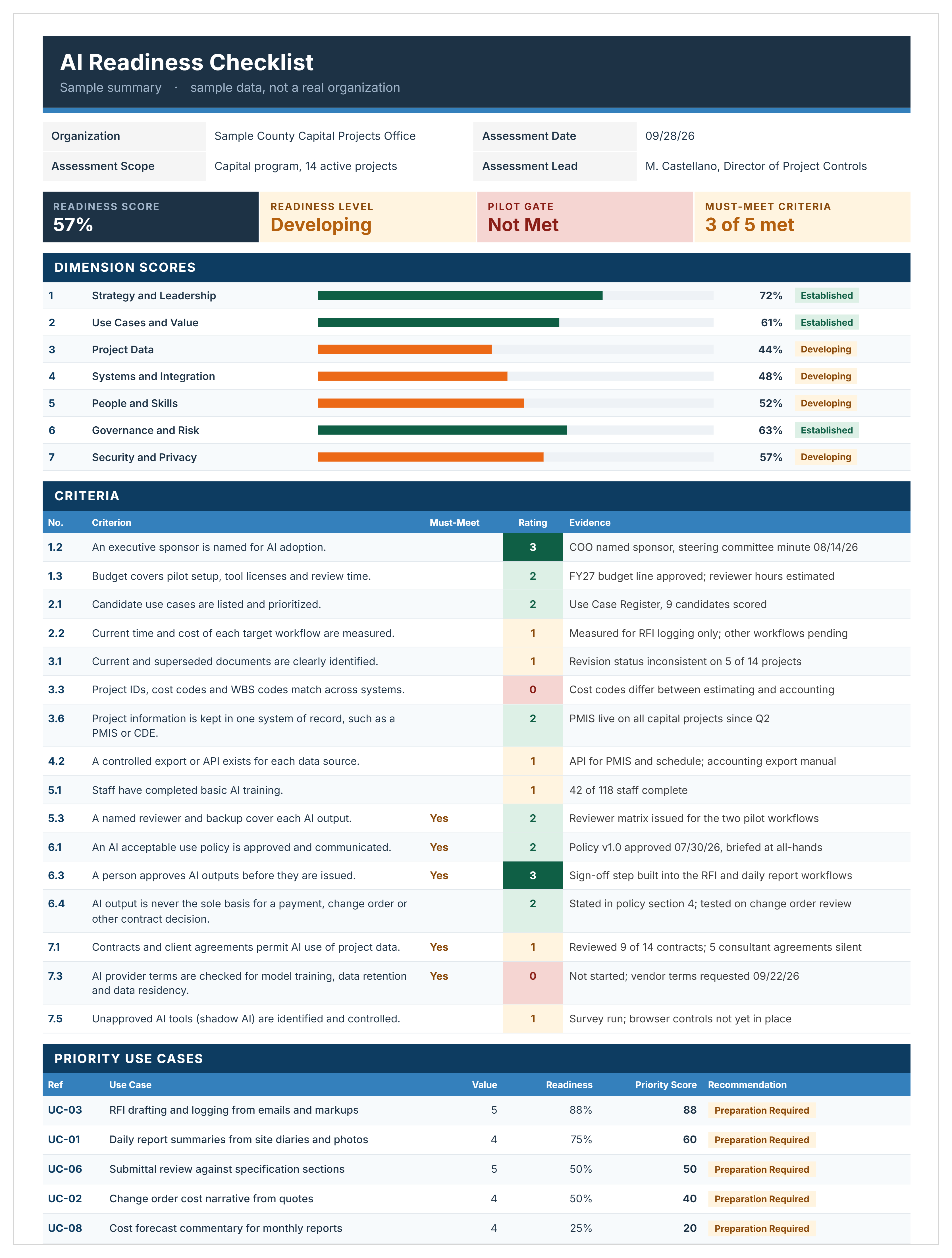
In this sample, the Readiness Score is 57%, so the level is Developing. Two must-meets score below 2: 7.1 on contracts and 7.3 on provider terms. The Pilot Gate stays Not Met, so no use case is ready yet.
How to Use the AI Readiness Assessment Checklist
Set a scope, rate the 44 criteria with evidence, then test use cases. Select any yellow cell to see what goes in it.
- Set the scope: fill in Assessment Details on the Dashboard (organization, scope, date, and lead). Scope can be the whole organization, a business unit, or one program. PM firms rating a client enter the client as the organization.
- Pick four or five reviewers: bring the sponsor, project controls, IT security, contracts, and one working PM.
- Review the criteria: edit criteria, add your own in spare rows, or change which are must-meet.
- Rate the must-meet criteria first: they decide whether any pilot can go ahead.
- Rate the rest with evidence: use 0 to 3, or N/A where a criterion doesn't apply. Then clear every message in the Rating Check column.
- List and test use cases: pick from the list or type your own. Give each a Value from 1 to 5, then rate the eight checks.
- Log every gap in the Action Plan: one row per criterion rated 0 or 1, and per unmet check. Give each an owner and a due date.
- Decide and record: take the first Ready for Pilot use case to the steering committee. Record the decision and save a dated copy.
Sheets are protected without a password, so formulas can't be typed over. To sort, unprotect the sheet and use a column header arrow. Don't insert rows, because only the built-in rows are counted.
💡 Pro Tip: Rate together in one workshop, not by email. Disagreements over a 1 or a 2 show where the real gaps are.
Construction technology consultant Erin Khan explains how to run a successful AI pilot:
"You'll be more successful if it's genuinely of interest to your end users."
- Erin Khan
Who Is This AI Readiness Checklist For?
This AI readiness checklist is for organizations that own or manage capital projects. That includes enterprises, government agencies, PM firms, and small businesses. It works for a whole portfolio, one program, or one client.
- Heads of capital delivery: decide which programs are ready for an AI pilot.
- Government program directors: check agency AI use against policy, privacy, and public records rules.
- Development managers: test whether project data can support AI before funding new tools.
- PM consultancy directors: rate their own firm first, then each client's program.
- Owner's representatives: show clients the gaps to close before an AI pilot.
- Project controls managers: confirm cost, schedule, and change order data are fit for AI.
- IT and information security leads: review AI tool access, provider terms, and data residency.
Related AI Articles and Guides
Use these guides to shortlist AI use cases before you score them. They cover AI applications, agentic AI, estimating, and scheduling.
.avif)
Written by
Jamie Cerexhe
A Forbes 30 Under 30 and PMI Future 50 honoree, Jamie Cerexhe is Mastt's co-founder and Chief Technology Officer. He leads the company's AI engineering, agentic pipelines, and security work, and earlier taught software development and contributed to the UNESCO Digital Skills Toolkit. At Mastt, Jamie contributes articles on AI, agentic workflows, and technology adoption in construction.

FREE AI readiness checklist to assess and decide where AI starts on your projects. Score 44 criteria, close must-meet gaps, and pick a pilot with evidence.

Top Performers Don’t Guess. They Deliver.
Cut the stress of showing up unprepared
Start for FreeTrusted by the bold, the brave, and the brilliant to deliver the future