Contract document management in construction is the process of keeping contract records accurate, current, and easy to verify. It ensures teams can rely on the latest information when making decisions and managing obligations.
This guide explains how contract information is handled from tender to closeout and who is responsible at each stage. It also outlines best practices and practical strategies to manage documents effectively and maintain control over construction projects.
What is Contract Document Management?
Managing contract documents is used to control the records behind a contract as work progresses. It keeps those records current, traceable, and easy to verify so the team can confirm what applies at any stage. It creates a dependable record that teams can check later when decisions need support.
Construction contract management by linking contract records to site activities and project decisions. This helps teams respond to changes and stay aligned with terms. When control breaks down, outdated information can affect delivery, cost, and compliance.

Contract Management vs. Document Management
Contract management focuses on how the agreement is administered, while document management focuses on how the records tied to that agreement are stored, tracked, and verified.
Strong document control supports contract management by making key decisions easier to check. For instance, a construction team may manage a change correctly under the contract and still face problems if the supporting record is incomplete or hard to verify.
Why Contract Document Control Matters on Construction Projects
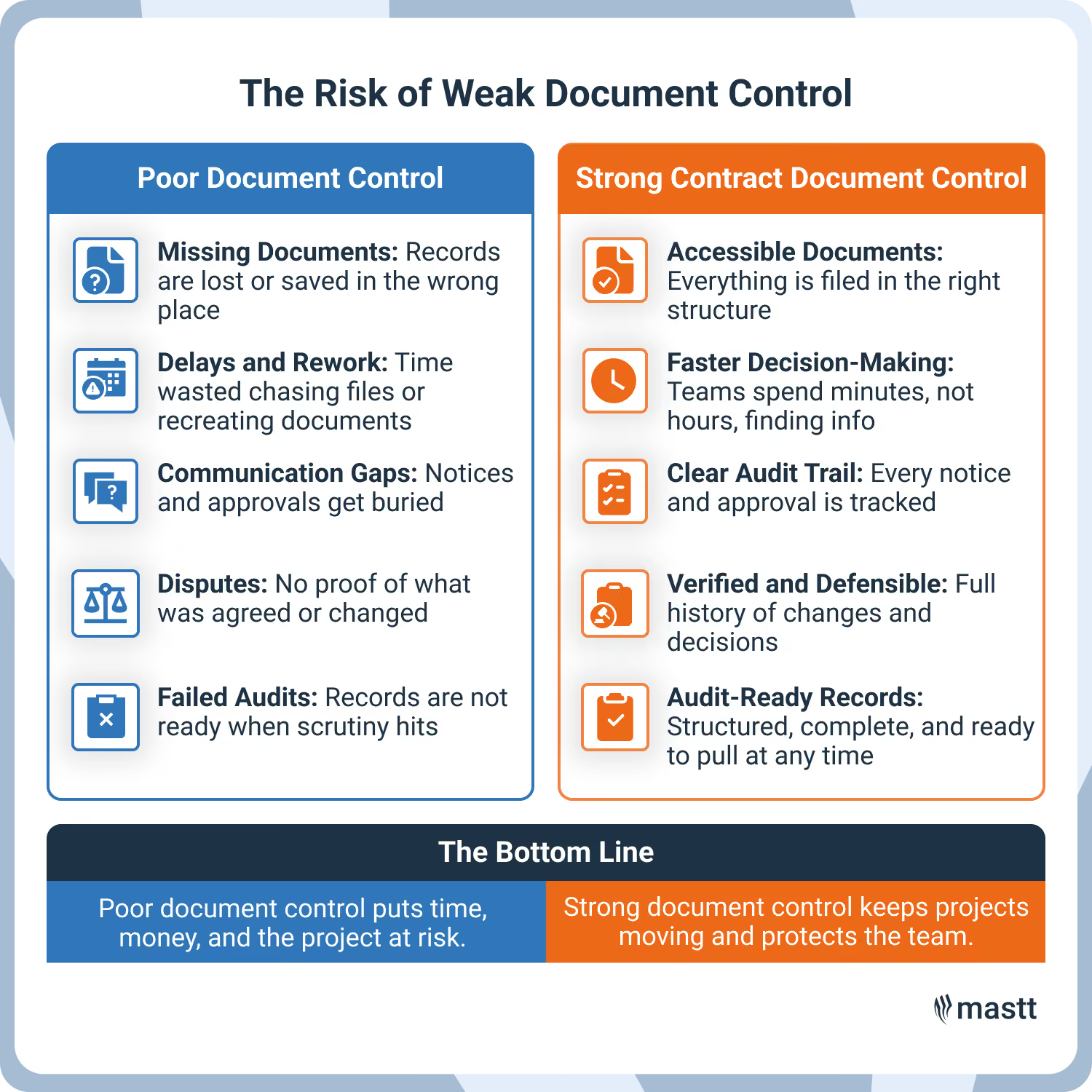
Construction projects rely on accurate records to keep work aligned with the contract. When teams cannot confirm which document applies, errors can affect time, cost, and compliance. Strong control helps teams act on information they can trust.
This matters most where contract terms affect day-to-day execution. Key reasons include:
- Supports contractual compliance: Clear records help teams follow notice requirements, approvals, and other obligations tied to the contract.
- Reduces dispute risk: A reliable document trail makes it easier to confirm what was issued, changed, or accepted at each stage.
- Improves decision-making: Project teams can respond faster when the latest information is easy to find and trust.
- Protects cost and time outcomes: Poor control causes missed changes, payment errors, and work started on the wrong scope.
- Keeps teams aligned: Owners, contractors, consultants, and site teams need access to the same records to avoid confusion.
- Strengthens accountability: Controlled documents show who issued a record, when it changed, and which version should be used.
On construction projects, contract records shape delivery as the project moves forward. They influence approvals, payment decisions, and commercial responses. Poor record control adds friction to routine decisions and increases the chance of error.
Key Features of a Contract Document Management System
A good contract document management system should make it easy to find the signed contract, verify the current file, and trace key updates during delivery. It should also help teams confirm which file is current and how it connects to the wider contract record.
- Centralized contract storage: Store the signed contract and related records in one controlled location. Teams should not have to search across folders or email to find them.
- Version control: The system should show when a file has changed and make the current version easy to identify. This reduces the risk of working from an outdated record.
- Change order tracking: Each change should link back to its source record, approval, and supporting pricing. Without that link, the file loses context.
- Notice and deadline tracking: The system should track time-sensitive notice periods and flag upcoming deadlines. This helps teams avoid missed contractual actions.
- Audit trail: Teams should be able to see who issued a record, when it changed, and which version was active at the time.
- Workflow and approvals: Approval routing should happen inside the system so the decision path stays visible and easy to verify.
💡 Pro Tip: Test the system with a live project task. If a new team member cannot find the current change record and trace it back to the original instruction quickly, the setup is adding friction instead of reducing risk.
How Contract Information Changes from Tender to Closeout
The contract record begins at tender and grows as new documents are added during award, delivery, change management, and closeout. Each new record adds context to the contract and affects how the project is administered.
The strength of this process lies in continuity. A record issued early in procurement can still affect a payment decision late in delivery, so the file needs to preserve that link.
For instance, a tender clarification may later support the contractor’s position on scope if a dispute arises during construction.
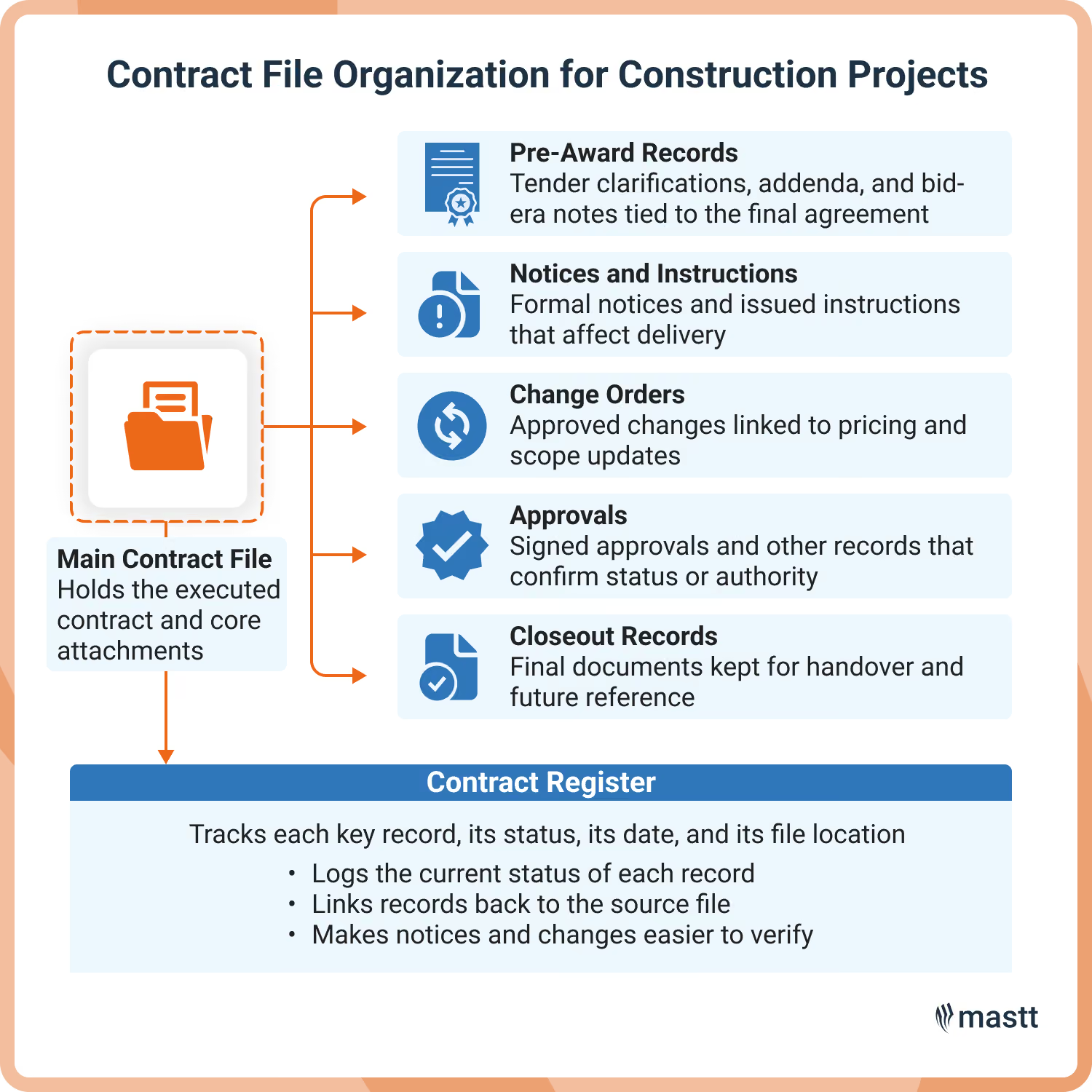
💡 Pro Tip: Keep tender clarifications, the signed contract, and change orders under the main file, then log each item in the contract register. This preserves the record trail and makes later decisions easier to verify.
Who Manages Construction Contract Documents?
Contract managers or contract administrators usually take primary responsibility for contract documents on a construction project. They maintain the formal record, though handling often involves other team members, depending on the stage and document type.
Other team members support the process based on their role:
- Project Manager: Keeps contract records aligned with project delivery and checks that the team is using current information.
- Construction Contract Administrator: Maintains formal records and tracks notices, changes, and approvals.
- Document Controller: Manages filing, issue workflows, and version integrity.
- Commercial Project Manager or Quantity Surveyor: Uses project records to assess changes, payments, and claims.
- Site Team or Package Leads: Work with records that affect scope, timing, and coordination during delivery.
- Client or Project Superintendent: Reviews, approves, or issues records based on the contract model.
On construction projects, confusion often starts when ownership is assumed rather than assigned. Each record should have a single source of truth so teams know who updates it, who reviews it, and who relies on it.
How to Set Up a Clear Document Structure on a Construction Project
To set up, begin with one controlled file path for the contract and every record tied to it. A defined file path also makes later updates easier to track as the project moves through delivery.
Step 1: Create one primary contract file
Start with a main contract file for each executed agreement. Keep the signed contract, its schedules, and any core attachments in that location from day one. This becomes the reference point for every later update.
Do not split the baseline across different folders or systems. Once the signed agreement becomes hard to find, teams start using copies that may not match the formal record.
Step 2: Organize records by project use
Build the folder structure around how the contract is used during delivery. Separate pre-award records, formal notices, change orders, approvals, and closeout files so each item has a clear place to go. Arranging records makes the structure easier to follow as the project develops.
Avoid vague folders such as “miscellaneous” or “general correspondence.” They slow down the retrieval process and make it harder to verify the record later.
Step 3: Use a naming rule that holds up in practice
Apply one naming rule across the project. This keeps the system easy for the whole team to follow. The file name should make the record easy to identify at a glance. That reduces the need to open multiple files just to find the right one.
💡 Pro Tip: Using AI for document analysis works best when filenames and folders follow a consistent structure. If records are scattered or poorly labeled, the output becomes less reliable and needs more manual checking.
Step 4: Separate current files from old versions
Keep live records in the active path. Then move superseded files to a clearly marked archive location. This makes the current version easier to identify during review and delivery. It also preserves the history without crowding the working file.
Minor naming differences are not enough on their own. If current and old files sit together, the risk of using the wrong version goes up quickly.
Step 5: Connect the structure to the contract register
Log each key record in the contract register and link it to its file location. This gives the team a reliable way to check status and confirm that the right record has been captured.
For example, if a superintendent’s notice affects scope, the team should be able to find it in the register, open the source file, and confirm when it was issued. That link matters once site activity picks up and records start moving quickly.
💡 Pro Tip: Set up contracts in your construction contract management software before site activity begins. Once notices and change orders start moving, gaps in the structure become harder to fix and more expensive to manage.

Where Contract Document Management Breaks Down in Construction
Contract management often break down when updates are issued quickly but the formal record is not kept current. In construction, this usually shows up as missing history, weak version control, or gaps between site activity and the formal record.
These gaps can delay payment review and make scope decisions harder to verify. This becomes a serious issue once the team needs to confirm what was formally issued, accepted, or tracked.
Best Practices to Keep Information Accurate and Usable
The strongest approach is to treat each contract record as something that may need to be checked later. Teams should keep the file reliable from the moment it enters the record.
☑️ Check against the contract: A file can look complete but still conflict with the signed agreement. Confirm it against the governing contract record before it is used.
☑️ Set the status early: A file should show whether it is draft, issued, approved, or superseded as soon as it enters the system. That removes guesswork during review.
☑️ Keep the decision trail: Supporting records should stay linked to the main file when they explain why something was approved or changed. This makes later review faster and more defensible.
☑️ Verify before commercial review: Check that the record is current and complete before a payment review or change assessment starts. Weak records slow commercial decisions and create avoidable rework.
☑️ Use dates carefully: The date should reflect the actual issue or revision event. This matters when timing affects notice compliance or sequence.
☑️ Fix gaps while they are live: Missing approvals or unsigned attachments are easier to resolve while the issue is still active. Delay makes the record harder to prove.
☑️ Record exceptions clearly: If the team departs from the usual process, capture that in the file. Future reviewers need to understand why the record differs.
These practices matter because project records are often tested when the job is under pressure. A usable file helps the team verify scope, payment, and responsibility without wasting time reconstructing the history.
Tools and Software That Help Manage Construction Contract Documents
Project teams need tools and registers to keep records easy to control during delivery. The most useful systems make it easier to verify the current file and follow formal updates without losing context.
- Document Management Software: Stores the working contract file in one controlled location and keeps revisions visible so teams can identify the current record quickly.
- Construction Contracts Software: Tracks contract obligations, approvals, notice deadlines, and related records so the team can manage the contract as work progresses.
- Contract Repository Software: Keeps executed agreements and core attachments organized for fast retrieval. It is most useful when teams need a dependable source for the baseline contract.
- Construction Contract Change Order Software: Tracks change records from initiation through approval and links each item back to its supporting documentation.
- Workflow Approval Tool: Route records to the right reviewers and create a visible approval path. This reduces the chance of documents being acted on before formal review is complete.
- Audit Trail Feature: Show when a file was issued, updated, reviewed, or replaced. This gives teams a clear history when they need to verify the record.

Build a Contract Document System Teams Can Trust
Contract document management keeps teams working from records they can trust as the job moves forward. Strong file control makes approvals, decisions, and obligations easier to verify when pressure builds. Apply these practices to tighten your record structure, then use the right system to keep every decision tied to a defensible source.

Written by
Stephanie Flores
Stephanie Flores was a Construction Content Writer at Mastt, producing long-form guides and research articles on cost management, contract management, and risk. She holds a Bachelor of Arts in Political Economy from the University of Asia and the Pacific.


Contributions by
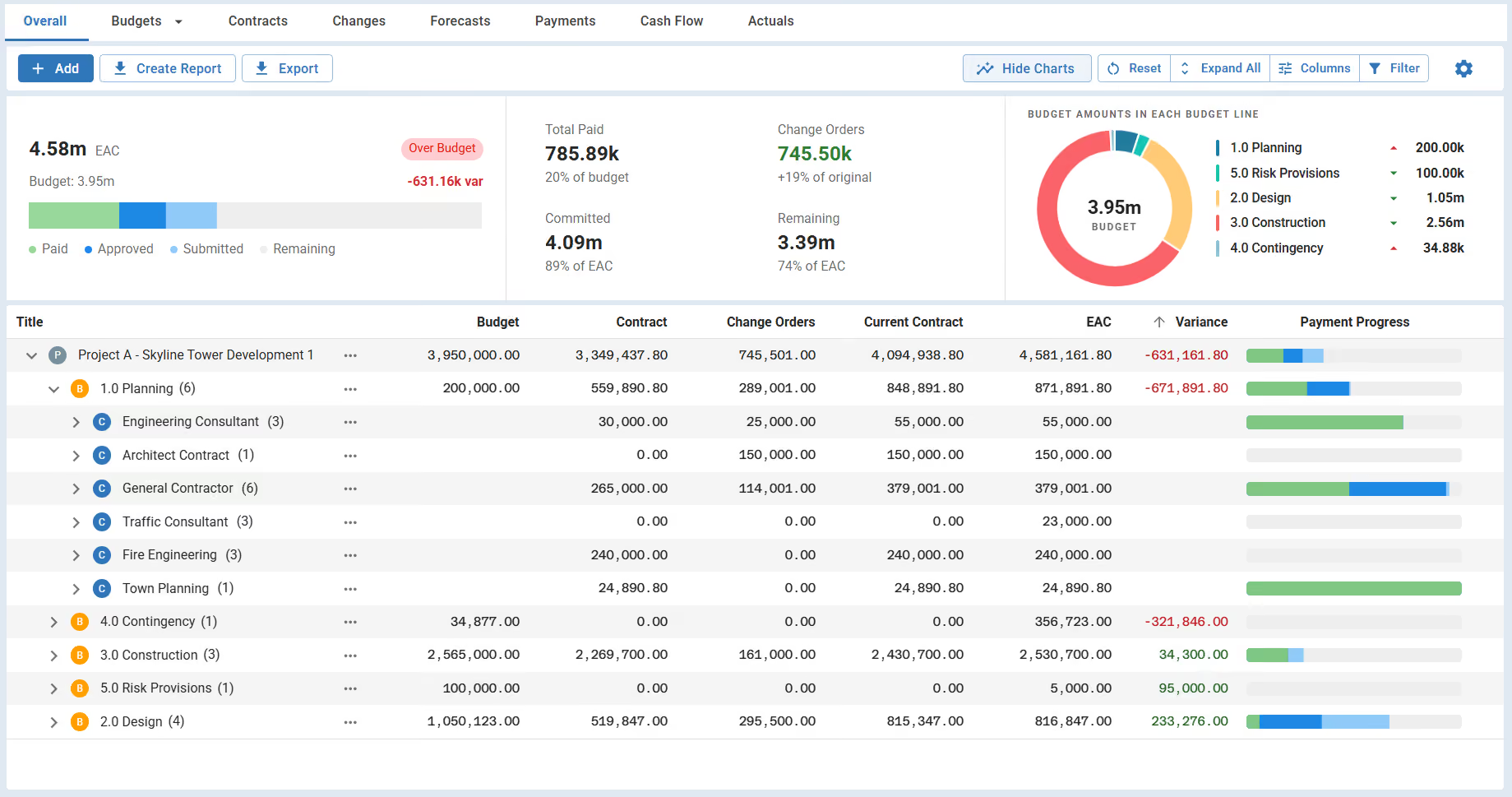
Contract Management Dashboard
A free contract management dashboard for owners and client-side teams. Track contract values, change orders, payments, and compliance in one live view.

Walk Into Every Meeting With Confidence, Clarity, and Control
No one wants to look unprepared, blindsided, or uncertain in front of stakeholders — but that’s exactly what happens without Mastt.
Start for FreeTrusted by the bold, the brave, and the brilliant across governments, Fortune 500s, and the world’s best in delivering the future

.avif)
.avif)