AI in construction is advancing quickly, but the value still comes from how you use it, not from the tool itself. Timothy Fairley has spent about eight years in project engineering and trained over 50,000 people in estimating and contracts.
In this interview, he covers where AI helps project managers today and where it should not be trusted. He also explains what it means for construction estimating, drawing on his attempt to build his own software.
From Electrical Engineering to Training 50,000 Construction Professionals
Timothy opens by tracing how he got into the industry. He explains the gap he noticed early on and why it led him into training rather than a purely technical career.
Q: Can you share a bit about your career and what you’re most proud of?
A: I studied electrical engineering, then took a job at a big infrastructure construction company, and I’ve been in the industry for about eight years now.
Something I noticed early is that a technical degree prepares you for a technical job full of circuits, transistors, and signal processing, but working in a construction company is completely different. It’s all schedules, budgets, costs, and contracts.
A couple of years in, I saw a massive gap in structured post-graduate training between what you learn at uni and what you actually need on the job, so I went on a slightly weird journey of building courses to fill it, covering estimating, contract management, and scheduling.
Well over 50,000 people have taken them, and once I started putting them on YouTube for free, they’ve had millions of views. That’s the part I’m proudest of, because I’m passing on the insights my managers and mentors gave me.
Why AI Is Changing the Construction Industry
Timothy’s conviction about AI came from doing, not predicting. A YouTube video that took off and an estimating tool that failed showed him where the opportunity sits.
Q: When did you realize AI was going to change the industry?
A: It clicked back in 2024. I’d been using ChatGPT constantly, and I did a video on how I use it for construction, like analyzing a contract or building a pricing schedule for an estimate, and it blew up on YouTube.
So I went further down the rabbit hole and actually tried to build my own AI estimating and contract management software. Six months and a lot of money later, it wasn’t much of a success.
What I learned is that the base models like Claude, ChatGPT, and Gemini keep getting better, and so much money is being poured into them that it’s very hard to compete by building on top. What you can get them to do is becoming pretty incredible.
What AI in Construction Project Management Looks Like Today
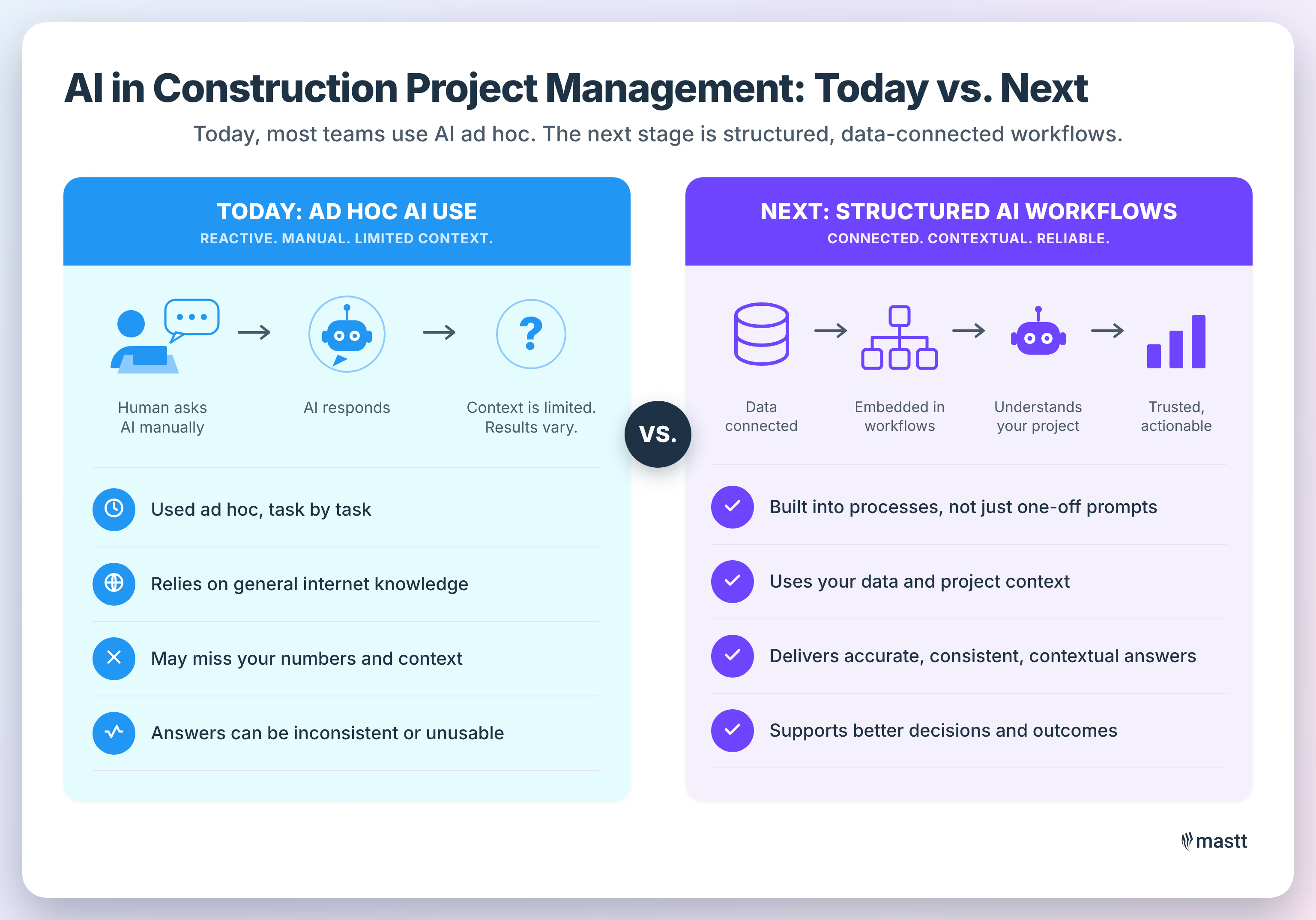
Most teams use AI reactively, not as part of a built-in workflow. The day-to-day reality is people querying a model when they hit a problem.
Q: For a project manager today, what does AI in project management actually look like day to day?
A: There are two sides to it. The first is ad hoc usage, where someone has Claude or ChatGPT open and throws tasks at it as they come up, like “find the concrete curing specs in my project documents” or “draft a schedule for me.” It’s unstructured, with the human triggering it.
The second is structured, pre-built workflows, which I think is the next stage, but I haven’t seen many companies applying it that way yet. What I see today is almost entirely the ad hoc approach.
Q: Which tools or setups actually make a difference?
A: Anything that helps you record and manage your data and connect it to a model is the real unlock. These models are trained on everything on the internet, like Reddit, Google, and random chat threads, so they’re not specific to any domain. To get real value, you have to give it the data it needs.
I’ve seen people criticize AI for a bad estimate, but they never gave it their cost rates, their productivity rates, or the output format they needed. That’s why Mastt works the way it does, because your costs, schedule, and risks are all in there, so its AI answers more reliably when it already has your project context.
For my own business, I use Notion the same way, because it links to AI with access to all my information, so it’s never answering from a clean slate.
“People often blame the tool when it does a bad job. They don’t really understand how much they can do to get better results out of it.”
- Timothy Fairley, Founder of ConstructIQ

Where You Should Not Trust AI in Construction
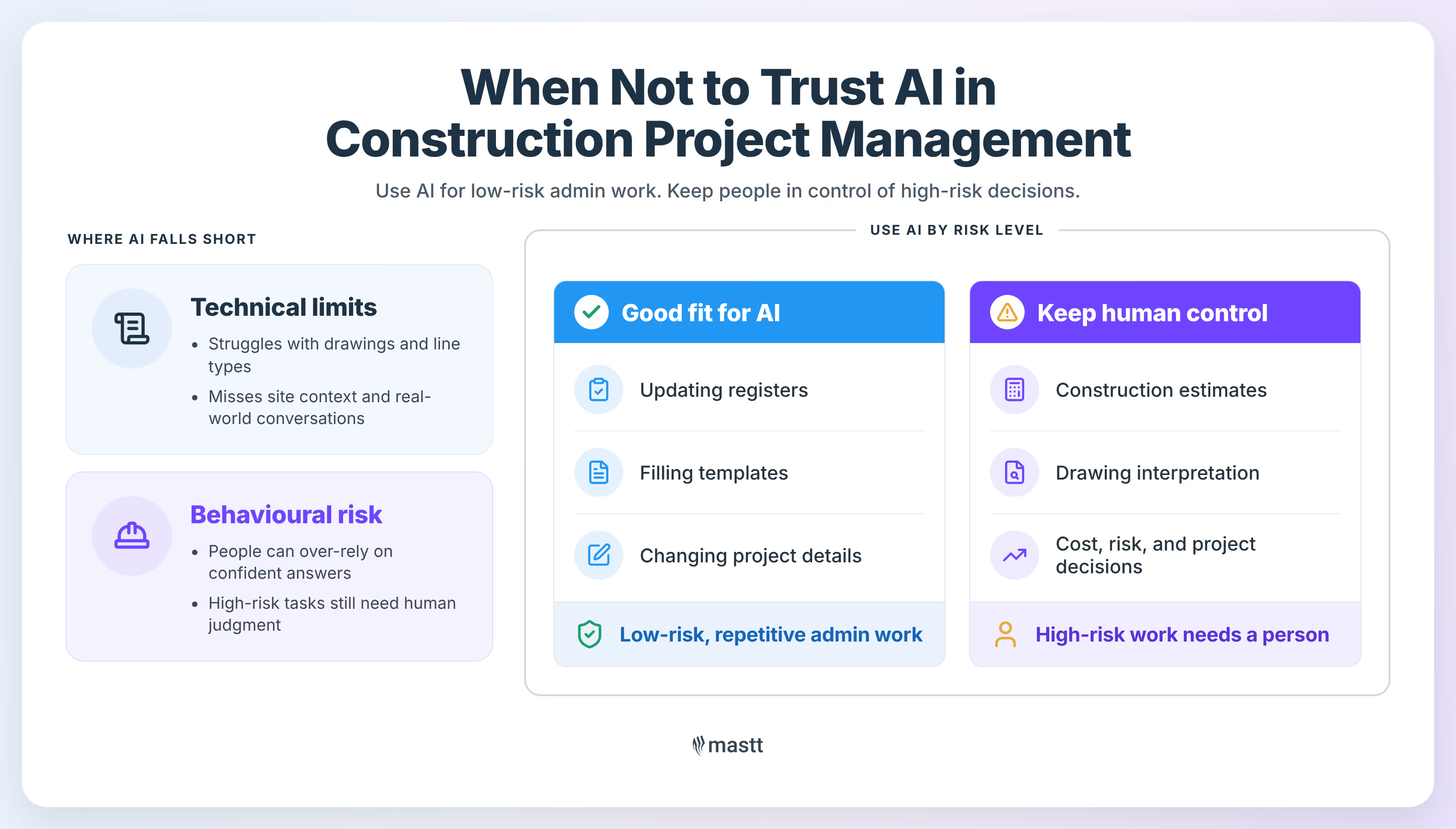
AI has two kinds of limits in construction, technical and behavioral. The technical gaps are real, but over-reliance is the bigger risk.
Q: Where should AI not be trusted?
A: I split it into technical limitations and behavioral ones. Technically, it’s incredibly bad at reading drawings. There’s a benchmark on how well AI can read an analog clock, and while humans sit around 90%, until recently the best models managed about 20%.
These models can look at a photo and tell you it’s a cat, but ask them to scale a trench length off a drawing, or tell a dashed line from a solid one on a piping diagram where it can mean a completely different service, and it’s genuinely hard for them.
The other technical limit is that construction happens in the real world, where you walk the site, you have the phone calls and face-to-face conversations, and you see the status of things. A huge amount of what a project manager knows never makes it into the AI’s context.
The behavioral side is us. When you have a tool that can theoretically do everything, it’s almost impossible not to over-rely on it. I think about it as low-risk versus high-risk tasks. If a task going wrong would be significant for your business or project, a person should do it. If it’s small and low-risk, where even if AI butchers it nothing much happens, let it run.
A construction estimate is high-risk, because companies run on 5 to 10% margins, so a 5 to 10% error on an estimate is your profit margin gone. Handing that to AI to save a couple of hours doesn’t make sense.
But updating 10 registers and 50 templates at the start of a project, changing the project name, the dates, and a few details, is boring, repetitive work people do badly anyway. AI does it in 20 minutes, which is a perfect use case.
“Construction companies run at 5 to 10% margin. If you have a 5 to 10% error on your estimate, that’s your profit margin gone.”
- Timothy Fairley
Q: When AI helps make decisions, who’s responsible when something goes wrong?
A: First, you can’t sue AI, because in the eyes of the law, the person using it is responsible, not the tool. Second, people say AI is like a graduate employee, and that holds up to a point. Where it breaks down is that a graduate gets better on their own, whereas AI only gets better if you make it better, with better instructions and more access to your data.
When the latest Claude model came out, someone asked what the best way was to get to the car wash at the end of their street, and it suggested walking, because by the time you got in the car and parked, you’d be quicker on foot. It’s technically efficient but a ridiculous answer, because obviously you’re driving the car there to get it washed.
The term for this is that it lacks a theory of mind, so it understands the literal question but not what you’re trying to achieve. It can help you make decisions, but you have to guide it and point it in the right direction. You’re responsible for the output.
How to Scale AI Across a Construction Business
Scaling AI is less about tools and more about preparation. It rests on two foundations, the data you feed it and the workflows you build from your processes.
Q: How do you scale AI from individual use into something a whole organization can rely on?
A: There are two things. The first one I call context curation, which means making it easy to give the model the correct context. A construction company has all its costs, productivity rates, standard terms, and key supplier contacts.
If you put that somewhere the AI can reach, like a SharePoint folder through the Claude connector, then every time someone asks it to do something, it has the relevant data.
One simple trick is to convert your files to markdown, because the model reads them using 20 to 30 times fewer tokens than a PDF, so it answers faster and more accurately. This is also why construction project management software is so useful, because it forces you to structure your data consistently. Mastt has AI features built in that can read all your project data.
The second thing is workflows. Any standard operating procedure, like how you run procurement or how you manage quality, can become a repeatable AI workflow.
Claude skills are great for this, because you take your process for setting up quality management and turn it into a skill that anyone can run, so it looks through the documents, builds the list of inspection and test plans, and pre-populates them from your templates. You set up the context first, then rebuild your standard procedures as workflows.
What Construction Estimating Is and Why AI Struggles With It
Estimating is working out what a project will cost to build. People want it automated, but much of it is judgment that models handle poorly.
Q: What is construction estimating, and why has it become such a focus for AI?
A: Estimating is working out how much it costs to build something. A client goes to a contractor for a quote, and to produce that quote, the contractor has to estimate the cost.
For most owners, estimating is an overhead, because nobody wants to go through drawings, do quantity takeoffs, and chase subcontractor quotes. If you could press a button and get an estimate, that would be everyone’s dream, and that’s why it’s such a focus.
But people underestimate how much of estimating is judgment rather than number-crunching, including understanding scope, deciding what inclusions and exclusions go in your bid, and weighing how you price against how the market is pricing.
Because it looks mechanical, people assume AI should be able to do it. I’m not sure there’s much evidence it can estimate as well as an estimator, so the focus comes mostly from people not wanting to do it.
Q: What estimating mistakes are you seeing, and how should teams check AI’s output?
A: The big one is shortcutting the scope, where people use AI to summarize the bid documents instead of understanding what they’re pricing. That’s the wrong place to use it, because if you don’t put in the time to understand the drawings, every task afterwards suffers and you can’t point AI in the right direction.
Where it works is narrow and specific. I keep an estimating spreadsheet, and copying a 20-line supplier quote into the Claude for Excel plugin to extract the rates is great.
To check AI’s output, you need really good historical cost data. If you own a business and your estimator brings you $15 million for a solar farm, you know solar should be about $1.50 a watt, so you can sense-check it instantly, and if it comes back at double that you know it’s outside tolerance.
People assume AI automatically knows this, but if you ask a fresh chat for a reasonable formwork production rate it won’t be anything like what you run on your projects. Give it your number and it’ll do a far better estimate. Treat AI as a data transformation tool.
“See AI as a data transformation tool. Give it the input, tell it what to do, and tell it the output format you want.”
- Timothy Fairley
Q: A lot of the risk is in what’s not in the drawings. How does AI handle that?
A: That’s a real challenge, because you’re articulating what a contractor has to do from a concept set of drawings, and there’s so much implied behind it. Something comes up, you put in a variation (change order), and the client says a competent contractor should have known. There are two ways to deal with it.
First, you build your own library of lessons learned over time, which again comes back to data. Second, AI is surprisingly good at brainstorming, so you can give it the scope and drawings and ask for a hundred things that could go wrong during construction, and it does that well.
But it’s trained on data, so it’s not natively creative, and it won’t surprise you with something nobody would think of, although a lot of people wouldn’t either, which is why you still need experienced project managers. It’s not purely an AI problem. It’s a risk problem the whole industry has.

What to Look for in Construction Estimating Software
The best estimating tool Timothy has used is still Excel, up to a point. Good software adds what Excel lacks at scale and a way to connect your own AI.
Q: What should a capital project owner look for in estimating software?
A: I’ll probably get agreement from most of the industry when I say the best construction software ever made is Excel. Build a good template, and it’s brilliant for estimating. The problem is that it doesn’t scale, so you get version control issues, ten versions of a template floating around, and someone changes a cell and it breaks and no one can work out why.
So the real question is where Excel breaks, and the answer is that you want version control, a shared rate library, and assemblies, which are combinations of resources people can reuse. That’s why big contractors use estimating software and small ones don’t.
On the AI side, I’d be really interested in anything that connects to your own Claude or ChatGPT account, because those companies are spending billions building the best general-purpose models.
Then there are takeoffs, because everyone wants AI-generated quantity takeoffs, but I haven’t heard of anyone succeeding with one. The frustrating part is that the data often already exists in the 3D model, but nobody passes on a bill of quantities, so we convert it to 2D drawings and then count everything back off them by hand. Solve that and it would be massive.
Practical Tips for Learning Estimating and Getting Value From AI
Learning to estimate takes practice and fundamentals together. Getting value from AI takes small, useful workflows rather than a grand plan.
Q: For someone building their estimating skills, and anyone getting started with AI, what are your top tips?
A: To learn estimating, you need a practice problem and the fundamentals at the same time. I can never learn by just listening, because I have to be doing it, but if you only do it without the fundamentals, you don’t really understand it. So find a practice project, or get one through work, and at the same time have a mentor explain it or learn the fundamentals properly.
On AI, the tip I give everyone is not to get caught up in everything you could theoretically do. Start with small, specific workflows that you know are genuinely useful and iterate from there.
"Getting it to do something useful in 30 minutes beats a grand AI strategy of a hundred things you never actually do."
- Timothy Fairley
Q: If there’s one message you’d leave with the industry, what is it?
A: Rather than getting frustrated that AI can’t do something, treat it as a limitation in how you’re using it and solve the problems around that. Most of the failures I see aren’t the AI itself, but how people structure the problem or what information they give it or hold back.
It’s not that hard to use. If it’s not doing what you want, experiment by giving it different information or getting it to solve the problem another way. Don’t try it once and decide it sucks.
Where to Start With AI in Construction
AI in construction pays off when you treat it as a tool you direct, not a replacement for your own judgment. Give it your data, keep people on high-risk work, and start with one small workflow that solves a real problem.
Note: This Q&A article is part of Mastt's interview series featuring construction industry experts. Timothy Fairley's responses have been lightly edited for readability.
.avif)
Written by
Doug Vincent
Doug Vincent is the co-founder and CEO of Mastt, the AI capital-project management platform used by governments, Fortune 500 companies, and consultancies across APAC, North America, and MENA. Before founding Mastt in 2019, he spent a decade at RPS delivering more than $2 billion in capital works, including the $2.1B Defence Navy Infrastructure program, and holds a CPSPM certification with the AIPM. He contributes content and speaks on AI in capital project delivery at Mastt.


Contributions by
Timothy Fairley
Timothy Fairley is the Founder of ConstructIQ and a Chartered Professional Engineer and PMP with 9 years delivering construction projects across renewable energy, rail, and infrastructure. He trained over 50,000 construction professionals worldwide through ConstructIQ’s courses and YouTube channel on estimating, procurement, and contract management. Timothy contributes content on construction cost management and estimating at Mastt.
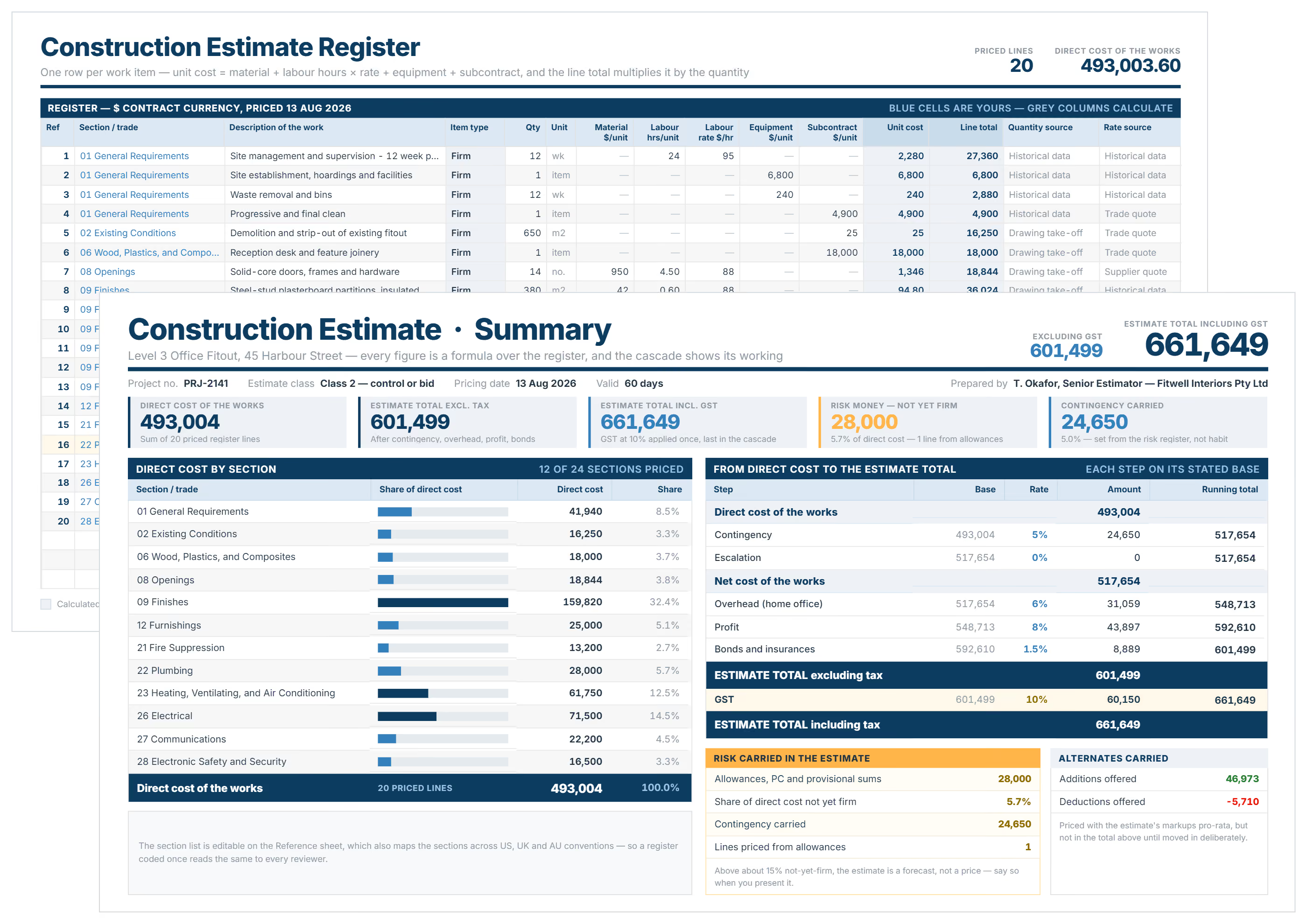
Construction Estimate Template
Use this construction estimate template to price projects accurately, win more bids, and control costs. Create professional estimates in Excel or Word format instantly.

Walk Into Every Meeting With Confidence, Clarity, and Control
No one wants to look unprepared, blindsided, or uncertain in front of stakeholders — but that’s exactly what happens without Mastt.
Start for FreeTrusted by the bold, the brave, and the brilliant across governments, Fortune 500s, and the world’s best in delivering the future