Construction project owners are being pitched AI scheduling tools every quarter, and most of the pitches are noise. A small number actually change how a project gets run. The questions that separate the two get asked too rarely, which is why most pilots fail before they prove anything.
This article works through what AI in construction scheduling is, where it adds value on a CPM schedule, where it falls over, and what an owner should ask a vendor before signing. Our guide to construction project scheduling covers the underlying methods. This one covers the AI layer that sits on top.
What Is AI in Construction Scheduling?
AI in construction scheduling is the use of artificial intelligence for predictive scheduling, schedule optimization, and continuous status capture on a project schedule. It removes the manual data-entry layer that normally sits between the field and the file.
AI does not replace the scheduler. It sits on top of the critical path method (CPM) schedule the scheduler builds, reads the underlying logic and float, and changes how everyone else interacts with that schedule.
Four applications of AI on top of a CPM schedule are real on construction projects today:
- Natural-language query lets anyone ask a plain English question and get a CPM-grounded answer.
- Agentic monitoring watches the schedule against site data and flags drift before a human notices.
- Automated status capture pulls progress from daily reports, photos, and field tools straight into the schedule.
- Generative scheduling proposes activity logic and durations from precedent projects.
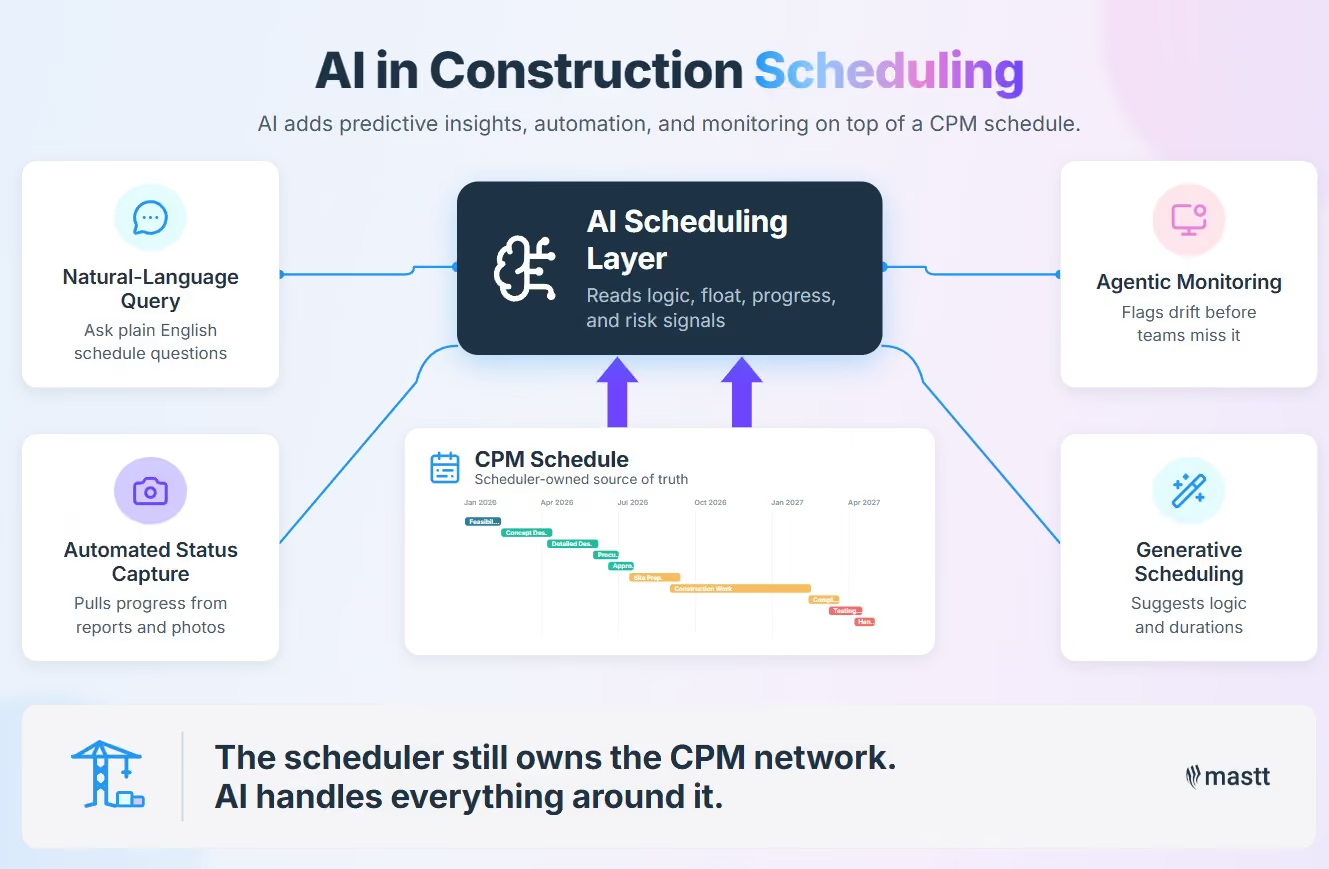
For example, on a typical highway widening project, this looks like a project manager asking the schedule what slipped this week and getting an immediate CPM-grounded answer. An agent flags that a near-critical path has lost eight days of float over the past quarter. Daily field reports flow into activity progress without anyone transcribing them. The scheduler still owns the CPM network. AI handles everything around it.
Why Construction Schedules Need AI Now
Construction productivity has barely moved for two decades, and the schedules running today's projects are worse than the industry wants to admit. The case for AI rests on those two facts more than on any vendor demo.
Four sources tell the story:
- McKinsey's 2024 construction productivity research shows productivity grew 0.4% annually from 2000 to 2022, against 2% for the wider economy.
- SmartPM's 2025 State of Construction Scheduling report found 88% of baseline schedules fail industry quality benchmarks, and only one in four teams update schedules on time.
- The Dodge/CMiC 2025 SmartMarket Brief on AI in Construction found 87% of contractors believe AI will meaningfully impact construction, but only 19% have adapted workflows.
- The Project Management Institute estimates 10% of global project investment is wasted, which works out to more than a trillion dollars a year.
The trillion-dollar number is the owner's problem more than anyone else's. The schedule is the artifact an owner pays the contractor to maintain, but it is also the artifact the owner rarely sees in its true form. Updates lag the field by weeks. Float gets gamed in the quiet between updates.
Timothy Mather, former CTO at PMA Technologies and co-owner of SBS Northwest, puts the current state plainly:
"It just seems like Kabuki theater to me. You're trying to align reality when really you should have one consistent platform that is thought out and is accessible to everyone and actually drives the work."
- Timothy Mather
How Can AI Work in Construction Scheduling?
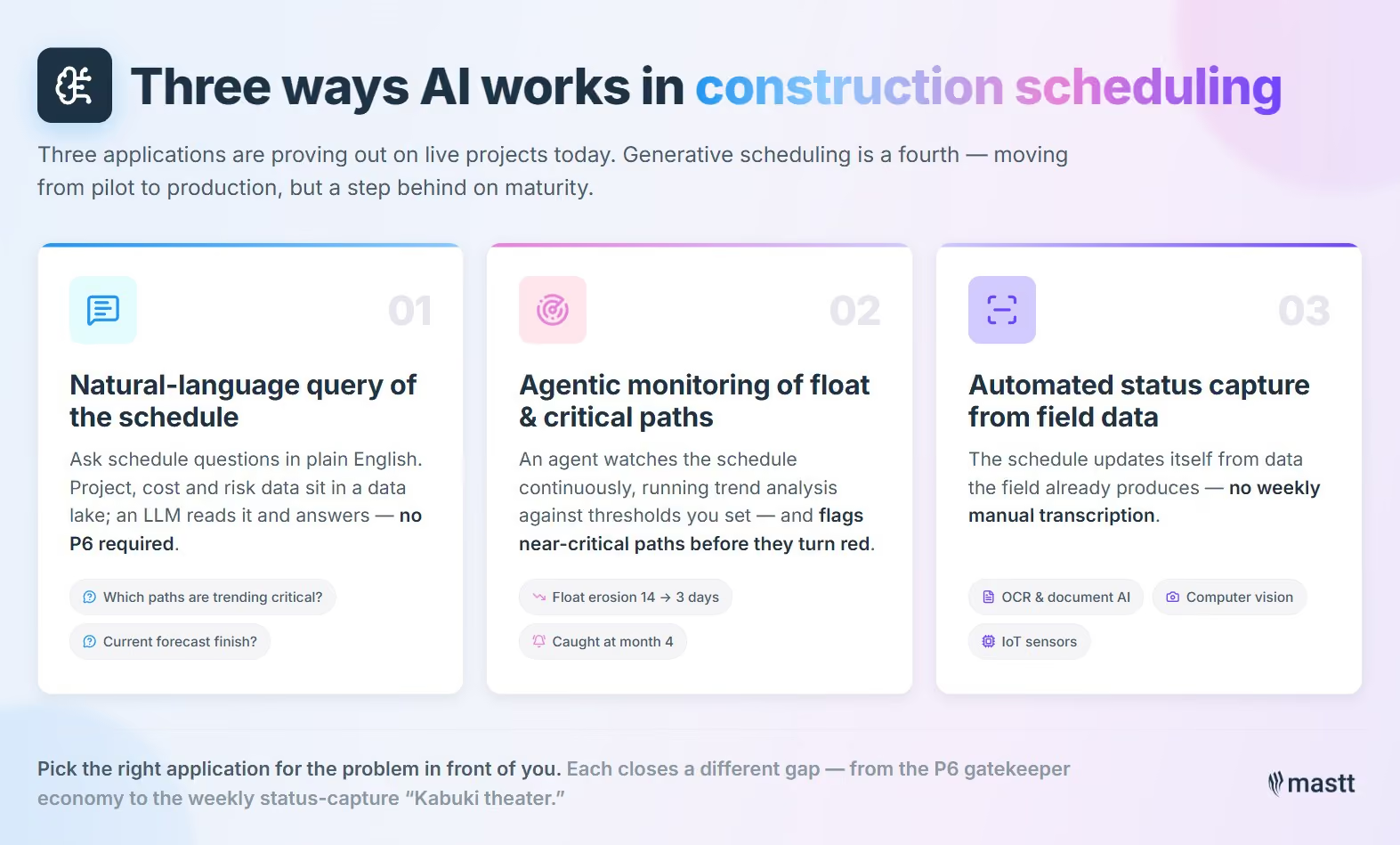
AI works in construction scheduling through three applications proving out on construction projects today: natural-language query of the schedule, agentic monitoring of float and near-critical paths, and automated capture of field status.
A fourth application, generative scheduling, is moving from pilot to production but sits slightly behind the first three in maturity. Using AI in construction scheduling well means picking the right application for the problem in front of you.
1. Natural-language query of the schedule
Natural-language query lets a project sponsor, CFO, or owner's representative ask schedule questions without opening Primavera P6 or staring at a Gantt chart. The project's schedule data, plus the related cost and risk data, sits in a data lake. An LLM interface reads it and answers questions in plain English.
Example queries that work in production today:
- "Which activities lost more than two days of float this month?"
- "What is the current forecast finish date on the structural package?"
- "Which paths are trending toward critical based on the last four updates?"
Access to P6 has functioned as a gatekeeper economy for thirty years. A small group of specialists controlled the answers, and owners paid consultants to ask basic questions on their behalf. Mastt AI sits in this category for owner-side users.
"The advent of AI within the world of scheduling is probably one of the biggest opportunities we have because the ability to build a data lake off a whole project and then natural language query that project for answers is going to level the playing field for all the professionals who have questions. You don't need to know P6 if you got that thing shared out."
- Timothy Mather
2. Agentic monitoring of float and critical paths
Agentic monitoring runs predictive analytics in the background and flags near-critical paths trending toward critical before a human notices. A prompt-driven tool waits for a question. An agent watches the schedule continuously and runs trend analysis against thresholds you set in advance.
Picture a 30,000-activity schedule on a hospital fit-out. Path X starts with 14 days of float. Over six months, float drops to 11, then 8, then 5, then 3 days. No single weekly update triggers an alarm. The agent catches the trend at month four and alerts the scheduler before path X has gone red. A human reviewing weekly updates almost always misses that pattern, because the numbers move slowly and the schedule is too large to scan in detail.
"Maybe the separation that we're talking about here is prompt driven versus agentic. To build a specific agent to watch for schedule progress, where are we losing flow in the schedule, is something near critical but trending towards critical. You capture it ahead of time in a 30,000 activity schedule. Nobody's going to notice it until it turns bright red."
- Timothy Mather
3. Automated status capture from field data
Automated status capture is the third application, and it most directly closes the gap Tim called Kabuki theater. Site teams stop transcribing progress into the schedule on a weekly cycle. The schedule updates itself from the data the field is already producing.
The mechanics vary by tool:
- OCR reads scanned daily reports and pay applications.
- Document AI parses contractor monthly updates and pulls activity-level percent complete out automatically.
- Computer vision processes field photos and drone footage against the 4D BIM model.
- IoT sensors feed equipment hours and material delivery timestamps to the activity records.
Buildots used computer vision on Intel fab projects to track visual progress with over a thousand activities monitored and 1,176 model updates per fab. SmartPM runs schedule data quality checks and flags discrepancies between reported and likely actual status.

How AI Changes the Construction Scheduler's Role
AI does not eliminate the construction scheduler. It changes what the scheduler spends time on, and the work that moves to AI is exactly the work most experienced schedulers least enjoy doing.
What goes to AI vs what stays with the scheduler:
For example, on a 24-month commercial build, a senior scheduler used to spend Mondays processing the previous week's field reports and reconciling them against the master schedule.
With AI handling the capture, that same scheduler now spends Monday morning with the construction manager reviewing which trade sequences are at risk in the next four weeks. The work output looks completely different. The schedule moves faster. The conversations are about decisions, not data hygiene.
Communication is the core function of construction project management. When AI handles status capture, both the scheduler and PM get hours back for the conversations where schedule problems actually get solved.
The output side of the role expands too. McKinsey's work with ALICE Technologies has covered 35-plus clients using generative scheduling with up to 20% schedule acceleration. One data center program cut its construction schedule by 40%.
"The real professional schedulers that I've met are craftsmen. They understand what they're trying to accomplish and they understand how to look at the model. They're not just clicking keys."
- Timothy Mather
What AI Tools and Platforms Are Used on Construction Projects
AI in construction scheduling sits across four tool categories. Each one solves a different part of the schedule lifecycle.
The categories overlap in practice. Procore now covers schedule risk inside its platform. ALICE crosses into CPM territory when its output feeds Primavera. nPlan is starting to appear inside owner-side dashboards as a data layer.
Owner-side platforms do not replace the contractor's P6 or Microsoft Project file. They consume it. The contractor still owns the network logic and the float calculations, because that is what the contract requires. The owner platform reads the file, extracts milestones and risk signals, and runs portfolio-level analytics on top, without forcing the contractor to switch tools.
Procore's Helix agentic AI platform, announced at Groundbreak 2025, includes a schedule agent that flags delays and triggers contractor notifications without a human prompt.
ENR reported that Autodesk is folding Construction Cloud into Forma with geometry-based AI assistants that link model geometry directly to schedule activities.
Owners who have moved to this kind of platform-of-record approach see the difference quickly.
"Mastt provides software that is currently at the forefront of owner/client-side project management for the construction industry and continues to change the way we operate for the better."
- Mark Winder, Project Director (Mastt Testimonials)

How AI Applies to CPM, Last Planner, and Location-Based Schedules
How AI plugs into a project depends entirely on which scheduling method underlies the project. Schedule optimization with AI looks nothing on a CPM job like it looks on a Last Planner job or a location-based job. Treating them as interchangeable is one of the reasons AI pilots fail.
CPM stays the network of record on most contracts, because that is what the courts recognize. The AI does not replace the network. It watches it. AACE International's recommended practices on schedule risk analysis and integrated cost-and-schedule risk analysis remain the standard governance layer, even as AI changes how the math gets done.
"The goal isn't more detail, the goal is better execution."
- Timothy Mather
AI Scheduling Case Studies on Real Construction Projects
The case for AI scheduling in construction stops being theoretical once you can name the projects, the contractors, and the dollar figures. Most articles on this topic rely on stylized hypotheticals or vendor mockups. The four cases below are real, named, and verifiable, with linked public sources so an owner can judge the patterns against their own portfolio.
The pattern across the four cases is consistent. They are heavy civil, megaprojects, or data centers. In those environments, a 1% schedule gain translates to seven or eight figures of avoided cost. AI proves out fastest where the math is regular and the stakes are high enough to fund a real implementation, not just a pilot.
Smaller commercial fit-outs and residential projects are missing on purpose. The ROI threshold has not been met at that scale yet. Most owners on those projects benefit indirectly when their contractors adopt the tools on bigger jobs and bring the learnings down later.
"Generative scheduling is reshaping how complex capital projects are planned and delivered."
- René Morkos, founder and CEO, ALICE Technologies, as quoted in Construction Dive
Why Most AI Scheduling Implementations Fail
Most AI construction scheduling trials fail because the underlying schedule data is too poor for AI to add value. No amount of model sophistication can fix that. The 95% failure rate that gets thrown around in industry talks is not about the algorithms. It is about the schedule data those algorithms are being fed.
At ENR FutureTech 2026, Alan Espinoza pointed to a 95% failure rate for AI initiatives across construction. SmartPM CEO Michael Pink put it bluntly in the same year's State of Construction Scheduling report: "Everyone's excited about AI. But if we don't get serious about improving schedule data first, AI will just automate bad decisions faster." If 88% of baselines already fail basic quality checks, the AI applied on top inherits every defect.
Beyond the data problem, four failure modes show up consistently on owner-side implementations:
- Hallucinated dependencies and fabricated durations when the LLM does not have a real activity network underneath it.
- Vendor lock-in pitched as agentic AI when the actual product is an overnight batch process running on a Tuesday-night cron job.
- No explainability layer, which means the owner cannot defend an AI-generated forecast in an EOT claim, a stage-gate review, or a board paper.
- Mismatched scale, where the AI is sold for a 30,000-activity megaproject but the owner is running a 600-activity fit-out, or vice versa.
The long-range schedule problem sits underneath several of these failure modes. Tim framed it bluntly:
"If you have a five year program with 30,000 activities in it, you're making it up. You don't know that three years from now this I beam is going to get bolted to that piece of concrete. It's just not true."
- Timothy Mather
AI applied to a fabricated 30,000-activity schedule amplifies the fabrication. The output looks more precise than the input deserves, which makes it more dangerous, not less.
When AI Is the Wrong Answer for Project Scheduling
Not every construction project is ready for AI scheduling, and pretending otherwise is how implementations burn budget. AI underperforms or actively hurts the project in three scenarios:
- Small fit-outs and short-duration jobs: A 400-activity, 12-week tenant improvement does not generate enough schedule data for AI to add value. A planner with a spreadsheet runs it faster.
- Single-trade subcontract work: When the schedule is driven by one trade's crew availability, the bottleneck is not analytical capacity. AI optimization adds overhead without changing the answer.
- Projects with no baseline integrity: If the baseline schedule was built to defend a contract position rather than describe the work, AI applied on top inherits and amplifies the original misrepresentation. Fix the baseline first, then layer AI.
The honest test for an owner is, if the schedule problem is "we do not have clean data," AI is not the answer yet. Fix the data, then come back.
How to Evaluate AI Scheduling Tools
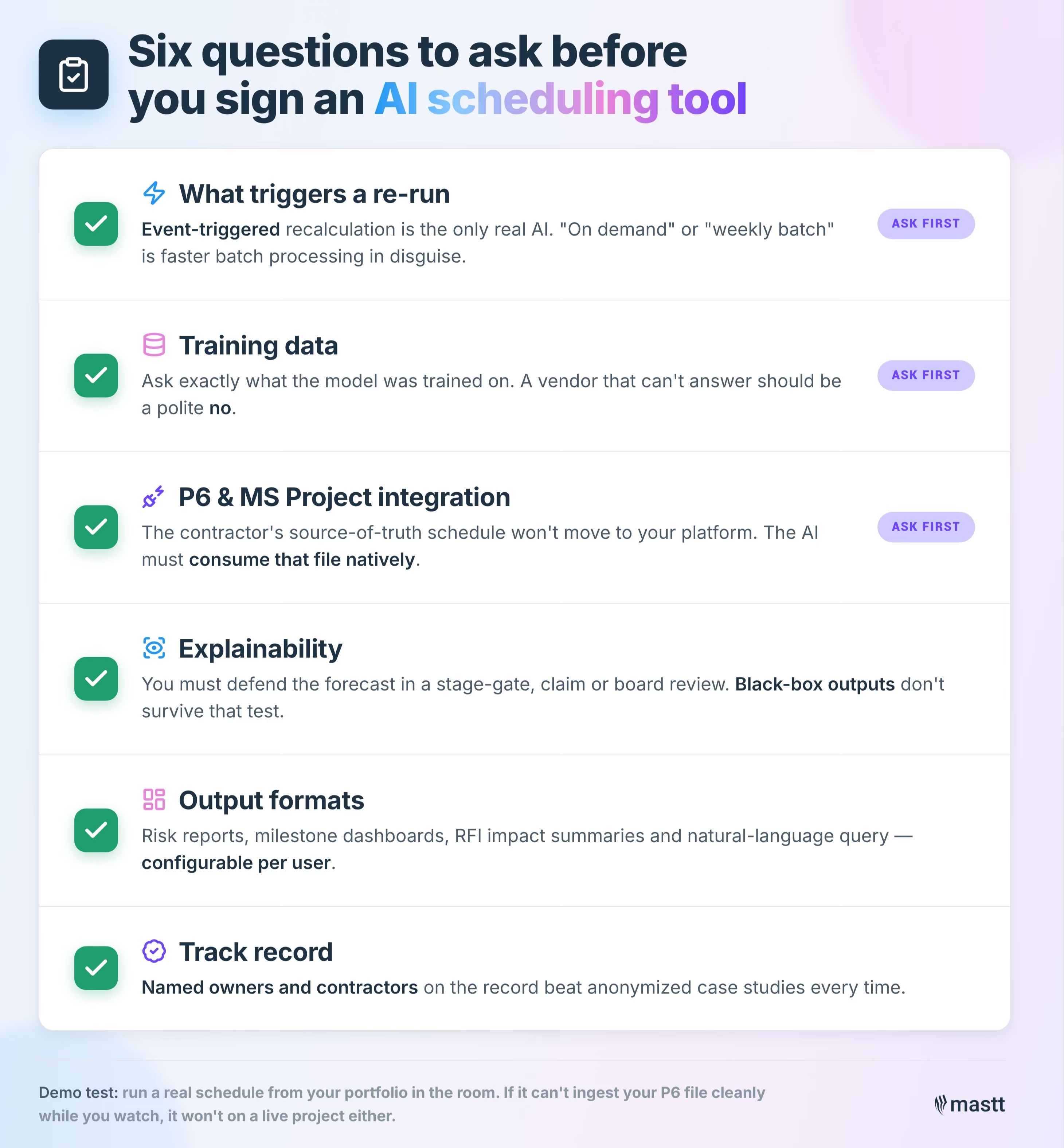
Owners and project controls teams should evaluate AI construction scheduling tools on three points first: What triggers a re-run. What data the tool was trained on. How cleanly the output integrates with the contractor's P6 or Microsoft Project file. Everything else is downstream of those three answers.
Tim's filter test is the cleanest gut-check on the market. Ask the vendor what triggers the AI to recalculate the schedule. If the answer is "on demand" or "weekly batch," the tool is faster batch processing dressed up in AI marketing.
Real continuous AI runs event-triggered: a material schedule change, a new risk register entry, or a documented change order kicks off recalculation automatically.
Use this six-point checklist when shortlisting vendors:
- What triggers a re-run: Event-triggered recalculation is the only real AI here.
- Training data: Ask exactly what the model was trained on. nPlan trained on 750,000-plus historical schedules. A vendor that cannot answer should be a polite no.
- Integration with P6 and Microsoft Project.: The contractor's source-of-truth schedule will not move to your platform. The AI must consume that file natively.
- Explainability: Owners must be able to defend an AI-generated forecast in a stage-gate, claim, or board review. Black-box outputs do not survive that test.
- Output formats: Risk reports, milestone dashboards, RFI impact summaries, and natural-language query should be configurable per user.
- Track record on named projects: Anonymized case studies are weaker evidence than named owners and contractors on the record.
Apply the checklist as a scoring rubric across the four tool categories before signing anything:
The Future of AI in Project Scheduling
AI in construction scheduling is moving from pilot to default tooling on capital projects. The projects driving the shift have the highest commercial pressure on schedule: data centers, energy, and heavy civil.
Deloitte's 2026 Engineering and Construction Outlook projects US data center power demand growing from 33 GW in 2024 to 176 GW by 2035. AI data centers drive most of that growth. The owners building those projects cannot afford the kind of slippage normalized on other building types for the last twenty years.
McKinsey and ALICE Technologies have a joint go-to-market alliance for generative project scheduling. The bigger shift is at the data capture layer. Schedule progress is moving from human reporting to sensor and computer-vision capture.
"Progress, as an example, currently progress is a human activity. I don't think in 2035 it needs to be. We should be able to progress the project based on sensors or who knows by then 2035 maybe there'll be a hundred robots on the site doing the work and reporting the data back real time."
- Timothy Mather
Drone-based progress capture from Buildots, photo-to-schedule update workflows from SmartPM Essentials, and digital twins fed by IoT sensors are already in production on the same projects Deloitte is projecting will drive most of the next decade's construction demand.
Where AI Earns Its Place
AI in construction scheduling earns its place when it removes the data-entry layer and surfaces trends a human cannot watch continuously. It fails when vendors sell it as a replacement for the scheduler's judgment, or when it sits on top of a baseline schedule nobody trusts.
Pick tools by three tests: what triggers a re-run, what the model was trained on, and how cleanly it consumes the contractor's P6 file. Everything else is downstream. The right construction project scheduling software consumes those files directly so the contractor does not have to switch tools.
.avif)
Written by
Doug Vincent
Doug Vincent is the co-founder and CEO of Mastt, the AI capital-project management platform used by governments, Fortune 500 companies, and consultancies across APAC, North America, and MENA. Before founding Mastt in 2019, he spent a decade at RPS delivering more than $2 billion in capital works, including the $2.1B Defence Navy Infrastructure program, and holds a CPSPM certification with the AIPM. He contributes content and speaks on AI in capital project delivery at Mastt.


Contributions by
Timothy Mather
Tim Mather is a former CTO and COO of PMA Technologies, where he spent 23 years developing construction scheduling and risk analysis software. He co-developed NetPoint® and NetRisk™ and co-authored "Core Traits of a Reliable Schedule." At Mastt, he writes on construction scheduling, project controls, and AI in construction.
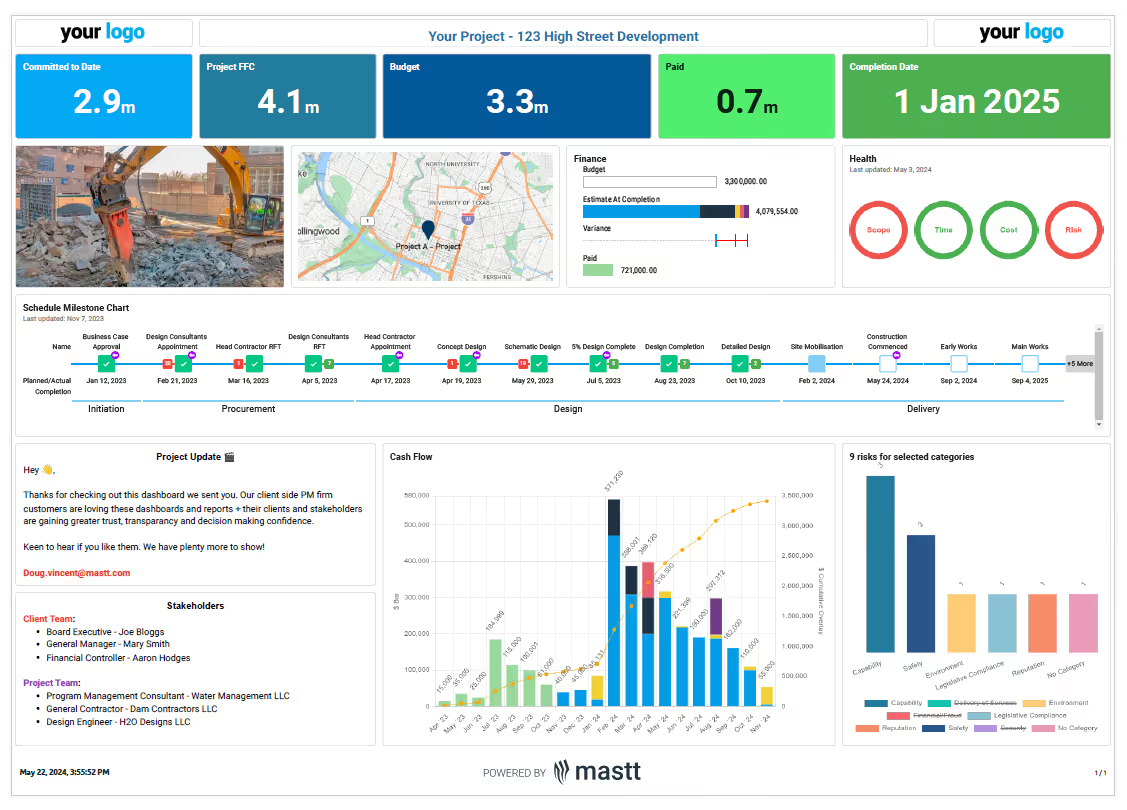
Project Controls Dashboard
Use this FREE Project Controls Dashboard to oversee cost, schedule, risks, and performance with precision. Track key metrics in one connected view, supported by live project control charts and real-time reporting.

Walk Into Every Meeting With Confidence, Clarity, and Control
No one wants to look unprepared, blindsided, or uncertain in front of stakeholders — but that’s exactly what happens without Mastt.
Start for FreeTrusted by the bold, the brave, and the brilliant across governments, Fortune 500s, and the world’s best in delivering the future