


AI prompts for construction can help project managers summarize bid requirements or turn site diaries into weekly reports. Useful answers depend on the project information you provide and how clearly you define the task. You can adapt the 19 prompts below for ChatGPT, Claude, or another approved AI tool even you don't have prompt engineering skills.
How to Use AI Prompts for Construction in ChatGPT and Claude
Start with a specific task, provide the relevant project information, and describe what the finished response should look like. A useful prompt follows this structure: role + task + context + output format.
Follow these steps to build a prompt for your project:
- Choose the task and perspective. Specify whether you’re reviewing an estimate, drafting a request for information (RFI), or preparing another document. State whose perspective matters, such as the owner’s project manager or the subcontractor’s estimator.
- Provide the project context. Replace placeholders with your project details. Supply the relevant documents, identify their revisions, and explain any constraints the response must account for. Use files approved for your chosen AI platform.
- Define the output. Request the format you need, such as a table with named columns or a report following your company template. Include a completed example when the structure matters.
- Explain how to handle gaps. Ask the AI tool to flag missing information and separate assumptions from documented facts. For document reviews, request page or clause references so you can check each finding.
- Review and refine the response. Check calculations, references, and project details against the source material. Give specific corrections, such as “Use the revised milestone dates in the attached schedule,” then review the updated draft.
For related tasks, carry forward the information you have already checked. For example, use a reviewed work breakdown structure to draft the schedule, then compare it with the estimate. Specify the documents and assumptions to use at each stage, and check each output before building on it.
For a broader look at how AI supports project delivery, see our guide to AI in construction. If you prefer to delegate a task without prompting each step, try Mastt Agent. Give it the goal and relevant project information, and it plans the steps and prepares the work for your review.
AI Prompts for Project Scope and Planning
Use these AI prompts for construction to extract bid requirements, organize the scope, and draft an activity schedule. Start with the current drawings and specifications, then review each output before using it as the basis for the next task.
1. Summarize bid documents and pricing requirements
Bid packages often spread pricing requirements across specifications, drawings, and addenda. Use this prompt to collect those requirements into a table your estimator can check against the source documents.
What to provide: The bid instructions, scope of work, relevant specifications, drawings, and issued addenda. Identify the trade or work package being priced.
Prompt:
Act as a construction estimator reviewing the attached bid documents for [project name]. We are pricing [trade or work package].
Extract requirements that could affect our price. Include scope inclusions, exclusions, access restrictions, working hours, material requirements, testing, commissioning, warranties, and handover obligations.
Return a table with these columns: requirement, potential pricing consideration, source document and page or section, and clarification needed.
Flag conflicting requirements and unclear scope boundaries. Identify any documents you cannot read. Do not invent quantities, prices, or requirements. Keep suggested allowances separate from requirements explicitly stated in the documents.
What to check: Confirm that the summary reflects all issued addenda. Check exclusions and work assigned to other parties, since these can leave gaps between trade packages.
2. Create a work breakdown structure
A work breakdown structure (WBS) organizes the project scope into manageable packages and deliverables. This prompt creates a draft structure you can review before developing the estimate or schedule.
What to provide: The project scope, deliverables, relevant specifications, and any required work-package naming or coding system.
Prompt:
Act as a construction project manager preparing a work breakdown structure for [project name].
Use the attached scope and specifications to organize the project into major deliverables and supporting work packages. Follow [required coding structure or attached example], if provided.
Return a table with WBS code, parent package, work package, scope description, and source reference.
Include supporting work required by the documents, such as mobilization, temporary works, testing, and closeout. Identify interfaces where responsibilities between packages need clarification.
List potential omissions and unclear responsibilities separately for review. Do not treat suggested additions as confirmed scope or assign durations at this stage.
What to check: Look for duplicated scope and gaps between packages. Confirm that testing, commissioning, and handover work sit within a defined package.
3. Draft a construction schedule
AI prompts for construction scheduling use your reviewed WBS, milestone dates, working calendar, and delivery constraints to draft an activity schedule. Check assumed durations and dependencies against crew availability and lead times before use.
What to provide: The reviewed WBS, required milestones, working calendar, known lead times, resource limits, and available duration estimates.
Prompt:
Act as a construction scheduler preparing a draft schedule for [project name].
Use the attached work breakdown structure and these planning inputs:
- Planned start date: [date]
- Required milestones: [milestones and dates]
- Working calendar: [working days, hours, and holidays]
- Delivery and access constraints: [details]
- Available resources: [crews and equipment]
- Known durations and lead times: [details or attached file]
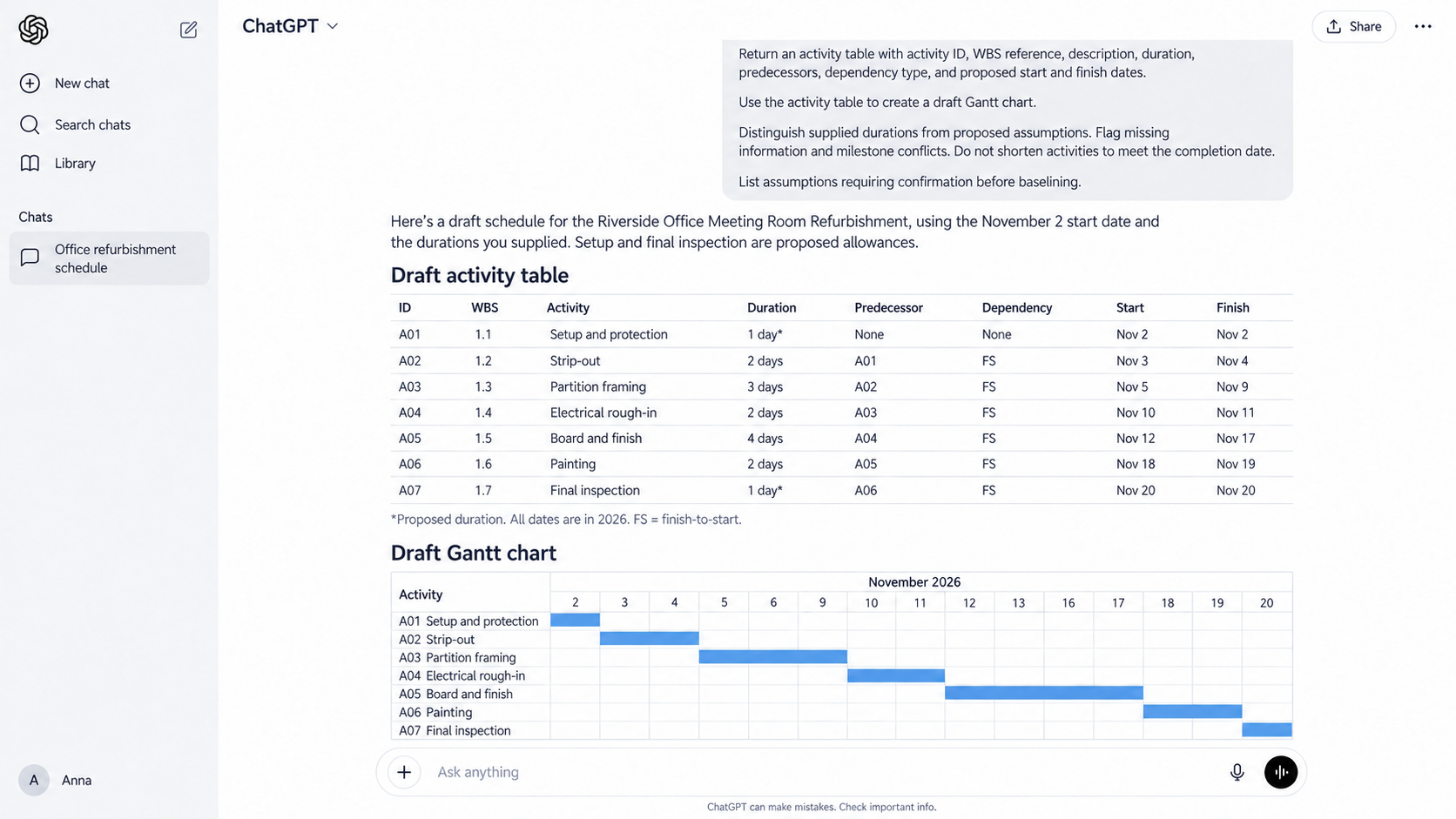
Return an activity table with activity ID, WBS reference, description, duration, predecessors, dependency type, and proposed start and finish dates.
Use the activity table to create a draft Gantt chart.
Distinguish supplied durations from your proposed assumptions. Flag missing information and conflicts with required milestones. Do not shorten activities simply to meet the completion date.
List the assumptions requiring confirmation before this draft becomes a baseline schedule.
What to check: Review dependencies, crew availability, and procurement lead times. Check calendar calculations and validate the critical path in your scheduling software before approving the baseline.
AI Prompts for Estimating and Cost Checks
These AI prompts for construction estimating help you prepare draft estimates, check pricing assumptions, and reconcile invoices with delivery records. When using ChatGPT or Claude, provide current quantities and rates alongside the scope and schedule so the review uses your project’s figures.
4. Prepare a draft construction estimate
Supply reviewed quantities and unit rates so calculations use your project’s pricing inputs. This prompt organizes those inputs into an itemized cost estimate and flags missing information before a bid or budget decision.
What to provide: The project scope, reviewed quantities, labor and equipment rates, material prices, subcontractor quotes, and estimating template.
Prompt:
Act as a construction estimator preparing a draft estimate for [project name] covering [scope or work package]
Use the attached quantities, rates, supplier prices, and subcontractor quotes. Follow the attached estimating template, if provided.
Return an itemized table showing work item, quantity, unit, rate, calculated amount, and source reference. Group costs into labor, materials, equipment, subcontractors, and project overhead.
For labor calculations, show the supplied productivity assumption and how it determines the required hours. State whether each rate applies to an individual worker or a complete crew.
Apply overhead, contingency, and taxes only as instructed in [pricing instructions]. Identify whether supplied prices already include these amounts.
Mark missing quantities or rates as “not provided.” Show a subtotal for priced items and list unpriced items separately.
What to check: Confirm that rates match the quantity units and that labor calculations use the intended crew composition. Check quote exclusions and validity dates before relying on supplier prices.
5. Check an estimate for omissions and inconsistencies
An estimate can contain correct arithmetic while leaving part of the scope unpriced. Use this prompt to compare an existing estimate with the project requirements and identify items worth investigating.
What to provide: The estimate, scope documents, relevant addenda, and the estimator’s assumptions and exclusions.
Prompt:
Act as a construction estimator reviewing the attached estimate for [project name].
Compare the estimate with the supplied scope, specifications, and addenda. Check for missing scope, duplicate allowances, inconsistent units, and calculation errors.
Review whether quantities and rates are applied consistently. Identify items that may already be covered by a subcontractor quote or another allowance. Return a findings table with estimate item or cell reference, potential issue, supporting evidence, and recommended check.
Distinguish confirmed discrepancies from questions requiring clarification. Do not assume an item is omitted simply because its description differs from the scope wording.
Identify any formulas, files, or document sections you could not inspect. Do not change the original estimate.
What to check: Investigate each finding before adjusting the estimate. An apparent omission may sit within a composite rate, subcontract package, or allowance described elsewhere.
6. Compare the estimate with the construction schedule
A schedule change can affect costs even when the physical scope stays the same. This prompt checks whether estimated resources and time-related allowances match the planned work.
What to provide: The estimate, current schedule, working calendar, resource plan, and assumptions about equipment rental and project overhead.
Prompt:
Act as a construction cost planner checking whether the estimate and schedule for [project name] align.
Compare estimated labor hours with the scheduled crew sizes, working hours, and activity durations. Use the supplied resource assignments. Do not assume every crew works throughout the full project.
Compare equipment allowances with planned rental periods. Check time-related costs, including site supervision, temporary facilities, and other duration-based allowances.
Return a table showing cost item, estimating assumption, scheduling assumption, calculated difference, and clarification required.
Show the calculations and source references supporting each difference. Flag shared resources or overlapping activities that could cause double counting.
Do not assume the schedule or estimate is correct. Identify what needs confirmation before either is revised.
What to check: Confirm how crews move between activities and whether equipment stays on site between uses. A longer project duration does not necessarily extend every resource allowance.
7. Reconcile supplier invoices with delivery records
This prompt helps identify invoiced items that need supporting evidence or further investigation. It is useful when invoices and delivery records use different descriptions or cover several deliveries.
What to provide: Supplier invoices, delivery tickets or receipts, and relevant purchase orders. Include the supplier and reporting period being reviewed.
Prompt:
Act as a construction project administrator reconciling supplier invoices for [project name] during [reporting period].
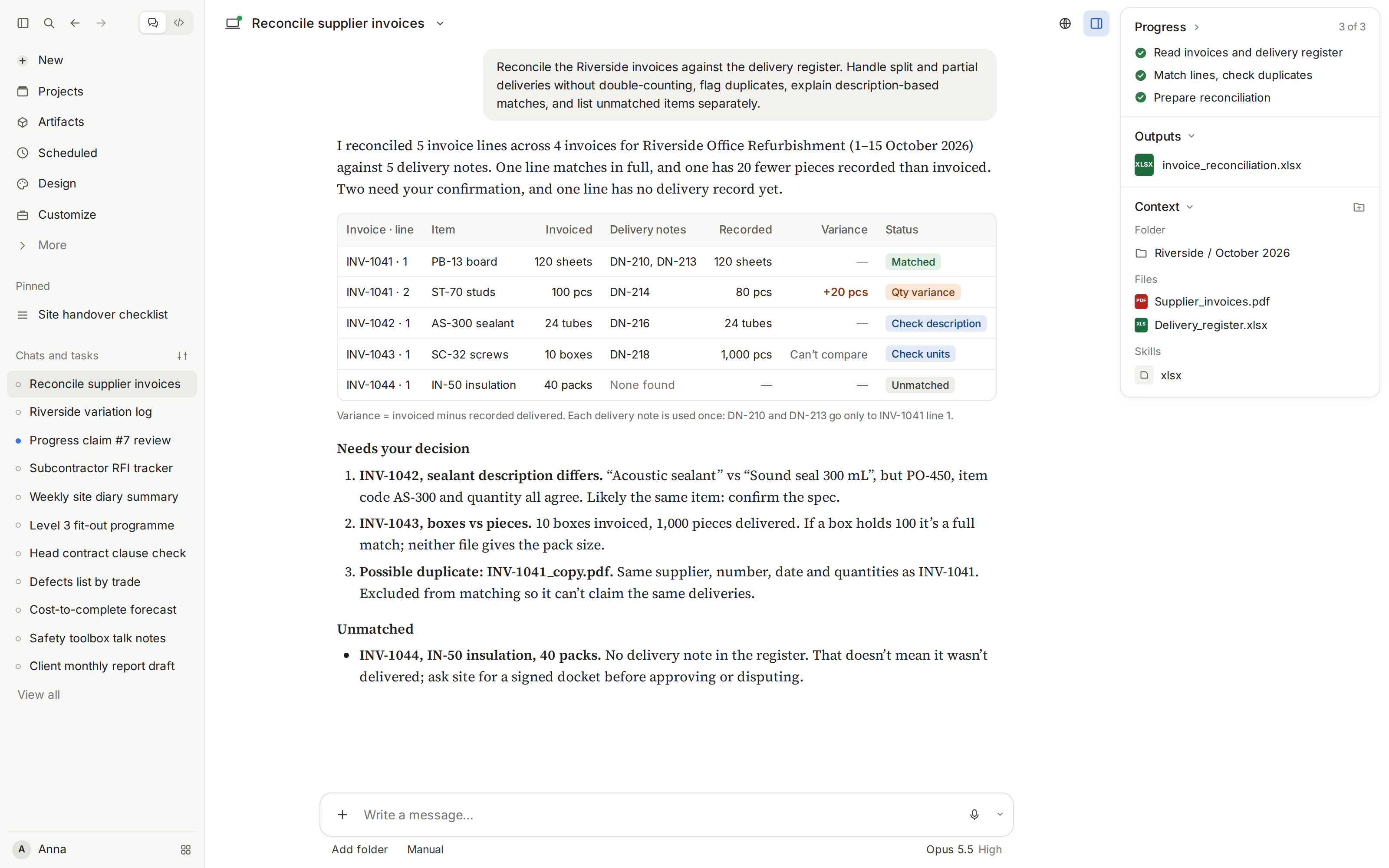
Match the attached invoice lines with delivery records using purchase order references, item codes, descriptions, quantities, and dates.
Return a table with invoice number, line item, invoiced quantity, matched delivery references, delivered quantity, difference, and match status.
Account for partial deliveries and multiple delivery records against one invoice line. Flag possible duplicate invoices and prevent the same delivered quantity from being matched twice.
Where descriptions differ, explain the basis for a proposed match and mark uncertain matches for review. Identify unit differences that prevent a reliable quantity comparison.
List unmatched items separately. Do not treat a missing delivery record as proof that the goods were not delivered.
What to check: Check returns, credits, and deliveries recorded outside the reporting period. Confirm receipt with the responsible site staff before deciding whether an invoice needs correction.
AI Prompts for Contracts and Correspondence
These AI prompts for construction contracts help extract obligations, flag clauses for review, and draft RFIs from documented issues. Supply relevant contracts and project records so you can check each response against its source.
8. Summarize construction contract obligations
Contract requirements can sit across the main agreement, schedules, and amendments. Use this prompt to prepare an obligation register showing who must do what and when. For clause-by-clause review prompts, see our guide to construction contract review.
What to provide: The contract, referenced schedules, amendments, and the party whose obligations you want to review.
Prompt:
Act as a contract administrator reviewing the attached contract for [project name] from the perspective of [contracting party].
Extract our obligations relating to notices, payment submissions, insurance, submittals, testing, warranties, and handover.
Return a table with obligation, responsible party, triggering event, deadline or frequency, required document, and clause reference.
Preserve the contract’s wording for time periods, including whether it specifies calendar days or business days. If a deadline depends on an event, record that trigger rather than inventing a date.
Identify requirements affected by amendments or referenced schedules. Flag unclear wording, conflicting provisions, and missing attachments.
Separate obligations explicitly stated in the contract from questions requiring interpretation. Do not assign responsibilities that the documents do not establish.
What to check: Verify each obligation against its clause and any relevant amendment. Check the event that starts each notice period before transferring deadlines into a project register.
9. Prepare a draft contract departures table
A departures table records proposed changes to a contract before agreement. This prompt compares the proposed terms with your stated commercial requirements and prepares discussion points for the reviewer.
What to provide: The proposed contract, your company’s commercial requirements, and any approved departures template or previously agreed positions.
Prompt:
Act as a commercial manager reviewing the proposed [contract or subcontract] for [project name].
Compare the attached agreement with our supplied commercial requirements. Review payment terms, change procedures, delay provisions, liquidated damages, insurance, indemnities, liability, and warranties.
Return a departures table with clause reference, current provision, difference from our requirements, potential commercial effect, and proposed discussion point.
Link each proposed departure to a specific company requirement. Where no position has been supplied, mark the item “commercial position required.”
Distinguish a requested amendment from a question about unclear wording. Identify related clauses that the reviewer should consider together.
Keep the original wording unchanged. Present any suggested replacement wording separately for legal and commercial review.
What to check: Confirm that proposed departures reflect an approved negotiating position. Review related clauses together, since changing one provision may affect how another operates.
10. Draft an RFI from project information
An effective RFI identifies the issue and asks for a specific decision. Use this prompt when drawings, specifications, or site information leave a requirement unclear.
What to provide: The relevant drawing revisions, specification excerpts, site observations, and your RFI template. Include the response date needed for planning.
Prompt:
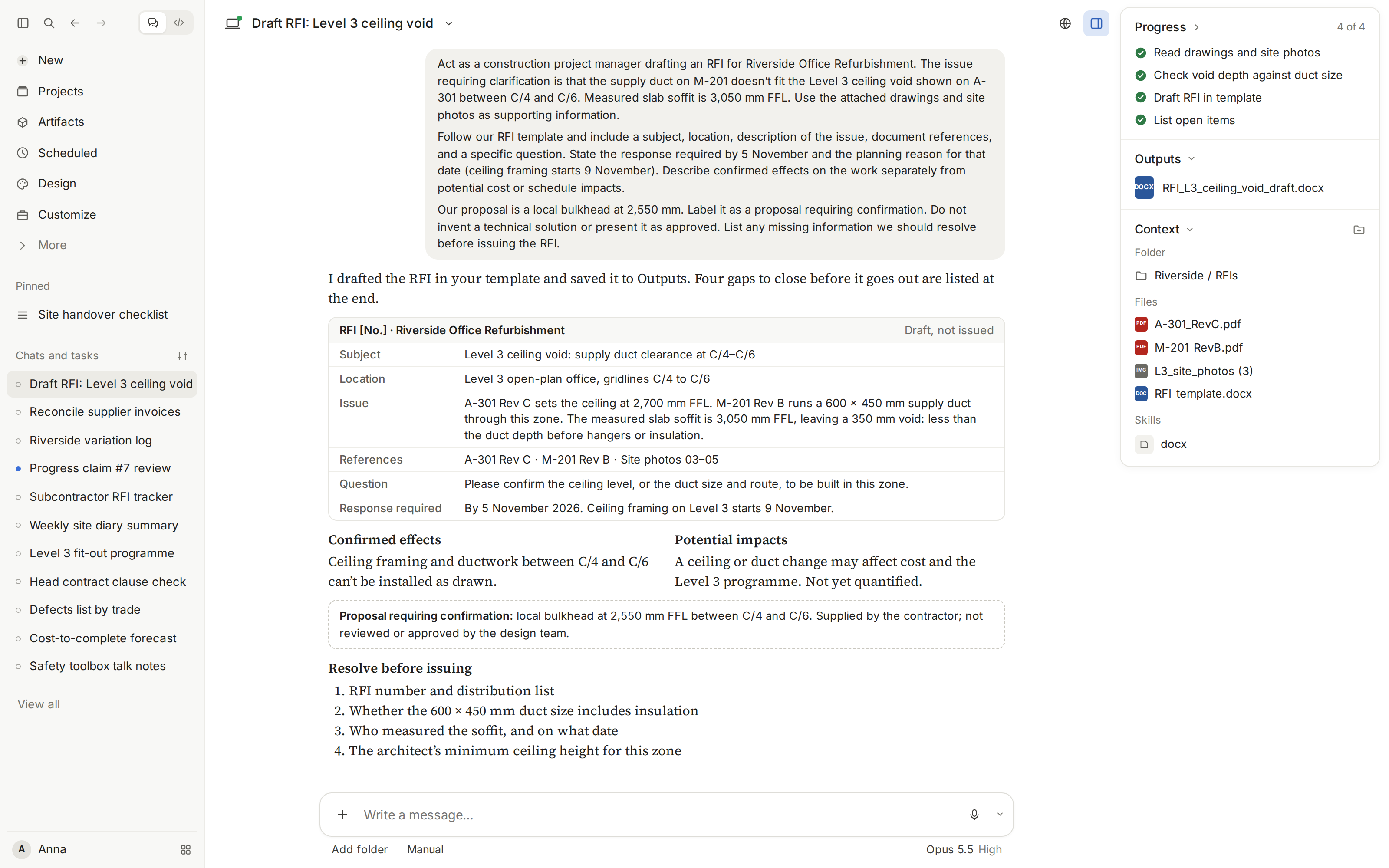
Act as a construction project manager drafting an RFI for [project name].
The issue requiring clarification is [describe the discrepancy or missing detail]. Use the attached [drawings, specifications, photographs, or records] as supporting information.
Follow our RFI template and include a subject, location, description of the issue, document references, and a specific question.
State the response required by [date] and the planning reason for that date. Describe confirmed effects on the work separately from potential cost or schedule impacts.
If we have supplied a proposed resolution, label it as a proposal requiring confirmation. Do not invent a technical solution or present it as approved.
List any missing information we should resolve before issuing the RFI.
What to check: Confirm drawing numbers and revisions, and make sure the question asks for an actionable response. Check that any stated impact is supported by project records.
AI Prompts for Project Communication
Use ChatGPT or Claude to draft project correspondence from supporting records. Specify the sender’s role, recipient, and required action so the message explains the issue and what needs a response.
11. Draft a change order request
A request for a construction change order should explain the proposed change and the basis for any requested cost or schedule adjustment. Use this prompt to organize the supporting records into a draft for commercial review.
What to provide: The original scope, relevant contract provisions, documented instructions, proposed change details, and supporting cost or schedule records. Include your change order request template.
Prompt:
Act as a contract administrator preparing a draft change order request for [project name] on behalf of [contracting party].
The proposed change is [description]. Use the attached original scope, instructions, and supporting records.
Follow our template. Explain the original requirement, what changed, and the documented reason for the request. Reference the relevant drawing revisions, instructions, and contract provisions.
Present the requested cost adjustment using the supplied quantities, rates, and calculations. Separate priced items from amounts still being assessed.
Describe any requested schedule adjustment using the supplied schedule analysis. Do not infer a time extension from additional cost alone.
Identify missing evidence and unresolved questions separately. Do not invent approval, contractual entitlement, or agreement on price or time.
Keep the request clearly marked as a draft for review.
What to check: Confirm that the change has not already been included in the original scope or another request. Verify the pricing basis and approval status, and check applicable submission requirements before issuing it.
12. Draft a delay notice to the owner
A delay notice records an event and its known effects on the work. Provide the relevant contract provisions so the draft can identify notice requirements without assuming that every delay creates an entitlement.
What to provide: The event chronology, site records, current schedule, relevant notice provisions, and correspondence about the event. Identify the sender, contractual recipient, and any required notice template, such as a notice of delay template.
Prompt:
Act as a contract administrator drafting a delay notice for [project name] from [contracting party] to [owner or designated representative].
The event is [description], first identified on [date]. Use the attached chronology, site records, schedule, and contract provisions.
Describe the event, affected activities, and effects documented to date. Distinguish confirmed impacts from possible effects still being assessed.
Include mitigation actions already taken or proposed, clearly identifying their status. State the response or information requested from the recipient.
Extract the supplied contract’s notice requirements into a separate review checklist, including recipient, delivery method, timing, and required particulars.
Do not invent dates, attribute fault without supporting evidence, or claim an entitlement that has not been established.
Flag missing information and any uncertainty about the notice requirements for review before issue.
What to check: Have the responsible contract administrator verify the notice timing, recipient, and delivery requirements. Check that the description matches contemporaneous records and that any stated schedule effect has supporting analysis.
13. Write a weekly owner update
A weekly owner update gives the owner a concise account of progress and decisions requiring attention. Use a reviewed progress report as the source so the email remains consistent with the formal project record.
What to provide: The reviewed weekly progress report, current milestone information, and outstanding owner decisions. Include the recipient’s preferred format and any agreed communication requirements.
Prompt:
Act as the project manager writing a weekly update to [owner or owner’s representative] for [project name].
Use the attached reviewed progress report for [reporting period]. Write an email of no more than [word count] words.
Summarize completed work and progress against the milestones identified in the report. Explain significant issues in plain language.
Highlight decisions required from the owner. For each, state the decision, the supporting reference, and the requested response date supplied in the records.
Include upcoming work from the current plan. Distinguish confirmed commitments from proposed actions and unresolved forecasts.
Do not introduce new progress percentages, completion dates, or assurances that the project is on track.
Use a clear subject line and close with the specific responses needed. List missing information separately from the email.
What to check: Confirm that the email matches the reviewed report and does not create new commitments. Check that each requested decision belongs with the owner and has a supported response date.
14. Draft a subcontractor instruction email
A subcontractor instruction email should make the authorized direction and affected work clear. Supply the approved instruction so the draft preserves its scope and identifies what the subcontractor needs to acknowledge or clarify.
What to provide: The approved instruction, relevant drawings or specifications, and the subcontractor’s work package. Include the sender’s authority, required communication procedure, and any confirmed dates.
Prompt:
Act as a project manager drafting an email to [subcontractor] about approved instruction [reference] for [project name].
Use the attached instruction and supporting documents. Identify the affected work package, location, and document revisions.
State the required action using the scope and wording of the approved instruction. Include only dates and sequencing requirements established in the supplied records.
Request acknowledgment and ask the subcontractor to identify any clarification needed before carrying out the instruction.
Where the supplied procedure requires it, request details of potential cost or schedule effects through that procedure.
Do not expand the instruction, approve additional costs, waive notice requirements, or imply that unresolved changes are agreed.
If the records do not establish approval or the sender’s authority, flag that gap and draft a clarification request instead.
What to check: Confirm that the sender has authority to issue the direction and that email is an accepted communication method. Check the attachments and revisions, and verify that the draft does not extend the approved scope.
AI Prompts for Meetings and Progress Reporting
These AI prompts for construction project management turn meeting transcripts and site diaries into draft project records. If you already use ChatGPT prompts for project management, adapt them to your meeting agenda or reporting template.
15. Turn a meeting transcript into minutes and actions
Meeting discussions often include suggestions that never become agreed decisions. Use this prompt to separate confirmed outcomes from open questions and prepare an action list for review.
What to provide: The meeting transcript, agenda, attendee list, and minutes template. Include the previous action register if you want to review outstanding items.
Prompt:
Act as a construction project coordinator preparing minutes for [meeting name] on [date] for [project name].
Use the attached transcript and agenda. Follow our minutes template, if provided.
Organize the minutes by agenda item. Summarize the relevant discussion, confirmed decisions, and unresolved questions. Keep proposals separate from agreed actions.
Create an action table with action description, owner, due date, and transcript reference or timestamp.
Record owners and deadlines only when explicitly stated. Otherwise, mark them “not confirmed.” Flag unclear speaker identities or conflicting statements for review.
If a previous action register is supplied, identify updates supported by this meeting. Do not mark an action complete unless the transcript confirms completion.
Exclude unrelated conversation and retain details needed to understand each decision.
What to check: Confirm that decisions reflect what participants agreed. Check action owners and dates, especially when someone offered a suggestion without accepting responsibility for completing it.
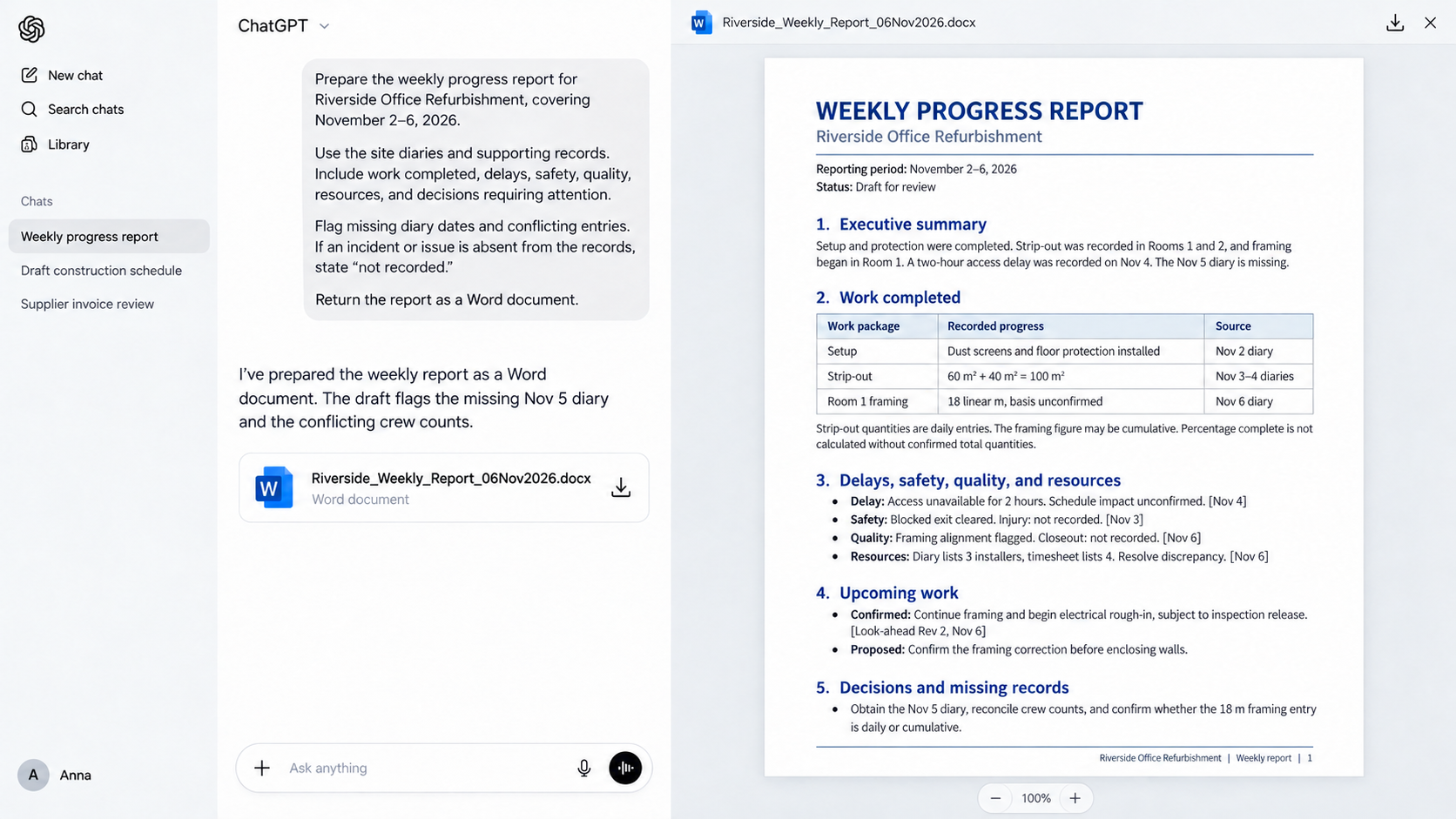
16. Create a weekly progress report from site diaries
A weekly construction progress report should show what happened during the reporting period and what needs attention next. This prompt brings daily records together while retaining references you can use to check the summary.
What to provide: Site diaries or daily logs for the reporting period, your report template, and the current schedule or look-ahead. Include verified progress quantities if the report requires them.
Prompt:
Act as a construction project manager preparing a weekly progress report for [project name], covering [start date] to [end date].
Use the attached site diaries and supporting records. Follow our report template, if provided.
Include an executive summary, work completed, recorded delays, safety and quality observations, resource use, and decisions requiring attention.
Group completed work by work package or location. Reference the diary date or supporting record for significant events.
Distinguish daily quantities from cumulative totals before calculating weekly progress. Do not calculate percentage complete without a confirmed total quantity or agreed measurement basis.
Use the supplied schedule or look-ahead to describe upcoming work. Keep proposed priorities separate from confirmed plans.
Flag missing diary dates and conflicting entries. If the records do not mention an incident or issue, state “not recorded.”
What to check: Verify reported quantities and make sure cumulative figures have not been added together. Check delay descriptions against the daily records and confirm that upcoming activities reflect the current plan.
AI Prompts for Quality and Project Documentation
AI tools can help organize project requirements into draft inspection documents and management plans. Provide the relevant specifications and approved templates so the drafts reflect your project. Ask the AI tool to flag missing requirements for review.
17. Draft an inspection and test plan
An inspection and test plan (ITP) identifies the checks required at different stages of the work. Use this prompt to organize documented requirements into a draft ITP with references the reviewer can verify.
What to provide: Relevant specifications, drawings, approved procedures, and your ITP template. Identify the work package the plan will cover.
Prompt:
Act as a construction quality coordinator preparing a draft inspection and test plan for [work package] on [project name].
Use the attached specifications, drawings, and approved procedures. Follow our ITP template, if provided.
Organize the checks by work stage. Include inspection or test activity, acceptance criteria, method, frequency, responsible party, required record, and source reference.
Identify hold points and witness points only where the supplied documents establish them. Preserve stated requirements for notification and release.
Flag missing acceptance criteria, unclear responsibilities, and conflicting requirements. Do not invent test limits, inspection frequencies, or references to standards.
Keep suggested additional checks in a separate list for the quality manager’s consideration. Label the ITP as a draft requiring technical review.
What to check: Verify acceptance criteria and test frequencies against the cited specifications. Confirm who must attend or release each hold point before work can proceed.
18. Create an inspection check sheet
A check sheet gives the inspector a place to record results against the approved requirements. This prompt converts an ITP into a field form while preserving the references needed to trace each check.
What to provide: The approved ITP, applicable inspection procedure, and company check-sheet template. Specify the activity or work stage being inspected.
Prompt:
Act as a construction quality coordinator creating an inspection check sheet for [activity] on [project name].
Use the attached approved ITP and inspection procedure. Retain their inspection requirements and acceptance criteria without changing their meaning.
Include fields for project, location, inspection date, inspector, drawing revision, and ITP reference.
Create a checklist showing item number, inspection requirement, acceptance criteria, recorded result, status, and supporting evidence reference.
Provide space for comments, corrective actions, and reinspection results. Include measurements or units where the source documents require them.
Leave results and sign-off fields blank. Do not mark any item as compliant or complete.
Flag requirements that cannot be converted into a clear check without further technical clarification.
What to check: Confirm that the form captures every applicable ITP requirement. Make sure inspectors can record actual measurements where a pass/fail box alone would be insufficient.
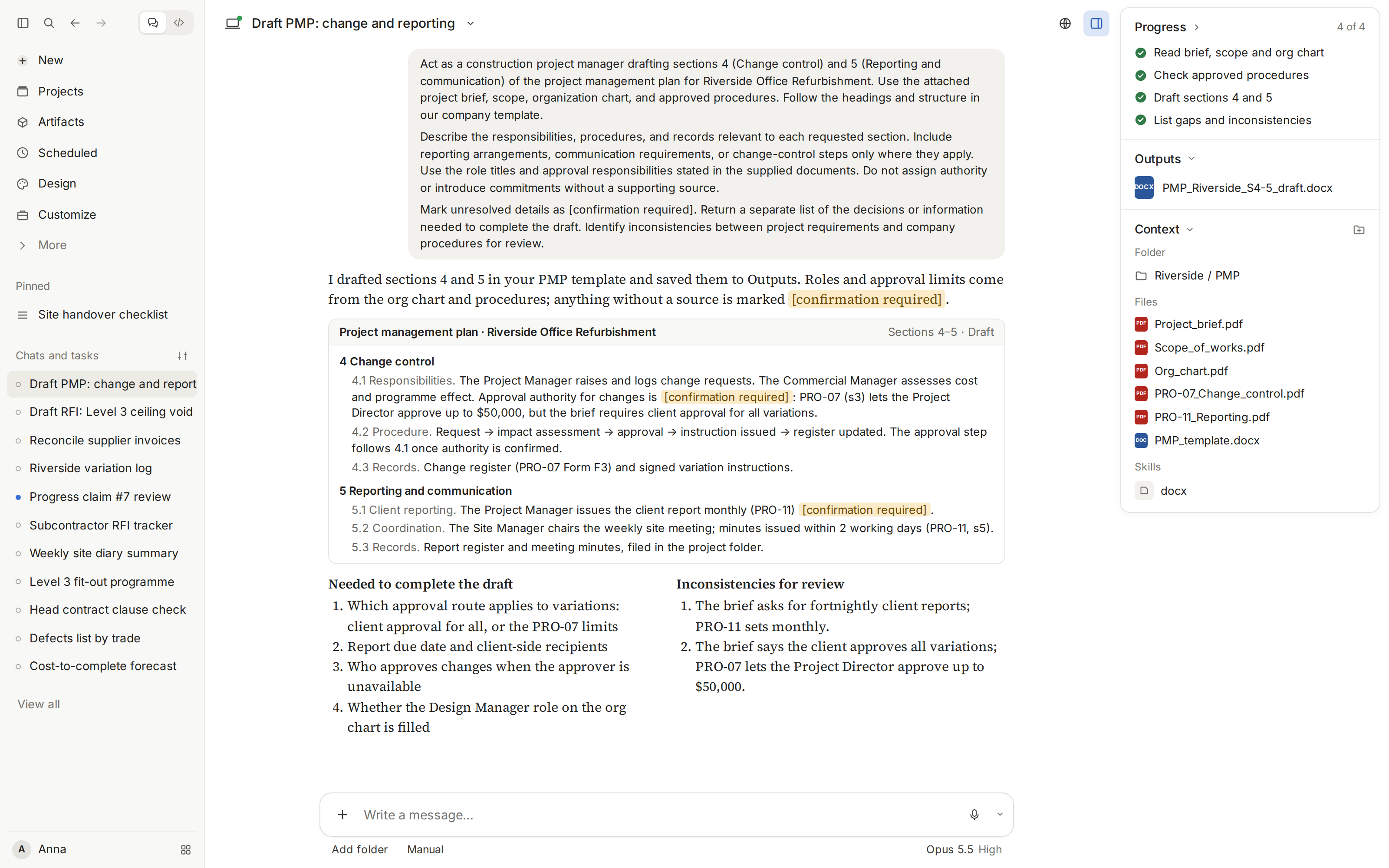
19. Draft sections of a project management plan
Project management plans need to describe how the project will be managed in practice. Use this prompt to draft selected sections from agreed procedures and identify decisions that remain unresolved.
What to provide: The project brief, scope, organization chart, company template, and approved management procedures. Identify the sections you want drafted.
Prompt:
Act as a construction project manager drafting [selected sections] of the project management plan for [project name].
Use the attached project brief, scope, organization chart, and approved procedures. Follow the headings and structure in our company template.
Describe the responsibilities, procedures, and records relevant to each requested section. Include reporting arrangements, communication requirements, or change-control steps only where they apply.
Use the role titles and approval responsibilities stated in the supplied documents. Do not assign authority or introduce commitments without a supporting source.
Mark unresolved details as [confirmation required]. Return a separate list of the decisions or information needed to complete the draft.
Identify inconsistencies between project requirements and company procedures for review.
What to check: Confirm that the plan reflects how the project will actually operate. Check approval responsibilities and reporting commitments with the people expected to carry them out.
Follow-Up Prompts for ChatGPT and Other AI Tools
Use a follow-up prompt to address a specific problem in the first response. Point to the affected item or document, then explain what needs checking or changing.
Ask ChatGPT to list what changed in the revised response and identify any items that remain unresolved. Check those changes against the source records before replacing your earlier draft. If a correction affects later work, such as revised quantities changing an estimate, review those calculations too.
What Makes an AI Prompt Work on a Construction Project?
An effective construction AI prompt gives ChatGPT or Claude enough project context to produce an answer you can check. It identifies the task, specifies which records to use, and explains what to return when information is missing.
Include these details:
- A specific task: Ask for a defined result, such as checking an estimate against the scope. “Review this project” leaves the purpose unclear.
- Current project information: Identify the relevant drawings, specifications, or reports by revision and date. State which document takes precedence where that has been established.
- Working constraints: Provide the conditions that affect the task, such as access restrictions, working hours, or approved pricing assumptions.
- A usable output format: Request named table columns or supply your company template. For an estimate review, ask for the item, potential issue, source reference, and required check.
- Instructions for uncertainty: Tell the tool to flag missing inputs and separate assumptions from documented facts. Request references so you can trace findings to their sources.
For example, “Check this estimate” gives little direction. “Compare estimate revision 3 with specification sections [references] and list requirements with no identifiable allowance” defines a reviewable task. The estimator can then investigate each finding before changing the price.
How to Improve AI Prompts for Construction
To improve ChatGPT or Claude responses, identify the error and provide the correct source. For a missing allowance, cite the scope requirement and request updated subtotals. Ask for a list of changes to check.
Give the missing context before requesting another draft
A weak response may come from incomplete inputs. Before asking ChatGPT to rewrite it, check whether you supplied the information a colleague would need.
For example, this request leaves the issue undefined:
Write an RFI about concrete strength.
A more useful prompt identifies the evidence and the response required:
Draft an RFI for [project name] about the concrete test results for [element and location].
The attached 28-day test report records [result], while specification [section and revision] requires [specified strength].
Reference both documents and ask the structural engineer to confirm the required assessment and next steps. Use our RFI template.
Do not propose a repair or conclude that the concrete is acceptable. List any missing information needed to complete the draft.
Check the source information before building on it
For tasks involving several steps, review the extracted information before asking for the next output. For example, check the scope summary before generating a WBS, then review the WBS before drafting the schedule.
For an incomplete response, ask which files or sections the AI used or could not read. Compare the list with your uploads and spot-check a finding from each document. Supply missing files or readable copies before refining the prompt.
Test a prompt before saving it for reuse
Try the prompt on a completed task where you already know the expected result. For invoice reconciliation, include a known partial delivery and check whether the output identifies the quantity difference.
Record the corrections the prompt needed, then update its instructions. Save the prompt with its required inputs, output template, and review checks. When using it on another project, replace the project references and confirm that its assumptions still apply.
Build a Prompt Library Around Your Project Work
Start with one recurring task and refine the prompt using your project records. Once the draft meets your needs, save the instructions with your template and review checks. Build your library of AI prompts for construction from versions you have tested, updating the inputs for each project.
.avif)
Written by
Doug Vincent
Doug Vincent is the co-founder and CEO of Mastt, the AI capital-project management platform used by governments, Fortune 500 companies, and consultancies across APAC, North America, and MENA. Before founding Mastt in 2019, he spent a decade at RPS delivering more than $2 billion in capital works, including the $2.1B Defence Navy Infrastructure program, and holds a CPSPM certification with the AIPM. He contributes content and speaks on AI in capital project delivery at Mastt.


Contributions by
Timothy Fairley
Timothy Fairley is the Founder of ConstructIQ and a Chartered Professional Engineer and PMP with 9 years delivering construction projects across renewable energy, rail, and infrastructure. He trained over 50,000 construction professionals worldwide through ConstructIQ’s courses and YouTube channel on estimating, procurement, and contract management. Timothy contributes content on construction cost management and estimating at Mastt.
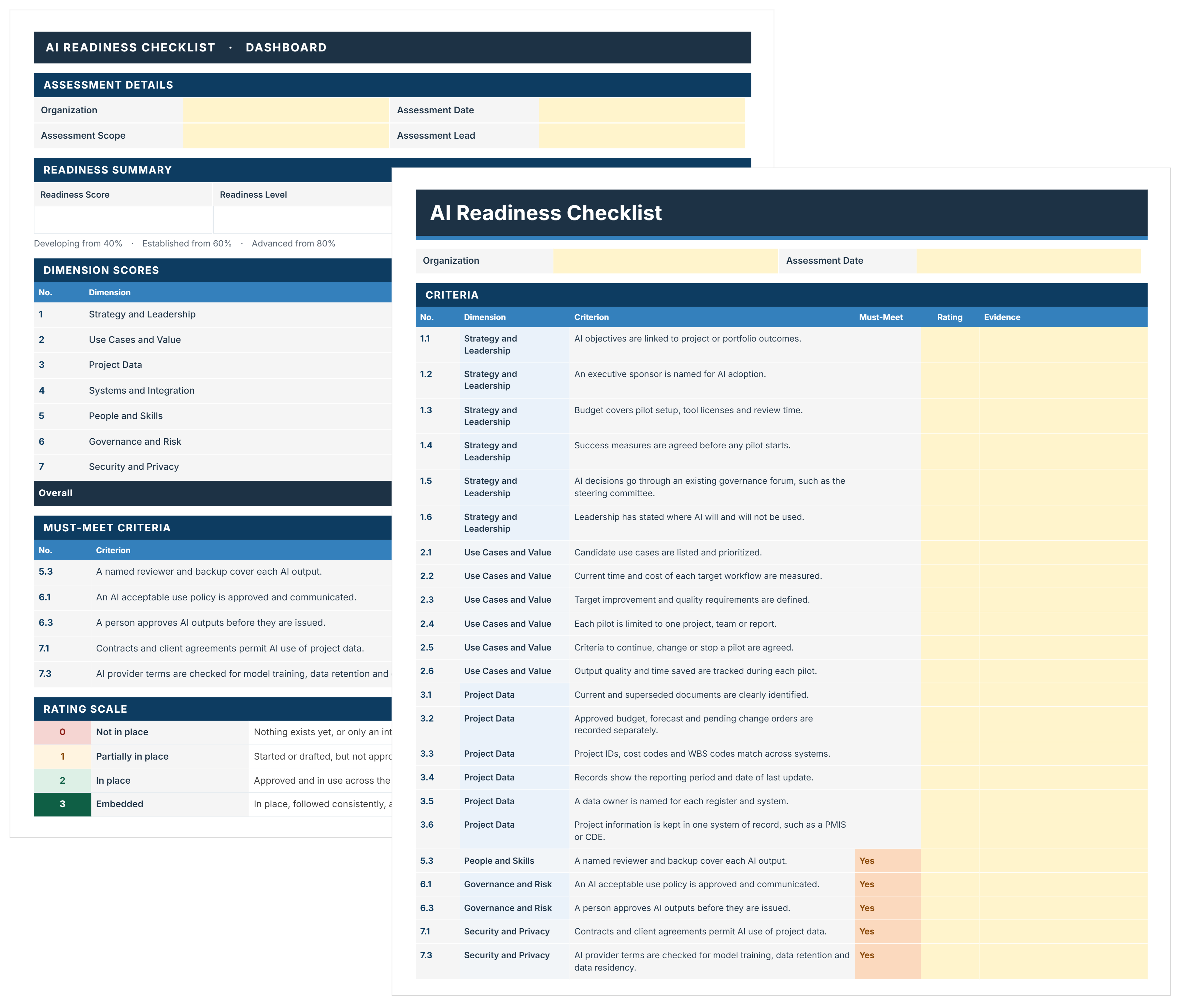
AI Readiness Checklist Template
FREE AI readiness checklist to assess and decide where AI starts on your projects. Score 44 criteria, close must-meet gaps, and pick a pilot with evidence.

Walk Into Every Meeting With Confidence, Clarity, and Control
No one wants to look unprepared, blindsided, or uncertain in front of stakeholders — but that’s exactly what happens without Mastt.
Start for FreeTrusted by the bold, the brave, and the brilliant across governments, Fortune 500s, and the world’s best in delivering the future