

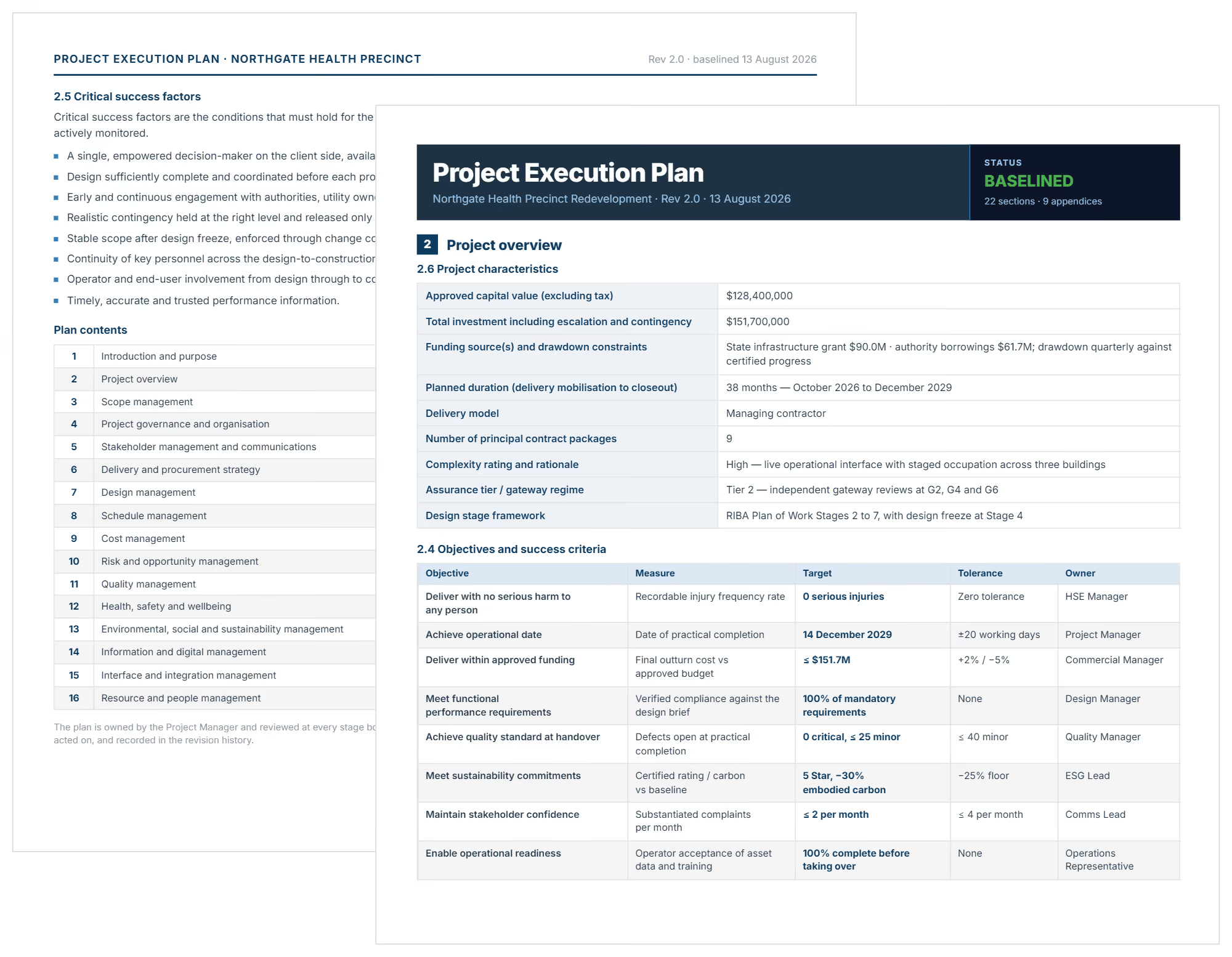

What is a Project Execution Plan Template?
A project execution plan template is a pre-formatted document that guides how teams implement projects from kickoff through completion. It provides ready-made sections for documenting scope, schedules, resources, risks, and stakeholder responsibilities in one framework.
This project planning template creates the roadmap teams follow during the execution phase when actual work begins. Project managers use it to translate high-level objectives into actionable tasks with assigned owners, deadlines, and success criteria.
Project Management Institute (PMI) standards recognize execution planning as critical for delivery success. Templates ensure consistent documentation across projects while saving setup time that manual planning requires.
What's Included in a Construction Project Execution Plan Template?
Comprehensive execution plan templates contain the essential components project teams need to manage delivery systematically. Each section captures specific information that guides coordination, monitors progress, and maintains control throughout implementation.
Standard elements in effective planning templates include:
- Project Scope and Objectives: Defines deliverables, boundaries, exclusions, and measurable goals teams must achieve.
- Resource Allocation Plan: Documents labor, equipment, materials, and budget assigned to each work package or phase.
- Project Schedule with Milestones: Establishes timeline showing start dates, completion targets, dependencies, and critical checkpoints requiring approval.
- RACI Matrix: Clarifies who is Responsible, Accountable, Consulted, and Informed for every task and decision.
- Risk Management Plan: Identifies potential project risks, rates likelihood and impact, assigns owners, and documents mitigation strategies.
- Quality Specifications: Sets standards, acceptance criteria, inspection procedures, and testing protocols deliverables must meet.
- Communication Plan: Defines stakeholder information needs, reporting frequency, meeting schedules, and escalation pathways.
- Change Management Procedures: Establishes how scope changes get requested, evaluated, approved, and incorporated into baselines.
- Performance Monitoring Approach: Specifies metrics, tracking methods, reporting formats, and review cycles for measuring progress.
💡 Pro Tip: Include a "Assumptions and Constraints" section in your template. Document what you're assuming to be true and what limitations exist. When assumptions prove wrong or constraints shift, you have documented justification for baseline changes.
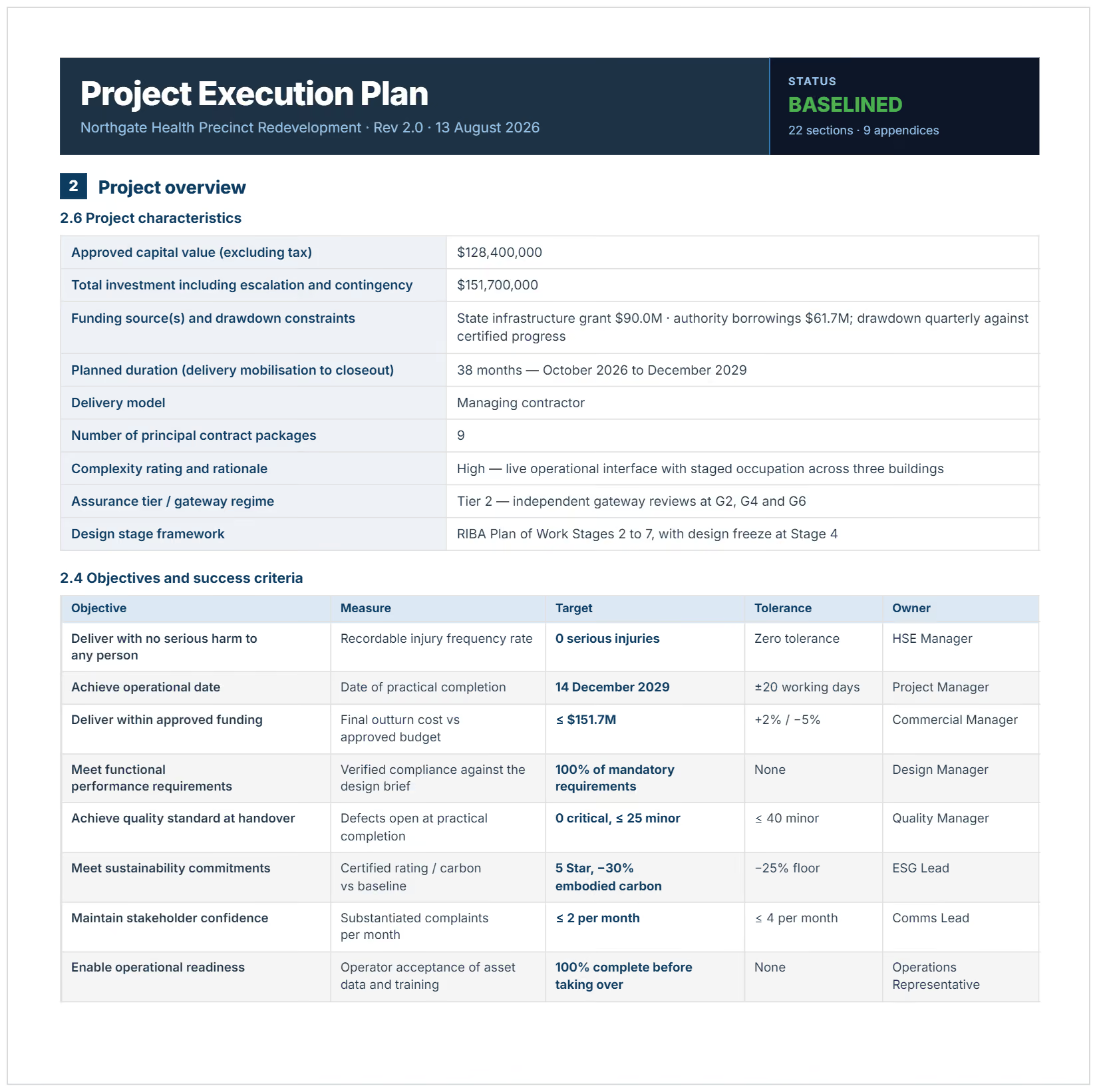
Why Use a Template for Project Execution Planning?
Execution plan templates prevent the coordination failures and scope confusion that derail project delivery. Starting each project with proven structure eliminates guesswork about what information teams need to implement successfully.
Templates protect delivery through specific mechanisms:
- Eliminates critical omissions: Pre-defined sections ensure risk management, quality standards, and communication protocols don't get forgotten during rushed planning.
- Accelerates project mobilization: Teams begin executing immediately instead of spending weeks creating planning frameworks from scratch.
- Prevents scope creep: Written boundaries and change procedures stop unauthorized work from consuming resources meant for approved deliverables.
- Improves resource utilization: Clear allocation documentation prevents team member conflicts and equipment scheduling disasters across concurrent projects.
- Supports PMI best practices: Templates align with PMBOK Guide methodologies, helping organizations maintain professional standards and certification requirements.
- Creates compliance audit trails: Documented plans satisfy client requirements, regulatory obligations, and internal governance policies requiring execution documentation.
- Enables portfolio standardization: Consistent formats let PMO directors compare projects, identify patterns, and improve organizational capabilities systematically.
- Facilitates stakeholder alignment: Everyone reviews identical information, reducing misunderstandings about responsibilities, timelines, and success criteria.
Teams using execution templates complete projects faster than those planning reactively. The difference lies in upfront clarity preventing mid-project confusion.
How to Create a Project Management Execution Plan
Creating effective execution plans requires systematic development that captures all critical information before work begins. Start by confirming project objectives and scope with stakeholders to establish what the plan must guide.
Follow these steps for comprehensive planning:
- Define project scope boundaries: Document included deliverables, explicit exclusions, and assumptions underlying the work.
- Establish measurable objectives: Write SMART goals with specific targets, completion dates, and success metrics avoiding ambiguity.
- Develop detailed project schedule: Create work breakdown structure, sequence activities, estimate durations, and identify critical path using Gantt chart tools.
- Allocate resources systematically: Assign team members, equipment, materials, and budget to tasks based on availability and skill requirements.
- Create RACI responsibility matrix: Map every deliverable and decision to accountable individuals, preventing ownership gaps during execution.
- Document risk management approach: Identify threats, assess probability and impact, assign mitigation owners, and establish contingency reserves.
- Design stakeholder communication plan: Specify information needs, reporting frequency, meeting cadence, and approval processes for each stakeholder group.
- Establish quality and technical specifications: Define acceptance criteria, inspection procedures, testing protocols, and compliance requirements deliverables must satisfy.
- Set change management procedures: Document how modifications get requested, evaluated for impact, approved through governance, and incorporated into baselines.
- Define performance monitoring methods: Specify earned value metrics, status reporting formats, variance thresholds, and corrective action triggers.
- Obtain stakeholder approvals: Route completed plan to sponsors, clients, and governance bodies for formal sign-off before execution begins.
- Distribute to project team: Share approved plan with all members, ensuring everyone understands their responsibilities and the overall approach.
💡 Pro Tip: Schedule your first plan review meeting before project kickoff. Walk the entire team through the execution plan section by section. Questions raised during this review catch coordination issues while fixing them costs nothing.
Who Should Use Execution Plan Templates for Projects?
Execution plan templates serve professionals managing project implementation across industries requiring systematic coordination.
✅ Project Managers: Coordinate execution across scope, schedule, budget, quality, and stakeholder dimensions using documented frameworks.
✅ Construction Project Managers: Guide building projects with plans covering mobilization, procurement, subcontractor coordination, and closeout requirements.
✅ Program Managers and PMO Directors: Standardize execution approaches across project portfolios, enabling performance comparison and continuous improvement.
✅ Engineering Project Managers: Document technical specifications, testing protocols, design reviews, and commissioning procedures for complex implementations.
✅ IT Project Managers: Plan software development, system implementations, infrastructure deployments, and technology rollouts with execution roadmaps.
✅ Contract Administrators: Ensure execution aligns with contractual obligations, compliance requirements, and client deliverable expectations.
✅ Small Business Owners: Bring structure to initiatives without formal PMO infrastructure, improving delivery predictability and team coordination.
✅ Project Team Members: Understand their responsibilities, dependencies, and deliverables within the broader execution framework guiding collaborative work.
When Should You Use a Project Execution Plan Template?
Project execution plan templates should be deployed during planning stages before teams begin implementing work. Early adoption ensures coordination mechanisms exist when execution starts and complexity emerges.
Deploy a project execution plan at these critical moments:
- After project charter approval: Translate high-level charter objectives into detailed execution roadmaps before mobilizing resources.
- During project planning phases: Develop comprehensive implementation approaches while scope, budget, and schedule remain flexible enough to optimize.
- Before construction mobilization: Document site logistics, safety protocols, procurement strategies, and subcontractor coordination before breaking ground.
- At software development kickoff: Establish development methodology, sprint planning, testing approach, and deployment procedures before coding begins.
- When initiating complex programs: Create execution frameworks for multi-phase initiatives requiring sustained coordination across multiple teams and deliverables.
- During cross-functional project launches: Align departments on responsibilities, communication protocols, and handoff procedures before competing priorities create conflicts.
- For client-mandated projects: Satisfy contractual requirements for documented execution approaches before clients authorize work commencement.
- When standardizing portfolio processes: Establish consistent execution practices across all organizational projects through mandatory template adoption.
💡 Pro Tip: Don't wait for "perfect information" before creating your execution plan. Build it with current knowledge, then update it weekly during the first month as details emerge. A living plan beats no plan.
Best Practices for Execution Plan Implementation
Well executed planning requires disciplined practices beyond template completion. Teams that extract maximum value from plans apply proven approaches throughout the project lifecycle.
☑️ Involve team members in plan development: Input from those doing the work improves accuracy, reveals coordination issues, and builds buy-in for the approach.
☑️ Align with PMBOK Guide methodologies: Structure plans around PMI knowledge areas and process groups, supporting professional development and organizational certification goals.
☑️ Integrate with project management software: Link execution plans to scheduling tools, resource management systems, and collaboration platforms for live updates.
☑️ Reference the plan in every status meeting: Keep execution approach visible by reviewing relevant sections during team updates, preventing drift from agreed approach.
☑️ Update plans when changes occur: Treat execution plans as living documents requiring revision when scope, resources, or constraints shift during delivery.
☑️ Conduct formal plan reviews at phase gates: Schedule structured reviews at major milestones, evaluating whether execution approach remains valid or needs adjustment.
☑️ Archive plans with lessons learned: Capture what worked and what failed during execution, informing future template improvements and organizational capability building.
☑️ Establish single source of truth: Maintain one authoritative version of the execution plan, preventing confusion from multiple copies circulating through email.
Deliver Projects On Time with Structured Execution Planning
Documented execution plans transform reactive firefighting into proactive coordination. Teams know their responsibilities, understand dependencies, and follow proven processes when challenges emerge during implementation.
With Mastt's AI, you generate comprehensive execution plans in minutes rather than hours. Describe your project or upload existing documents, and AI builds execution frameworks tailored to your specific delivery context.
👉 Try Mastt AI today and create your project execution plan that guides teams from kickoff through successful delivery.

Written by
Jefbeck Eje
Jefbeck is an SEO Specialist at Mastt who creates optimized content for the construction project management industry. Focused on delivering accurate and actionable insights, Jef combines SEO expertise with industry knowledge to enhance visibility, build authority, and drive engagement. His work ensures Mastt remains a trusted resource for construction professionals seeking reliable information.

Use this FREE project execution plan template to guide implementation, prevent scope creep, and keep teams aligned. Define deliverables, allocate resources, and track milestones from kickoff through project closure.

Top Performers Don’t Guess. They Deliver.
Cut the stress of showing up unprepared
Start for FreeTrusted by the bold, the brave, and the brilliant to deliver the future