




An anticipated cost report shows the expected total cost of a construction project based on current information. It helps project teams understand how project costs are likely to land if current conditions continue.
In this guide, you’ll learn how an anticipated cost report works, what information it includes, and how construction teams use it for cost reporting and cost control.
What is an Anticipated Cost Report?
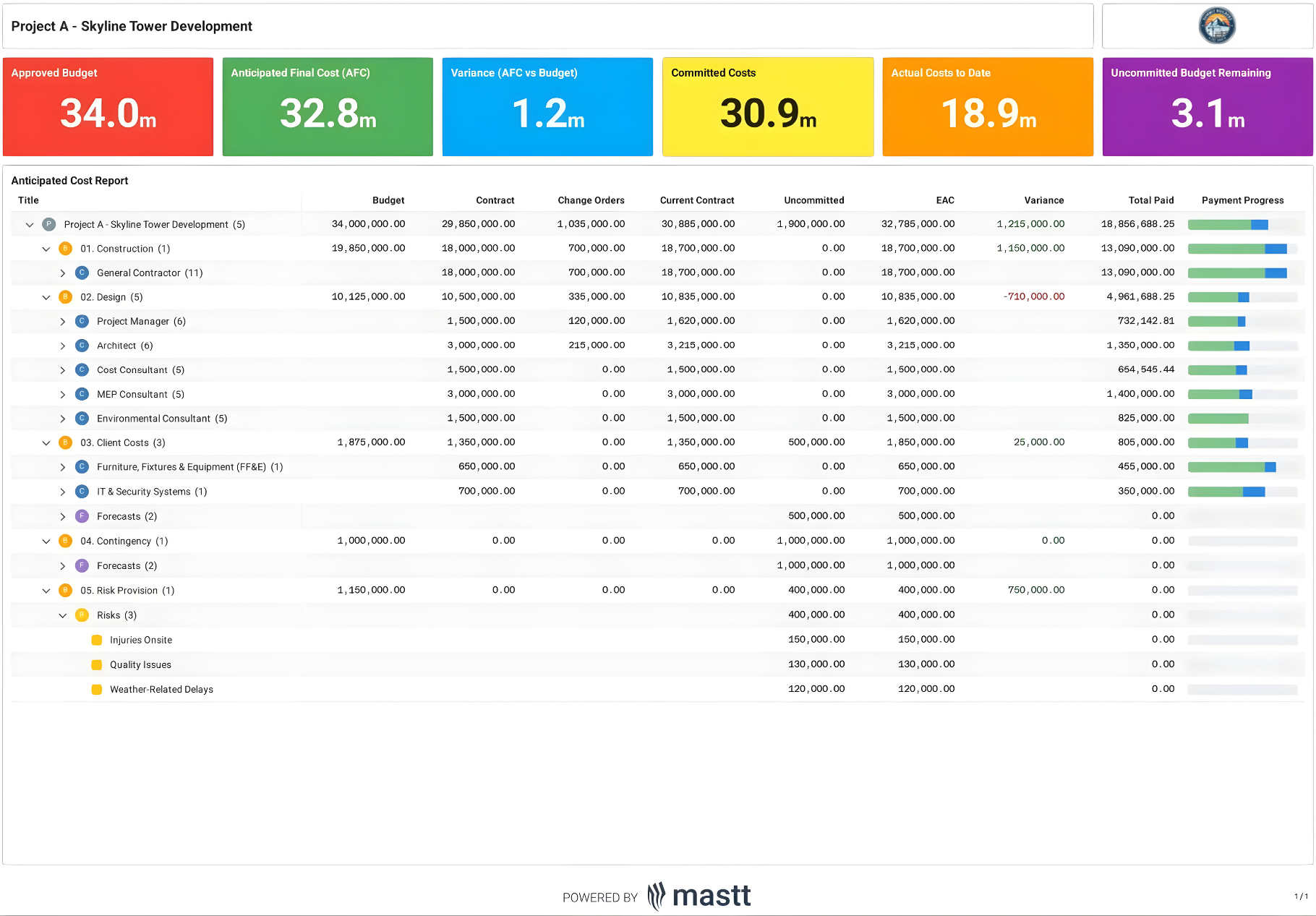
An anticipated cost report (ACR) is a forward-looking cost reporting document used to forecast the expected final cost of a construction project. It takes your current actual costs and adds all committed expenses, approved change orders, and estimated costs for remaining work to show your projected final budget.
An anticipated cost report focuses on cost exposure and future outcomes. It includes signed subcontract agreements, pending change orders awaiting approval, and the estimated cost to complete work that has not yet been contracted.

Anticipated Cost vs Standard Cost Report: What’s the Difference?
An anticipated cost report focuses on forecasting the expected final cost of a construction project based on current conditions. A standard cost report focuses on tracking what has already been spent and committed at a specific point in time.
The key difference is timing. Anticipated cost reports look ahead, while standard cost reports look back.
💡 Pro tip: When reviewing project health, use both reports together. Start with the standard cost report to confirm cost accuracy, then use the ACR to assess whether current commitments and pending changes will exceed the approved budget. This sequence helps catch overruns early, before they appear on invoices.
What is Included in an Anticipated Cost Report?
An anticipated cost report pulls together budget, cost, and forecast data to show the expected financial outcome of a construction project. It reflects both what has already happened and what is still likely to occur based on current commitments and remaining work.
Here's what makes up an anticipated cost report:
- Original budget: The approved baseline budget established at the start of the project, used as the reference point for all cost comparisons.
- Current or revised budget: The original budget adjusted for approved scope changes, budget transfers, and authorized revisions.
- Committed costs: The total value of executed contracts, subcontracts, and purchase orders, including approved change orders.
- Actual costs to date: Costs that have already been incurred and recorded, such as labor, materials, and subcontractor invoices.
- Projected remaining costs: Estimated costs to complete work that is not yet fully billed or contracted.
- Potential change orders: Pending or anticipated changes that may affect the final cost if approved.
- Anticipated total cost: The combined view of actual costs, committed costs, and projected remaining costs.
- Cost variance: The difference between the current budget and the anticipated total cost, used to identify overrun or underrun risk.
The level of detail varies by project size and complexity. A small renovation might track costs in a few major categories, while a large commercial construction project breaks down anticipated costs by cost account, trade, or building system. Your report should match the level of detail your project team needs to make informed cost-control decisions.
How are Anticipated Costs Calculated?
You compute anticipated costs by adding your actual expenses to all committed future costs and estimates for remaining work. Anticipated cost calculations are typically broken into two parts: budget calculations and cost calculations.
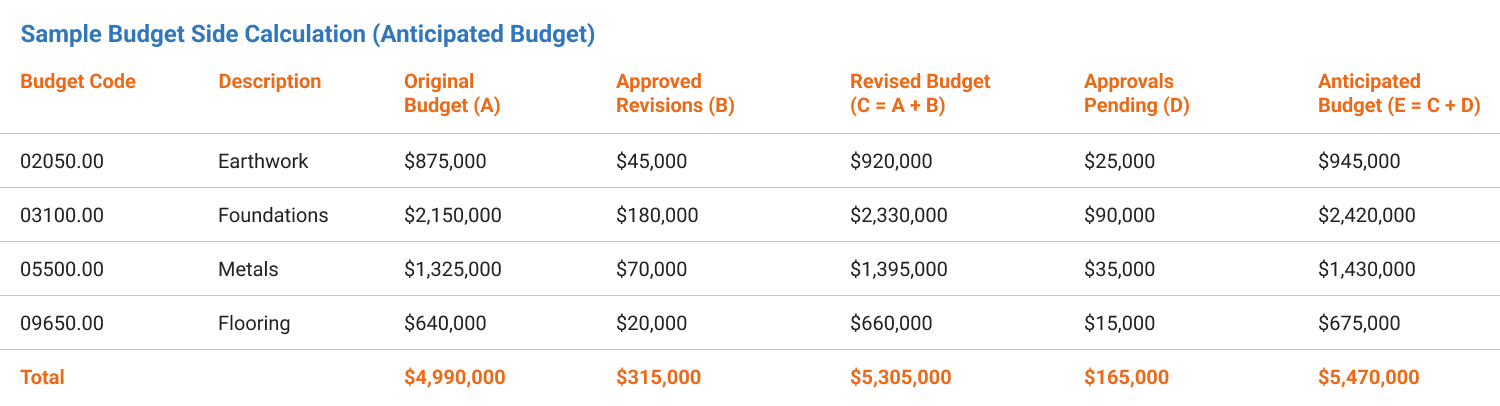
1. Budget Calculations
Your budget calculations show how much money you have available to spend. Start with your original budget and add approved changes:
Revised Budget = Original Budget + Approved Revisions
This gives you your current authorized budget based on approved scope changes. Then add pending approvals to see your full potential budget:
Anticipated Budget = Revised Budget + Approvals Pending
2. Cost Calculations
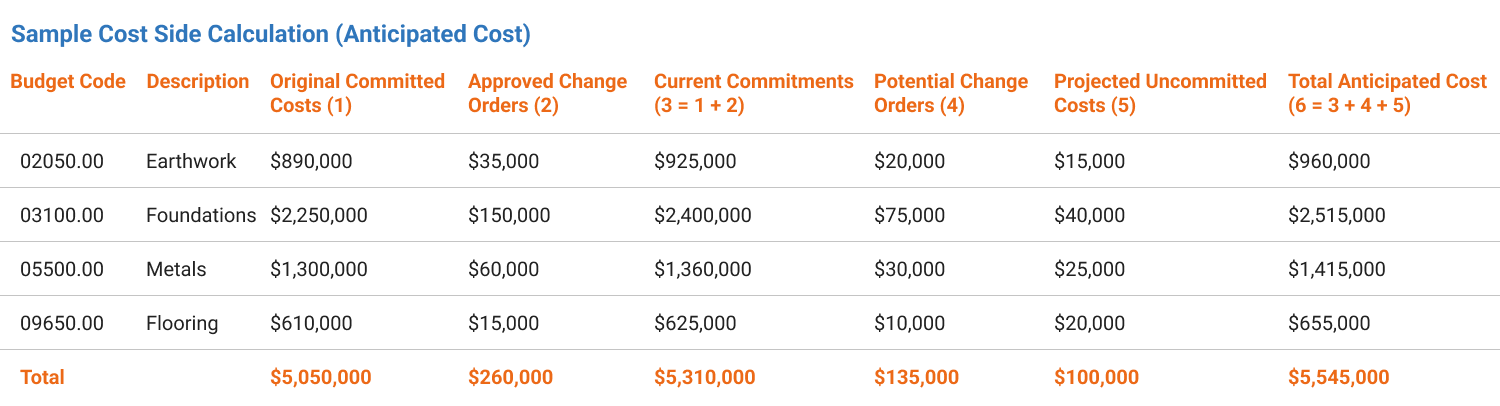
Your cost calculations show how much you expect to spend. First, calculate your current commitments:
Current Commitments = Original Committed Costs + Approved Change Orders
This captures all costs you're legally obligated to pay. Then add potential changes and remaining work:
Total Anticipated Cost = Current Commitments + Potential Change Orders + Projected Uncommitted Costs
3. Calculate Your Variance
Compare your anticipated budget to your anticipated cost:
Variance = Anticipated Budget - Anticipated Cost
A positive variance means you're projected to finish under budget. A negative variance signals an overrun that needs attention.
These calculations are usually performed at the cost code or cost account level, then rolled up to show the overall project position. Accuracy depends on keeping commitments, pending changes, and remaining cost estimates current as the project evolves.
How to Prepare an Anticipated Cost Report?
Preparing an anticipated cost report requires gathering current budget data, confirmed cost commitments, and estimates for remaining work, then organizing them into a consistent cost structure. The process takes coordination between your project team, accounting staff, and field personnel to ensure accuracy.
Step 1: Align your budget structure
Set up the report using the same cost codes or cost accounts from your project budget and accounting system. This prevents gaps, double-counting, and mismatched totals when you roll up costs.
Step 2: Gather your actual cost data
Pull all actual costs from your accounting system or capital project management software. Export invoices paid, labor costs incurred, material purchases, equipment rentals, and subcontractor payments through your reporting date. Organize these by cost account or trade to match your budget structure.
Step 3: Collect committed cost information
Review all signed subcontractor agreements, purchase orders, and material contracts. Document the total contract value for each commitment and what's been invoiced. Include retention amounts that you'll pay later. Your committed costs represent legal obligations even if the work isn't complete.
Step 4: List all change orders
Create two separate lists for change orders. Your first list includes all approved changes with signed documentation. Your second list captures pending change orders that have been submitted but await approval. Note the dollar amount and status of each change order so you can update quickly when approvals come through.
Step 5: Estimate costs for remaining work
Identify all work packages not yet under contract. Break these down by trade or scope and estimate costs using current market rates. Use actual productivity rates from your project rather than original estimate assumptions. Factor in any price increases you're seeing from suppliers or labor shortages affecting your schedule.
Step 6: Calculate your totals and variance
Add your actual costs, committed costs, approved changes, pending changes, and estimated remaining costs. Compare this total anticipated cost against your current budget to calculate variance. Document any significant variances by cost account so you can explain them to your project team and owner.
Step 7: Format and distribute the report
Organize your data into a clear report format that shows budget versus anticipated cost by category. Include a summary page with overall variance and detailed backup pages showing the calculations.
You can also use an anticipated cost report template that shows budget versus anticipated cost by category to maintain consistency across reporting periods.
💡Pro tip: Freeze the data cutoff before you start the report. Pull budget, commitments, and actual costs from the same reporting date every cycle, and document that cutoff in the report header. This prevents shifting numbers between versions and avoids false variances caused by timing gaps between accounting and project updates.
Who Uses Anticipated Cost Reports on Construction Projects
Multiple stakeholders across a construction project rely on anticipated cost reports to make informed financial decisions. Cost engineers and quantity surveyors typically prepare these reports and monitor ongoing cost performance. Project managers use the reports to oversee the overall budget.
These roles use anticipated cost reports to meet different project objectives:
✅ Project Managers: Track overall project financial health and identify cost overruns early enough to implement corrective actions before budget problems become critical.
✅ Cost Engineers and Quantity Surveyors: Monitor detailed cost performance by trade or cost account, validate contractor billing, and provide accurate financial forecasts to senior leadership.
✅ Program Managers: Oversee multiple projects simultaneously and use ACR to allocate resources, prioritize funding, and identify projects at risk of overruns.
✅ Project Owners and Developers: Review anticipated costs against available funding to determine if additional capital is needed and make go/no-go decisions on scope changes or project phases.
✅ General Contractors: Manage subcontractor commitments, track change order impacts, and ensure they're staying within their guaranteed maximum price or lump sum contracts.
✅ Financial Controllers: Reconcile anticipated costs with cash flow projections, plan payment schedules, and ensure sufficient funds are available when invoices come due.
✅ Lenders and Investors: Verify project costs align with approved budgets before releasing construction draws or additional funding tranches.
💡 Pro tip: Tailor your ACR format to your audience rather than sending the same detailed report to everyone. Owners want a one-page summary that shows the total variance and the major risk items. Your CFO needs cash flow timing. Field superintendents need cost breakdowns by trade.
Common Anticipated Cost Reporting Mistakes and How to Avoid Them
Anticipated cost reports fail when teams treat them as historical accounting reports rather than forward-looking forecasts. This is the most common mistake, and it usually leads to forecasts that hide emerging cost risk.
The most common reporting mistakes occur during transitions between project phases. When you move from design to construction or from structural work to finishes, cost ownership often shifts between team members. This creates gaps where no one updates estimates or captures new commitments, causing your anticipated costs to drift from reality.
Best Practices for Using Anticipated Cost Reports in Construction
Effective use of anticipated cost reports requires consistent processes, proactive monitoring, and clear communication across your project team. Following proven practices helps you catch budget problems early and maintain accurate financial forecasts throughout the project life cycle.
Apply these practices to maximize the value of your cost reporting:
☑️ Update Reports on a Fixed Schedule: Run your ACR on the same day each month so stakeholders know when to expect it and can plan reviews accordingly.
☑️ Compare Month-Over-Month Trends: Track how your anticipated costs change from one report to the next to identify which cost accounts are growing and whether the trend signals a problem.
☑️ Separate Contingency as Its Own Line Item: Show contingency spending separately rather than hiding it in other categories so everyone sees how much cushion remains in your budget.
☑️ Document Every Assumption: Record the basis for each estimate in your notes field so future updates maintain consistent logic and you can defend your numbers during budget reviews.
☑️ Reconcile Against Accounting Monthly: Cross-check your anticipated cost data against your accounting system to catch invoices that didn't get recorded or commitments that weren't entered properly.
☑️ Flag Variances Above a Threshold: Set a dollar or percentage threshold for variances that require explanation, such as any cost account more than 5% over budget or $10,000 off target.
☑️ Review with Field Teams: Walk through the report with construction superintendents and foremen to verify your estimates match what they're seeing on site.
☑️ Maintain Version Control: Save each month's report with a clear date stamp and keep a history so you can track how forecasts evolved and identify when problems first appeared.
☑️ Share Action Plans with Variances: When you distribute a report showing overruns, include specific actions you're taking to address them.
These practices separate project teams that react to overruns from those that prevent them. The most successful teams use anticipated cost reports as a forward-looking management tool. They outline scope priorities before budget pressures eliminate flexibility.
What Tools are Used for Anticipated Cost Reporting?
Construction teams rely on specialized software and systems to compile, track, and analyze the data that feeds anticipated cost reports. The right tools streamline data collection from multiple sources and reduce manual errors that compromise forecast accuracy.
- Capital Project and Program Management Software: Centralizes budgets, commitments, change orders, and forecasts so anticipated costs update automatically as contracts are signed and scope changes.
- Accounting and ERP Systems Integration: Provide verified actual costs and committed values that form the financial foundation of your report.
- Construction Project Cost Management Software: Support cost code tracking, variance analysis, and forecast rollups at project and portfolio levels.
- Spreadsheet-Based Templates: Work well for smaller projects, though they require strict version control to prevent calculation errors.
- Project Reporting Dashboards: Combine cost forecasts with schedule performance and cash flow projections for executive decision-making.
- Construction Document Management Systems: Link cost line items to source documents like contracts and change orders for validation and audit trails.
- Mobile Field Applications: Capture labor hours, equipment usage, and material quantities on-site that feed directly into estimated costs to complete.
The most reliable ACR pulls data from multiple systems but presents it in a single, consistent format. Integration between accounting and project management tools is critical to avoid timing gaps and conflicting numbers.
💡 Pro tip: Choose tools that lock commitments and actual costs once a reporting period closes. This prevents retroactive changes and keeps forecast trends meaningful from one reporting cycle to the next.
Make Anticipated Cost Reports Part of Cost Control
An anticipated cost report helps project teams see financial risk while there is still time to act. When teams keep the data current and treat the report as a forecasting tool, it becomes a reliable input for real decisions. Used consistently, it supports tighter cost control and fewer surprises as the project moves forward.

Written by
Anna Marie Goco
Anna is a seasoned Senior Content Writer at Mastt, specialising in project management and the construction industry. She leverages her in-depth knowledge to create valuable content that helps professionals in these fields. Through her writing, she contributes to the company's mission of empowering project managers and construction professionals with practical insights and solutions.


Contributions by

Anticipated Cost Report Template
Use this FREE Anticipated Cost Report Template to track forecasted costs against budget. Maintain clear visibility of committed, incurred, and estimated-to-complete expenses to avoid overruns.

Walk Into Every Meeting With Confidence, Clarity, and Control
No one wants to look unprepared, blindsided, or uncertain in front of stakeholders — but that’s exactly what happens without Mastt.
Start for FreeTrusted by the bold, the brave, and the brilliant across governments, Fortune 500s, and the world’s best in delivering the future

![What to Include in a Construction Cost Report [Examples]](https://cdn.prod.website-files.com/607f739c92f9cf647516b37b/673325cfc0431e0bcb96cbb8_66fa6b3e729571b2ca1ef55d_What%2520to%2520Include%2520in%2520a%2520Construction%2520Cost%2520Report.avif)
![What to Include in a Construction Cost Report [Examples]](https://cdn.prod.website-files.com/607f739c92f9cf647516b37b/63d87efa7c9fde41daf46741_Mastt_headshots_%20(54).avif)